
YouTube changed something almost every month of 2026, and most of it never touched recommendations. Public views started counting from the first frame. Shorts got custom thumbnails. Only a few YouTube algorithm updates changed which videos get shown to whom, and the latest came on October 1, when the Shorts feed started favoring original videos.
We're AIR Media-Tech, an official YouTube partner with 3,000+ channels in our network, so every one of these changes lands on someone we work with. YouTube's posts say what changed. Our support and Safety teams see what it means for a real channel, and where they have something to add, you'll find it right next to the update.
Each update below has its date and status, so you can tell what YouTube rolled out from what it only tested or announced. If your views dropped, line up the day it started with these dates. A drop that begins before an update wasn't caused by it.
Latest update · October 1, 2026 · Confirmed by YouTube
Shorts recommendations now favor original content
YouTube updated its recommendation systems to give original Shorts more reach. Channels that mostly re-upload other creators' videos without significant changes will likely get less distribution in the Shorts feed. TeamYouTube announced it in a pinned Help Community post, and the post covers the Shorts feed only.
Clips from other creators still work when you add your own commentary, edits or storytelling. Minor technical edits and template changes don't count as your own work. If your Shorts use other people's footage, compare your Shorts feed traffic in YouTube Studio before and after October 1.
What our team sees
YouTube says the change is aligned with its existing policies. Under the rules on reused and inauthentic content, the review always looks at the channel as a whole, says Yelyzaveta Lovtsova, Moderation & Support Team Lead at AIR Media-Tech, an official YouTube partner. Even fully original channels can be suspended from monetization for inauthentic content. What counts is how unique each video is, whether the script is your own and whether the footage is yours. If it's someone else's, it matters how you used it and what you changed.
In this guide:
- How the algorithm works
- Signals that changed
- Every update, month by month
- Rumors vs confirmed changes
- Satisfaction, Ask YouTube and notifications
- Monetization
- Shorts
- Auto-dubbing
- AI and deepfakes
- TV
- Livestreams
- Hype
- YouTube Studio
- Kids and teens
- Collabs
- How to adapt
- If your views dropped
Key takeaways
- The latest update came on October 1, 2026. The Shorts feed now favors original videos and cuts reach for re-uploads without your own changes.
- Few 2026 changes touched recommendations. The October 1 Shorts update, teen recommendations from January 14 and push notifications for inactive subscribers from April 21 did. Most others were features, labels and rules.
- Public views count from the first frame since August 24. Earnings, YPP, CTR, average view duration and retention still use engaged views.
- YPP entry doubles on February 1, 2027. AIR Media-Tech's partner support team says applications filed by 23:59 UTC on January 31, 2027 are judged at 4,000 hours.
- YouTube publishes no signal weights. Hype puts videos on a leaderboard, and an AI label doesn't change recommendations on its own.
How Does the YouTube Algorithm Work In 2026?
YouTube's algorithm in 2026 is a set of recommendation systems built around one core idea, satisfaction-weighted discovery. YouTube tries to match each viewer with videos they are likely to watch, enjoy, and find valuable. YouTube itself states that recommendations draw on watch history, dislikes, Not interested feedback, and satisfaction surveys.
The five main distribution surfaces are Home, Search, Suggested, Shorts and Subscriptions.
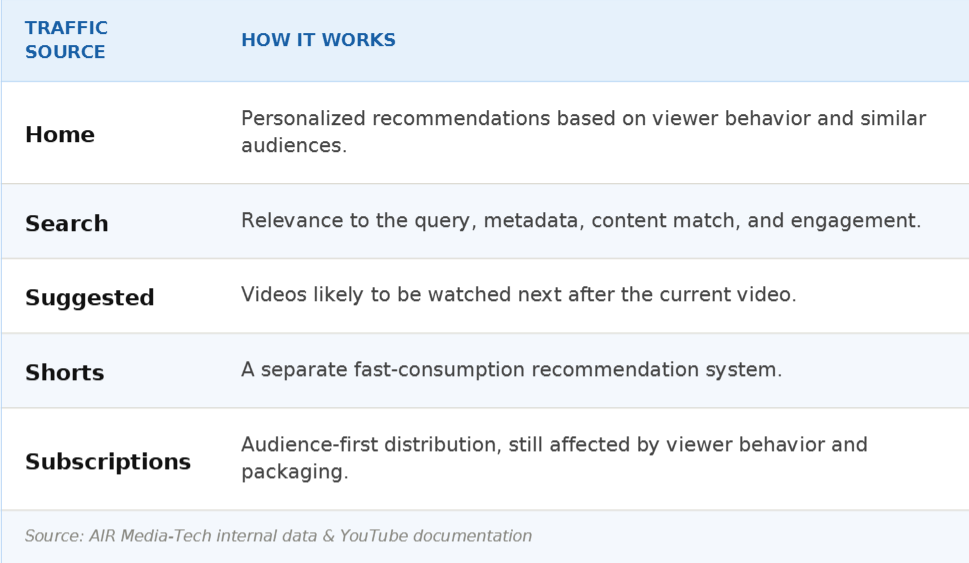
The key signals are CTR, average view duration, retention, engagement, viewer feedback and satisfaction. YouTube looks at long-term viewer satisfaction, not only watch time, and in September it said the weighting differs for every viewer. The algorithm also doesn't hold small channels back by default. YouTube says it finds videos for viewers rather than promoting channels, and features like Hype were built to help emerging creators get noticed.
Key Algorithm Signals That Changed in 2026
YouTube doesn't publish a weight for any signal. On Creator Insider in September, Todd Beaupré, senior director of growth and discovery at YouTube, said the weighting isn't the same for every viewer, or even for one viewer at different times. Watch time can matter more on TV, while likes and dislikes can say more on mobile. So instead of guessing weights, here's what YouTube itself says about each signal and what changed in 2026.
| Signal | What YouTube says | What changed in 2026 | Source |
|---|---|---|---|
| Viewer satisfaction | Recommendations use watch history, dislikes, Not interested feedback and satisfaction surveys, which help YouTube see satisfaction, not just watch time. | Shorts lost the dislike button on June 25. In Shorts, Not interested and Don't recommend this channel now carry that feedback. | YouTube Help |
| Watch time and retention | They work together with satisfaction, and no single metric decides reach. The weighting differs by viewer and by moment. | No change announced. After August 24, retention and average view duration still use engaged views. | Creator Insider |
| Click-through rate | Half of all channels and videos have an impressions CTR between 2% and 10%. | Title and thumbnail A/B tests rolled out in December 2025. Video A/B testing was announced on September 23. | YouTube Help |
| Originality | Re-uploads without anything of your own get less reach in the Shorts feed. | New on October 1, for the Shorts feed. | TeamYouTube |
| Notifications | Subscribers on the All setting who haven't watched for about a month and ignore alerts stop getting push notifications. | Rolled out on April 21 after a test in February. Uploads still reach their Inbox and Subscriptions feed. | TeamYouTube |
| Public view count | A view counts from the first frame on every format. | New on August 24. Earnings, YPP, CTR, average view duration, and retention still use engaged views. | TeamYouTube |
| AI disclosure | Realistic AI content needs a disclosure. | Since May 27, YouTube may add the label itself if you skip the AI use survey. YouTube says a label alone doesn't change recommendations or earnings. | TeamYouTube |
| Hype | Hypes aren't used as a signal for search and discovery. They put a video on a weekly leaderboard. | No change in 2026. | TeamYouTube |
| Tags | Tags play a minimal role in discovery. The title, thumbnail, and description matter more. | No change. | YouTube Help |
| Shorts and long-form | Each format has its own recommendation system, and YouTube hasn't seen Shorts hurt long-form performance. | The October 1 originality update covers the Shorts feed only. | YouTube Blog |
What to track in YouTube Analytics
- Returning and regular viewers in the Audience tab. They're the closest thing to satisfaction you can see in Studio.
- The shape of the retention curve, not only average view duration. Look for the second viewers leave and the parts they rewatch.
- Impressions CTR against your own recent uploads. Half of all channels and videos sit between 2% and 10%, so a universal benchmark tells you little.
- Engaged views next to public views. Since August 24, the public counter counts every play, while CTR, average view duration and retention still use engaged views (here's what changed).
- The AI use survey on every upload with realistic AI, so YouTube doesn't add the label for you.
Views dropped, and Analytics won't tell you why?
Our specialists read your Studio data, find where your channel has the most room to grow, and give you a plan to get there.
Find what changed on my channel →Latest YouTube Updates, Month by Month
Every major YouTube algorithm and platform update from January through October 2026, newest first. Each row shows the date, whether the change touches which videos YouTube recommends, its status and the source.
Confirmed means YouTube announced it as live. Test means YouTube tried it with part of its viewers. Announced means it's coming later. Press means only news outlets have reported it so far. AIR Media-Tech team means the row comes from what our Moderation and Support team saw on the channels we work with, not from a YouTube post.
| Date | What changed | Changes recommendations? | Status | Source |
|---|---|---|---|---|
| October 2026 | ||||
| October 1, 2026 | Shorts feed favors original content. Channels that mostly re-upload other creators' videos without significant changes get less reach. | Yes, Shorts feed | Confirmed | TeamYouTube |
| September 2026 | ||||
| September 23, 2026 | Made on YouTube. Shorts series, AI feedback on draft videos in Ask Studio, video A/B testing and a live auto-dubbing pilot for early 2027. | No | Announced, rolling out | TeamYouTube |
| September 2026 | Inauthentic-content suspensions hit long sleep-music and prayer compilations built on one template, where videos were almost interchangeable. The topic and AI tools weren't the issue. | No | AIR Media-Tech team | AIR Media-Tech Moderation & Support team |
| September 3, 2026 | Creators get age and country controls for branded content. YouTube says automatic detection of undisclosed sponsorships rolls out in the coming months, and it may then add the label itself. | No | Confirmed | TeamYouTube |
| September 1, 2026 | Todd Beaupré, who leads growth and discovery at YouTube, explains how recommendations work. No rule changed. | No | Confirmed | Creator Insider |
| August 2026 | ||||
| August 24, 2026 | Public views count from the first frame on every format (announced August 17). The old count stays in Studio as engaged views. Earnings and YPP eligibility don't change. | No change announced | Confirmed | TeamYouTube |
| August 2026 | Long-form videos can have thumbnails in different languages, shown to each viewer by their language setting. | No | Confirmed | YouTube Help |
| August 10, 2026 | From February 1, 2027, YPP entry needs 8,000 watch hours or 20M Shorts views. AIR Media-Tech's partner support team says an application filed by 23:59 UTC on January 31, 2027 is judged at 4,000 hours, whatever day the decision comes. | No | Announced, starts Feb 1, 2027 | YouTube Blog |
| July 2026 | ||||
| July 24, 2026 | Custom thumbnails for Shorts, Partner Program creators first. Ask Studio can generate long-form thumbnails. | No | Confirmed | YouTube Blog |
| July 13, 2026 | Monetization policy rewritten into three groups that can't earn. Repetitive content, unsatisfying content and AI personas on sensitive topics. | No | Press | Tubefilter |
| July 7, 2026 | Ask YouTube, a conversational search, opens on desktop in the US for signed-in viewers 13+ searching in English. | Partly, new search surface | Confirmed | TeamYouTube |
| June 2026 | ||||
| June 25, 2026 | Shorts player drops the dislike button. Viewers tune the feed with Not interested and Don't recommend this channel. | Partly, feedback signals | Confirmed | YouTube Blog |
| June 4, 2026 | Creators and publishers can set up a profile in Google Search that brings their work, links and channels into one place. | No | Confirmed | Google Blog |
| May 2026 | ||||
| May 28, 2026 | New YouTube Premium features roll out for members. | No | Confirmed | TeamYouTube |
| May 27, 2026 | Viewers in the US can build their own Home feed from a prompt and pin it as a chip. | Partly, viewer-built feeds | Confirmed, US | TeamYouTube |
| May 27, 2026 | AI disclosure moves into an AI use survey at upload. If you skip it, YouTube may add a label to realistic AI content itself. | No change announced | Confirmed | TeamYouTube |
| May 19, 2026 | Google I/O. Gemini Omni comes to Shorts Remix and YouTube Create. | No | Confirmed | TeamYouTube |
| March 10 to May 16, 2026 | Likeness detection expands to journalists and officials (March 10), the entertainment industry (April 21), then all creators 18+ (May 16). | No | Confirmed | TeamYouTube |
| April 2026 | ||||
| April 21, 2026 | Push notifications stop for inactive subscribers on the All bell setting. They still get uploads in the Inbox, and Bell notifications sent in Studio can drop. | Partly, notifications | Confirmed | TeamYouTube |
| April 20, 2026 | Parents in Europe can set the Shorts feed timer to zero. | No | Confirmed, Europe | YouTube Blog |
| March 2026 | ||||
| March 31, 2026 | Ask, YouTube's conversational AI tool, comes to smart TVs. | No | Confirmed | YouTube Blog |
| March 23, 2026 | BrandConnect and the Creator Partnerships Hub come together as YouTube Creator Partnerships. | No | Confirmed | TeamYouTube |
| March 18, 2026 | Reimagine, an AI remix tool for Shorts. | No | Confirmed | YouTube Blog |
| February 2026 | ||||
| February 13, 2026 | Test of fewer push notifications for viewers who ignore a channel. | Partly, notifications | Test | 9to5Google |
| February 5, 2026 | Auto-dubbing opens to all creators, in 27 languages. | No | Press | gHacks |
| January 2026 | ||||
| January 21, 2026 | Neal Mohan's 2026 letter. More AI tools for creators and a push against low-quality AI videos. | No | Announced | YouTube Blog |
| January 16, 2026 | Advertiser-friendly guidelines relax for some controversial topics. | No | Press | TechCrunch |
| January 14, 2026 | High-quality principles for teen content now feed recommendations for teens. Parents get a Shorts timer and bedtime reminders. | Yes, for teen viewers | Confirmed | YouTube Blog |
| January 8, 2026 | Search filters change. Shorts get their own filter in Type. | Partly, search filters | Confirmed | TeamYouTube |
For the full story behind each month, read our breakdowns for January 2026, February 2026, March 2026, April 2026, May 2026, June 2026, July 2026, August 2026 and September 2026.
Some 2025 changes still shape how the algorithm works now, from how Shorts views are counted to the rules on inauthentic content. Here they are, one row per month.
| Month | What changed |
|---|---|
| March 2025 | Shorts views count on every play from March 31, with engaged views kept in Studio. Hype reaches Turkey and Brazil. |
| April 2025 | Auto-dubbing for Partner Program creators. YouTube backs the NO FAKES Act. Inspiration tab in Studio. Automatic mid-rolls on older videos. |
| May 2025 | Mid-roll ads stop pausing livestreams. Google Lens tested inside Shorts. |
| June 2025 | AI search carousel for US Premium viewers. New, casual, and regular viewer segments in Studio. Auto-dubbing expands. |
| July 2025 | The repetitious content policy is renamed inauthentic content (July 15). Creators under 16 can livestream only with an adult on camera. Age estimation for teen protections starts in the US. |
| August 2025 | Hype expands to 39 countries, including the US, UK, and India. Co-creator tagging grows. |
| September 2025 | Made on YouTube 2025. Title A/B testing, up to 5 collaborators on one video shown to every collaborator's audience, Ask Studio and lip sync for auto-dubbing. |
| October 2025 | Likeness detection starts in the Partner Program. 4K thumbnails up to 50MB. |
| November 2025 | AI Super Resolution on TV. Stricter enforcement on AI spam. AI chat in Creator Support. |
| December 2025 | A/B tests for titles and thumbnails roll out in Studio. Shorts auto-translation. Shorts on TV. |
YouTube Algorithm Rumors in 2026: What's Confirmed and What Isn't
Some claims about the 2026 algorithm travel faster than YouTube's own posts. Here are the ones that come up most often, checked against what YouTube has published.
| What you may have heard | What YouTube says | Verdict | Source |
|---|---|---|---|
| A September 2026 update pushed down how-to videos. | YouTube published nothing about it. Its only September statement on recommendations came from Todd Beaupré on Creator Insider, and he explained how the system works, not a change. | Not confirmed | Creator Insider |
| One metric decides your reach, usually CTR or watch time. | YouTube publishes no weights. Todd Beaupré said the weighting isn't the same for every viewer, or even for one viewer at different times. | No | Creator Insider |
| Subscribers stopped seeing my uploads. | Since April 21, subscribers on the All setting who haven't watched you for about a month and ignore your alerts stop getting push notifications. Your uploads still reach their Subscriptions feed and Inbox. | Partly true | TeamYouTube |
| The new public view count cut my earnings. | Since August 24, public views count from the first frame. YouTube says earnings and Partner Program eligibility don't change, and Studio keeps the old count as engaged views. | No | TeamYouTube |
| Hype boosts a video in recommendations. | TeamYouTube says hypes aren't used as a signal for search and discovery. Hype puts a video on a weekly leaderboard in Explore. | No | TeamYouTube |
| YouTube pushes AI videos down. | YouTube says an AI label alone doesn't change how a video is recommended or whether it earns. AIR Media-Tech's Moderation and Support team saw inauthentic-content suspensions hit compilations built on one template, and the AI tools weren't the issue. | Not for AI itself | TeamYouTube, AIR Media-Tech Moderation & Support |
| YouTube shadowbans channels. | Rene Ritchie, YouTube's Creator Liaison, said in February 2026 that channels he checks after shadowban claims usually still get most of their views from recommendations. Copyright claims and age restrictions can limit a single video's reach. | No evidence | TubeTalk |
If a claim isn't in YouTube's posts and your Analytics don't show it, don't rebuild your channel around it. For more on the shadowban question, see our shadowban breakdown.
How YouTube is Moving Towards Satisfaction-Weighted Discovery in 2026
On Creator Insider in September, Todd Beaupré, senior director of growth and discovery at YouTube, said most videos get a click-through rate of about 10% or less in the Subscriptions feed. So even with your best video, about nine times out of ten a subscriber who sees it doesn't click. That's why YouTube ranks each video for each viewer and learns separately how subscribers, returning viewers, and new viewers respond.
In 2026 that idea reached teens and the Home page. Since January 14, YouTube's principles for high-quality teen content feed the recommendations teens see. Since May 27, viewers in the US can build their own Home feed from a prompt and pin it as a chip. A video still has to satisfy the specific person it reaches, and a clear topic helps YouTube match it to the right viewer and the right custom feed.
Ask YouTube Feature
Ask YouTube answers a question with clips, videos, and Shorts mixed with text. It opened on desktop in the US on July 7 for signed-in viewers 13+ searching in English, and YouTube says more devices and countries come next. A viewer who gets a one-line answer may never click, so it's worth building videos around a process or a result that a text answer can't replace.
Changes to Notifications
Since April 21, YouTube no longer sends push notifications to subscribers on the All setting who haven't watched your channel for about a month and ignored its recent alerts. They still see uploads in their Inbox and Subscriptions feed, and push alerts come back once they watch again.
YouTube tested this in February and rolled it out in April. In Studio, Bell notifications sent can drop while your views stay the same.
What to do now
Return habits matter more than the bell now, and series with a steady upload day build them. Keep the notify-subscribers box checked on uploads too, because Beaupré advises against turning it off.
How Monetization Changed Throughout 2025-2026
The biggest monetization change of 2026 hasn't started yet. From February 1, 2027, new channels need 8,000 watch hours in 365 days or 20M Shorts views in 90 days to join the YouTube Partner Program, double today's bar. Channels already in YPP need 10M Shorts views every 90 days to keep earning from Shorts.
AIR Media-Tech's partner support team adds what YouTube's post leaves out. An application filed by 23:59 UTC on January 31, 2027 is judged at 4,000 hours, whatever day the decision comes. A channel rejected in January that reapplies on February 1 or later faces the new bar. Here's how to plan around the 2027 rules.
YouTube Partner Program from February 1, 2027
Apply by
January 31, 2027, 23:59 UTC. The application is judged at 4,000 hours, whatever day the decision comes.
New channels
8,000 watch hours in 365 days or 20M Shorts views in 90 days.
Already in YPP
10M Shorts views every 90 days to keep earning from Shorts.
Brand deals and earning rules changed too.
- Brand deals moved under one name on March 23, when YouTube brought BrandConnect and the Creator Partnerships Hub together as YouTube Creator Partnerships.
- On September 3, creators got age and country controls for branded content, and YouTube said automatic detection of undisclosed sponsorships rolls out in the coming months.
- The July 13 policy wording named the kinds of content that can't earn, from repetitive videos to AI personas giving advice on sensitive topics.
- Earnings still come from engaged views and engaged watch hours, even though the public counter now counts every play.
Every 2026 rule, with its date, is in our monetization policy timeline.
How Did YouTube Shorts Change in 2026
Shorts now average 200 billion daily views, Neal Mohan wrote in his 2026 letter. The change that matters most for them came on October 1. The Shorts feed started favoring original videos, so unoriginal Shorts from channels that mostly re-upload other creators' clips without significant changes get less reach. Clips still work when you add your own commentary, edits, or storytelling.
The rest of 2026 changed how Shorts get made and watched.
- Remix got Reimagine in March and Gemini Omni on May 19, and every remix links back to the original.
- The player lost its dislike button on June 25, so viewers now tune their feed with Not interested and Don't recommend this channel.
- Custom thumbnails arrived on July 24, first for Partner Program creators.
- Shorts series, announced on September 23, group Shorts into seasons and episodes.
Shorts and long-form run on separate recommendation systems, and YouTube says it hasn't seen Shorts hurt long-form performance. The flip side is that Shorts don't feed long-form either.
FutCrunch, a football creator with about 24 million subscribers, told VidSummit 2026 that Shorts barely work for him, because people who watch them don't come over to his long videos (our recap). If you go with Shorts for reach, pin a long video to each one with the related video link and watch that video's traffic sources. Then check what Shorts pay in your niche.
How YouTube Auto-Dubbing Changed: 2025 vs. 2026
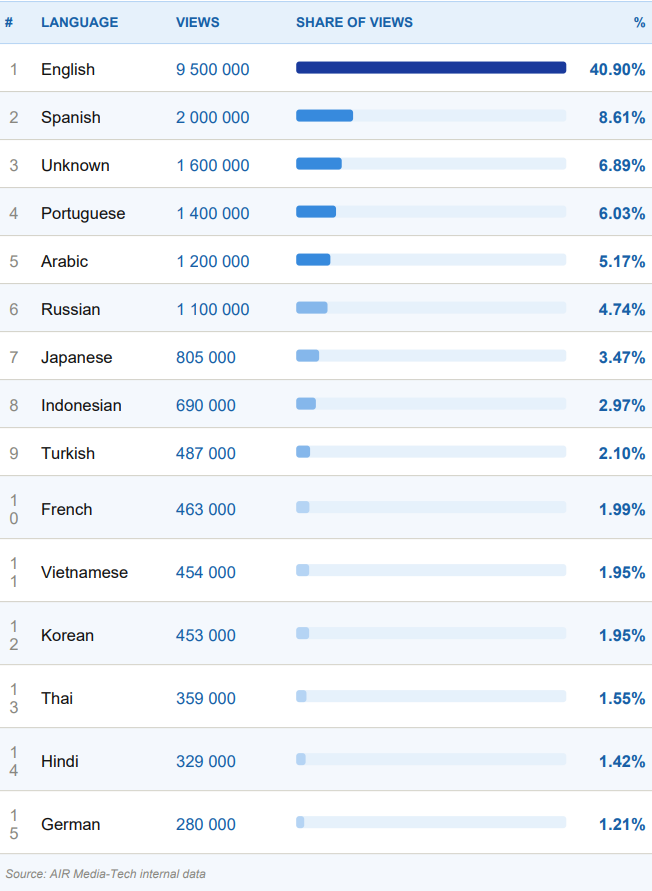
English runs 40.9% of all YouTube channels, according to AIR Media-Tech research on 60M channels. Auto-dubbing is YouTube's way to carry a video past the language it was made in, and in February it opened to all creators in 27 languages.
In August, long-form videos got thumbnails in different languages, shown to each viewer by their language setting. At Made on YouTube, YouTube announced a pilot of live auto-dubbing in English and Spanish for early 2027 and said more than 40% of live watch time comes from viewers outside a creator's home country (our September breakdown).
AI dubbing shows you where the demand is, but it rarely holds viewers the way a human voice does. On Brave Wilderness, the wildlife channel we localized into nine languages, the AI-dubbed English track held viewers for 1:22 on average, while pro-dubbed tracks on the same videos held them for 3:40 to 5:19, up to four times longer (our AI dubbing data).
Brave Wilderness, average view duration on the same videos
AI-dubbed English track
1:22
minutes
Pro-dubbed tracks
3:40–5:19
minutes
Up to 4x longer with a human voice.
So start with auto-dubbing as a test, check average view duration and returning viewers by language, and move the languages that hold viewers to professional dubbing.
Stance on AI and Deepfakes, AI Slop on YouTube in 2026
On July 13, YouTube rewrote its monetization policy and named the content that can't earn, including repetitive videos and AI personas giving advice on sensitive topics. It followed Neal Mohan's January letter, which promised creators more AI tools and a push against low-quality AI videos. So the risk comes from repetition, whether a channel uses AI or not.
“
Inauthentic content isn't only about AI. Channels with their own material can be hit too, if they're built on a template and every video looks like the last one, with nothing new in it.
Anastasiia Kulyk, Safety Team Lead, AIR Media-Tech
Labels changed in May 2026. Since May 27, you disclose realistic AI in an AI use survey at upload, and if you skip it, YouTube may add the label itself. YouTube says a label alone doesn't change how a video is recommended or whether it can earn.
Disclosure is required only for photorealistic content. YouTube names three cases.
- A real person saying something they didn't.
- Altered footage of a real event.
- A realistic scene that never happened.
Here's everything on how YouTube treats AI in 2026.
Likeness Detection by YouTube
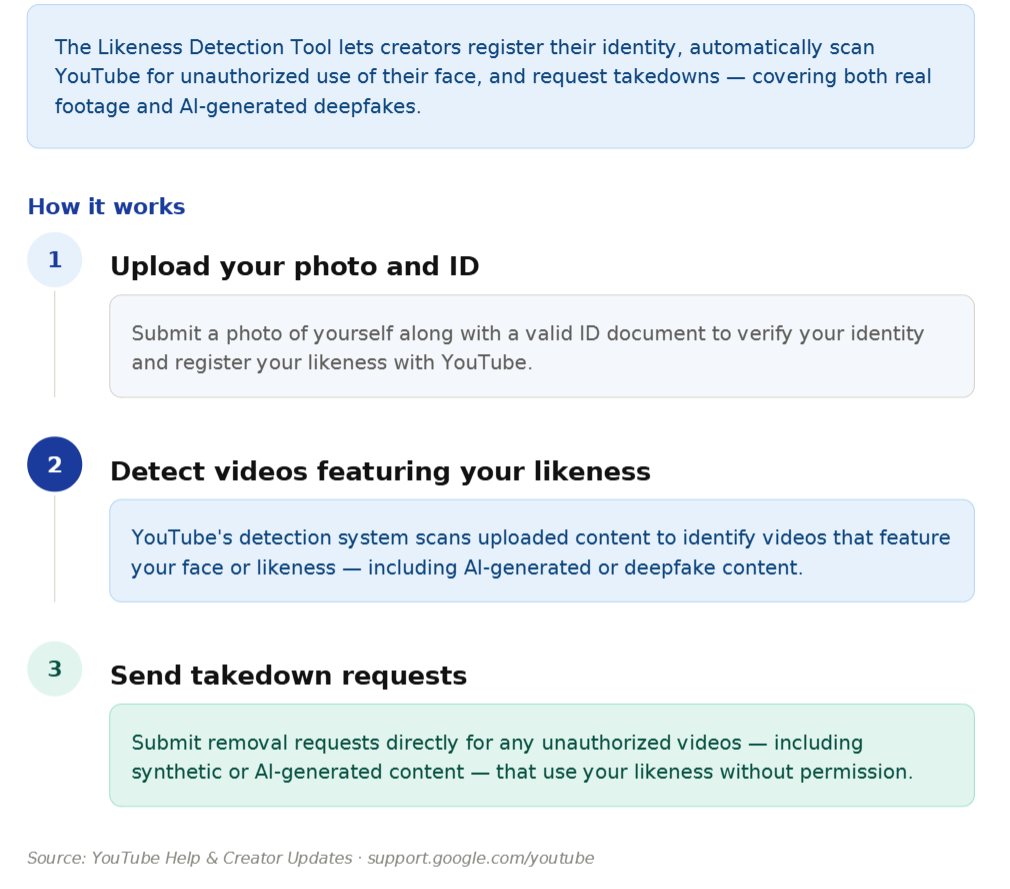
Likeness detection finds videos that use your face without permission, so you can ask YouTube to remove them. It started in the Partner Program in October 2025. In 2026 it opened to journalists and officials on March 10, the entertainment industry on April 21, and every creator 18+ on May 16. At Made on YouTube, YouTube said voice detection and enrollment in the mobile app come later this year.
Channeling the TV Experience and What Impact It Will Have in 2026
YouTube has been number one in streaming watch time in the US for nearly three years, according to Nielsen, Neal Mohan wrote in January. That's watch time, though. AIR Media-Tech's internal analytics across 3,000+ channels show phones still bring more than 60% of views. YouTube isn't pushing longer videos onto TVs either. Viewers there pull them, Beaupré said, because they don't want to pick up the remote every few minutes, which is also why series work on TV.
TV leads watch time, phones lead views
Nielsen, cited by Neal Mohan
No. 1 in US streaming
YouTube has led streaming watch time in the US for nearly three years.
AIR Media-Tech internal analytics, 3,000+ channels
60%+ of views on phones
Watch time grows on TV, but most views still start on a phone.
2026 added more ways to use YouTube from the couch.
- On March 31, the Ask tool came to smart TVs, so viewers can ask about a video with their remote.
- In September, Shorts series started rolling out to TV.
- YouTube said viewers will be able to comment from their TV by voice.
- Analytics got a Co-Viewed metric that estimates views from several people watching together.
Thumbnails and text that read from across the room matter more now, and here's how to adapt videos for the living room. One European creator we work with grew TV views by 107% after moving to 4K and redesigning for the big screen (the case).
Livestreaming and Its Effectiveness in 2026
Streams pay better than their reputation. In AIR Media-Tech's data from 404 channels across 2025 and early 2026, a stream view out-earned a video view on the same channel in 8 of the 11 niches we could measure. Channels that stream 8+ times a month got a median 50.2% of their ad revenue from live (the full study).
8 of 11
niches where a stream view out-earned a video view on the same channel
50.2%
median share of ad revenue from live for channels streaming 8+ times a month
600M+
logged-in viewers watching live every day in August 2026
YouTube is building more around live. More than 600M logged-in viewers watched live content every day in August 2026, YouTube said at Made on YouTube.
- Creators can already rehearse a stream privately in Live Practice Mode.
- Watch With, for live reactions to long-form videos, comes later in 2026.
- Go Live Together, which pairs you with a co-host, is planned for early 2027 (everything announced for live).
Hype Feature on YouTube: How It Works in 2026
Hype puts a video on a weekly country leaderboard in Explore, gives it a Hyped badge for 7 days and lets viewers find it through a Hyped filter on Home. It doesn't push the video in regular recommendations, because TeamYouTube said at launch that hypes aren't used as a signal for search and discovery. Hype reached 39 countries in August 2025, and nothing about it changed in 2026.
Who can use it
Partner Program channels with 500 to 500,000 subscribers.
Which videos
Long-form public videos in their first 7 days.
How viewers hype
Each viewer gets 3 free hypes a week, and the fewer subscribers you have, the bigger the bonus points.
What it gives
A spot on the weekly leaderboard in Explore, a Hyped badge for 7 days and the Hyped filter on Home. Not a push in regular recommendations.
So Hype is a way to show a strong upload to people who browse the leaderboard and the Hyped filter. Ask your regulars to hype it once, in the first days after you publish, and save the ask for your best uploads.
How YouTube Studio Changed Its Course In 2026
Most Studio changes in 2026 put AI next to your analytics. Ask Studio, YouTube's AI assistant inside Studio, now generates long-form thumbnails you can adjust in chat. At Made on YouTube, YouTube said it will give feedback on the title, structure, script and pacing of drafts before you publish, with new Insights and Research sections rolling out through 2027.
Auto-Generated Metadata and A/B Testing
Testing in Studio grew in three steps.
- Title and thumbnail A/B tests rolled out in December 2025. You can test up to three versions, and YouTube shows everyone the one with the highest watch time.
- In September, YouTube announced video A/B testing, so you'll be able to compare up to three cuts of the same video and see which opening holds viewers.
- YouTube also said you'll soon be able to upload up to three thumbnails per video and let it show the best one to each audience.
AI Help Chat Update for Faster Support (+ Ask Studio)
Creator Support has an AI chat inside Studio, while Ask Studio works with your channel's own data. Ask it why a video didn't take off or what your comments keep asking for, then check the answer against Analytics.
General YouTube Studio Improvements
On June 23, the Content tab got a redesign that shows each video's visibility, restrictions, and monetization at a glance. In August, claims got a clearer view in Studio too.
YouTube Kids, Age Protections, and How It Impacted Views
Since January 14, YouTube's principles for high-quality teen content feed what teens get recommended, and YouTube named Khan Academy, CrashCourse, and TED-Ed as the kind of videos it now shows them more often (YouTube Blog).
Parents got a Shorts timer, and since April 20 parents in Europe can set it to zero and switch the Shorts feed off. Teen reach now depends more on what a video gives the viewer. Educational and family channels can gain from it, while short, repetitive formats lose teen viewers when parents limit the feed.
Collab Updates, Easier Ways to Connect
Collaborations got simpler in 2025, when YouTube let creators tag up to five co-creators on one video. The video can then reach each collaborator's audience, and viewers jump to any partner channel in one tap. Next is Go Live Together, announced for early 2027. You'll be able to see who's live right now or join a queue and get paired with a similar co-host. Here's which collaboration formats work in 2026.
How To Adapt Your Channel To the 2026 Algorithm Changes
The worst move after an update is to change everything at once. Find the weak spot in Analytics first, fix one thing, and give it a few weeks before the next change.
Start with four questions in Analytics
- Which surface brings most of your views, Home, Suggested, Search, Shorts, or Subscriptions? That's your growth engine right now.
- Which videos get the most Suggested traffic? Study what they have in common and make more of them on purpose.
- Are returning viewers growing? New viewers with flat returning viewers means you get discovered but don't build an audience.
- Which videos lead viewers into another video afterward? They start sessions, and YouTube likes that.
Then use what changed in 2026
- Shorts as a way in. If your Shorts don't bring channel visits, pin a related long video to each one and test hooks that leave a question open (more on growing with Shorts). Since October 1, keep your own commentary or edit in every clip you borrow.
- Languages that already hold viewers. Check average view duration by dubbed language for the last 30 days. Where a dub holds viewers, professional localization pays off, and here's how to build a localized channel strategy. Translated titles and descriptions come first, and the AI Metadata Translation tool handles them.
- A/B tests on every major upload. Studio tests up to three titles or thumbnails. Two extra points of CTR on a video with 100K impressions is 2,000 more views.
- Packaging that reads on TV. YouTube leads US streaming watch time, so thumbnails and on-screen text should work from across the room.
- Old videos with fresh metadata. Rewrite titles and descriptions on evergreen videos that slipped, and link related playlists to keep viewers watching. AI Metadata Lab helps with new uploads, and VidIQ shows what ranks in your niche now.
Sometimes the bottleneck isn't visible from inside your own Analytics. Meanwhile in the Garage, a 1.2M-subscriber channel we work with, had good content and flat growth. An outside audit, new metadata, and a 24/7 stream took it from 1.1M to 1.75M monthly views, and revenue grew 28.5% (the case). On another channel, fixing structural leaks made revenue grow nearly three times faster than traffic.
What To Do If Your Views Dropped After An Algorithm Update
A drop tells you something. Find out what broke before you change anything, because a CTR problem and a retention problem need different fixes.
Step one. Find where the drop happened
Open Analytics and compare the last 28 days with the 28 before, split by traffic source. If either period starts before August 24, compare engaged views, because the public counter counts every play since then.
- Home fell. Recent videos likely got clicks but didn't satisfy, so YouTube shows them to fewer people.
- Suggested fell. Your videos stopped pairing with others in your niche. Check whether recent topics or formats drifted.
- Search fell. A keyword lost volume, a competitor took your spot, or your titles stopped matching how people search.
- Shorts feed fell. Viewers swipe away faster, or the October 1 update cut reach for reused clips.
- Notifications or Subscriptions fell. Since April 21, inactive subscribers on the All setting don't get push alerts. If regulars still don't click, look at the packaging.
Step two. Match the drop date with the table above
A drop that starts before an update's date wasn't caused by it.
- If it started around April 21 and only notification traffic fell, it's the push notification change. Your uploads still reach those subscribers' Inbox.
- If it started around October 1 and only the Shorts feed fell, count how many of your Shorts reuse other creators' footage.
- If public views jumped after August 24 and revenue didn't, nothing broke. The counter changed, and earnings still follow engaged views.
- If a realistic AI video got an automatic label, fill in the AI use survey in the Content tab. YouTube says a label alone doesn't change recommendations, so keep looking for the cause.
- If it was a slow slide over months, look at satisfaction. Returning viewers falling while new viewers hold steady is the usual pattern.
Step three. Fix the weakest signal, not the most obvious one
- CTR below your channel average. Fix the thumbnail first, then the title, and run an A/B test to get the data.
- Retention drops in the first 30 seconds. The hook doesn't pay off the click. Watch the opening cold and ask whether it earns the next minute.
- Retention drops mid-video. Find the exact second on the retention curve and fix the pacing there.
- Suggested collapsed while CTR and retention look fine. Make the ending lead to another video instead of letting viewers leave YouTube.
- Regular viewers falling while new ones hold. Compare recent uploads with your top 10 videos by returning viewers and see what changed.
What not to do
- Don't post more to recover. If the signal is broken, more of the same gives YouTube more proof.
- Don't delete videos that underperform. They don't hurt you, and you lose the data.
- Don't switch niche or format after one bad month. Give it 6 to 8 weeks of data.
If the drop holds after that, the cause is usually structural. A network of localized kids channels we work with went from 24M to 299M views in one quarter after a full audit, daily review of every upload, and 34 quality rules applied in every language. That's +1140% views and +386% revenue (the case). Not every channel will see numbers like that, but recovery starts with the diagnosis.
Not sure whether to change your videos or wait it out?
Change the wrong thing and you lose what still works. Wait too long and the dip sets in. We see every update play out across 3,000+ channels. In a channel audit, our specialists read your Studio data, tell you what changed on your channel and why, and give you a plan for where to grow next.
- A clear verdict on your Studio data, so you know what to keep
- Your numbers next to up to 3 channels you choose
- Where your channel has the most room to grow
- A 90-day plan of 5–8 actions ranked by impact