
Many YouTubers believe YouTube algorithms (and recommendation systems) to be a tricky beast. And that’s more than justified, because there are countless methods to increase the recommended traffic on your channel. Which one works best? Which one makes sense for your content? We analyzed hundreds of cases to answer these questions. Let’s get into how to get your videos recommended on YouTube in 2026, with real examples to back up our words.
On paper, YouTube’s recommendation system is not that hard to understand.
It has two simple stated goals: to help each viewer stumble upon videos they’d want to watch, and to maximize long-term viewer satisfaction. Recommendations are personalized to each viewer’s habits, device, and even the time of day they watch. All of that, especially for a creator, sounds awfully abstract.
Before we get into the tactics, here is what the recommendation system is responding to.
YouTube recommends videos based on a handful of signals:
- whether viewers click when shown the video
- how long do they stay
- whether the video starts a new viewing session rather than just continuing one already underway
- and post-watch satisfaction signals, such as likes and shares.
Every strategy in this article moves one or more of those signals. Some improve performance on content that already exists. Others open surfaces where the content can reach audiences who have never seen the channel at all. That second type of gain is the one most creators underestimate, and it is where most of the cases here do their work.
The Short Answers First
Before we get into the strategies, here are the answers to the questions we hear most often. The full evidence is below.
Why aren't my videos being recommended?
Usually traces back to one of three things: low click-through rate, low average view duration, or weak session depth. The tricky part is that all three look the same from the outside: flat recommendation traffic. But they require completely different fixes. In this article, we break down real cases where each of these was the actual bottleneck, and what helped to break free in each situation.
Does watch time affect YouTube recommendations?
Yes, and it is one of the strongest signals YouTube has. But raw watch time is less useful than average view duration as a percentage of video length: a 10-minute video where 70% of viewers finish tells the algorithm far more than a 40-minute video where everyone leaves at minute three. We have seen channels dramatically change their recommendation standing without gaining a single new subscriber, purely by improving how much of their existing videos people watch. The cases in this article show exactly how that happened.
Do Shorts help long-form recommendations?
Indirectly, and only under specific conditions that most creators get wrong. Shorts live in their own feed and do not automatically lift your long-form videos in Home or Suggested. The mechanism that works is more specific, and one of our partner channels went from 24 million to 299 million views in a single quarter once those conditions were right. We explain what those conditions are and why the same strategy fails for other content types.
What moves recommendation traffic the fastest?
Based on our work across hundreds of channels, the changes that shift recommendation traffic fastest are ones that improve performance on content that already exists, not new uploads. Metadata localization, click-through rate on existing top videos, and 24/7 streaming from an existing archive are the three that consistently produce the fastest results. One partner added over 63 million views in 30 days without publishing a single additional video. The details are in the cases below.
Does 4K quality affect recommendations?
Not directly, but it unlocks TV recommendation surfaces that lower-resolution content is excluded from entirely. Not less competitive. Excluded. TV viewers generate substantially longer watch sessions per recommendation click than mobile viewers, which feeds the algorithm differently. A music channel we worked with saw revenue jump significantly after the 4K switch, for reasons that had nothing to do with visual quality and everything to do with which surfaces the content was now eligible for. That case is in the first section.
So, let’s break it all down into manageable actions.
YouTube’s Push Towards TV Viewership and How It Shapes the Recommendations
Okay, this might sound a little random off the bat. But let’s consider YouTube’s words first: their active push to increase TV viewership since 2025 (which carried into 2026), and that trend doesn’t show any signs of slowing anytime soon. Why is that?
As stated by Neal Mohan, YouTube’s current CEO, in 2026, YouTube viewers watch over 1 billion hours of content on TVs daily. And as of late 2024, TV surpassed mobile as the #1 device for YouTube viewing in the U.S. by watch time. Which means that the shift towards implementing new TV-based features on YouTube is more than logical. It is simply the next step of YouTube's development.
When YouTube says TV "surpassed" mobile, they're talking about watch time, meaning people spend more cumulative hours watching YouTube on TVs than on phones. This is not the same as views share, where mobile still leads at over 60%, according to AIR's own data based on 3000+ channels.
Mobile still leads globally by traffic, largely driven by short-form browsing and Shorts.
Shorts, for instance, account for 88% of total views but only a fraction of total watch time. Videos 20+ minutes long account for over 57% of watch time.
Someone watching a 40-minute documentary on a TV counts for more watch time than three people watching 30-second clips on their phones. So the shift is happening in long-form, lean-back viewing, not in raw view counts.
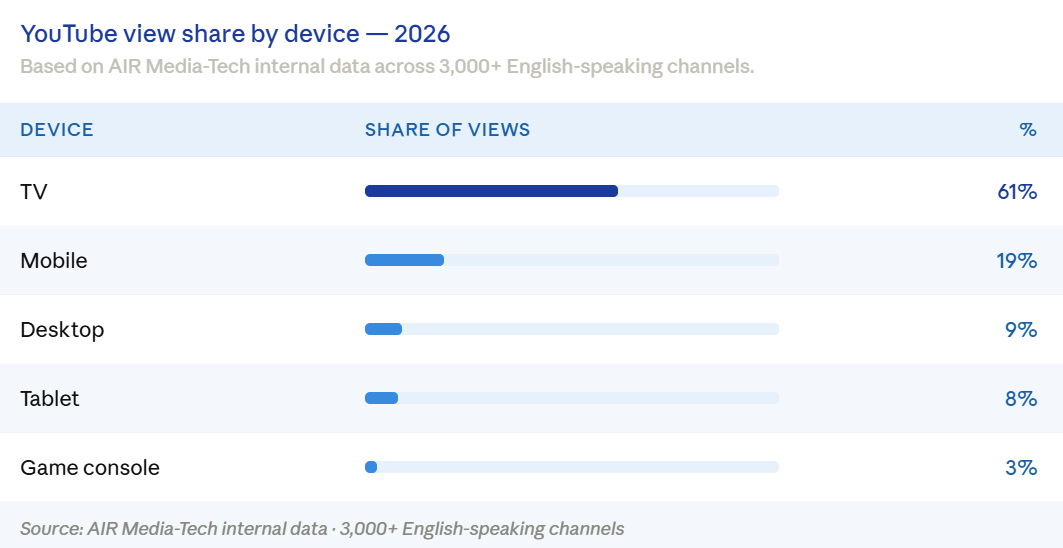
How does it all relate to YouTube’s recommendations? YouTube, as a platform, keeps introducing newer and newer features catered specifically to increase the TV viewership of the platform, which includes the 4K quality update introduced all the way back in 2025. Additionally, podcasts alone have claimed over 700 million daily views on TVs in 2025. YouTube also commands 12.7% of all U.S. TV viewing time, making it the single largest streaming destination, according to Nielsen's Gauge data. That means YouTube commands more TV attention than Netflix, Hulu, Disney+, or any other streaming service.
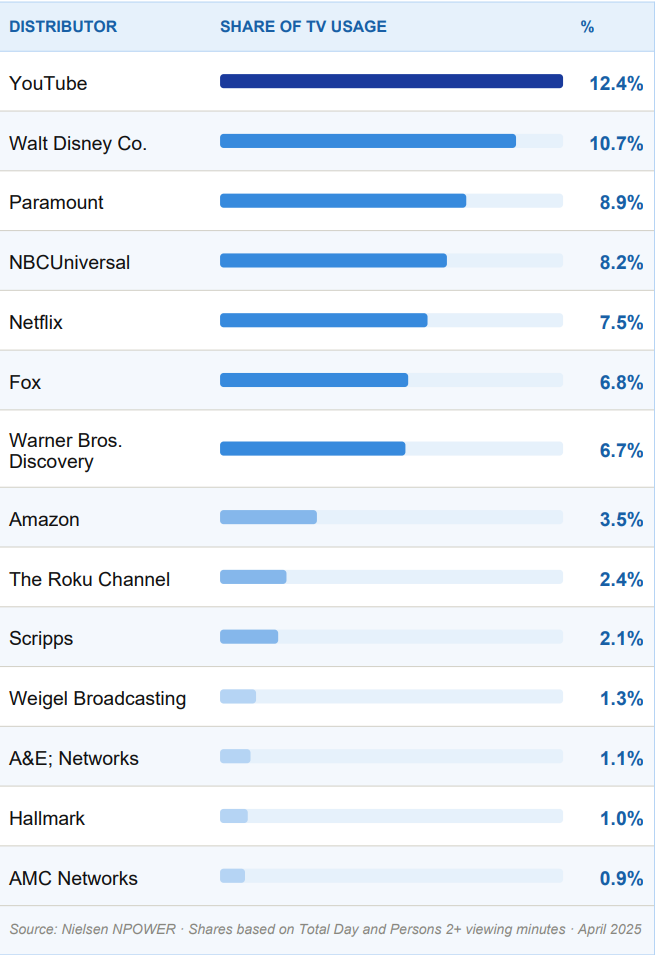
For long-form content, especially, TV accounts for more YouTube watch hours than mobile. Optimizing for TVs became a valid option for some creators to increase the impressions of their videos in the recommendation feeds.
How TV Optimization Can Influence the Recommendation Impressions
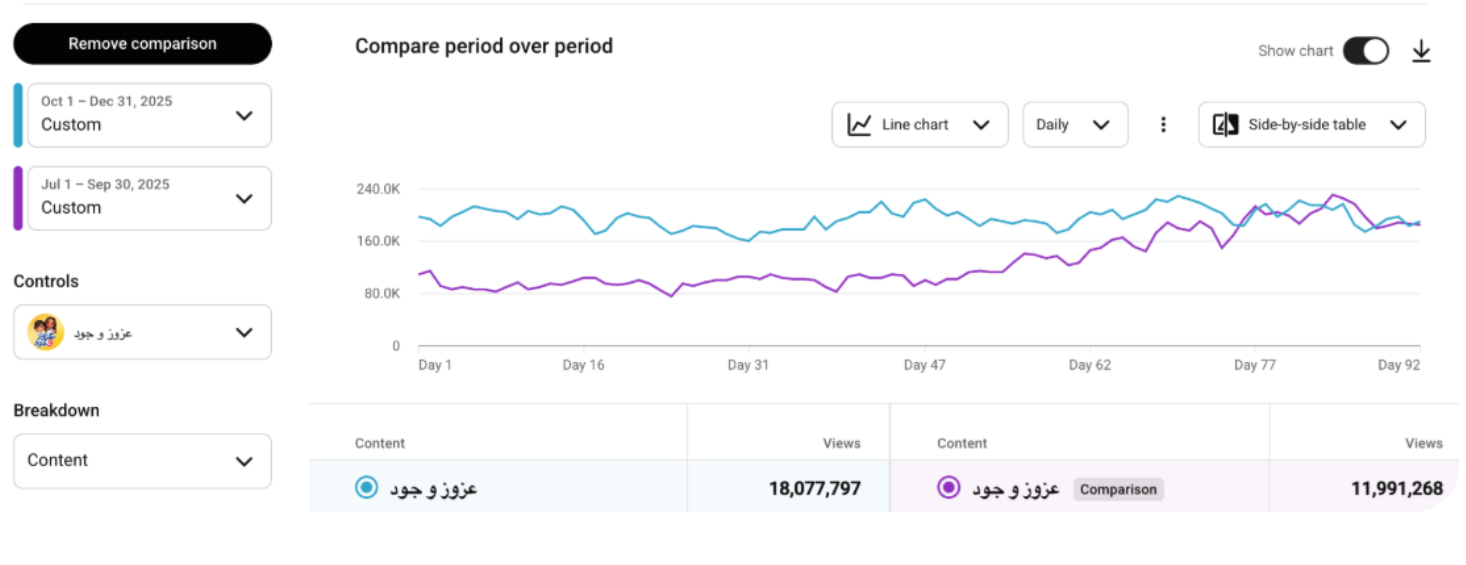
Let’s review the evidence. The first channel under our magnifying glass is one of our partners, a kids' channel with over 271K subscribers, Azooz & Jude. They came to us with a problem of inconsistent and rather unstable performance on their channel.
Aside from advice concerning kids’ content overall, we have suggested upgrading their uploads to 4K quality in addition to overall optimization for bigger TV screens (so, the metadata, the uploading schedule, and everything in between).
The increase in their views, in part, can be attributed to the increase in their TV suggested & recommended impressions, all from making relatively small changes to optimize for TV viewership. You can read more about the case here.
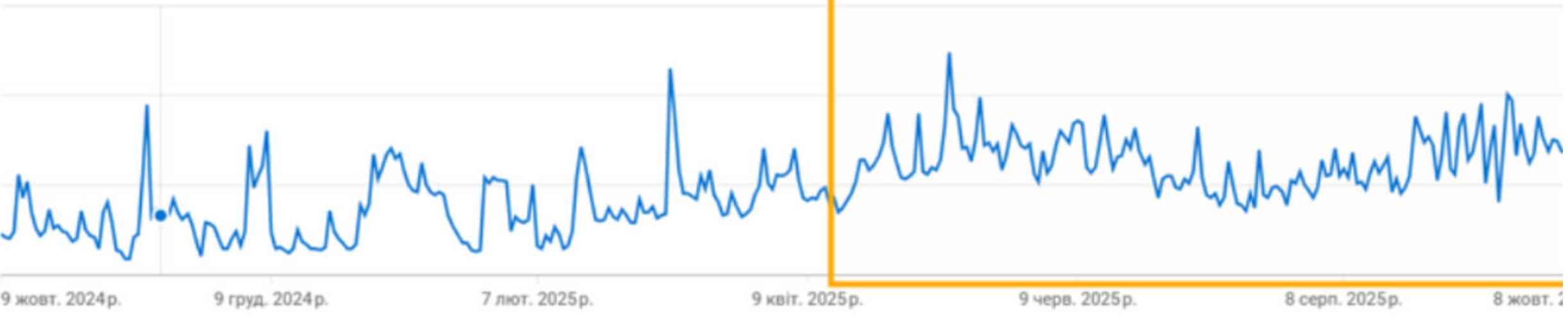
Up next, another TV optimization that made the views surge to over a 100% along with the recommendation impressions. This European creator, who partnered with AIR Media-Tech, wished for an increase in TV viewership specifically, which we helped to achieve by optimizing for bigger TV screens.
Among the 4K uploads and other small adjustments, their Smart TV traffic (a large chunk of which came from TV recommendations specifically) increased by 86%.
Finally, a Music Channel case, where increasing the uploading quality for their content to 4K caused them to get boosted in recommendations and unlock a +52% revenue. This partner, a channel with over 340K subscribers, wanted to adjust to the living room experience as well.
Music channels often find success there because some people tend to turn on music as background noise on TVs while they are doing something else. And tapping into that specific audience requires 4K quality uploads simply because anything below that becomes invisible for YouTube TV’s algorithm. Better quality, in this case, helps the content to rise into recommendation feeds that much more easily.
Pro Tip: Increasing the quality of your videos to 4K and optimizing your content to suit the TV audience might make your content more noticeable in the eyes of YouTube’s algorithms, which, in turn, can push your content further on YouTube’s recommended page and in suggested traffic on TVs.
How Can You Boost YouTube Recommendations With a TV Strategy?
Here is the pattern underneath all three cases.
TV viewers don't browse the way mobile viewers do. When someone opens YouTube on their TV, they are choosing something to settle into, and when they find it, they stay. A single recommendation click on TV can generate 20 or 30 minutes of uninterrupted watch time. That session behavior is exactly what the algorithm rewards most, and it flows back into recommendation distribution for the video that started it.
The Azooz & Jude case is worth noting specifically because their problem wasn't low views; it was instability. Strong weeks, then unexplained drops. The TV recommendation surface, once opened, created a more consistent floor. Mobile-driven recommendation traffic tends to spike and fade. TV-driven traffic tends to be steadier because the viewing intent behind it is different.
One more thing the cases show: 4K alone didn't do it in any of them. Metadata alignment, scheduling, and thumbnail readability at screen distance all contributed. The 4K upload was the entry requirement. The rest determined how well the new surface actually converted.
- Content formats that work best: music, kids', ambient, long-form tutorials, anything people put on and leave running. These formats invite the extended sessions, TV surfaces reward.
- Talking-head and fast-cut content is mobile-native. TV optimization will have a limited impact there regardless of upload quality.
- If your channel already gets some TV traffic, filter Analytics by TV device and look at the recommendation share specifically. A low recommendation percentage despite decent TV views usually points to a metadata issue, not a content issue.
A Quick TV Strategy Self-Check
- Are you uploading in 4K? Without it, TV recommendation surfaces are not available to your content.
- Is your content 10+ minutes and suitable for lean-back viewing?
- Have you checked your TV traffic in Analytics and looked at how much of it is coming from recommendations versus search or direct?
- Are your thumbnails legible at viewing distance on a large screen?
- Is your channel's weekly performance stable, or does it have unexplained volatility? If the latter, and TV recommendations are low, that surface may be the missing stabilizer.
If you’re not sure TV is your way, show us your content, and we’ll analyze how you can get most of the TV viewership.
Keep in mind that there’s no guarantee that this specific strategy alone will work on your particular content. So, let’s review the other methods of improving your recommendation impressions and, subsequently, their traffic.
Getting Recommended and Suggested Traffic From Different Countries
YouTube is a platform where English absolutely dominates the scene. And it’s not surprising, given that English, as of 2026, accounts for 40.9% of all channels on YouTube, according to AIR Media-Tech research based on 60M channels. However, beyond that, there’s a whole world worth of potential audience to tap into.
Not everyone in every part of the world knows English. Even if they do, some want to support content in their own language. YouTube itself supports the notion of expanding into different regions, since time and time again, they introduce new features that are aimed to help with just that.
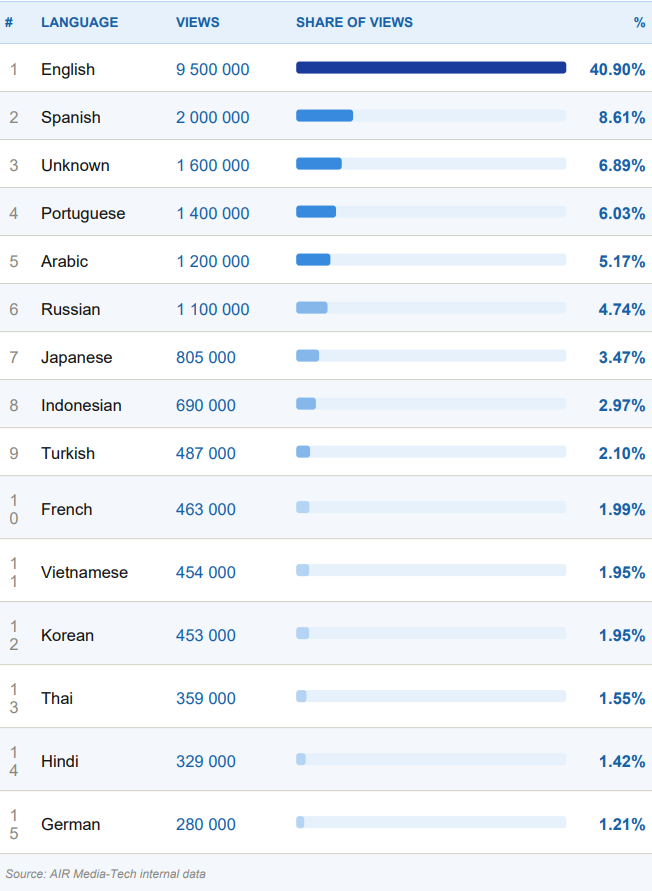
Even when your channel is fully in English, the benefit your channel can get from translation cannot be underestimated. According to YouTube, over 60% of a creator's watch time comes from outside their home country. That means the majority of your audience is already international; they just might not be able to engage with your content fully because of the language barrier. And that's the opportunity. Whether it's translated metadata, subtitles, or full dubbing, even small steps toward localization can unlock an audience that's already looking for content like yours.
How does it all relate to recommendations and suggested feeds? YouTube promotes multi-lingual reach because it makes the platform itself more accessible and more popular among viewers all over the world. For them, and for you as a creator, it’s a great opportunity for growth. And, depending on the content you produce, you don’t always need to go for the full channel localization. Auto-caps, manual subtitles, full dubbing, or a multilingual approach, it all works, in the end, to bring your content into recommendation feeds all over the world.
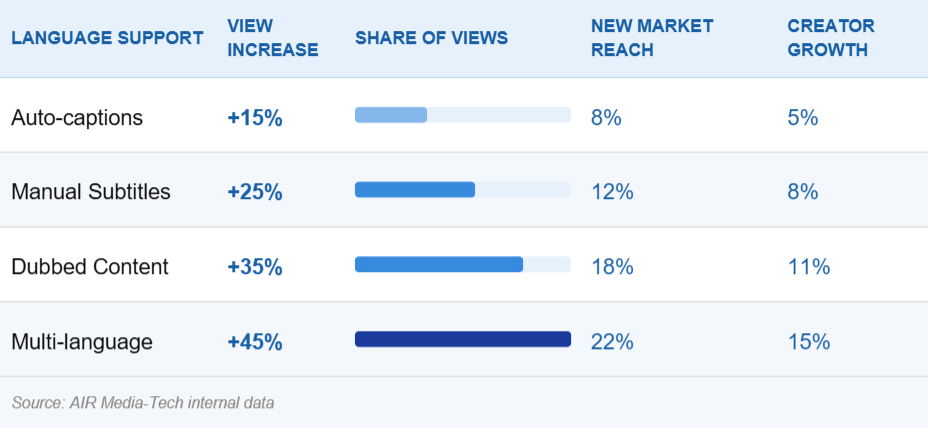
Let’s look at how our partners managed to expand their reach beyond the English market and get a surge in recommended feed traffic.
A Look Into Translation and How It Impacts Recommendations
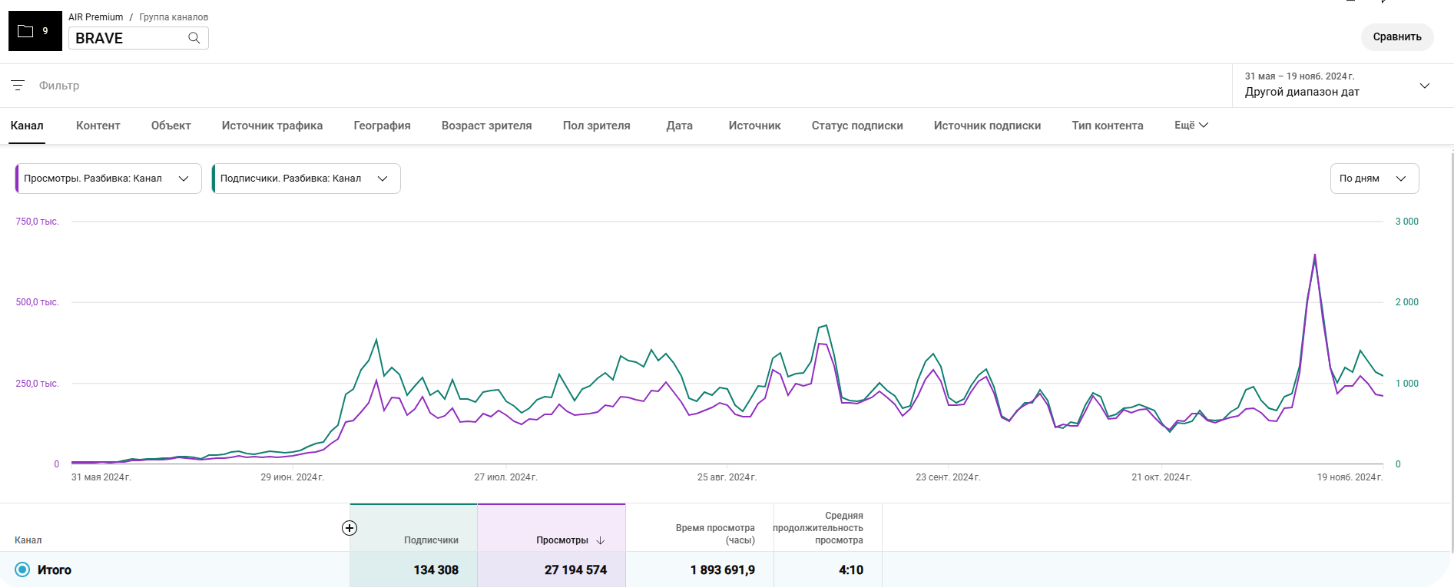
Our first set of evidence comes from Brave Wilderness, a channel with over 21M subscribers that we’ve helped to go global. We made sure their content was seen as culturally relevant, so we fully localized it and, in just six months, helped them launch 9 dedicated localized channels. But that wasn’t all. Additionally, we launched a Portuguese version of the channel, but it didn’t find success for quite some time.
So, what did we do? To test the algorithms, we started uploading Portuguese tracks to the Polish channel. It was only when these tracks appeared on the Polish channel that traffic from Brazil started to appear on the Portuguese one. This particular strategy can also be used to boost a channel if it doesn’t perform well.
Localized content brought new subscribers through the recommended and suggested feeds, which resulted in an additional 27.2 million views. It works because if your videos are already popular, translation and localization can help them appear in the feeds of the viewers who aren’t English speakers. This has the potential to show your videos on recommended feeds across the globe, not only the English-speaking segment.
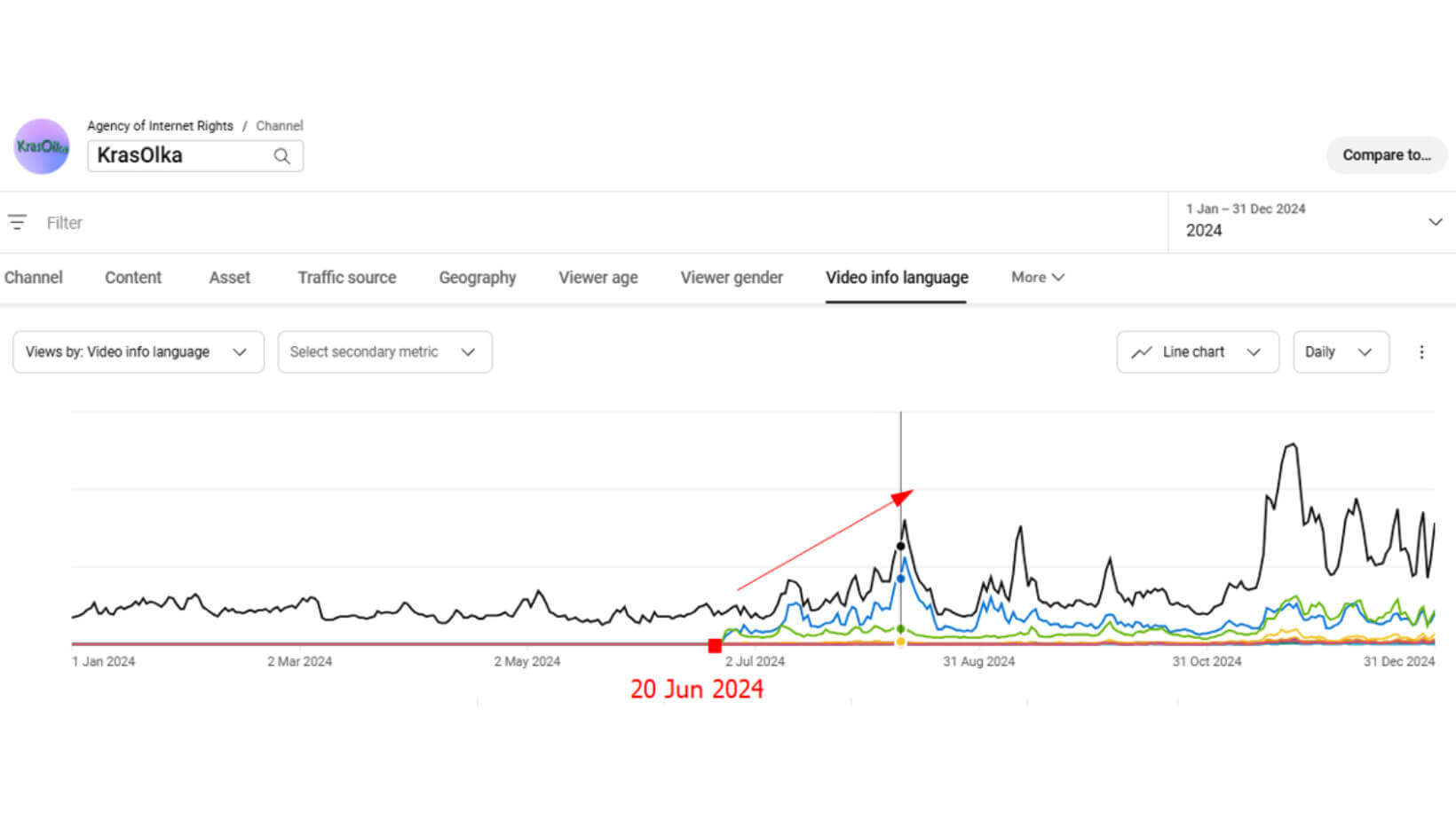
Up next is a case with a simpler solution to global expansion, KrasOlka (with 264K subscribers). This case is more of a demonstration of the fact that to appear more in the recommended feeds of other countries, you don’t necessarily need full-on localized channels. Sometimes, the simplest solution is more than enough. And their solution was in AI Metadata Translation.
After the translation, within mere weeks, more than 45% of international viewers started finding KrasOlka through recommended placements. That’s how metadata works, especially when it comes to channels that don’t rely heavily on narration.
And, as for the last piece of evidence in this segment, let’s look at the channel we’ve worked with for years. Here, we tried a different approach: dubbed audio tracks. Their English tracks have already earned 291M views, and with our dubbed tracks included, they gained 125.5M on top. Back all the way in November 2024, our team decided to kick off their localization with 5 videos and dubbed tracks in 11 languages.
Then, we used the ratio of “Views by Country” to “Audio Track Enabled” to spot demand and let the data speak its truth. We quickly found that, on our partner's channel, 4 languages work the best. From there, every subsequent upload has gotten its own dubbed tracks.
And YouTube picked it all up, which caused the traffic to roll from ‘suggested videos’ and recommendations. Then came the ‘Browse Features’ boost.
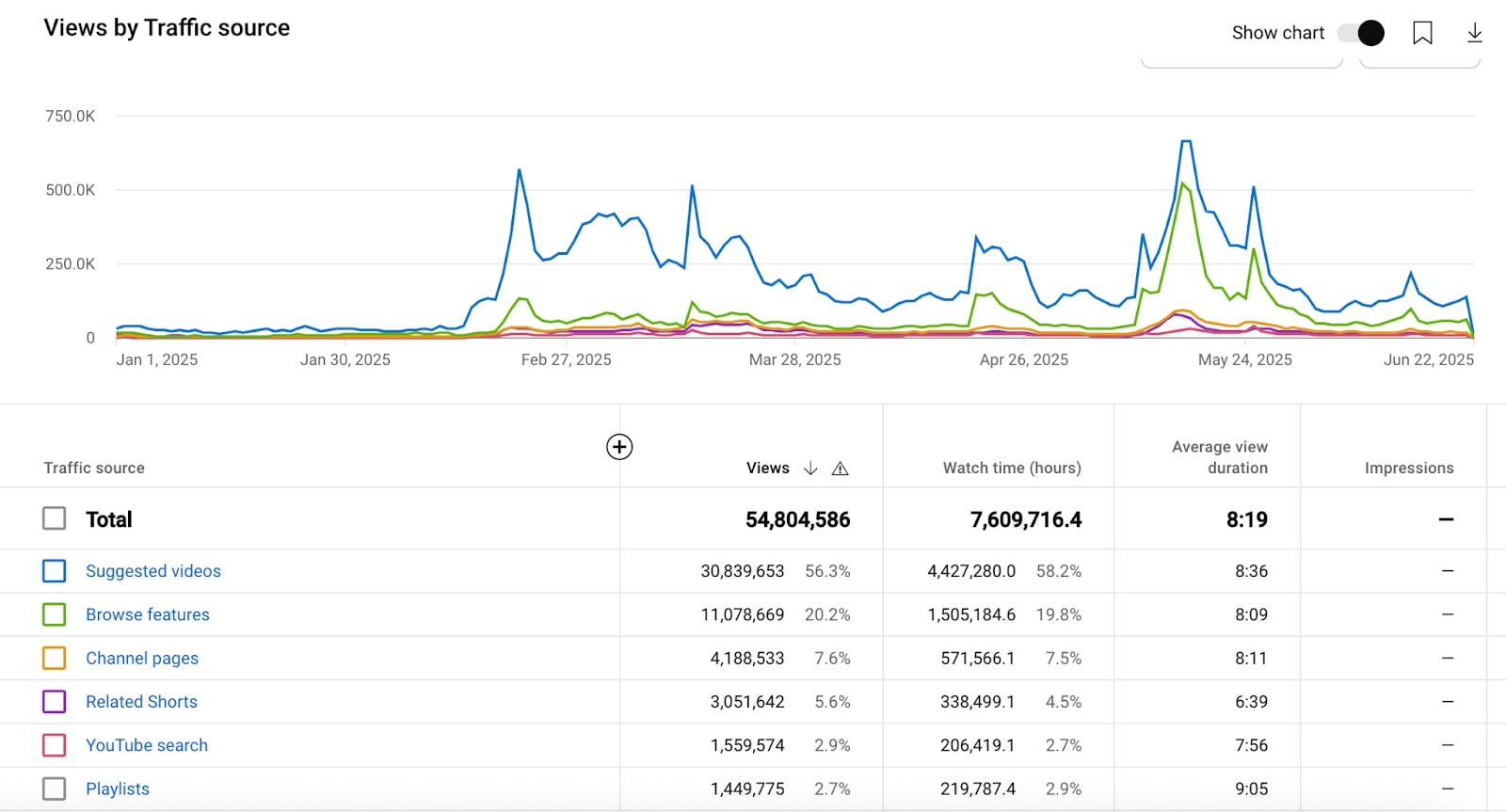
These things have proven time and time again to bring in traffic from other countries. After helping over 400 channels of all sizes with localization, we broke it down to pure science. If you wish to expand beyond just one language segment on YouTube, be sure to reach out to us, and we can help you figure out the localization strategy that would be perfect specifically for you, your content, your audience, and your niche.
Pro Tip: You can check if your content would benefit from translation and localization first by turning on the auto-dubbing feature on your videos. See which markets are worth expanding to, for you and your channel. See which language markets bring more recommended traffic to your channel and then adjust your strategy accordingly.
YouTube named AIR as a recommended vendor for translations.
How Can You Boost YouTube Recommendations With Translation?
The cases above show three localization depths producing three different results. The pattern underneath all of them is the same.
YouTube won't push content into a new language market without evidence that it works with that audience. It needs an engagement signal first. That's why the Portuguese channel went nowhere on its own and why uploading Portuguese tracks to the established Polish channel worked.
The KrasOlka result (metadata changes alone, 45% of international viewers arriving through recommendations) worked because the content was visually led. YouTube could classify and distribute it without audio comprehension. For dialogue-heavy content, the same metadata change opens the door but doesn't convert, because view duration drops too low in the new market to sustain recommendations. The right localization depth is determined by content type, not budget.
One more finding from the dubbed tracks case: starting with 11 languages and narrowing to 4 based on actual engagement data is more reliable than deciding upfront. The data tells you which audiences stay and watch; market-size estimates can't do that.
Recommended traffic in a new market always arrives before Browse Features. That sequence is consistent across cases. If you're seeing early recommendation growth in a new language and assume it's the ceiling, you're likely underestimating where it goes.
A Quick Translation Self-Check
- Which countries are sending you the most watch time right now? Not views, but watch time? That is where translation would have the fastest impact.
- Do you have any translated content already live? If so, compare average view duration on translated versus original-language content. A significant drop points to an audio barrier that metadata alone will not fix.
- Have you started with a small test (a handful of videos in multiple languages) before committing to a localization strategy? The engagement data from those early videos is more reliable than any market-size estimate.
- After translation, are you tracking the recommendation share in the new market specifically? Total views from a country are not the signal. Recommended and suggested as a share of that traffic is.
24/7 Streaming and Its Influence on Recommendations
When some creators hear ‘streaming’, they immediately think ‘gaming channels’. But that is a very old notion. And while gaming still holds the crown in streaming popularity, the entire structure in itself has evolved way past that. Here are just a few of our last cases, and look, it's not just gaming that makes 24/7 streaming work.
|
Channel / Case |
24/7 Streaming Period |
Views (Stream) |
Watch Time |
Revenue Impact |
|
DIY |
2 months |
1.15M views (6.3% of channel total) |
260K hours (~10% of channel total) |
4.5% of total channel revenue |
|
3 month |
5x non-sub traffic on winter stream |
~100% watch time retention in non-English regions |
78–79% of pre-holiday revenue retained (vs 40–60% niche avg drop) |
|
|
~6 months |
799,609 views (vs 65,003 before) |
268,524 hours (vs 20,125 before) |
+1,234% revenue ($30.68 → $1,269.41) |
|
|
Education |
Several weeks |
111,053 views (5.3% of channel total) |
N/A |
+2.43% of total channel income |
|
Sports |
~5 months |
+40.5% monthly views |
1.15M hours/mo (+183%; 83% of total) |
+65% monthly revenue; 55% of total from streams |
|
Gaming |
~12 months tracked |
N/A |
83% of total channel watch hours |
5x income; streams = 80% of annual revenue; highest RPM on channel |
Okay, but how does it work to push your content into the homepage, suggested, and recommended feeds?
The thing is, in 2026, YouTube still treats livestreams as a valid and giant discovery engine. They can be watched on all devices and surfaces (over 30% of stream views came from TV viewers in the U.S. in 2025 alone). And since they are still high in popularity, YouTube promotes and incorporates newer and better tools to help creators and the audience connect better during Lives. Those updates included things like streaming across horizontal and vertical formats, live reactions, and AI highlights.
Although the latest materials don’t state whether or not streaming is prioritized over other types of content, one thing remains clear: streams can still be discovered through the same major traffic sources, which include suggested videos, homepage, and others. The fact of the matter is that YouTube gives Live extra surfaces, tools, and product attention that can help discovery.
Now, let’s look deeper into 24/7 streaming in particular, because that one is interesting on more than one level. While it doesn’t directly make your YouTube stats skyrocket the day after its implementation, it has a positive impact on:
- Watch time (live streams have proven to hold viewers longer);
- Revenue growth (streams consistently bring in a bigger share of creators’ total YouTube earnings (often 50–90%), and RPMs are usually 50–100% higher too);
- Retention (on average, retention on live streams is 50% higher than regular uploads);
- Subscriber growth (because live content can trigger algorithmic boosts).
All of which, subsequently, pushes your content into recommended, suggested, and homepages.
Now, let’s look a bit closer at how 24/7 streaming with Gyre helped our partners see a real surge in recommended traffic.
Real Evidence of 24/7 Streaming Impacting Recommendations
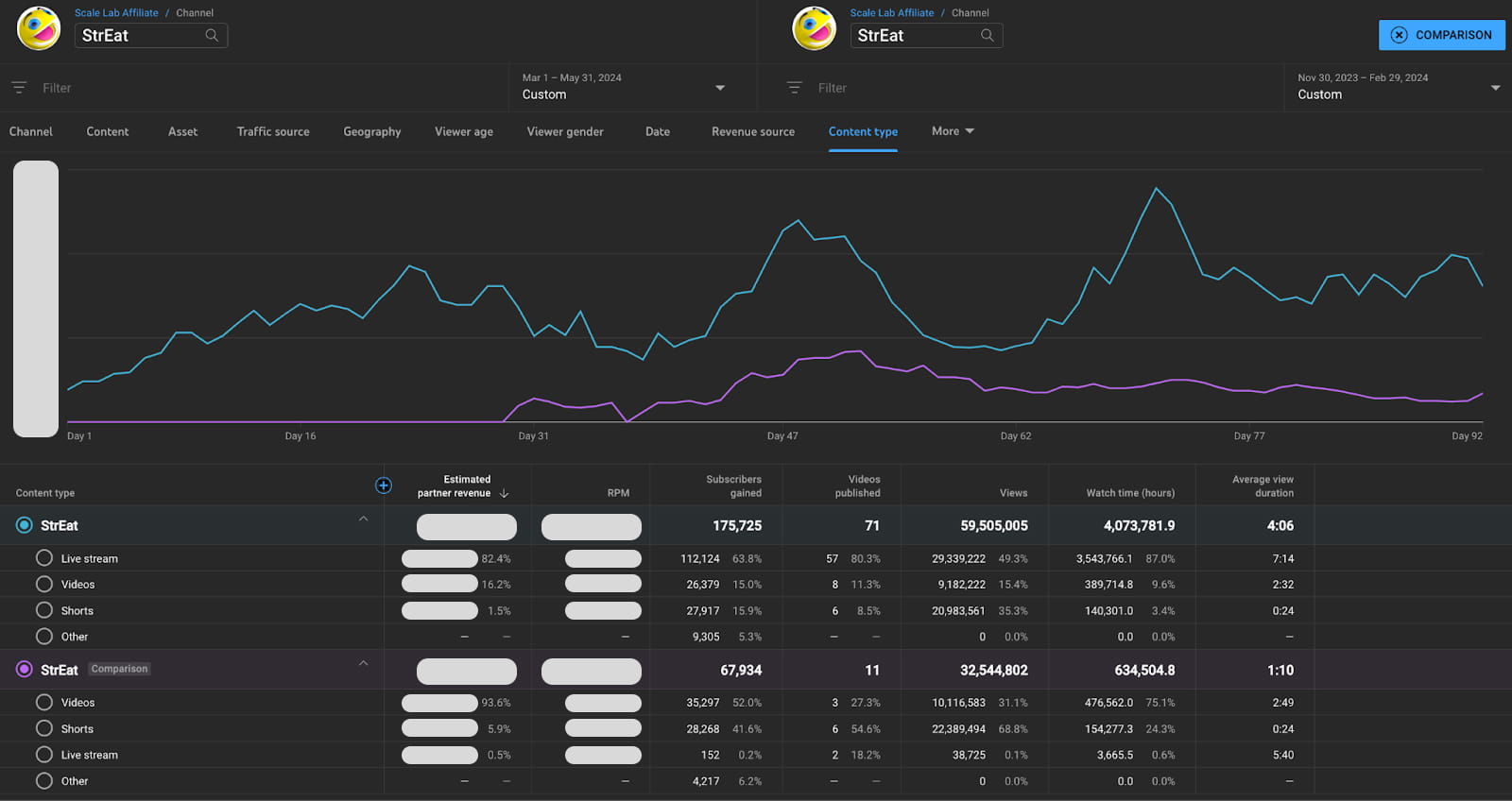
Let’s start with the gaming channel, StrEat, with over 2.83M subscribers, 1.85B views, and a massive library of videos (250+). Starting in March of 2025, StrEat implemented a “multi-stream” approach to increase the surface area of its audience. But it went even further than that, because putting their videos on live was only half the battle (the easiest part of it).
We implemented a strategy where we restarted streams based on real-time viewer activity to keep engagement levels at their peak. Since the channel was always live, it constantly sent positive signals to YouTube’s algorithms, because they had high watch time and longer session durations, all of which had an impact on the channel’s increased performance in recommendation feeds.
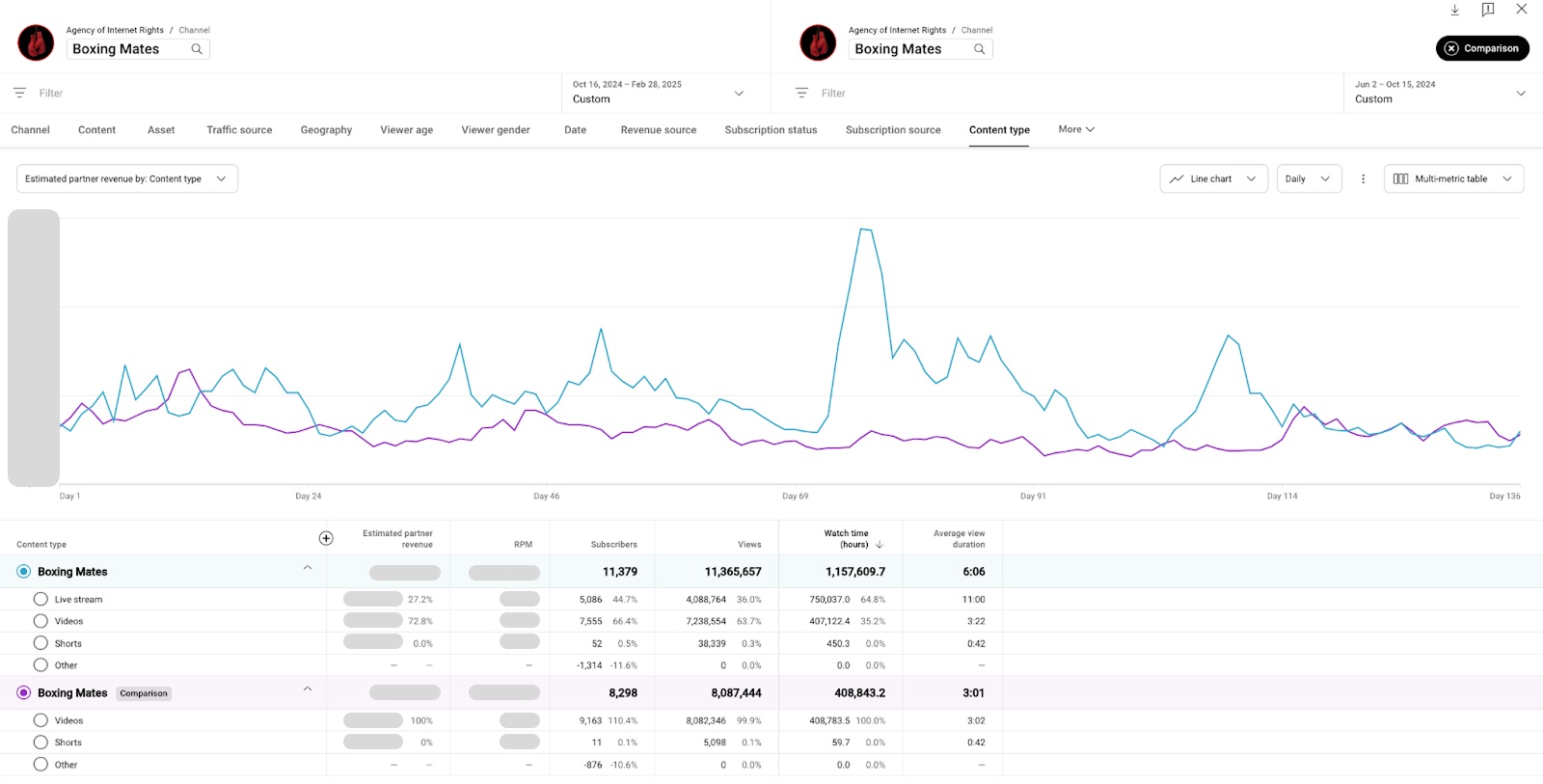
Another channel that saw a surge in recommended traffic after incorporating 24/7 streaming is Boxing Mates, with a massive back catalogue of over 153M views. We used their high-quality content and helped create 4 simultaneous live streams that ran 24/7.
This boosted their visibility in the ‘Live’ section, which subsequently boosted their visibility in recommendations. How did that happen? Due to their increased engagement and x4 in watch time, YouTube algorithms picked up that people are interested in this type of content and their videos in particular, which is why they started recommending those videos more and more.
The last channel in this section under our review is a DIY channel, Dream Fairy DIY, with over 732K subscribers and over 100M views. After implementing a continuous streaming strategy with AIR Media-Tech, they saw a 300% increase in AVD (Average View Duration). To stay at the top of YouTube’s recommendation engine, they needed to show that their channel is active (even during the period they weren’t).
Which is why the multi-stream approach worked so well for them. Just like the cases above, this channel increased its ‘surface area’ across the platform, which means that instead of appearing once in a subscriber feed, the channel was now more visible across the Home feed, Suggested, and the dedicated Live Tab, all at the same time. You can see it in the results.
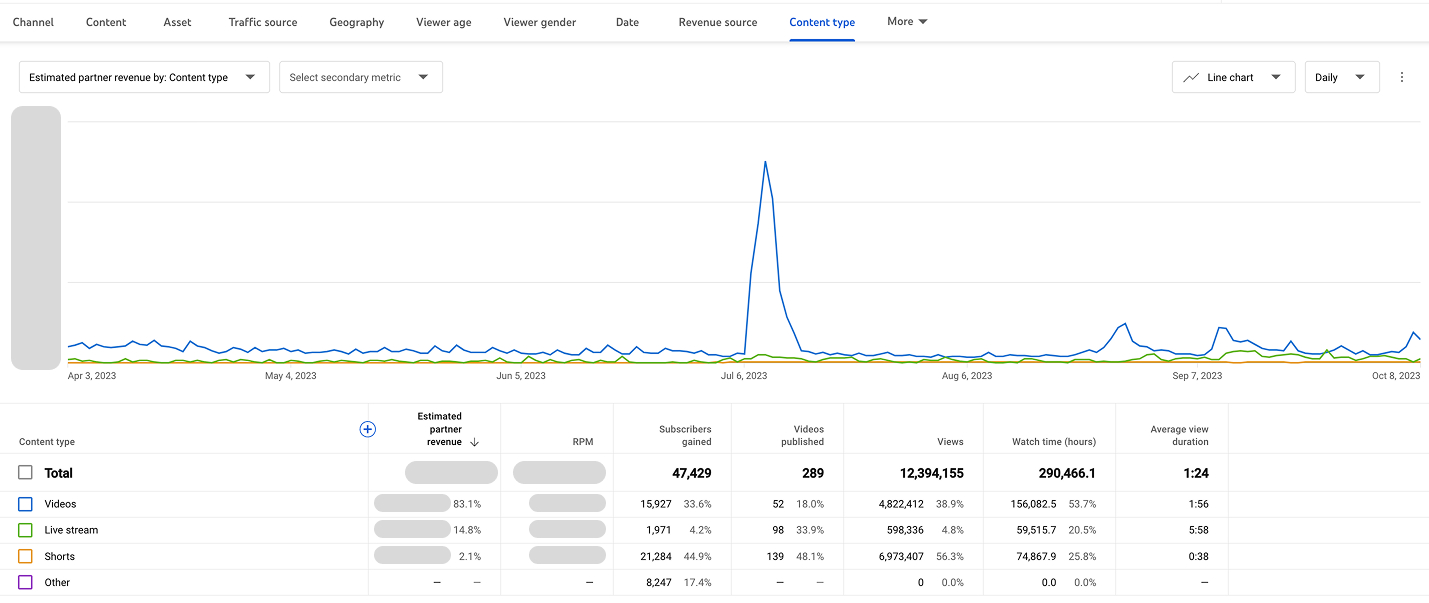
YouTube notoriously favors channels that are capable of keeping users longer on the platform, which is why the constant stream of content and watch time “warmed up” the system so that when they uploaded a new tutorial, it was met with an algorithm already primed to put it in recommendations.
Pro Tip: Look at your content first and see which videos bring the most views. Compile those videos into one continuous stream and try to see the results within a month.
How Can You Boost YouTube Recommendations With 24/7 Streaming?
The cases above used streaming to stay present in the algorithm between uploads, and the recommendation lift on regular content followed.
A channel that goes quiet between uploads loses ground in active distribution. A channel with a continuous stream never goes quiet. Dream Fairy DIY's AVD increase makes sense in that context; the stream was keeping the algorithm warm so that when a new video arrived, it entered a primed system rather than a cold one.
The Boxing Mates approach (four simultaneous streams) shows the surface area logic taken further. More streams means more simultaneous entry points: Home feed, Suggested, Live tab, TV surfaces all at once. The Live section visibility came first, then it fed into general recommendations. That sequence is consistent across cases: streaming improves Live section standing first, which then spills into broader recommendation distribution.
The StrEat case adds the detail most people miss: managing a stream based on real-time viewer activity is what keeps the engagement signal strong. A stream running on a fixed loop with declining concurrent viewers sends a progressively weaker signal. Restarting based on actual audience behavior keeps the density consistent enough to matter algorithmically.
A Quick Streaming Self-Check
- Do you have enough long-form archive content to run a continuous stream without heavy repetition?
- Have you identified which videos have the strongest AVD, not just views? Those are the right anchor content, not your most popular ones.
- Is someone actively managing the stream based on viewer activity, or is it set and forgotten?
- Are you tracking what happens to recommendation traffic on your regular uploads while the stream runs? That secondary lift is the signal that the strategy is working.
- Is your channel currently in a quiet period between uploads? That's exactly when streaming has the highest impact.
YouTube Shorts Recommendations
YouTube Shorts is a whole separate environment with a separate recommendation feed. It doesn’t serve as a direct booster for your long-form recommendations. However, it still has its influence on it, which we will see directly below. In practice, Shorts affect recommendations in three ways:
- Shorts can get you more discovery inside the Shorts feed.
- Shorts can appear outside the Shorts feed, where viewers may be recommended Shorts on Home and Watch Next.
- Shorts can help with audience expansion across formats, where they drive traffic to your long-form content.
So, in other words, a successful Short can introduce your channel to new people, but that doesn’t guarantee your long-form videos will suddenly appear more in Home or Suggested. It can help with the discovery, but the cross-format lift depends on whether your viewers also want to watch your long-form content. Shorts can increase your chances of being recommended, so they are best used as a parallel discovery engine.
This is why we placed it last as a method to get your videos recommended on YouTube in 2026. But let’s see proof of where Shorts actually had a positive impact on recommendations. As always, with our partners in mind.
A Dive Into Shorts Increasing Recommendation Shows
One of our partners, a channel into clay sculpting and resin art, suddenly hit a ceiling; they didn’t hesitate to reach out to us. They needed to renew their recommended traffic, so after reviewing everything, we came to the conclusion that the best course of action for their particular channel would be… Shorts. We put our faith in “cross-format viewing,” which quickly paid off.
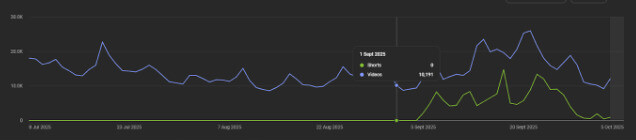
Since their content is evergreen, this approach worked well for them. How? By increasing the amount of material for the algorithm to latch on to, their video catalog started gaining more traction because of the cross-format viewership. We helped make it in a way that Shorts teased results, showed detail, hinted at process, and made the audience crave more.
This resulted in more clicks for their long-form content. Which, in turn, boosted their content in recommendation feeds.
Now, let’s look at the kids’ channel case. Here, in only one quarter, the channel went from 24 million views to 299 million. But here, it’s an interesting case, because here, we used several approaches at the same time.
Here, the translation and Shorts worked in tandem to increase recommendations traffic, specifically on YouTube Shorts. Shorts feed alone started bringing in 244.6M views, which is 81.8% of all traffic.
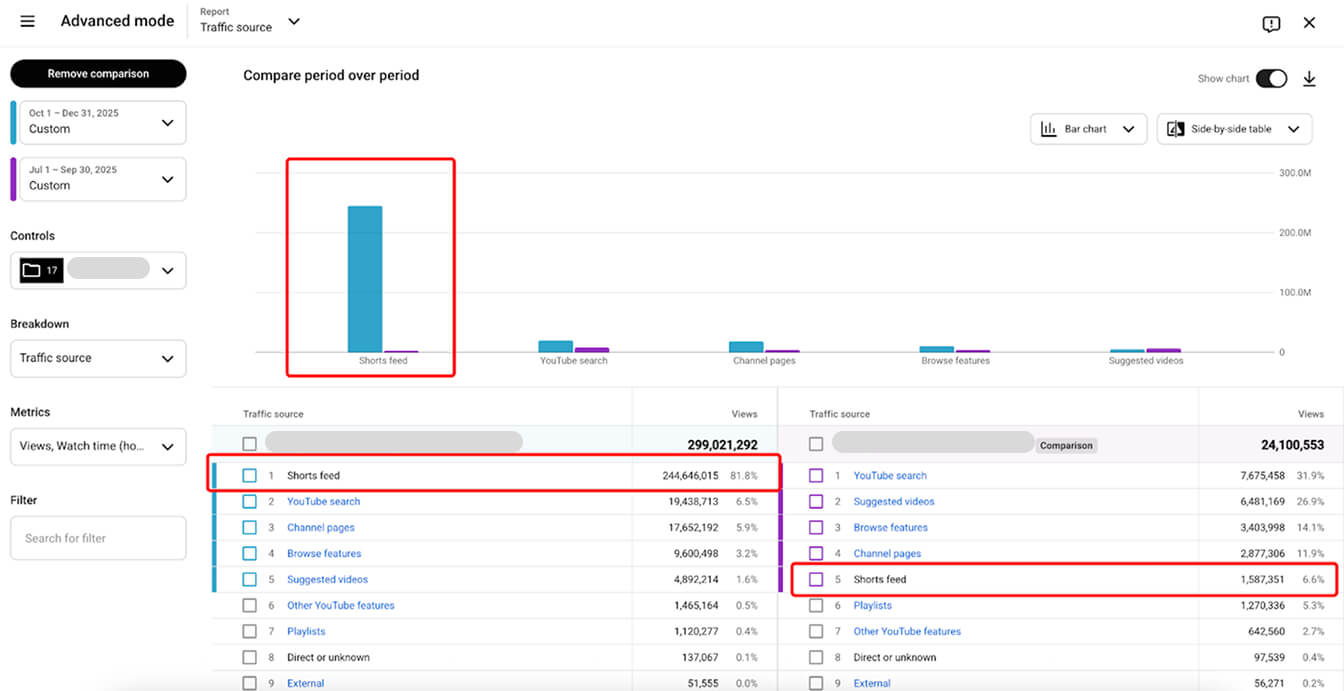
Which is to say that the Shorts approach is more than valid when you want to get your videos recommended on YouTube in 2026. However, this approach alone will not boost you; it needs to work in tandem with one or several other methods to bring in real results.
Pro Tip: Shorts are capable of bringing in traffic. If you rely more on long-form, clip your videos into manageable 60-second chunks, turn them vertical, and post them at least several times per day. It doesn’t have to be a time sink as well; you can make all of it real with the help of AI tools, which shortens both the time and effort spent by a large margin.
How Can You Boost YouTube Recommendations With Shorts?
The craft channel case is the more instructive one here, because it shows how Shorts work as a recommendation driver.
The channel had hit a ceiling on recommendations. What changed was adding surface area for the algorithm to latch onto, with Shorts engineered specifically to create a gap. Tease the result, show the detail, hint at the process, stop before delivering the full thing. That gap is what drives the click to the long-form video, which is what generates the watch session, which is what feeds the recommendation signal.
The kids' channel result (24M to 299M in a quarter) looks like a Shorts story but is really a combination story. Shorts and translation running in tandem, on visually-led content that needed no language comprehension to engage. That's what made it scalable globally. Remove either element, and the result is different.
That's the consistent pattern across both cases: Shorts work when they create a reason to keep watching.
A Quick Shorts Self-Check
- Are your Shorts leaving something unresolved that the long-form video answers?
- Is your content evergreen? If not, you need a high and sustained posting cadence for Shorts to compound.
- Have you checked cross-format viewership in Analytics? Not Shorts' views, but how many viewers move from Shorts to long-form. That's the only number that tells you whether the strategy is feeding recommendations.
- Is your content visually led? If so, it travels globally in the Shorts feed without translation, pairing it with even basic metadata localization opens markets with far less English-language competition.
- Did you launch Shorts during a period of stalled recommendation growth, or from a cold start? Shorts work best as a ceiling-breaker. From zero, the compounding takes longer to show up.
Want More of Your YouTube Videos Recommended?
Every case in this article started the same way. We:
- Looked at which recommendation surfaces the channel was missing from
- Found what was blocking the signal: a resolution threshold, a language gap, a quiet period between uploads, a Shorts feed with no bridge to long-form
- and mapped out what to fix first
That is what a proper channel audit produces. A specific breakdown of your traffic sources, content setup, localization gaps, and recommendation signals, with a prioritized list of steps that apply to your channel specifically.
We do this every day, across more than 3,000 channels. The patterns that are invisible from inside a single channel become obvious at that scale. And we have built proprietary technology specifically to surface them faster.
If you want to go further than the audit, we can help you implement what we find. Localization, dubbing, 4K setup, 24/7 streaming.
Start with our expert channel audit and find out exactly what is standing between your content and the recommendation feeds it should already be in.