![Live Auto Dubbing, Made on YouTube, and More [September 2026]](https://air.io/storage/YQmIVErjRp29SNJNDzwXGhnaZx7TBahOGmY9hILX.jpg "Live Auto Dubbing, Made on YouTube, and More [September 2026]")

On September 23, YouTube announced more than 30 updates at Made on YouTube, from live auto-dubbing to AI feedback on draft videos. Some already work, and others arrive later in 2026 or in 2027. Two changes affect every channel right now: the public view counter counts every play, and YouTube can label undisclosed sponsorships on its own. Here's each update, plus two from Instagram, with its status and what it means for your channel.
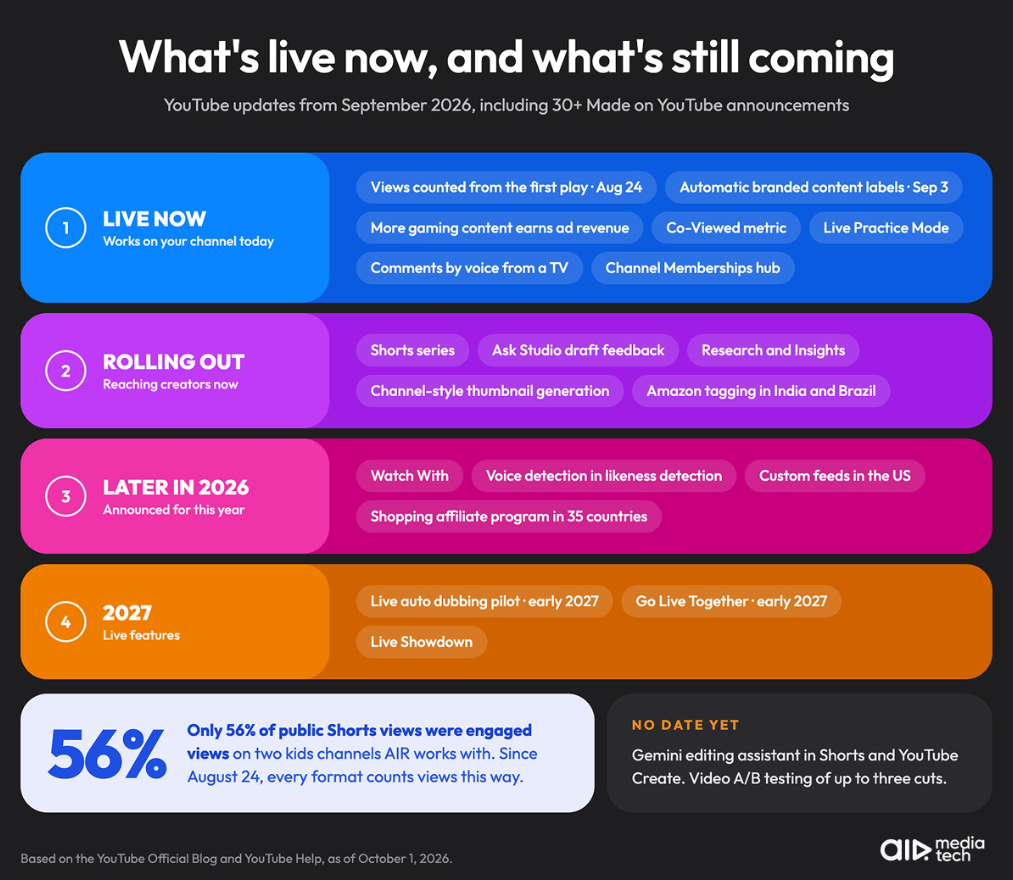
Here's where each update stands as of October 1, 2026:
|
Update |
Status |
Where and for whom |
|---|---|---|
|
Public views counted from the first play |
Live since August 24, 2026 |
All formats, all channels |
|
Automatic branded content labels, age and country limits |
Live since September 3, 2026 |
All channels, YouTube Studio |
|
Shorts series (seasons and episodes) |
Rolling out now |
Web, mobile, and TV |
|
Comments by voice from a TV |
Live |
Viewers on TV |
|
Co-Viewed metric |
Live |
YouTube Analytics → Audience |
|
Channel Memberships hub |
Live |
Viewers, youtube.com/channel_memberships |
|
Live Practice Mode |
Live |
YouTube mobile app, vertical streams |
|
Creator Partnerships |
Live |
20 countries |
|
Ad revenue for more gaming content (recreational drugs, graphic scenes after the first 7 seconds) |
Live since September 2026 |
Monetized gaming and scripted content |
|
Ask Studio draft feedback, Research, Insights, and thumbnail generation |
Rolling out |
YouTube Studio on web and mobile |
|
Gemini editing assistant |
Announced, no date yet |
Shorts and the YouTube Create app |
|
Video A/B testing (up to three cuts) |
Coming soon, no date yet |
YouTube Studio |
|
Amazon product tagging outside the US |
In the coming weeks |
India and Brazil first |
|
Custom feeds |
This fall |
Viewers in the US |
|
Voice detection in likeness detection, enrollment from mobile |
Later in 2026 |
Creators enrolled in likeness detection |
|
Watch With |
Later in 2026 |
Live reactions to long-form videos |
|
YouTube Shopping affiliate program in 35 countries |
By the end of 2026 |
YouTube Shopping creators |
|
Go Live Together |
Early 2027 |
Live streamers |
|
Live auto dubbing (pilot) |
Early 2027 |
Live streamers |
|
Live Showdown |
2027 |
Live streamers |
YouTube Now Counts a View the Moment a Video Starts Playing
Since August 24, 2026, YouTube counts a view as soon as a video starts to play. Shorts already worked this way. Now the same rule covers long-form videos, podcasts, and live streams.
The old definition didn't disappear. YouTube renamed it an engaged view: the viewer clicked to watch or kept watching past the first few seconds. According to YouTube's explainer, CTR, average view duration, and retention in Analytics are still calculated on engaged views, and recommendations didn't change.
Shorts have counted views this way since March 31, 2025, so they show how big the gap can get. On PlayToys and Play Dolls, two kids' channels we work with (8.03M and 7.26M subscribers), only 56% of public Shorts views were engaged views after the channels launched Shorts in 2025: 503,000 of 877,000 on Play Dolls and 161,000 of 301,000 on PlayToys.
This doesn't change how you get paid.
YouTube's Help Center says YPP earnings "will still be based on engaged views and engaged watch hours," and YPP eligibility "will still be based on qualified views."
We explained how qualified views work for YPP in our August updates.
What this means for creators:
- The public counter under your video can now be noticeably higher than the number of views you're paid for. To estimate earnings, use engaged views, not the public count. Here's how much YouTube pays for 1 million views
- If you're tracking progress toward YPP, check engaged views and watch hours in YouTube Analytics, not the counter under the video
- If a sponsor pays per view, send engaged views from Analytics along with the public count, so you both work from the same number
Big view counts, small paycheck?
The public counter now counts every play, but YouTube pays on engaged views. Our specialists will show you where your views stop turning into revenue and give you a plan to fix it.
Show me the gap →YouTube Can Now Label Undisclosed Sponsorships on Its Own
On September 3, YouTube updated its paid promotion tools and its branded content policy. Branded content is anything a brand influenced in exchange for something of value: payment, free products, or a sponsorship.
Here's what changed:
- Automatic labels. YouTube's systems check uploads for undisclosed branded content. If they find it, YouTube can add the disclosure label and notify you.
- Age and country limits. When you mark a video as containing paid promotion, you can choose the countries where it shows and a minimum viewer age, globally or per region.
- One standard term. YouTube now uses "branded content" across its policies.
- A redesigned label that gives viewers more context about the promotion.
If YouTube labels a video by mistake, you can certify in YouTube Studio that it doesn't contain branded content and override the label. Disclosure under local advertising law is still the creator's responsibility.
What this means for creators:
- Before publishing a sponsored video, tick "My video contains paid promotion" in YouTube Studio (Content → your video → Show more), so the label comes from you, not from YouTube's systems
- If a sponsor's campaign runs only in certain countries or for certain ages, set those limits when you mark the video
- If YouTube labels a video that isn't sponsored, override the label in Studio
Live Auto Dubbing Is Coming to Streams in Early 2027
YouTube already auto-dubs Shorts and long-form videos. At Made on YouTube, it announced that it will start piloting live auto dubbing in early 2027.
The feature translates a streamer's speech in real time, so each viewer hears the stream in their preferred language. According to YouTube, more than 40% of live watch time comes from viewers outside a creator's home country, so many streamers already have a large audience that doesn't speak their language.
For channels that stream often, live is already a main source of income. In AIR Media-Tech data from 127 monetized streaming channels in 2025 and early 2026, channels that went live 8 or more times a month earned a median 50% of their ad revenue from streams.
You don't have to wait until 2027 to reach viewers in other languages. Your regular videos can carry dubbed audio tracks today, and we compared the options in Is YouTube's AI Dubbing Safe for Your Channel? Auto Dub vs. Pro.
New Live Features: Watch With, Go Live Together, and Live Showdown
Live is already a big part of YouTube: in August 2026, more than 600M logged-in viewers watched live content, including archived streams, every day on average. At Made on YouTube, YouTube announced three new live features:
|
Feature |
What it is |
When |
|---|---|---|
|
Watch With |
React live to any eligible long-form video. The reacting creator keeps the ad revenue and fan funding from their live reaction. The original creator gets attribution, combined views, and watch time from all reactions in YouTube Studio, and can choose whether other channels can react to their content |
Later in 2026 |
|
Go Live Together |
Co-host matchmaking. Browse creators who are live right now, or join a queue, and YouTube pairs you with similar creators you may not know yet |
Early 2027 |
|
Live Showdown |
Head-to-head co-host competitions. Viewers push their creator's score forward on screen with chats, gifts, and Super Chats |
2027 |
Until Go Live Together launches in early 2027, here's where to find collaboration partners on YouTube.
Shorts Series: Seasons and Episodes for Shorts
Creators can now group their Shorts into seasons and episodes. Series get custom thumbnails and sequential playback, so viewers can watch episodes in order. Shorts series is rolling out now on the web, mobile, and TV.
The timing matches demand. In the first half of 2026, microdramas on YouTube passed 6.5 billion views, and their watch time grew by more than 50% year over year. On TV alone, views of microdrama content grew by more than 90%.
What this means for creators:
- If you already post episodic stories, sketches, or recurring formats in Shorts, group them into a series so viewers watch the next episode instead of scrolling away
- Series work on TV too, where episodic viewing is growing fastest
We Unpack All YouTube Updates on IG
Follow us on @airmediatech to take advantage of new features first!
Gemini Editing Assistant Comes to Shorts and YouTube Create
YouTube is adding a conversational editing assistant powered by Gemini to Shorts and the YouTube Create app. You start from a suggested prompt or write your own, get a first draft, and keep chatting to change it: reorder clips, trim, or sync music to the beat. Gemini is already built into both apps, and in August 2026 alone, hundreds of thousands of channels used it every day.
YouTube hasn't published a launch date or country list for the new assistant yet.
If you edit Shorts on your phone, describe the cut you want in a prompt first, then fine-tune the draft instead of trimming every clip by hand
Ask Studio and A/B Tests: YouTube's AI Tools for Creators
YouTube also expanded its AI tools in YouTube Studio:
- Ask Studio on mobile: the AI assistant is now in the YouTube Studio app for iOS and Android
- Draft feedback: Ask Studio reviews an unpublished draft and gives notes on "pacing, structure, storytelling, and more"
- Research and Insights: new sections that explain how your past videos performed and what content is working on the platform
- Thumbnail generation: thumbnails generated in your channel's style. With dynamic thumbnails, YouTube recommends the best of three options to different audience segments
A/B testing is also expanding. Since the official launch in 2024, creators have run more than 40 million title and thumbnail tests. Video A/B testing is coming soon: you'll be able to test up to three cuts of a video to see which opening hook works best. Ask Studio will also check your older videos in the background, then suggest and test refreshed thumbnails. VidSummit founder Derral Eves picked dynamic thumbnails and video A/B testing as the two features to watch in his VidSummit 2026 keynote.
What this means for creators:
- Once video A/B testing arrives, you can test the opening hook itself, the part of a video that decides much of its retention
- Your back catalog gets a second chance: older videos with weak thumbnails can be refreshed automatically
Likeness Detection Adds Voice Detection
The likeness detection feature (which finds AI-generated content that uses a creator's face) is getting an update as well. Later this year, YouTube will start combining speaking voice detection with facial detection to make matches more accurate.
Enrollment will also move to the mobile app, so creators can sign up directly from their phone.
YouTube Shopping Expands to 35 Countries
The YouTube Shopping affiliate program will be available in 35 countries by the end of 2026. More than 1.3 million creators are already in the program, and YouTube says Shopping tags drive more than twice as many clicks as description links.
Key changes:
- Amazon outside the US: after launching in the US in August, Amazon product tagging expands to India and Brazil "in the coming weeks," with more countries before the end of the year
- Localized product tags: tags now show a link localized for each viewer's country, and you earn commission on those global sales
- Affiliate campaigns: retailers and brands can offer creators incentives such as exclusive commission rates or bonuses
Brand Deals: Creator Partnerships and Ask Studio
YouTube Creator Partnerships, which helps brands find creators, now works in 20 countries. YouTube also announced tools for the deal itself:
- Ask Studio for brand deals: drafts replies to brand briefs, builds pitches, and tailors your media kit to each brand's goals
- Access codes for brands: a one-click code lets a brand partner see how your videos perform
- Creator Partnerships Boost: brands can put paid media behind your content
- Dynamic brand segments: a sponsor segment can go into up to 20 of your long-form videos at once, targeted by region
What this means for creators:
- A sponsor segment no longer has to live in one video. When you price a deal, agree on how many videos and which regions the segment covers
Communities: Members-Only Spaces and AI Comment Moderation
For creators with Memberships, YouTube announced member-only spaces in Communities, plus opt-in AI comment moderation that learns your moderation style over time.
Custom Feeds: Viewers Build Their Own Home Page
Viewers in the US will soon be able to create custom feeds with a text prompt, like "Witty podcasts for my daily 30-minute commute." They can save several feeds, and each one updates automatically. Custom feeds are coming to web, mobile, and TV.
What this means for creators:
- A clear niche and accurate titles and descriptions matter even more when viewers describe what they want in their own words
- Custom feeds are one of the few 2026 updates that change how videos reach viewers. The rest are in our YouTube algorithm updates 2026 timeline.
More Updates for Creators and TV
- More gaming content can earn ad revenue. In September, YouTube updated two of its advertiser-friendly content guidelines. Gaming and scripted content that shows the use, sale, or promotion of recreational drugs is now eligible to earn ad revenue. Graphic gaming content in the first 8 to 15 seconds of a video will earn ad revenue too, while graphic gaming content in the first 7 seconds stays ineligible.
- Replace copyrighted music with an instrumental track. Since May, creators in the US can use a Create button in the Replace Song tool in YouTube Studio on desktop. YouTube generates four royalty-free instrumental tracks you can use to replace claimed audio and release Content ID claims.
- Live Practice Mode. Creators can rehearse a vertical live stream privately in the YouTube mobile app and test chat, polls, stickers, and green screen without an audience. When you're ready, you can go live straight from practice mode.
- Comments from your TV. Viewers can now post comments directly from their TVs by voice, without switching devices. Creator Posts are also coming to TV in the coming months.
- Channel Memberships hub. Viewers now have a dedicated page with a personalized shelf of channels they're most likely to join.
- Co-Viewed metric in Analytics. A new Co-Viewed metric estimates total views including several people watching together, for example, on a TV. You'll find it under Analytics → Audience.
Instagram Updates: "AI-generated profile" Label and Replace Audio
Instagram now requires profiles that feature an AI-generated person to carry an "AI-generated profile" label, the new name for the older "AI creator" label. Profiles that add the label themselves keep their reach, while AI-generated profiles without it may see their reach limited. Creators who only use AI tools in their work don't need it.
Since July, Instagram also lets you replace the music on a published feed post or carousel with Replace Audio, without deleting and re-uploading it. Likes, comments, shares, and reach stay the same.
What to Do After September's YouTube Updates
Here's what to do now, starting with the changes that already apply to your channel:
- Track YPP progress with engaged views and watch hours in YouTube Analytics, not the public view counter
- Mark sponsored integrations as paid promotion and use the new age and country limits where they apply
- If you make gaming content, keep graphic scenes out of the first 7 seconds of a video, so it stays eligible for ad revenue
- If a large share of your live audience is international, add dubbed audio tracks to your regular videos now instead of waiting for live auto dubbing in 2027
- If you make reaction content, get ready for Watch With on long-form videos later this year, and decide whether other channels can react to your videos
- Group episodic Shorts into a Shorts series
- Install the YouTube Studio app and try Ask Studio's draft feedback before your next upload
- Get ready for video A/B testing by planning two or three different hooks for your next key video
- Sign up for likeness detection, and watch for voice detection and mobile enrollment
- Outside the US? Check whether YouTube Shopping and Amazon tagging are available in your country
- If your audience watches on TV, check the Co-Viewed metric in the Audience tab
- Rehearse your next vertical stream in Live Practice Mode
- Running an AI-created Instagram account? Add the "AI-generated profile" label
- Refresh the music on older Instagram posts and carousels with Replace Audio instead of reposting them
Not sure which of these updates will pay off for you?
An AIR channel audit looks at your data and ranks what to change first, so you spend time on the tools that fit your channel.
- A report on your packaging, retention, traffic sources, format mix, revenue, and audience
- A 30-day action plan ranked by impact
- A 45–60-minute live call with an AIR strategist
16 years managing 3,000+ channels · YouTube Certified Partner
Find what to fix first →