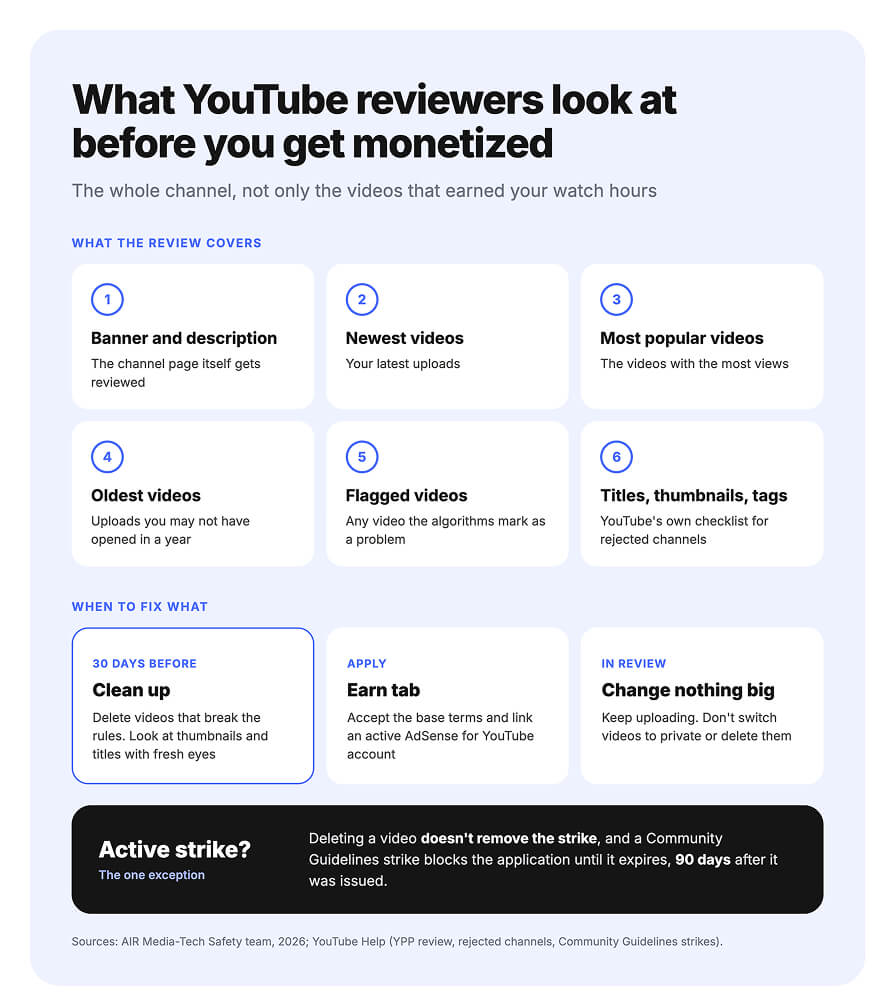
Before a channel earns from ads on YouTube, automated systems and human reviewers look at it as a whole. AIR Media-Tech's Safety team, who handle strikes and policy reviews for the channels we work with, say the review covers the banner and description, your newest, most popular and oldest videos, and any video the algorithms have flagged. Their advice is to delete videos that break the rules 30 days before you apply. The exception is a video with an active strike, since deleting it doesn't remove the strike.
So we've put together answers to the questions creators ask most about applying, with the team's advice at each step: what to fix on the channel first, the steps in YouTube Studio, what not to change while you wait, and what to do after a yes or a no. Until February 1, 2027, you can apply at 1,000 subscribers and 4,000 qualified watch hours in 12 months. YouTube has announced that new applicants will need 8,000 hours from that date.
Key takeaways
- The review covers the whole channel. AIR Media-Tech's Safety team says reviewers look at the banner and description, the newest, most popular and oldest videos, and any video the algorithms have flagged.
- Delete rule-breaking videos 30 days before you apply. A video with an active strike is the exception: deleting it doesn't remove the strike.
- The review starts once AdSense is linked. YouTube queues the channel after you accept the base terms and link an active AdSense for YouTube account, and decides typically in about a month.
- No pay for views before approval. Earnings start once the channel passes the full review and has a working AdSense account, the team says.
- February 1, 2027 decides the bar. AIR Media-Tech's partner support team says an application submitted by 23:59 UTC on January 31 is judged at 4,000 hours. If your reapplication or appeal is decided after February 1, plan for 8,000.
In this guide:
- What reviewers look at, and what to delete first
- How to apply in YouTube Studio
- What not to change while you wait
- What to switch on after approval
- Appeal or reapply after a rejection
- Shorts, 500 subscribers, under 18
- Not eligible yet: the Dr Roto case
What YouTube Reviewers Look At, and What to Delete 30 Days Before You Apply
YouTube Help says automated systems and human reviewers check "your channel as a whole." We asked AIR Media-Tech's Safety team, who handle strikes and policy reviews for the channels we work with, what that covers in practice and what to fix before you apply.
Your banner and description get reviewed too
The review goes wider than the videos that earned your hours. Here's how AIR Media-Tech's Safety team describes it:
“
They look at the channel overall: the banner, the description, videos the algorithms flag as a problem, and of course the latest videos, the popular ones and the old ones. They check whether any video breaks the rules and whether the channel meets every criterion.
Anastasiia Kulyk, Safety Team Lead, AIR Media-Tech
YouTube's own checklist for rejected channels names the same places: videos, titles, descriptions, thumbnails and tags. Go through them before you apply, starting with the uploads you haven't opened in a year.
Delete rule-breaking videos 30 days ahead, but not one with a strike
Do the cleanup before you apply.
“
If there are videos that break the rules, delete them 30 days before you apply, unless there's an active strike on them, because deleting a video doesn't remove a strike. Then go through the channel with fresh eyes, thumbnails and titles included.
Anastasiia Kulyk, Safety Team Lead, AIR Media-Tech
The 30 days come from the team's practice, and YouTube Help doesn't give a number. Help does warn that once you've applied, "changes to your video privacy settings or deletion of video might impact the status of your application" (YouTube Help). Finish deleting and editing before you click Apply Now.
A copyright strike won't block you, but it makes the review stricter
Strikes come in two kinds, and only one is on YouTube's list of conditions. A Community Guidelines strike blocks the application until it expires 90 days after it was issued. Copyright strikes aren't on the list, but AIR Media-Tech's Safety team says they can still signal problems on the channel, and such channels get a stricter review. A copyright strike expires after 90 days once you complete Copyright School, and the person who filed it can retract it sooner. Clear it before you apply if you can.
Reused, inauthentic and kids content: the three the team sees most
Asked which policies cause channels the most trouble in 2026, the Safety team named three. Each has its own section in YouTube's channel monetization policies:
- Reused content: videos built from content already on YouTube or elsewhere without significant original commentary, substantive changes, or educational or entertainment value.
- Inauthentic content: mass-produced or repetitive videos. YouTube renamed its "repetitious content" policy to "inauthentic content" in July 2025 and said this content has always been ineligible.
- Kids content: a channel with a strong focus on low-quality "made for kids" videos can be suspended from YPP. YouTube's quality principles name deceptively educational videos, sensational or misleading ones, and strange use of children's characters.
If you run a kids channel, see what YouTube wants from kids' content before you apply.
An AI voice isn't a rejection on its own
Tools don't decide the outcome. "A channel is always judged as a whole," says Yelyzaveta Lovtsova, Moderation & Support Team Lead at AIR Media-Tech. "Even fully original channels can be suspended for inauthentic content. What matters is how unique each video is, how much of the script is your own, and whether the footage is someone else's or your own. If it's someone else's, how it was used or changed."
So an AI voice over your own script and edit doesn't fail an application by itself. A channel of near-identical videos can, whoever voices them.
Close to YPP, but your views have stalled?
The Full Channel Audit reads your Studio data, puts your numbers next to up to 3 channels you choose, and shows where your channel has the most room to grow. You get a 90-day plan of 5–8 actions ranked by impact.
Show me where my channel can grow →How to Apply for the YouTube Partner Program in YouTube Studio
You apply in the Earn tab of YouTube Studio: open Earn, accept the base terms, link AdSense, and wait until Get reviewed shows In Progress. Check three account settings first, since a wrong country or a second AdSense account can stop the application.
Three settings that are easy to miss
YouTube lists six account conditions for joining, from 2-Step Verification to no active strikes, and our YPP requirements guide covers all of them. Three are easy to miss:
- Country of residence. Set it in YouTube Studio → Settings → Channel → Basic info. YouTube bases YPP eligibility on this setting, so pick the country you live in. The program isn't available in every country.
- Advanced features. Check them under Settings → Channel → Feature eligibility, since applying for monetization is an advanced feature. Active channels usually get them from their history. To get them right away, verify your identity with a valid ID or a video.
- One AdSense account. YouTube allows one AdSense account per payee name. A duplicate isn't approved, and monetization gets turned off on the channel it's linked to. If you already have an active account, link it instead of opening a new one. A new account usually takes several days to get approved, sometimes 2–3 weeks, and you can change the linked account once every 32 days.
If you run more than one channel, check the others too. AIR Media-Tech's Safety team says both a termination and a suspension from YPP on one of your channels can affect the rest.
Then apply. You can do it on a computer or in the YouTube Studio app, and YouTube Help gives the same flow for both:
Applying in the Earn tab, step by step
01
Open Earn
In YouTube Studio, select Earn in the left menu. Not eligible yet? Select Get notified, and YouTube emails you once you cross the threshold.
02
Accept the base terms
Select Apply Now, then Start next to the base terms. By accepting them, you agree to follow YouTube's monetization policies.
03
Link or create AdSense
Select Start next to AdSense for YouTube. Link your active account, or create one here. A new account usually takes several days to get approved, sometimes 2–3 weeks.
04
Wait for In Progress
When both steps are done, Get reviewed shows In Progress. YouTube has your application, and your channel is in the review queue.
What In Progress means for the February 1, 2027 deadline
The In Progress status also fixes which bar your application is judged against. "If the application is recorded in the system before February 1, it's reviewed under the old requirements, no matter when the moderator makes the decision," says Olga Soshynskaya, Head of Customer Service on the Network Support & Safety team at AIR Media-Tech, an official YouTube partner. The cutoff is 23:59 UTC on January 31, 2027, while the bar is still 4,000 hours.
A rejection is where the date catches channels out. AIR Media-Tech's partner support team says a reapplication sent on or after February 1 faces 8,000 hours, and if an appeal is decided after that date, plan for 8,000 too. After a first rejection, you wait 30 days to reapply, and a review takes about a month, so an application sent by early December still leaves room for a second try. Every case is in our breakdown of the 2027 YPP changes.
While You Wait: What Not to Change During the Review
Once Get reviewed shows In Progress, your application is in YouTube's queue. AIR Media-Tech's Safety team says ordinary activity on the channel doesn't hurt a first application. Here's what to keep in mind while you wait:
Keep uploading as usual.
Ordinary activity doesn't hurt a first application. Sudden mass changes can, and a reapplication after a violation gets a closer look.
Don't hide or delete videos.
YouTube Help says switching videos to private or deleting them can affect the application.
Falling numbers are fine.
If subscribers or watch hours drop below the threshold while you wait, YouTube still reviews the channel.
Check the status in Earn.
The Earn tab in YouTube Studio shows where your application stands at any time.
The wait itself varies. YouTube says a decision comes typically in about a month. On the channels AIR Media-Tech's Safety team works with, decisions have come anywhere from one day to a month, most within a week. Our guide on how long it takes to get monetized breaks down the whole timeline.
“
YouTube doesn't pay for views between the application and approval. It pays once the channel has fully passed the review and has a working AdSense account connected.
Anastasiia Kulyk, Safety Team Lead, AIR Media-Tech
So a video that takes off while you wait won't pay for those views later.
Approved: Three Things to Switch On Before Ads Run
After approval, three things decide when you start earning.
Accept the modules you want to earn from
YouTube splits monetization into modules, each with its own terms in the Earn tab. The Watch Page Monetization Module covers ads and Premium revenue on long-form videos and live streams. The Shorts Monetization Module covers ads between videos in the Shorts feed. The Commerce Product Module covers memberships, Super Chat, Super Stickers and Super Thanks.
Accept the Shorts module the day you're approved. Shorts revenue sharing starts accruing on the date you accept the Shorts Monetization Module.
Turn on ads for videos you've already uploaded
For older uploads, turn on ads in the Content tab of YouTube Studio, one video at a time or several at once. Videos that meet YouTube’s advertiser-friendly content guidelines can run all ads, while a video that misses some of them usually still earns limited ads with a yellow icon. Premium revenue on long-form videos also needs the Watch Page module and Watch Page ads turned on.
Finish your AdSense payment setup
YouTube pays through AdSense for YouTube, and each payment step opens at a revenue threshold. In US dollars:
- Right after you join: submit your tax info. Without it, Google may deduct up to 24% of your total earnings worldwide.
- At $10: verify your identity and address. For the address, Google mails a PIN to your payment address.
- At $10: choose how you want to get paid.
- At $100: you get paid, as long as there are no holds on your account.
If Step 2 stalls, the PIN doesn’t arrive, or your first payment comes in lower than YouTube Studio showed, our guide to AdSense Step 2, the PIN, and your first payment walks through each case.
Rejected: Appeal Within 21 Days or Reapply After 30
A rejection email names the policies the reviewers flagged, according to YouTube Help. Read it before you decide what to do, because you have two routes and they don't mix well.
Two ways to answer a YPP rejection
If the reviewers got it wrong
Appeal within 21 days
YouTube reviews the channel as it is, so don't delete videos first. Send an unlisted video under 5 minutes that shows how you make your content, or contact Creator Support from the Earn tab. The answer comes within 14 days. If the appeal fails, you wait 90 days to reapply.
If the email names a real problem
Reapply after 30 days
Fix or delete the videos that break the policies and keep uploading original content. After a first rejection, you can reapply in 30 days. After a repeat rejection or an earlier reapplication, the wait is 90 days.
Source: YouTube Help on rejected applications and appeals
If an appeal fails, your next application waits 90 days, while a first reapplication without an appeal waits 30. YouTube's appeal page also says the channel is assessed in its current state, which is why you leave the videos alone until the decision. So appeal when you're sure the channel follows the rules, and reapply when the email points to something you can fix.
An appeal video has to follow YouTube's format:
- Start with your channel URL in the first 30 seconds.
- Show how you film and edit, with examples from the channel.
- Upload it as unlisted, under 5 minutes, to the channel you're appealing.
For inauthentic content, Yelyzaveta Lovtsova, Moderation & Support Team Lead at AIR Media-Tech, an official YouTube partner, says what works is showing real human input, how you bring your own idea to life, and what makes your ideas unique.
For a reapplication, the Safety team's advice is to fix the mistakes and make the content stronger before you try again. Near the deadline, mind the date too: a reapplication sent on or after February 1, 2027, faces 8,000 hours, and if an appeal is decided after that date, plan for 8,000 as well.
How to Get Monetized on YouTube Shorts, at 500 Subscribers, or Under 18
The steps in the Earn tab stay the same in these three cases. The bar or the paperwork changes.
Shorts: 10 million views in 90 days
A Shorts-first channel applies with 1,000 subscribers and 10 million qualified Shorts views in the last 90 days, about 111,000 views a day. Watch time from the Shorts feed doesn't count toward the 4,000-hour route, so the two routes don't add up. YouTube has announced that new applicants will need 20 million Shorts views from February 1, 2027.
Plan for lower pay once you're in. In AIR Media-Tech's data from 274 channels, Shorts paid 3–14% of long-form RPM (full-year medians).
500 subscribers: fan funding first, ads later
In countries where the expanded program is available, you can apply earlier, with 500 subscribers, 3 public uploads in the last 90 days, and either 3,000 qualified watch hours in 12 months or 3 million qualified Shorts views in 90 days. You apply through the same Earn tab. This tier turns on memberships, Super Chat, Super Thanks and Shopping, without ad revenue.
AIR Media-Tech's partner support team says moving up to ads later goes through a full review again in practice, even though YouTube Help describes the switch more simply. From February 1, 2027, that move takes 8,000 hours. Our guide to YouTube features by subscriber count shows what each level opens.
Under 18: a parent's AdSense account
AdSense for YouTube has a minimum age of 18. If you're younger, the only way to monetize is to link your channel to an approved AdSense for YouTube account of a parent or guardian over 18. The steps in the Earn tab stay the same, and the payments go to that account.
Not Eligible Yet? Why Dr Roto Sat at $0 for Four Years
Some channels never reach the review. Dr Roto, a fantasy sports channel we worked with, published more than 500 videos in four years and earned $0. The channel broke no rules. It never crossed 4,000 watch hours.
An AIR audit compared it with four leading channels in its niche. 19 of its 20 recent long-form videos had a click-through rate under 1.2%, against 4–6% for the niche leaders, and the channel used no Community posts or pinned comments. Over three months with an AIR channel manager, the creator moved to 8–12 minute videos, reworked titles, thumbnails, sound and intros, and started Community polls. The channel got into YPP, the first payout came about three months in, and it now earns $500 a month.
Dr Roto at a glance
Niche
Fantasy sports on YouTube
Before
4 years, 500+ videos, $0. Not in YPP.
What the audit found
19 of 20 recent long-form videos under 1.2% CTR, against 4–6% for niche leaders. No Community posts or pinned comments.
What changed
8–12 minute videos, new titles and thumbnails, reworked sound and intros, Community polls. Three months with an AIR channel manager.
Result
In YPP, first payout about three months in. Now $500 a month.
If you're still short of the bar, our guide on how to get 4,000 watch hours has the daily math and the fixes that add hours fastest.
Months of uploads, and the hours still won't add up?
Dr Roto spent four years at $0 before an audit showed why its videos weren't adding up to watch hours. The Full Channel Audit reads your Studio data, finds what holds the channel back, and gives you a plan for the weeks before February 1.
- Your Studio numbers next to up to 3 channels you choose
- Where your watch hours can grow fastest
- A 90-day plan in 3 waves, 5–8 actions ranked by impact
- Read-only Studio access, no revenue share, no network contract