
YouTube has announced that on February 1, 2027, it will double the entry bar for ad revenue in the Partner Program: new applicants will need 8,000 qualified watch hours or 20 million Shorts views, up from 4,000 and 10 million today. Anyone planning to monetize has one season left under the current requirements — and review alone takes about a month.
The requirements themselves confuse more creators than the deadline does. YPP has two tiers with different thresholds, watch hours and Shorts views count separately and never combine, and the Shorts number YouTube checks differs from the one on your dashboard.
Here is how the program works in 2026, from the first threshold to the day a reviewer opens your channel.
Key Takeaways
- Full monetization (Tier 2) needs 1,000 subscribers and 4,000 qualified watch hours in 12 months, or 10 million qualified Shorts views in 90 days.
In this guide:
What Are the YouTube Partner Program Requirements in 2026
|
Requirement |
Tier 1: Fan Funding |
Tier 2: Full Monetization |
|---|---|---|
|
Subscribers |
500 |
1,000 |
|
Long-form path |
3,000 qualified watch hours in 12 months |
4,000 qualified watch hours in 12 months |
|
Shorts path |
3 million qualified Shorts views in 90 days |
10 million qualified Shorts views in 90 days |
|
Public uploads |
3 in the last 90 days |
Not required |
|
Earns from |
Memberships, Super Chat, Super Stickers, Super Thanks, Jewels and gifts, Shopping, Creator Partnerships |
All of Tier 1 plus ad revenue and YouTube Premium revenue |
|
Also required |
2-Step Verification, no active strikes, advanced features, linked AdSense, YPP available in your country |
Same |
Sources: YPP eligibility, expanded YPP. Tier 2 thresholds change on 1 February 2027, also reported by Tech Times, with a breakdown from YouTube-certified expert Alan Spicer.
How to Qualify for YPP Before February 1st, 2027?
You qualify on watch hours or on Shorts views – the two never combine, and planning as if they do is the most common mistake creators make with these thresholds. The 3-upload requirement applies at 500 subscribers only.
Tier 1: Early Access at 500 Subscribers (Fan Funding and Shopping)
The early access tier opens at:
- 500 subscribers
- 3 valid public uploads in the last 90 days
- and either 3,000 qualified watch hours or 3 million qualified Shorts views.
It pays through fan funding and Shopping, with ad revenue reserved for the next tier.
The tier opens Channel Memberships, Super Chat, Super Stickers, Super Thanks, Jewels and gifts, Shopping, and Creator Partnerships – the brand-deal marketplace in Studio, renamed from BrandConnect in March 2026.
Keep in mind that some of these carry extra conditions worth knowing before you count on them. Shopping needs a channel that is not set as made for kids and has no Hate Speech strikes. Memberships have their own country list. For a channel with a committed audience, memberships often out-earn what ads would pay at that size.
Tier 2: Full Monetization at 1,000 Subscribers (Ad Revenue)
Full monetization requires 1,000 subscribers plus either 4,000 qualified watch hours in 12 months or 10 million qualified Shorts views in 90 days. There’s no upload requirement at this tier.
Tier 2 adds ad revenue and a share of YouTube Premium fees – the earnings that scale with audience size. Everything from Tier 1 carries over. Channels already earning from ads keep their YPP status after February 1, 2027, and don’t need to reach the new bar. A channel in the 500-subscriber tier that moves up to ad revenue from that date needs 8,000 qualified watch hours or 20 million qualified Shorts views. Our partner support team at AIR Media-Tech confirmed it.
Universal Requirements for Both Tiers
Both tiers share six account conditions, and any one of them can hold up an application that cleared every threshold:
- Compliance with the channel monetization policies
- A channel based where YPP operates
- No active Community Guidelines strikes – strikes expire after 90 days
- 2-Step Verification on the linked Google Account
- Access to advanced features in YouTube Studio
- An active AdSense for YouTube account linked to the channel
The tiers also have separate country lists – 138 countries for standard YPP, 99 for the 500-subscriber tier. Eligibility for one does not guarantee the other.
What Changes in YPP Requirements on 1 February 2027
The ad-revenue bar doubles. New applicants will need 1,000 subscribers plus either 8,000 qualified watch hours in 365 days or 20 million qualified Shorts views in 90 days – the first major rewrite of YPP entry terms since 2018. What monetized channels earned before the change, by niche and format, is in our YouTube monetization statistics report.
It is the first change to the entry bar since the current two-tier system took shape:
- February 2018 – 1,000 subscribers and 4,000 watch hours become the entry bar for ad revenue.
- February 2023 – Shorts revenue sharing launches, adding the 10-million-views path.
- June 2023 – the fan funding tier opens at 500 subscribers.
- July 2025 – the repetitious content policy becomes inauthentic content, tightening review for mass-produced and AI-generated uploads.
- 1 February 2027 – entry thresholds for ad revenue double; the fan funding tier stays unchanged.
|
Before February 1st, 2027 |
After February 1st, 2027 |
|
|---|---|---|
|
Path to full monetization |
Through 31 January 2027 |
From 1 February 2027 |
|
Subscribers |
1,000 |
1,000 (unchanged) |
|
Long-form |
4,000 qualified watch hours |
8,000 qualified watch hours |
|
Shorts |
10 million qualified Shorts views |
20 million qualified Shorts views |
|
Fan funding tier (500 subs) |
3,000 hours or 3M Shorts views |
Unchanged |
Source: Changes to the YouTube Partner Program, YouTube Help.
If you’re already in YPP, the new entry thresholds don’t touch you – but you do have to accept the updated terms in Studio by 31 January 2027 or lose the associated features. If you're not in yet, what counts is when you apply. An application that reaches YouTube by 23:59 UTC on January 31 is still judged at 4,000 hours, even if the answer comes later. Our partner support team confirmed it. Here's what to do if you're close to 4,000 hours.
Earning ad and subscription revenue on Shorts will require 10 million qualified Shorts views in the trailing 90 days, checked monthly. And the six-month inactivity rule becomes a defined test: 1,000 watch hours in 365 days, or 1 million Shorts views in 90 days, or two long-form videos or five Shorts every 90 days. Our 2027 update breakdown covers the revenue-share side in full.
When Should You Apply If You Want the Current Thresholds?
By 23:59 UTC on 31 January, and ideally much earlier. The date that counts is when your application reaches YouTube, not when a reviewer decides, our partner support team confirmed.
Review takes about a month. Submitting in early December leaves room for one rejection and the 30-day wait before you can reapply, so a second try still lands before the cutoff. Submitting on 25 January still counts, but leaves no room for a second try.
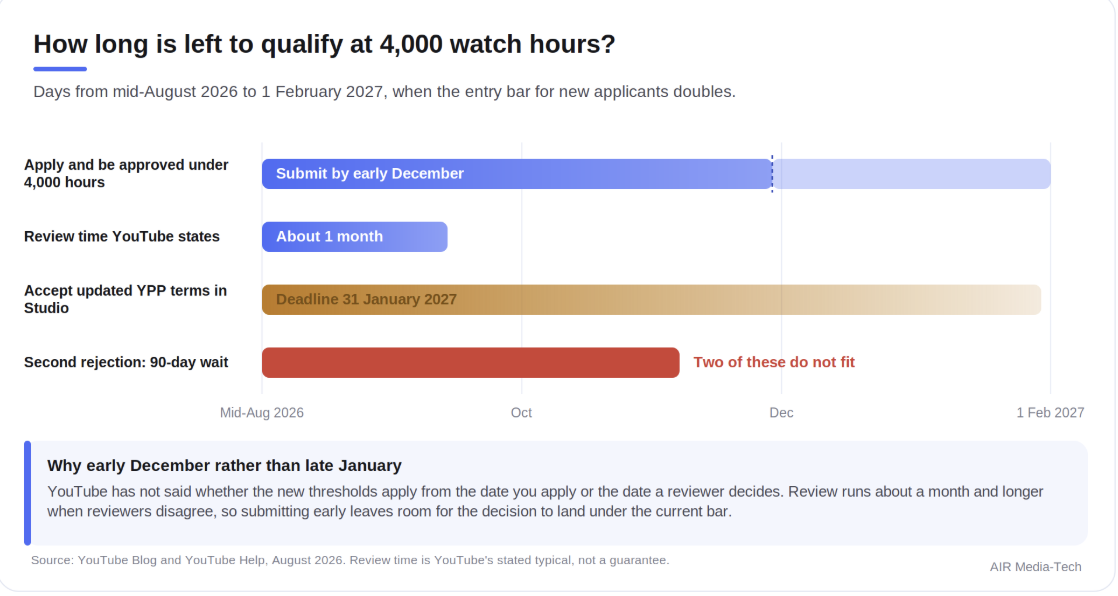
The window between now and the 1 February 2027 threshold change. Source: YouTube Blog and YouTube Help, August 2026.
Short of 4,000 hours before the February deadline?An AIR audit turns the gap into a step-by-step plan: which uploads to rework, what your retention curve says about the length and format worth publishing next, and which lane — long-form or Shorts — is actually reachable before the bar doubles. Built on 16 years of benchmark data across 3,000+ partner channels in 70+ countries.Get your speed-up plan
Do Shorts Views Count Toward the 4,000 Watch Hours?
No – Shorts and long-form are separate lanes with separate thresholds, and neither feeds the other. You qualify through whichever lane you fill first.
Shorts distribution is spiky, so one or two breakout clips can carry most of 10 million views in 90 days. Long-form is slower and steadier: a 20-minute video with decent retention needs a few thousand loyal viewers per upload to reach 4,000 hours in a year. What never works is splitting effort across both and expecting the counts to pool — they won’t, and the split delays each lane.
Two caveats before you commit to Shorts.
- Only public Shorts views from the last 90 days count, so a viral January stops counting by May.
- Shorts earn from a dedicated pool that pays less per view than long-form ads — our data from 274 channels puts numbers on that gap in the Shorts RPM breakdown.
Not all watch time on those formats counts, though — see what YouTube includes and excludes below.
Qualified Watch Hours and Short Views: What Counts and What Doesn’t
Qualified means public: long-form watch time on public uploads, and Shorts plays in the Shorts feed. Everything else is where creators lose hours without noticing.
|
Counts toward watch hours or Shorts views |
Does not count toward watch hours or Shorts views |
|---|---|
|
Public long-form uploads |
Private and unlisted videos |
|
Live streams converted to public VOD |
Deleted videos |
|
Public Shorts in the Shorts feed |
Watch time from ad campaigns |
|
External embeds of public videos |
Live streams never archived |
|
Image posts in the Shorts feed |
Source: What counts as qualified watch hours and Shorts views, YouTube Blog.
Three takeaways:
- Privating an old video deletes its hours. Set an early upload to private or unlisted and its hours leave your total that day. The video you are embarrassed by may be carrying 400 of your 4,000 hours. Hide it after approval, not before.
- Deleting is permanent. A re-upload starts at zero, and the original’s hours are gone for good.
- Unarchived streams never counted. A public stream converted to VOD counts in full. End one without saving it and the hours never existed.
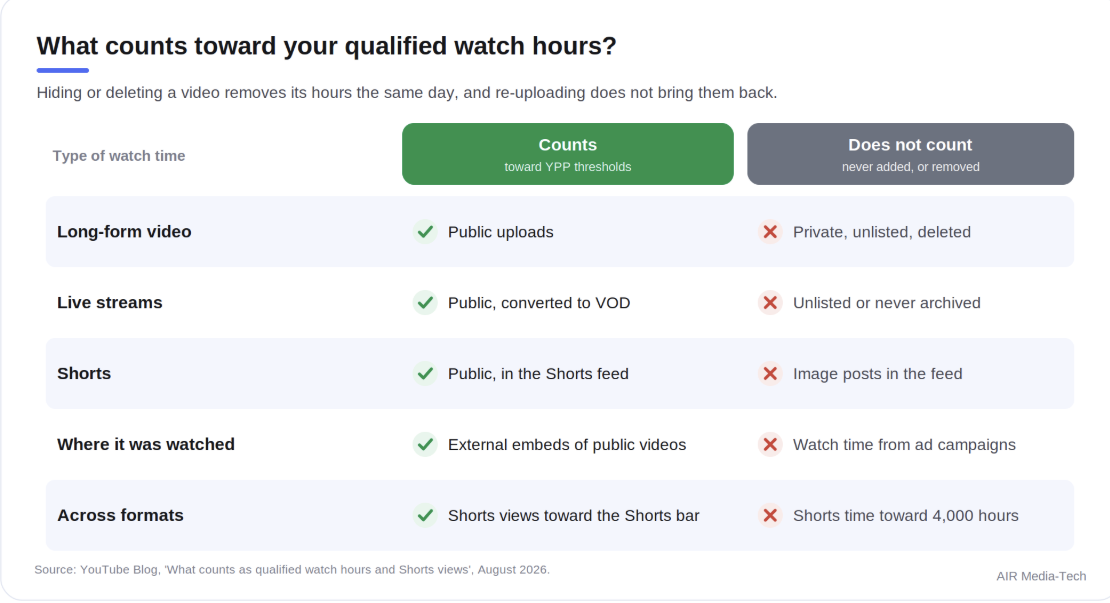
What YouTube counts toward qualified watch hours and Shorts views. Source: YouTube Blog, August 2026.
Shorts Views vs Engaged Views
Since 31 March 2025, a Short registers a view on every play or replay, with no minimum watch time. Monetization stayed on the stricter metric – renamed engaged views and moved into Analytics Advanced Mode. YouTube has not published the exact bar a play needs to clear to count as engaged — only that it is stricter than a raw view.
YouTube extended the same counting to long-form and live streams on 24 August 2026, and confirmed that Partner Program eligibility still runs on qualified views.
A channel showing 12 million Shorts views on its dashboard can sit under the 10-million line where it counts. Check engaged views before planning a quarter around Shorts.
Engaged views run below the headline Shorts number, and hiding an old upload removes its watch hours from your total the same day – so the figures in your dashboard are rarely the ones your application is judged on. An AIR audit reconciles both into your real distance from the threshold.
Tracking Your YPP Progress in YouTube Studio
Open Studio → Earn tab. It shows live progress toward both tiers: subscribers, qualified watch hours over the trailing 12 months, and qualified Shorts views over the trailing 90 days, each with its own bar.
What to do:
Select Get notified in the Earn area for an email the moment you cross the line — the rolling 90-day Shorts window can carry a channel over the threshold and back out within a quarter. Then cross-check the Shorts figure against engaged views in Advanced Mode, since the dashboard number and the counted number are not the same thing.
How Long Does It Take to Reach 4,000 Watch Hours?
4,000 hours is 240,000 minutes of public watch time in a rolling 12-month window. How fast you get there depends on video length, retention, and view count, so the target translates differently for every format:
- 10-minute video at 50% retention: about 48,000 views a year, or 4,000 a month
- 20-minute video at 40% retention: about 30,000 views a year, or 2,500 a month
- 45-minute podcast at 25% retention: about 22,000 views a year
All of it doubles from February 2027. Average view duration moves the total faster than upload frequency does, and our analysis of 282 channels found that posting more often can actually pull RPM down.
Our guide to getting 4,000 watch hours has the views-per-day math and the fixes that add hours fastest.
The YPP Review: What YouTube Checks Before Approval
Meeting the thresholds puts you in the review queue, not in YPP. Review takes about a month, longer when reviewers disagree about a channel. Here’s how long the YPP review takes in practice, and what not to change while you wait.
Reviewers look at five things:
- your channel’s main theme
- your most-viewed videos, your newest uploads
- your watch-time leaders
- your metadata.
In other words, the exact content responsible for your qualifying numbers gets the closest look.
AIR Media-Tech’s Safety team sees reviewers open the banner and the channel description too. What to clean up before you submit is in our guide on how to get monetized on YouTube.
Originality decides most of it. Since July 2025, the old repetitious-content rules go by the name inauthentic content, covering mass-produced videos, template output, and reuploads changed only cosmetically. In July 2026, YouTube named three categories it targets hardest:
- generic or repetitive AI CGI and template output;
- content built to distress or manipulate;
- AI personas posing as authorities on finance, legal or medical topics.
Reaction, commentary and clip formats stay monetizable – the test is whether a reviewer can identify what you added. If they can’t tell what you contributed, the numbers don’t save the application.
Meeting these checks does not guarantee approval — here is what still sinks an application.
Why Do YouTube Partner Program Applications Get Rejected?
Rarely for the numbers, since those are checked automatically before a reviewer ever sees the channel. Seven causes cover most rejections:
- Inauthentic content. Mass-produced videos, minimal-edit compilations, slideshow farms, AI narration over stock footage. The most common cause in 2026.
- Reused content with nothing added. Other people’s material, or your own recycled without new framing.
- An active Community Guidelines strike. Blocks the application until it expires.
- Misleading metadata. Thumbnails and titles promising what the video does not contain.
- Non-qualifying numbers. Hours from hidden or deleted videos, and purchased views — a policy violation in themselves.
- AdSense problems. A suspended, duplicate, or unlinked account stalls an otherwise clean channel, so fix a stuck AdSense Step 2 before you worry about the review itself.
- Ineligible country or missing 2-Step Verification. Rare, and the fastest to fix.
The rejection email names the policy, never the videos. You’re left to find the offenders across a catalog that may run to hundreds of uploads. And switching niche resets nothing. Review assesses the channel as a whole, so forty old low-effort uploads can sink ten good new ones.
Rejected and not sure what caused it?
AIR Media-Tech is an official YouTube partner. Our Safety team goes through the channel with you, helps find the videos behind the rejection, and guides you through the appeal or the next application.
Appeal, Reapply, or Fix: Your Options After a YPP Rejection
Each route runs on its own clock:
|
Route |
Window |
Decision time |
When it fits |
|---|---|---|---|
|
Appeal |
Within 21 days |
About 14 days |
You believe the decision was wrong |
|
Reapply after a first rejection |
After 30 days |
About 1 month |
The rejection was fair and fixable |
|
Reapply after any later rejection |
After 90 days |
About 1 month |
Second or subsequent rejection |
Source: My channel was rejected for monetization, YouTube Help.
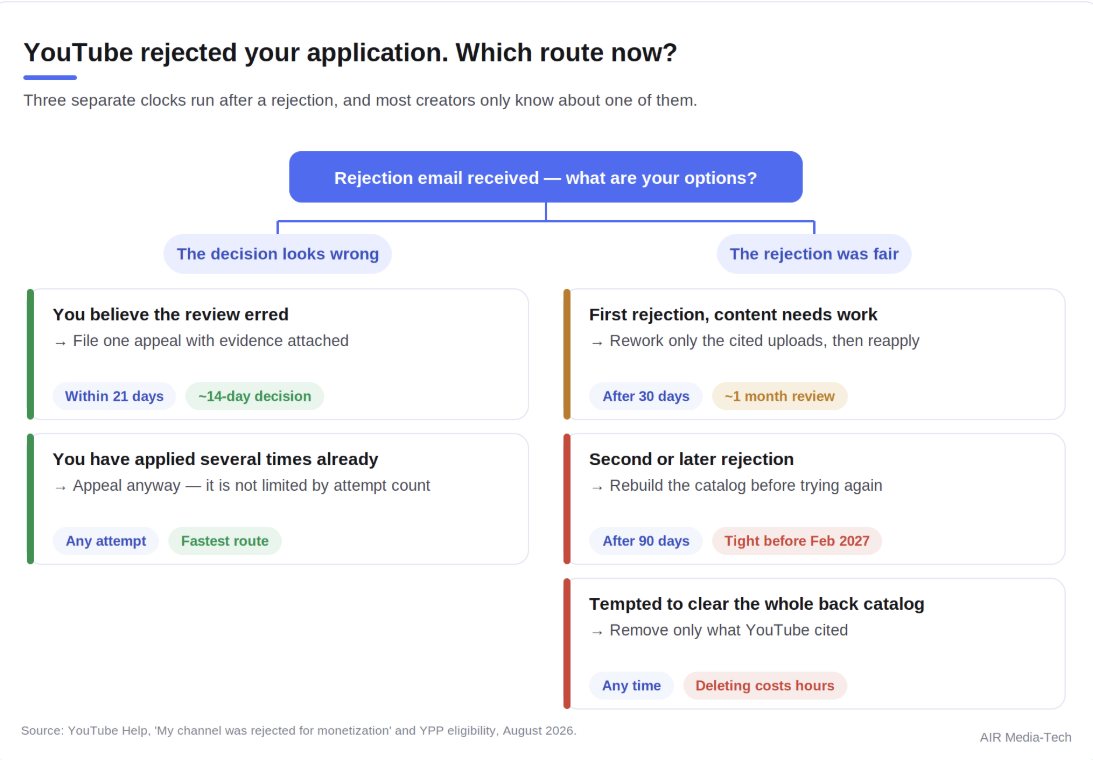
Appeal within 21 days, reapply after 30 days, or reapply after 90 days. Source: YouTube Help, August 2026.
Appeal is the underused route. It’s faster than reapplying, and it stays available no matter how many times you have applied. The 90-day clock is the one to fear: two rejections put you on it, and two of those do not fit before February.
If YouTube later suspends a monetized channel, the clock changes to 21 days to appeal and 90 days to reapply, as our guide to channel-level demonetization explains.
What to do if you’re fixing rather than appealing?
Rework only the content YouTube cited, since deleting costs you the hours you need. Match titles and thumbnails to what the videos actually deliver. Then publish uploads that show what you add, because recent videos are what the next reviewer sees first.
Making It Into YPP Before 1 February 2027
There is one application season left under the current thresholds. AIR works with creators on both sides of that date – getting into YPP before the bar doubles, and earning more once they are in.
- Prepare.
A Full Channel Audit reads your Studio data, puts it next to up to 3 channels you choose, and shows where your channel has the most room to grow, with a 90-day plan of what to do first. A rejection costs 30 days, or 90 if it is not your first, so the sooner you reach the bar, the more room you have for a second try.
- Apply.
Our step-by-step guide to applying for YPP covers each screen of the application, from the base terms to the AdSense step, and what to clean up before you submit.
- Earn more.
Two channels with the same subscriber count can earn several times differently depending on niche, ad formats and language coverage. Our RPM data from 300 channels maps where that gap comes from – part of 16 years and 3,000+ creator channels of benchmark data.
Request an AIR channel audit →
Related Reading, By Stage
- Understanding the change: 2027 update breakdown
- Choosing a lane: Shorts RPM vs long-form, does posting more hurt RPM
- After you’re in: what YouTube pays in the first six months, RPM data from 300 channels