If you’ve reached the bar for YouTube monetization and Step 2, the AdSense step, still says In Progress, the hold-up is usually in AdSense for YouTube, not on your channel. And while Step 2 waits, YouTube hasn’t started reviewing your channel at all.
AIR Media-Tech’s Safety team sorts out AdSense and policy problems for the channels we work with, and they keep running into the same five causes. YouTube Help adds the official clock. A new AdSense account usually takes several days to approve and sometimes 2–3 weeks, and linking one you already have takes minutes.
So we’ve put together answers to the questions creators ask most between Step 2, the PIN letter, and the first payment. One date in the payment calendar can push that payment back a month. A $112 balance in YouTube Studio can turn into $97 in AdSense. ChatGPT, Claude, and Gemini gave us three different answers on which country to pick. And one creator we work with went months without a verification code until Google made an exception. We’ll get to all of it.
Key takeaways
- Step 2 holds up the review. Get reviewed switches to In Progress only after your AdSense for YouTube account is linked.
- A new AdSense account takes days, an existing one minutes. YouTube Help says a new account usually takes several days to approve and sometimes 2–3 weeks. AIR Media-Tech's Safety team usually sees about a week.
- Rejections usually come down to five causes. AIR Media-Tech's Safety team names a duplicate account, a country that doesn't match your documents, a name or address that doesn't hold up, a link to a blocked account, and bought traffic.
- The PIN goes out at $10 and takes 3–4 weeks. You have 4 months to enter it, and three wrong entries demonetize the channel.
- The 20th decides the month. Your balance has to reach $100, and your payment setup has to be done by the 20th. At the median RPM of $2.30 across 300 channels AIR Media-Tech works with (May 2025 to May 2026), the first $100 takes about 43,500 views.
YouTube AdSense Step 2 In Progress or Error: Minutes for an Old Account, Weeks for a New One
"Youtube monetization Step 2 stuck for 6 days. Anyone else?" asked one creator on r/youtube in June 2026. Six days is still normal for a new account. What matters more is what the wait holds up. Step 2 is the AdSense for YouTube card in the Earn tab, and Get reviewed switches to In Progress only after you finish it, so while Step 2 is stuck, your channel isn't in the review queue yet. Our guide to applying for monetization walks through each screen of the Earn tab. Here's what each status on the card usually means and what to do about it.
| What Step 2 shows | What it usually means | What to do |
|---|---|---|
| In Progress after you created a new account | AdSense is still reviewing it. YouTube Help says this usually takes several days and sometimes 2–3 weeks. | Look for a message from [email protected], spam included, and sign in to AdSense to see if it asks for an ID or missing details. |
| In Progress after you linked an existing account | Linking takes a few minutes, and YouTube Studio can take up to 24 hours to show it. | If nothing changes after a day, check that you linked the Google account that owns your AdSense, which can differ from your YouTube login. |
| Error or Disapproved, with an email saying you already have an AdSense account | You already have an account under the same payee name, so the new one counts as a duplicate. | Link the old account with Change Association, or close the old one and keep the new one. |
| AdSense asks for a website URL | The account was started on the AdSense homepage, not in YouTube Studio, and YouTube disapproves those. | Start the account from the Earn tab. |
| "Oops, something went wrong" | YouTube Studio doesn't recognize the email you signed in with. | Pass "Verify it's you" with your YouTube email. For a Brand Account, use the email that created the channel. |
Two moves that make Step 2 take longer
Switching accounts back and forth. YouTube lets you change the linked AdSense account once every 32 days, so every switch you try locks the next one for a month.
Opening a new account on top of the old one. Several Step 2 tutorials on YouTube say to close everything and start over, but a second account under the same payee name is a duplicate, and YouTube disapproves it. If you'd rather keep the new account, close the old one first. Google lets you close an AdSense account once your personal information is verified and any tax notices are resolved, and the same page explains how to reactivate it later.
When to contact Creator Support
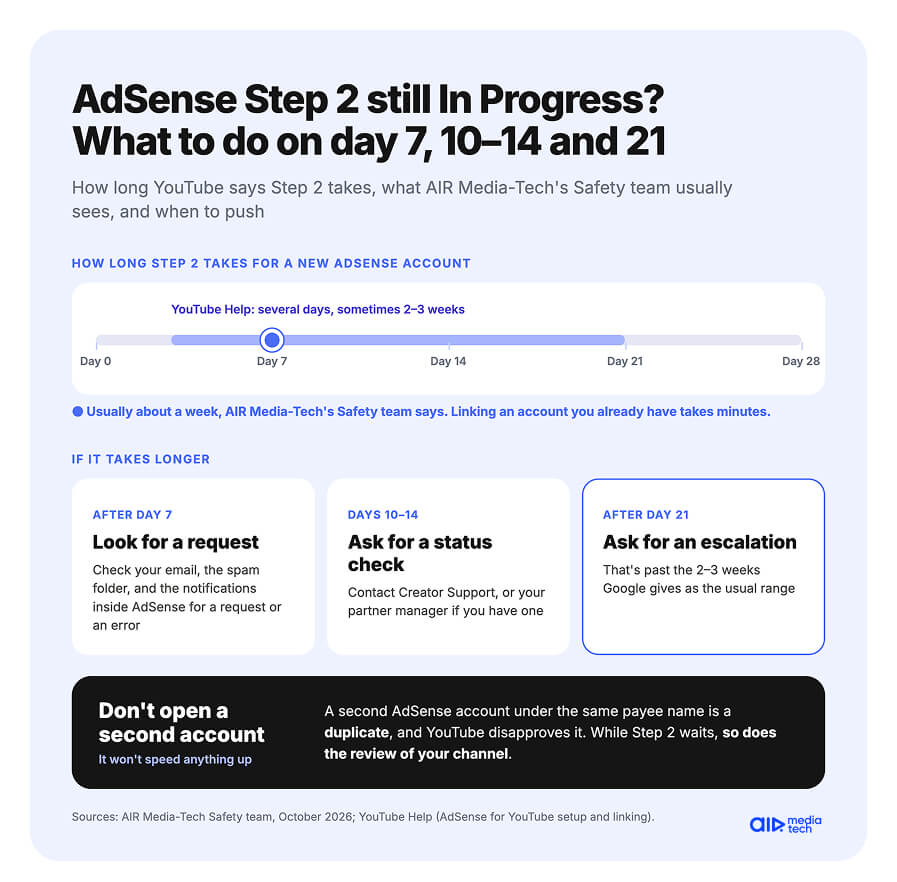
AIR Media-Tech's Safety team says Step 2 usually clears in about a week, sometimes in a couple of days, and sometimes later. If yours takes longer, here's how the team would handle it.
- After 7 days, check your email, the spam folder, and the notifications inside AdSense for a request or an error.
- On days 10–14, ask Creator Support or your partner manager, if you have one, to check the status.
- After 21 days, ask for an escalation, since that's past the 2–3 weeks Google gives as the usual range.
When you write, say how many days Step 2 has shown In Progress and whether you created a new AdSense account or linked an old one.
Step 2 still stuck after weeks of tries?
AIR Media-Tech's Troubleshooting team looks into AdSense and monetization problems, takes the case to YouTube through partner channels when it needs that, and gives you a plan for what to do next.
Get help with my AdSense →Why AdSense Rejects YouTube Step 2: A Second Account, a Wrong Country, an Old Ban
When AIR Media-Tech's Safety team trained our account managers, scouts and support staff in October 2026, AdSense got a section of its own, with the five reasons an application gets turned down. Here they are, with what to do about each.
Why AdSense turns down Step 2
01
A second AdSense account on the same details
Google allows one account per payee name, and an old account from a blog or an earlier channel counts. An email with the subject "You already have an existing AdSense account or AdSense for YouTube account" tells you which one it is. Link that old account with Change Association, or close it and keep the new one.
02
A country that doesn't match your documents
AdSense doesn't let you change the country later, so it's worth getting it right the first time. The next section covers creators who live abroad.
03
A name or address that doesn't hold up
The payee name has to match your ID, and the address has to take ordinary mail, since your PIN comes by post. If the name is wrong, fix it in your payments profile and start identity verification again from the beginning.
04
A link to an AdSense account Google has blocked
A new account for the same person runs into the duplicate rule, so it doesn't get around the block.
05
Bought or bot traffic
AIR Media-Tech's Safety team also sees rejections on channels that bought views or got them from bots.
Live in Dubai, passport from India: which country goes into AdSense
We asked ChatGPT, Claude and Gemini this in October 2026 and got three different answers. YouTube and AdSense Help set three rules that settle it.
- The country can't be changed. If you move, you close the account and open a new one.
- Your bank has to be in the same country as your payments address, or the SWIFT code won't be accepted.
- Online ID verification only accepts an ID issued in the country of your payments profile. With an ID from another country, you go through the Identity verification troubleshooter instead.
Google offers that troubleshooter, but in practice AIR Media-Tech's Safety team doesn't see a way around the country rule.
“
Your documents have to match the country in AdSense. There are no other options.
Anastasiia Kulyk, Safety Team Lead, AIR Media-Tech
So pick the country your ID is from and set up a bank account and a mailing address there. For a creator in Dubai with an Indian passport and an Indian bank, that means India, with an address in India where someone can pick up the PIN letter.
If you already picked the wrong country, you can't simply edit it. The official route is to close the old AdSense account and open a new one with the right country. Before you do, the team advises finding out the status of the old account and the exact reason it was turned down.
When nothing works: a verification code that never came
BLOODLINES, a channel AIR Media-Tech works with, spent several months unable to verify a Georgian AdSense account. The verification code never came, even after eight Georgian phone numbers. AIR's security team escalated the case through YouTube's partner channels, and Google confirmed the account by exception.
BLOODLINES at a glance
The problem
The AdSense verification code never came for several months
What the creator tried
Different browsers and devices, incognito mode, eight Georgian phone numbers
Support's last idea
A Georgian landline, while the creator lived outside Georgia
What AIR did
Collected screenshots of every failed attempt and escalated the case through YouTube's partner channels
Result
Google confirmed the account by exception
If you're stuck the same way, screenshot every failed attempt and send the lot to support in one message. A documented case gets further than the same request sent again.
YouTube AdSense PIN: When the Letter Comes and What to Do If It Doesn't
Of everything between Step 2 and your first payment, the PIN is the one step that still travels by paper mail, with no tracking number. Google sends the 6-digit code to your payment address to check that it's real, and YouTube Help sets out the steps and deadlines.
| Stage | What happens | When |
|---|---|---|
| Your balance reaches the verification threshold | Google asks you to verify your identity first. In some countries, passing the online check means you skip the PIN. | At $10 on a new AdSense for YouTube account |
| Identity verified | The PIN goes out by standard international mail. | Usually arrives in 3–4 weeks |
| No letter after 3 weeks | Request a replacement under Payments → Verification check. A new PIN also resets the limit of 3 tries. | Any time after 3 weeks |
| No letter after the 4th replacement | Go to the PIN troubleshooter. | 3 weeks after the 4th request |
| The letter arrives | Enter the PIN under Payments → Verification check. Three wrong entries demonetize the channel. | Within 4 months of the PIN being generated |
Miss the 4-month deadline and YouTube pauses monetization on the channel, memberships and Super Chat included, until you verify the address. If the letter still hasn't come, YouTube Help gives five possible reasons. Your earnings haven't reached the threshold, identity verification isn't finished, the address has been linked to fraud, it can't receive standard mail, or your last request was less than 3 weeks ago.
Any earnings count toward the $10, so fan funding can start the clock before ads do. On the 500-subscriber tier, available in some countries, Super Thanks and memberships pay into the same AdSense for YouTube account, and the PIN can already be on its way by the time your channel qualifies for ads.
Your First YouTube Payment: Why the 20th Decides Whether It Comes This Month
A channel approved in October can earn $130 by the end of November and still wait until late December for its first payment. The date that decides it is the 20th. YouTube pays once a month through AdSense for YouTube, on this calendar.
7th–12th
Last month's earnings are finalized and added to your AdSense balance
By the 20th
The balance reaches $100 for US dollar accounts, and the PIN, payment method and tax info are done
21st–26th
The payment goes out
Anything you finish after the 20th, such as entering the PIN or adding a bank account, counts from the next month's cycle, and the balance rolls over until then. After the 21st, a bank transfer can take up to 7 business days to arrive, a wire up to 15.
Here's how that October channel plays out. It earns $60 in October and $70 in November. October's $60 lands in AdSense on November 7–12, which is under $100, so it rolls over. November's earnings bring the balance to $130 on December 7–12, and the payment goes out on December 21–26, as long as the PIN, payment method and tax info are in place by December 20. If the PIN letter comes on December 22, the money waits until January.
How fast you reach $100 depends on your views. At the median RPM of $2.30 across 300 channels AIR Media-Tech works with (May 2025 to May 2026), the first $100 takes about 43,500 views. For channels under 10,000 subscribers, our month-by-month look at the first six months of earnings shows that 55% reached $100 within two months.
Why AdSense shows less than YouTube Studio did
YouTube Studio shows estimated revenue, and YouTube adjusts it twice, once a week after the views and again when the month is finalized. The final figure leaves out invalid traffic, revenue from Content ID claims and disputes, some ad campaign types, and tax on earnings from US viewers. So $112 in Studio can become $97 in AdSense. The $97 isn't lost. It stays in your balance and goes out once the balance passes $100.
Two settings to finish before your first payment
Choose how you want to be paid once your balance reaches $10. The options depend on the country of your payments address, and our comparison of YouTube payment methods sets out the fees and speed of each.
Submit your tax info as soon as you join. Without it, Google may deduct up to 24% of your total earnings worldwide.
Our W-8BEN guide for creators outside the US shows every screen of the form and which treaty rate to claim.
Monetized, but your first $100 is still months away?
At the median RPM, the first $100 takes about 43,500 views. Dr Roto, a fantasy sports channel, had its first payout about three months after an AIR audit. The Full Channel Audit reads your Studio data, shows where your channel has the most room to grow, and gives you a plan to get there sooner.
- Your Studio numbers next to up to 3 channels you choose
- Where your channel has the most room to grow
- A 90-day plan of 5–8 actions ranked by impact
- Read-only Studio access, no revenue share, no network contract