
Yes, through fan funding, not ads. With 500 subscribers, 3 public uploads in 90 days, and 3,000 watch hours in 12 months or 3 million Shorts views in 90 days, a channel can join the YouTube Partner Program for memberships, Super Chat, Super Thanks, and Shopping. Ad revenue needs 1,000 subscribers plus 4,000 watch hours or 10 million Shorts views. From February 1, 2027, new channels will need 8,000 hours or 20 million Shorts views.

22 Steps to Grow from $500 to $10,000 on YouTube.pdf
Getting into the YouTube Partner Program doesn't turn your earnings on by itself. In the Earn tab of YouTube Studio, every way to earn sits in its own module that waits for you to accept it, and ads on the videos you uploaded before approval stay off until you switch them on. It adds up. Between May 2025 and May 2026, the median channel among 300 channels AIR Media-Tech works with showed ads on only 53% of its views, and ad settings left half-done were one of the reasons.
There’s also a date to put in your calendar. YouTube asks every partner to accept its updated terms in YouTube Studio by January 31, 2027. If you miss it, the features you didn’t accept stop paying on February 1, though your channel stays in the program.
Some of the rest can’t wait either. YouTube counts Shorts ad revenue only from the day you accept the Shorts module, and a view that played without an ad doesn’t pay later. Other things, like memberships, work better a few weeks in.
Key takeaways
- Getting monetized doesn't switch your earnings on by itself. Accept the Watch Page, Shorts, and Commerce Product modules in the Earn tab of YouTube Studio, then turn on ads for the videos you uploaded before approval.
- Accept the Shorts module on day one. YouTube counts Shorts ad revenue only from the date you accept it.
- Check how many of your views show an ad. In AIR Media-Tech's data from 300 channels, May 2025 to May 2026, the median channel showed ads on 53% of its views.
- Place mid-rolls by your retention graph, not the middle of the video. Mid-rolls need videos of 8 minutes or longer, and in AIR Media-Tech's data from 21,755 videos published in 2025, the median 5–15 minute video was watched for 30% of its length.
- Accept YouTube's updated terms by January 31, 2027. From February 1, a channel stays active with 1,000 watch hours in 365 days, 1 million Shorts views in 90 days, or 2 long videos or 5 Shorts every 90 days.
In this guide:
- what to accept in the Earn tab first
- ads on videos you already uploaded
- where to put mid-rolls
- Super Thanks, memberships and Shopping
- your first numbers in week four
- what keeps monetization on after February 1, 2027
What to do first after getting monetized on YouTube: accept your modules in the Earn tab
A creator on r/youtubegaming summed up the first day in YPP in one line. “I reached 1k and got monetized…but now what???”
The first answer sits in the Earn tab of YouTube Studio. YouTube splits the program into contract modules and calls them optional, so you choose the ones that fit your channel and accept each with Get started. Most new partners see three.
- Watch Page Monetization Module. Ads and YouTube Premium revenue on long videos and live streams, including when they play embedded on other sites.
- Shorts Monetization Module. Your share of the ads shown between Shorts in the Shorts Feed.
- Commerce Product Module. Fan funding, which covers memberships, Super Chat, Super Stickers, and Super Thanks.
Accept all three on day one, even if you rarely post Shorts. YouTube starts counting your Shorts ad revenue on the date you accept the Shorts module, so every day you wait is a day of Shorts views that pay nothing. The Commerce Product Module works differently. Accepting it doesn’t switch on memberships or Super Thanks. It only lets you turn them on later, when you’re ready.
January 31, 2027: the one deadline every partner has
The terms you accept now aren’t the last ones. YouTube is updating the program on February 1, 2027, and asks every partner to accept the updated terms by January 31. The notice appears on your Studio dashboard or in the Earn tab. Select Review for each updated module, then Submit. If you were approved recently and don't see a notice, open the Earn tab anyway and check that every module there shows as accepted.
Missing the date doesn’t take you out of the program. YouTube Help says you’d stop earning from the features whose terms you didn’t accept, starting February 1, and get them back as soon as you accept. If your channel is in a network as an affiliate, you accept the terms yourself. For owned-and-operated channels, the network does it. AIR Media-Tech’s partner support team confirms it works this way for the channels we work with.
The doubled entry bar of 8,000 watch hours from February 1 doesn’t apply to you, because you’re already in. Here’s what changes on February 1 for everyone else.
Turn on ads for the videos you uploaded before approval
Guides often say that switching on ads across your back catalog makes its past views start paying. They don’t. A view earns only when an ad plays in it, so the views your videos got before approval stay unpaid. What switching ads on does is let the next views of those videos earn.
You can turn on ads for videos you’ve already uploaded one at a time or in bulk. For a whole back catalog, bulk is faster.
- In YouTube Studio, open Content.
- Tick the box next to each video you want to monetize.
- Choose Edit, then Monetization, and set it to On.
- The same Edit menu has Ad settings, where you can add mid-roll ads to all the selected videos at once. Leave that until you’ve read the section on mid-rolls.
- Select Update videos and confirm.
Ads won’t show at the same minute. YouTube Help says each video first goes through a standard review, automated or by a person, against the advertiser-friendly content guidelines.
Turning ads on also means you confirm you hold the rights to every image and sound in the video. A video built on someone else’s clips or music is one to leave off the list, because YouTube keeps reviewing channels after they join the program, not only before.
Rate each video honestly in the self-certification questions
When you turn on ads, YouTube Studio asks you to rate the video against its advertiser-friendly content guidelines, topic by topic, from profanity to violence. If a video still ends up with limited ads, Studio marks it with a yellow icon. Here’s what a yellow icon means and how to get full ads back.
One more setting sits outside the Content page. In Settings, under Channel and then Advanced settings, keep Disable interest-based ads unchecked. YouTube warns that checking it may significantly reduce your channel’s revenue.
Not sure what to fix first on your channel?
AIR's Free Channel Check reads your YouTube Studio data and, in up to 5 minutes, shows you the first things to fix on your channel.
Check my channel for free →Mid-roll ads start at 8 minutes, and the middle isn't always the best spot
In AIR Media-Tech’s data from 21,755 long-form videos on 302 channels, published in 2025, the median 5–15 minute video was watched for 30% of its length. For a 9-minute video, that's about 2 minutes 42 seconds per view, so a mid-roll at 4:30 sits 1:48 past the typical view and plays only for the viewers who stay that long.
A 9-minute video: the typical view vs. the usual mid-roll spot
Typical view, at the median 30% watched
2:42
minutes per view
Where most advice puts the mid-roll
4:30
into the video
The mid-roll sits 1:48 past the typical view, so it reaches only the viewers who keep watching.
Source: AIR Media-Tech, YouTube watch time vs AVD vs APV, data from 21,755 long-form videos on 302 channels, published in 2025.
The rules come from YouTube Help. Mid-rolls work only on monetized videos that are 8 minutes or longer, and an ad slot doesn’t guarantee an ad. YouTube’s systems decide which slots get one. Slots at natural breaks, like a pause in the audio or a change of scene, serve ads more often, because viewers tend to stay at those points. Slots placed mid-sentence or mid-action serve less often.
You can place mid-rolls in three ways.
- Automatic. YouTube looks for natural breaks itself. This is the default when you switch mid-rolls on.
- Manual. You set the timestamps. Within about an hour, Studio marks in red the slots that are unlikely to get an ad, so you can move them.
- Both. Automatic slots are added on top of your manual ones unless you uncheck Automatic ad slots.
We’d start from the retention graph, not the clock. Open the video’s audience retention in YouTube Studio, find the last natural break before the line drops steeply, and put the first slot there. To have mid-rolls on every future upload, go to Settings, then Upload defaults, then Monetization, and check Show mid-roll ads during my videos. To turn them off for one video, uncheck the same box on that video's Monetization page.
Longer videos do carry more ads. Across 300 channels in AIR Media-Tech’s RPM study, a view that showed ads carried about 1.55 ads at the median, and long videos with room for several mid-rolls carried more. That’s still no reason to stretch a 7-minute video to 8. The longer the content can’t hold, the lower the share people watch, and a mid-roll placed in them plays to viewers who have already left.
Super Thanks this week, Memberships when your viewers ask for more
Super Thanks takes a minute to set up and then works on its own. In the Earn tab, open Supers and select Get started. YouTube Help says the Thanks button then appears on all your eligible Shorts and long videos, the ones already posted and the ones to come. A viewer buys a one-time animation and a highlighted comment, and you get 70% of the revenue after taxes and fees. Here’s how Super Thanks, Super Chat, and Super Stickers differ.
Super Chat and Super Stickers sit in the same tab, but they only work in live streams and Premieres. If you don’t go live, there’s no rush.
Memberships ask more of you. Viewers pay every month, so they need a reason every month, like badges, custom emoji, or members-only posts. Before you set them up, read how much channels earn from memberships and decide what you can keep up.
Shopping depends on what you have to sell. Tagging your own merch opens once your channel meets the subscriber threshold. The Shopping affiliate program, where you earn a commission on other brands’ products, works by invitation in 18 countries, including the US, UK, India, Brazil, and Germany. It isn’t open to music channels or channels set as made for kids.
Here’s when we’d turn each one on.
|
Feature |
What YouTube requires |
When we’d turn it on |
|
Super Thanks |
Commerce Product Module, 18+, an eligible country |
Week 1 |
|
Super Chat and Super Stickers |
Commerce Product Module, 18+, an eligible country |
When you start going live |
|
Channel memberships |
500 subscribers, 3 public uploads in 90 days, 3,000 watch hours or 3M Shorts views |
When viewers ask for more of you |
|
Shopping, your own products |
YPP subscriber threshold |
When you have merch to tag |
|
Shopping affiliate |
Invitation, one of 18 countries, not music or made for kids |
When you’re invited, and the products fit |
Sources: YouTube Help — How to earn money on YouTube; YouTube Help — Turn on and manage Super Thanks; YouTube Help — YouTube Shopping affiliate program overview and eligibility. Checked November 2026.
Week four: check how many of your views showed an ad
By week four, you’ll have your first real revenue numbers, and the one most creators skip is how many views showed an ad. In YouTube Studio’s revenue report, Estimated monetized playbacks counts the views in which a viewer saw at least one ad. Divide it by your views for the same period, and you get the share of your views that paid.
Compare that share with the median. Across 300 channels in AIR Media-Tech’s RPM study, the median channel showed ads on 53% of its views between May 2025 and May 2026. The study found four things that pull the share down. They are short watch sessions, viewers leaving before the first mid-roll, ad settings left half-done, and traffic from regions where few advertisers buy.
As for the money itself, a typical small channel earned $88 in its first full month, in YouTube Studio data AIR Media-Tech reviewed for 297 channels with under 10,000 subscribers. Here’s how much YouTube pays after monetization, month by month. The money reaches you through AdSense for YouTube, and the PIN letter has to arrive first. If something there gets stuck, here’s what to do about AdSense Step 2: the PIN and your first payment.
If your views dropped after you got monetized
It’s one of the most common worries in the first month, and YouTube’s answer is no. Its performance FAQ says the search and recommendation system doesn’t know which videos are monetized. AIR Media-Tech’s team sees the same thing on the channels it works with. Most channels get monetized after one video takes off, and views then settle back to the channel’s usual level. In our data on 297 small channels, views fell 54% from month two to month six, and here’s why views drop after monetization and how to find the video that carried your first month.
To see what changed on your channel, compare the four weeks before approval with the four weeks after on the Reach tab in YouTube Analytics.
- Impressions fell. YouTube is showing your videos to fewer people, so look at your topics.
- Impressions held; click-through rate fell. Your titles and thumbnails stopped pulling people in.
- Both held; views fell. Look at retention, and at where your mid-rolls sit.
What keeps your YouTube monetization on after February 1, 2027
Many guides still say YouTube can turn off monetization after six months with no uploads or community posts. That’s today’s rule, and it changes on February 1, 2027.
From February 1, 2027, a channel counts as active in YPP if it has any one of these.
- 1,000 qualified watch hours in the last 365 days
- 1 million qualified Shorts views in the last 90 days
- 2 long-form videos or 5 Shorts uploaded every 90 days
YouTube Help says most partners already meet this. A channel that falls below all three gets an extended 90-day window to reach 1,000 qualified watch hours or 1 million qualified Shorts views. Uploads alone don’t restore active status, and community posts aren’t on the new list.
The rule covers channels already in the program, so it covers you from your first February. YouTube Help describes it as the requirement for creators in YPP, not for new applicants. For a channel in its first months, 2 long videos or 5 Shorts every 90 days is the easiest of the three to plan for.
Shorts earnings get a bar of their own. From February 1, 2027, a channel needs 10 million qualified Shorts views over the last 90 days to earn from the Shorts Creator Pool in a given month. Falling short doesn’t take you out of YPP and doesn’t affect your long-form, fan funding, or Shopping earnings. In AIR Media-Tech's data from 274 channels that post Shorts, Shorts brought in less than 2% of total revenue for most channels. Here’s everything that changes in YPP on February 1.
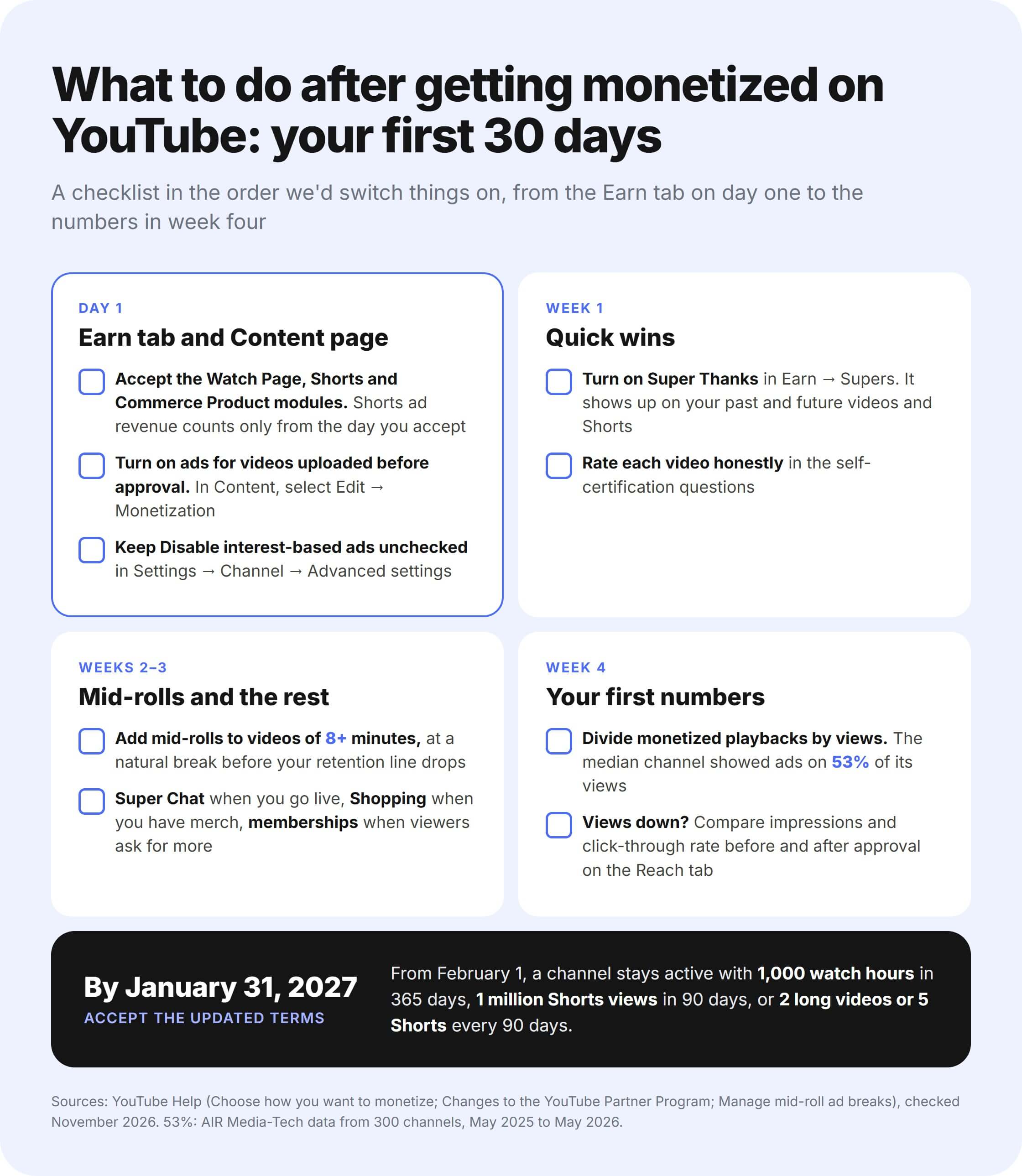
Save the checklist and tick it off as you go through your first month.
Everything's switched on, and the money still isn't growing?
Dr Roto, a fantasy sports channel, earned $0 in four years. After an AIR audit and three months of fixes with the AIR channel manager, it got its first payout. A Full Channel Audit shows where your channel has the most room to earn and gives you a plan to get there.
- Your YouTube Studio data read across all 10 audit blocks, from packaging to revenue
- Your numbers next to up to 3 channels you choose
- Which ways to earn are running, underperforming, or not turned on, and the gap in dollars
- 5–8 actions in 3 waves, ranked by impact