
Chapters work outside the YouTube player too. When your video shows up in Google search, its chapters can appear right under it as Key Moments, links that open the video at each section. Google's AI Overviews often link to a moment inside a YouTube video too. A searcher judges each of those links by its title, so a chapter that names the answer gets the click, and "Part 2" doesn't.
Say the best tip in your 30-minute tutorial sits at minute 19. Most viewers won't get there on their own. Across 21,755 long videos on 302 channels AIR Media-Tech works with, a typical viewer watched about a quarter of a 15–60 minute video, which on a 30-minute upload is under 8 minutes. A chapter is how someone reaches minute 19 anyway. In a tutorial, that's the point, since people skip to the step they came for and stay. In a storytime or a challenge, the same skip drops them at the ending and cuts out the setup it needs. YouTube can also add chapters to new uploads without asking you, so decide video by video before it does.
Key takeaways
- The average view of a long video covers about a quarter of it. On AIR partner channels, a typical 30-minute video is watched for about 7 minutes 48 seconds per view, so anything later is easiest to reach through a chapter.
- Half of YouTube's links in Google AI Overviews point to a moment inside the video. From mid-May to early August 2026, 50% of them carried a timestamp, against 0.6% of ChatGPT's YouTube citations.
- YouTube is the most-cited site in Google's AI Overviews. It held a 29.5% citation share in September 2025, and its AI Overview citations grew 34% in six months.
- No study has shown that chapters cause AI citations. The data shows where AI Overviews link, and nobody has yet compared videos with and without chapters.
- Chapters can cost watch time on videos built toward a payoff. On a storytime or a challenge, they let viewers skip the setup, and YouTube can add automatic chapters to any new upload unless you untick the box.
YouTube Chapters by Video Type
Whether a video needs chapters comes down to why someone opens it. A viewer who came for one specific part wants a quick way there, while a viewer who came for a story needs every part in the order you cut it.
|
Video type |
Chapters |
|---|---|
|
Multi-step tutorials and how-tos |
Add |
|
Explainers and video essays |
Add |
|
Reviews and buying guides |
Add |
|
Podcasts and long interviews |
Add |
|
Storytimes and narrative videos |
Leave off |
|
Challenges and experiments |
Leave off |
|
Countdowns built to a #1 reveal |
Leave off |
|
Short videos that answer one question |
Leave off |
|
Vlogs |
Test both ways |
|
Comedy and sketch videos |
Test both ways |
Where chapters go in, each title should read like a search someone would type, because the chapter list travels well beyond the player.
Where YouTube Chapters Appear in Search Results
The chapters you write live in your video description. Google and YouTube both read that description, so your chapter titles show up in more places than the player.
Key Moments in Google Search
When your video ranks in Google, the timestamps in its description can turn into Key Moments. That's a row of links under the result, and each one opens the video at a chapter. Google prefers the moments you set yourself over the ones it finds on its own, and it uses your chapter titles as their labels.
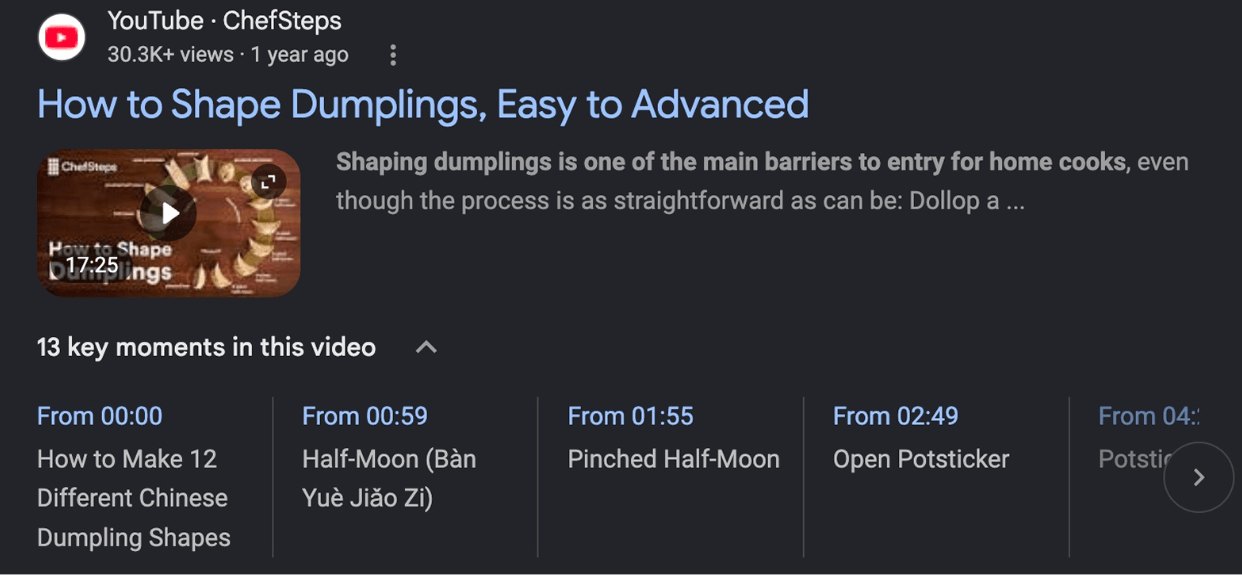
Screenshot: Key Moments under a YouTube result in a Google search for "how to fold dumplings".
Key Moments won't lift a video into the results, though. They only show up on videos that already rank, and Google doesn't promise to show them even then.
For a video on your own website, Clip markup does the same job, and SeekToAction markup lets Google pick the moments itself.
Chapter Labels in YouTube Search
YouTube search compares your title and description with what people type, and your chapter titles are part of that description. YouTube can also show a video's chapters right in the search results, so a viewer can jump straight to the section that matches their search.
YouTube doesn't list chapters among its ranking factors. Think of them as part of your description: they put the words people search for in front of YouTube and in front of the viewer.
Your older videos stopped bringing new viewers?
The AIR audit reads your Studio data, shows which parts of your channel have the most room to grow, and gives you a 90-day plan to act on it.
Check my channel →Timestamped Links in AI Overviews
YouTube is the site Google's AI Overviews cite most. In September 2025, it held a 29.5% share of AI Overview citations, and by early 2026 its citations had grown 34% in six months.
Many of those links point inside the video. Half of YouTube's citations in AI Overviews carry a timestamp, so they open the video at a specific moment rather than at the start. ChatGPT does that for fewer than one YouTube link in a hundred.
50%
of YouTube citations in Google AI Overviews linked to a timestamp, mid-May – early August 2026
0.6%
of YouTube citations in ChatGPT did the same
These numbers show where AI Overviews link. Nobody has yet compared videos with and without chapters, so nothing proves that chapters earn the citation. Google also lists no special requirements for AI Overviews. Clear chapters are still the most direct way to mark the moments worth linking to, which makes them a sensible bet.
The bet has a price. A chapter that sends a searcher to one moment lets every other viewer skip to it too.
When YouTube Chapters Help and When They Hurt Retention
Most views of a long video end well before the video does. On AIR partner channels, the average view of a typical 15–60 minute video covers about a quarter of it. Past the hour mark, it covers about a sixth: roughly 15 minutes of a 90-minute podcast.
That cuts both ways. For a searcher, the answer may sit at minute 19, well past where the average view stops. A chapter is the quickest way there. For a story, the minutes a viewer skips are the ones the ending depends on.
YouTube has said that viewers watch more of a video, on average, when it has chapters, but it didn't break that finding down by format. In one AIR audit, a channel with 16–23% APV on its 10+ minute videos added chapters, short recaps and visual breaks to three videos, and APV rose to 38%. Those changes went in together, so chapters alone don't get the credit.
The table sorts formats by why someone opens them.
|
The video |
Chapters |
Why |
|---|---|---|
|
A 25-minute Photoshop tutorial on eight techniques |
Add, one per technique |
Searchers come for one technique, and the later ones sit past the point the average view reaches. |
|
A 90-minute podcast interview |
Add, one per topic |
The average view covers about 15 minutes, so a listener after one topic needs a direct way in. |
|
A phone review with the verdict at the end |
Add, verdict included |
A chapter shows viewers the verdict is in your video before they return to the results. |
|
A 12-minute storytime |
Leave off, untick automatic chapters |
The setup makes the ending land, and labels tend to give the twist away. |
|
A 100-day survival challenge |
Leave off |
A chapter called "Day 100" is a shortcut to the reason anyone watches. |
|
A top-10 countdown |
Leave off |
Viewers skip straight to number one, and named chapters reveal the ranking early. |
|
A resin-art tutorial ending on the demolding reveal |
Add for the steps, leave the reveal unlabeled |
Crafting viewers stay to see the finished piece, and a "Final reveal" chapter lets them skip every step. |
|
A travel vlog through four Lisbon neighborhoods |
Test both ways |
Neighborhood names get searched, while the day's storyline doesn't. |
Sources: APV benchmarks from AIR Media-Tech data on 21,755 long-form videos across 302 channels, 2025; crafting viewing pattern from AIR data on 31,852 long-form videos across 301 channels, 2025.
Chapter Skips on the Retention Graph
You can see chapter skips on your audience retention graph. When viewers jump ahead, the line dips at the part they skip and spikes where they land. A dip that ends in a spike at a chapter start means viewers skipped that stretch but stayed with the video.
On a tutorial, that's the chapter list doing its job. On a story, it shows you the setup viewers chose to miss. Fix that in the edit: AIR's guide to retention editing covers the cutting patterns that keep viewers past minute 8.
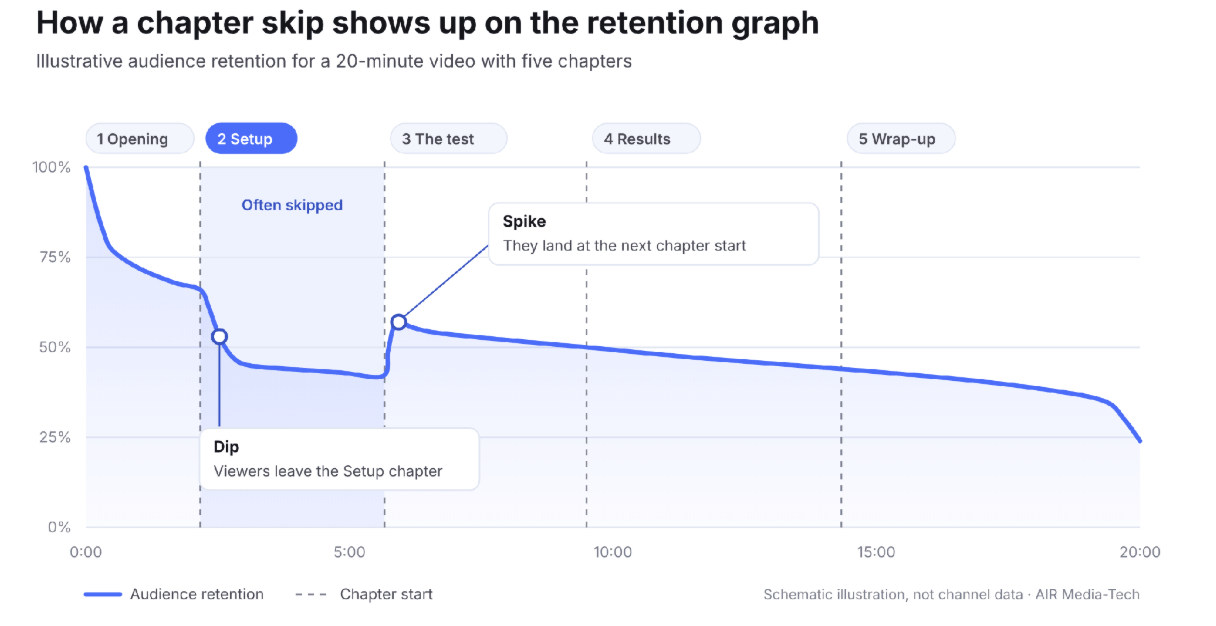
Illustration: a chapter skip on the audience retention graph. A dip that ends in a spike at the next chapter start marks viewers who jumped ahead and kept watching.
Try this
Open the retention graph of your last chaptered video and write your chapter start times beside it. Where a dip ends in a spike at a chapter start, note which section viewers skipped. If it's setup the payoff depends on, merge that chapter into the next one, or untick automatic chapters on the video.
Where chapters stay on, the words in each title decide how much search they bring.
Writing YouTube Chapter Titles as Search Queries
Wherever a chapter title appears, someone is deciding whether that segment holds what they need. The words that decide it fastest are the ones they'd type into search.
A chapter title works as a search entry when it:
- names what the segment delivers in the viewer's words, such as "Fold dumplings without tearing" instead of "Step 3";
- starts with the phrase people search for;
- covers a subtopic the video title doesn't;
- names the question and leaves the answer to the video, as in "Is it worth it for beginners?" on a review's verdict;
- reads like a person wrote it, without stacked keywords.
Leading with the search phrase comes from how video titles work. AIR's research on 18,080 channels found that keyword position matters most in niches that get their views from search. Chapter titles haven't been studied the same way, and YouTube doesn't publish a length limit for them. Short titles that lead with the key phrase are the safe choice.
Your first chapter has to start at 00:00. Instead of calling it "Intro," name what the opening covers, so that chapter works in search too.
Try this
In YouTube Studio, open a video's Reach tab and find the Traffic source: YouTube search card. It lists the terms viewers typed before they found that video. Where a term matches a section, use it as that chapter's title, word for word if it reads naturally.
The table puts generic labels next to rewrites across niches.
|
Niche |
Before |
After |
Why it works |
|---|---|---|---|
|
Cooking |
Part 2 |
How to fold dumplings so they don't tear |
Matches a how-to search and names the result |
|
Software tutorial |
Intro |
What DaVinci Resolve's free version can't do |
Gives the required 00:00 chapter a question people ask before downloading |
|
Personal finance |
Tips |
Roth IRA vs 401(k): which to fund first |
Mirrors a comparison query word for word |
|
Gaming |
Boss fight |
How to beat Malenia in Elden Ring |
Uses the phrase stuck players type |
|
Podcast |
Topic 3 |
How to price your first freelance project |
Turns a stretch of conversation into an answer |
|
Product review |
Verdict |
Is it worth it for beginners? |
Names the question buyers search and keeps the answer for the video |
A title only works if YouTube shows it, and on a new upload YouTube may be showing labels of its own.
Automatic vs. Manual YouTube Chapters: When to Override
Automatic chapters are breaks and labels YouTube generates for a video without input from you. The Allow automatic chapters setting is on by default for new uploads, though not every video qualifies. YouTube doesn't document how it picks the breaks or the labels.
Timestamps you write in the description override the automatic ones, which makes manual chapters the only version where you choose the words viewers and searchers read.
The chapters feature also isn't available on channels with active strikes or on content that may be inappropriate for some viewers, so a missing chapter bar isn't always a formatting problem.
Each video falls into one of these cases:
- Keep automatic chapters on back-catalog videos with clear on-screen structure and little search traffic.
- Write manual chapters on anything that gets search traffic, because those labels are what searchers read.
- Switch automatic chapters off on videos built toward a reveal. Untick the box in the video's details, or change the channel default under Settings → Upload defaults → Advanced settings; a bulk opt-out handles older uploads.
To find the box on one video, open it from Content in YouTube Studio, click Show more on its details page and scroll down to Automatic chapters.

Screenshot: the Allow automatic chapters box on a video's details page in YouTube Studio, under Show more.
With hundreds of videos in the back catalog, the remaining question is where to start.
Prioritizing Your Back Catalog by Search Traffic
Chapters only help in search on videos that search already shows, so start there. That can include old uploads. AIR's analysis of 20,000 channels found that a travel video about a destination can still bring search views three years after upload, and it treats any video that still gets search traffic as worth keeping and updating.
An order that puts the effort where search already sends viewers:
- In YouTube Studio's Advanced mode, filter by the YouTube search traffic source and sort videos by views.
- Add your channel to Search Console as a platform property, an option Google began rolling out in July 2026, to see which videos get Google clicks and impressions.
- On the videos leading both lists, rename generic chapters with terms from each video's YouTube search card.
- Untick automatic chapters on videos built toward a reveal.
- After 28 days, compare search traffic with the 28 days before and check the retention graph for skips at chapter starts.
Not sure which fixes to make first across your channel?
A chapter pass works one video at a time. The AIR audit reads your Studio data through read-only access, compares the whole channel with a 450,000-channel library, and shows where it has the most room to grow, with a plan of what to fix first.
- All 10 blocks checked, Retention & Session included
- Benchmarks from a 450,000-channel pattern library
- Up to three competitors you name in the comparison
- A 90-day plan of 5–8 actions ranked by impact
- Read-only Studio access you can revoke at any time
The free Channel Check covers 3–5 core blocks in 5–15 minutes.
Check my channel →Retention and Watch Time Guides
How to read your YouTube retention graph explains the dips and spikes that show whether viewers use your chapters to skip.
Retention editing for long videos covers the cutting patterns that hold viewers through a story when chapters stay off.
Watch time vs average view duration shows which metric to compare before and after a chapter change.