


The highest-impact free actions are mechanical: configure Related Video metadata on every Short by going to Video Details → Related Video and linking it to the parent long-form. Set end screens on every long-form video to link to the specific next video in the series, not "latest upload." Add every video to at least 3–4 thematic playlists — each placement is a separate discovery surface. These take hours to implement and directly improve the algorithmic signals that drive organic distribution. No ad spend required.

22 Steps to Grow from $500 to $10,000 on YouTube.pdf
Promoting a YouTube channel in 2026 comes down to 10 core angles: algorithm mechanics, packaging and CTR, retention structure, YouTube SEO, Shorts strategy, playlist architecture, analytics and traffic sources, competitor benchmarking, cross-platform promotion, and community building. They all work in synergy.
Having deep Studio access, we’ve analyzed thousands of channels to answer that question for them. This guide pulls those findings together so you can answer it for yourself. Here we go.
What This Guide Covers
This guide explains 10 different angles of how you can promote a YouTube channel for free. It's built on analytics access to thousands of AIR’s channels. YouTube Studio data, retention curves, traffic source splits, and optimization structure across niches and sizes.
- How the YouTube algorithm works in 2026. It now measures value per second, not watch time, which changes everything about how you should be promoting your channel.
- How to write titles and design thumbnails that get clicks without breaking retention, and why a high CTR with early drop-off actively damages your distribution.
- How to structure your videos so viewers stay. The universal benchmark is 50% retention at the midpoint — and most channels are losing viewers at the same three timestamps for the same fixable reasons.
- How to find the SEO gaps your competitors aren't closing, and why series naming alone compounds Suggested traffic without any additional work.
- How to leverage Shorts as a discovery engine. Most channels are at 0.04% Shorts-to-long-form conversion when the target is 0.5–1%, and the fix has nothing to do with content quality.
- How to build playlists that extend sessions and earn more Browse and Suggested placements for free, without producing a single new video.
- How to read your traffic source split as a diagnostic. Browse above 50% looks strong until one packaging issue cuts it overnight, with no backup engine to absorb the drop.
- How to benchmark yourself against the right channels — not the giants who have algorithmic advantages that don't apply at your scale.
- How to build cross-platform promotion that doesn't get suppressed by the very platforms you're posting on.
- How to build a YouTube community that the algorithm treats as a signal — because comments, polls, and returning-viewer rates feed directly into Browse and Suggested recommendations.
Each section below gives you the diagnostic logic, the benchmark numbers, and the specific fix. If you already know what's wrong with your channel, use the headings to jump straight to it.
How Does YouTube Decide Who Sees Your Videos in 2026?
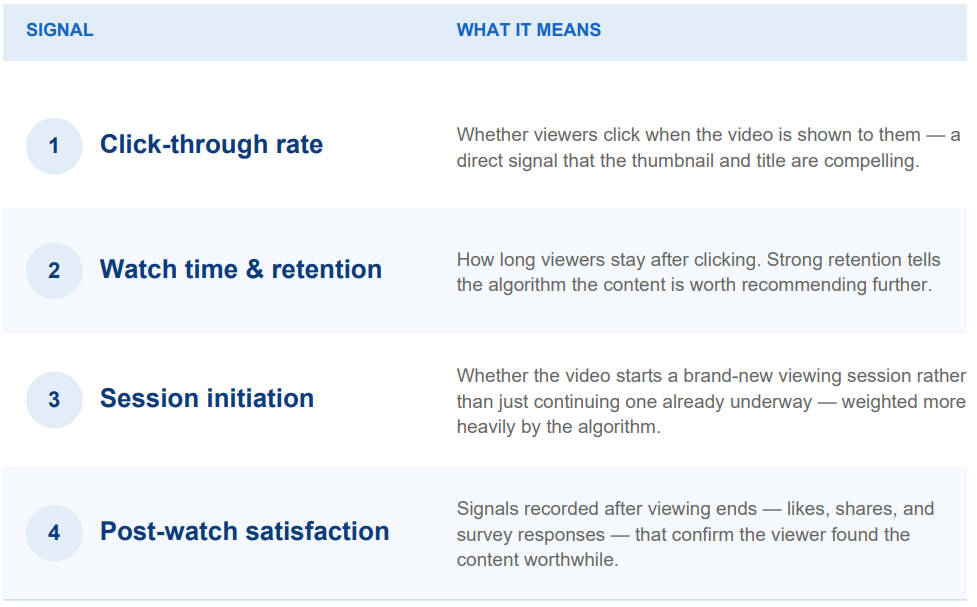
YouTube uses Satisfaction-Weighted Discovery. That’s a system that rewards value delivered per second, not upload volume or watch time alone. YouTube itself states that its recommendation system responds to four signals:
- Whether viewers click when shown the video
- How long they stay, and whether they rewatch
- Whether the video starts a new viewing session
- And post-watch signals: likes, shares, “not Interested” feedback
That’s great news for smaller channels.
A 45-second Short with 100% retention sends a stronger discovery signal than a 15-minute video at 30% retention. Throughout 2025-2026, this shift fundamentally changed what “promoting a YouTube channel” means.
You’re also not promoting on one surface. There are five, each with different logic:
- Home: The predictive engine. This is where the AI bets on what the viewer wants before they even know they want it, based purely on historical satisfaction patterns.
- Search: The intentional landscape. Increasingly driven by natural language processing, this surface rewards clarity, utility, and direct problem-solving.
- Suggested: The contextual web. This relies heavily on session contribution: can your video successfully follow someone else's hit and keep the viewer on the platform?
- Shorts: The high-velocity swipe feed. A dopamine-driven loop, where the first two seconds dictate whether you get 100 views or 1,000,000.
- Subscriptions: The legacy feed. This is a chronological utility bill for your most loyal fans, but it is no longer the engine of YouTube growth.
Does Posting Daily Work on YouTube in 2026?
No. Posting daily no longer gives you an algorithmic advantage. The "daily grind" is a relic of 2018. Back then, feeding the beast with sheer volume could brute-force your way into the recommendations.
Today, that approach might work if your content relies on daily events (for example, if you report gaming news, world events, or similar things). Otherwise, that’s a sure way to get burnt out.
YouTube’s engineers have made it explicitly clear: the platform does not possess a metric that counts how frequently you post to reward you for volume. Instead, the system evaluates content on a decentralized, per-video basis.
Our analysis reveals that a channel publishing once a week with 55-60% midpoint retention earns more Browse impressions per upload than a daily channel at 20-25% retention. Quality of engagement per upload is the variable that matters now.
Feeling Stuck on YouTube?
Our specialists have found the exact block across 3,000+ channels using 21 AI diagnostic tools. We'll find yours and hand you a ranked plan.
Diagnose your channel
Packaging: YouTube Thumbnails and CTR
Packaging is the highest-leverage free thing you can change to promote your YouTube video. It determines both whether viewers click and how the algorithm classifies your content to decide who to show it to.
What Is a Good CTR on YouTube in 2026?
CTR (click-through rate) is the front door of your video. It is the first click that the viewer makes that decides whether or not they stay. But what CTR is considered good and what is bad in the eyes of the algorithm? Let’s take a look:
|
CTR Range |
What It Means |
What to Do |
|
Below 2% |
Critical danger zone. Packaging misses the audience, or the concept is dead on arrival. |
Redesign the thumbnail and title immediately. |
|
2–4% |
Below baseline. The algorithm will limit distribution. |
Test new thumbnail variants using Test & Compare. |
|
4–8% |
Healthy and sustainable baseline. |
Focus on retention to compound distribution. |
|
10%+ |
Exceptional hook. Strong immediate resonance. |
Protect retention, don’t let CTR outpace delivery. |
One critical note is that your CTR benchmark is niche-specific, not universal. One channel we audited sat at 4% and was the top performer across its entire comp set, because the vertical average was 2.1%. Check what “good” looks like in your specific niche before making changes.
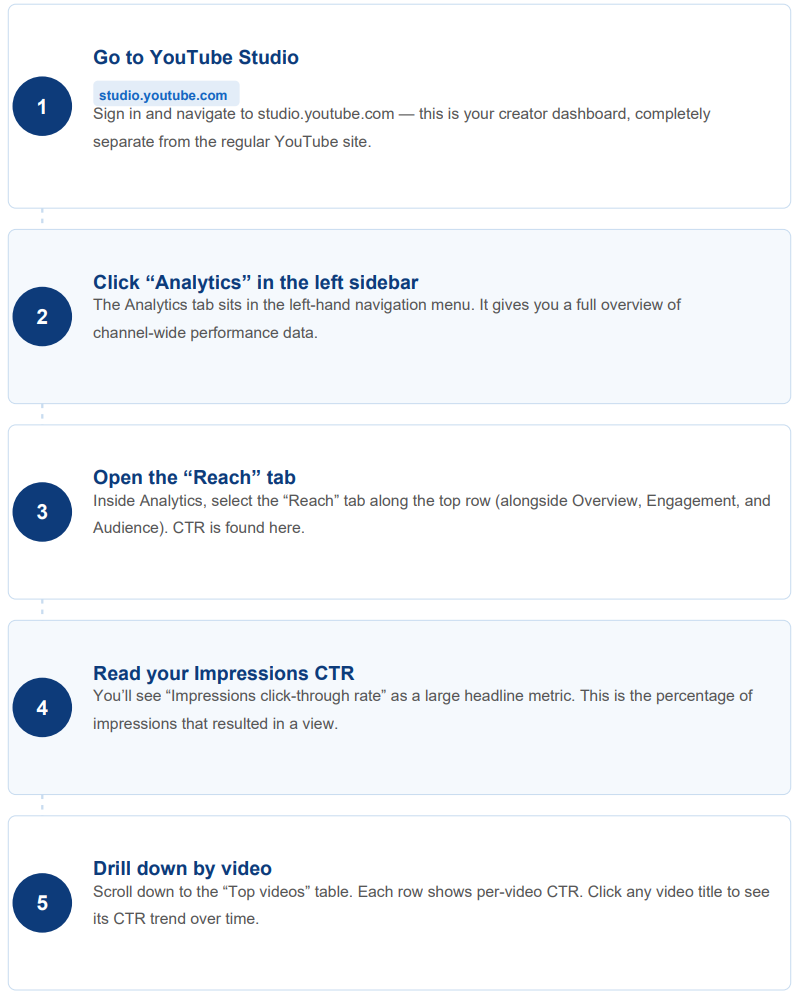
Here is where to find your CTR metrics on YouTube:
How to Improve CTR with YouTube Thumbnails?
Thumbnails are the single most critical variable driving your CTR and growth on YouTube. A thumbnail exists to attract attention and help the viewer decide whether to click.
But thumbnails also impact retention. A thumbnail makes one promise: the value I signal visually will be there when you click. Breaking that promise generates high CTR and immediate drop-off, which the algorithm reads as a packaging failure.
How to make an effective thumbnail:
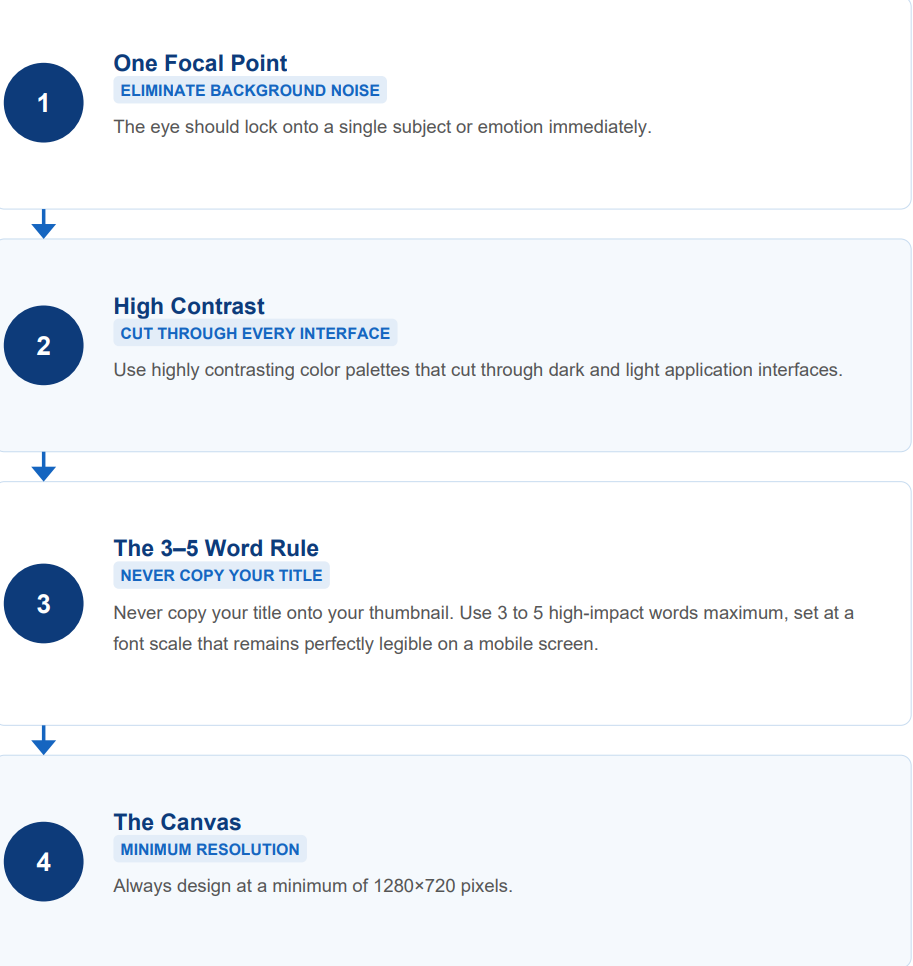
- One focal point: eliminate background noise. The eye should lock onto a single subject or emotion immediately.
- High contrast: use highly contrasting color palettes that cut through dark and light application interfaces.
- The 3–5 word rule: never copy your title onto your thumbnail. Use 3–5 high-impact words maximum, set at a font scale that remains perfectly legible on a mobile screen.
- Face-forward thumbnails: Across our audited channels, face-forward thumbnails with high contrast and 3–5 words of text outperformed screenshot-style and text-heavy alternatives on CTR in almost every case. A human face signals "educational/personal" to both viewers scanning the feed and to the automated classifier deciding how to categorize the content.
- The canvas: always design at a minimum of 1280×720 pixels.
If you struggle with thumbnail ideas, you can always try out AI tools for YouTube thumbnails and use them as a starting point before making something your own. Have a distinct visual signature.
Your thumbnail is also classified before it’s clicked. For channels in sensitive or policy-adjacent niches, the language on your thumbnail affects whether the video gets full monetization. One channel we audited got yellow coin flags consistently, and the trigger was colloquial phrasing in thumbnail text. Switching to neutral, descriptive language on new uploads resolved the flags.
How to Test YouTube Thumbnails?
YouTube’s native Test & Compare tool allows channels to upload up to three distinct thumbnail variants simultaneously.
YouTube evaluates them based on Watch Time Share per Impression. If Variant A gets 12% CTR but causes an immediate bounce, and Variant B gets 8% CTR but keeps viewers hooked for ten minutes, the system crowns Variant B the winner. It prioritizes long-term platform satisfaction over short-term bait-and-switch clicks.
Make it a rule to audit your analytics dashboard every Monday. If a video’s CTR has dipped below 4%, swap the thumbnail and let the system re-sample your content to a fresh audience.
You can learn more about testing YouTube Thumbnails here.
Can't pinpoint what's broken?
Your Studio data has the answer — you just need the right lens to read it. With 3,000+ channel audits behind us and AI tools trained on a 450K-channel dataset, we can show you exactly what’s wrong and how to fix it. Find what's broken.
YouTube SEO: How to Optimize Titles & Descriptions?
YouTube SEO matured in 2026. Keyword stuffing, copying competitor metadata, and 1,000-word descriptions are either neutral or harmful now. What works is relevance alignment: your title, transcript, description, and viewer engagement must all point to the same topic.
Where to Find YouTube Keywords?
Before typing a single script line, figure out what the audience you’re trying to reach wants to see.
- Native trend search: use YouTube Autocomplete to uncover what users search for in real time, and cross-reference with Google Trends (strictly filtered for “YouTube Search”).
- Looking into Analytics: use tools like VidIQ to isolate search volume vs. competition density. VidIQ provides contextual accuracy so you can map out semantic clusters related to your topic.
Once you have the terms, place them where the algorithm reads:
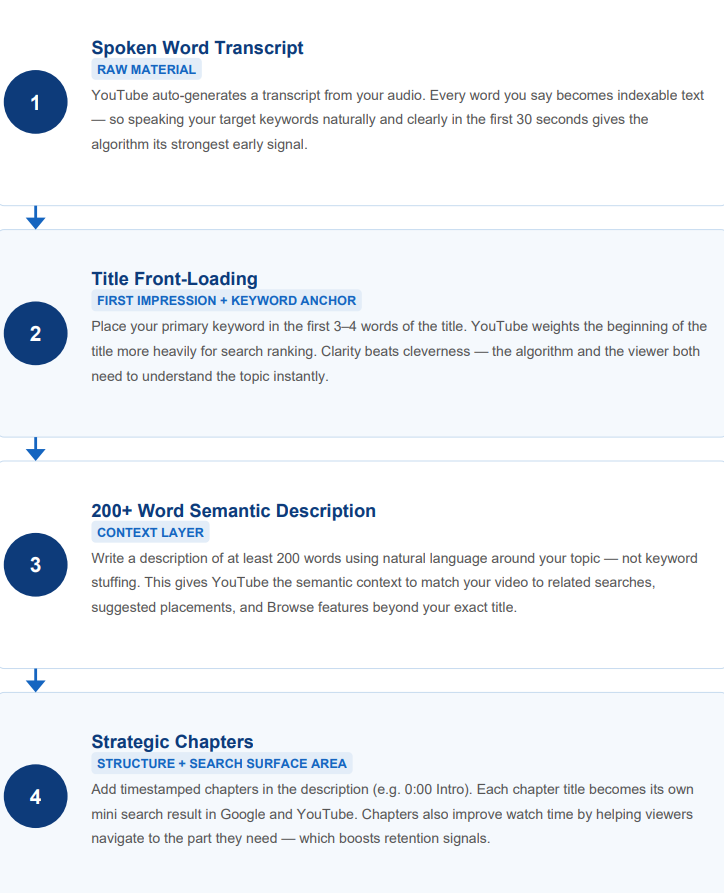
[Spoken Word Transcript] ➡ [Title Front-Loading] ➡ [200+ Word Semantic Description] ➡ [Strategic Chapters]
|
Placement |
Weight |
Rule |
|
Title — first 5 words |
Highest |
Front-load the primary keyword. “How to increase Amazon sales” beats “A guide to selling more on Amazon.” |
|
Spoken audio — first 30 seconds |
High |
YouTube’s transcript indexing reads audio. Say your keyword aloud. |
|
Description — first 150 characters |
High |
This appears in search previews. Include keyword + direct outcome promise. |
|
Chapter titles |
Medium |
YouTube indexes chapter text in Google Search. Use real search phrases. |
|
Tags |
Low |
Largely deprecated. Useful only for disambiguation in ambiguous niches. |
How to Write a YouTube Title That Works?
Your title competes in two contexts at once: search results and the Browse/Suggested feed. These need different things.
In Search, the viewer has intent — they typed something. The title wins by precisely matching the query and promising the most specific outcome. “How to run ads on Amazon marketplace in 2026” beats “How to run ads” because it answers the exact question a seller typed.
In Browse and Suggested, the viewer has no declared intent. Your title creates it. The formats that work:
- Concrete outcome promise: “How I doubled watch time without changing my content” — the reader sees immediately what they’d get.
- Myth-busting frame: “Why posting daily is hurting your channel” — activates disagreement, one of the strongest click drivers.
- Entity + specific problem: “Amazon ads that generate zero sales. What to fix” — the named entity tells the algorithm exactly who to serve this to.
The under-60-character rule is about precision. Every word that doesn’t pull its weight dilutes the signal. If your title is vague — “Important update,” “My thoughts on this,” “How to succeed” — it gives neither the viewer nor the algorithm anything to act on.
The Title Psychology: when the title is neutral, it doesn’t grab attention the way these do:
- Curiosity Gaps: “This YouTube Mistake Is Costing You 80% of Views”
- Concrete Data/Numbers: “7 Ways to Scale...”
- Strict Outcome Promise
- Opinion-Led Titles: “I Was Wrong About X” or “This is Why Y Doesn’t Work”
How Should You Structure a YouTube Video Description?
First 150 characters: keyword + outcome promise. For the viewer deciding whether to click.
Characters 150–400: what they'll learn. Secondary keywords, related topics, and named entities. For semantic indexing.
Then: your most important links. UTM-tagged if you're tracking external traffic. The first link gets the most clicks.
Last three lines: maximum 3 hashtags. Your series name, niche term, and one broad category. No slang terms that invite policy flags.
Now, let’s look at additional uses of keywords in your content to better understand how to promote your YouTube channel in 2026.
- The Title: Keep it under 60 characters. Place your primary, high-intent keyword in the first few words.
- The Title Psychology: When the title is neutral, it doesn’t grab as much attention as the title that uses Curiosity Gaps ("This YouTube Mistake Is Costing You 80% of Views"), Concrete Data/Numbers ("7 Ways to Scale..."), a Strict Outcome Promise, or a Title That Expresses Opinion (“I Was Wrong About X”, “This is Why Y Doesn’t Work”).
- The Description: Write a comprehensive, 200+ word overview. Don’t stuff it with keywords unnecessarily. The first 150 characters are critical; they appear in search results, so they must feature your core keyword alongside a direct call-to-action (CTA).
- The Transcript Indexing Rule: Say your primary keywords out loud within the first 30 seconds of your video. YouTube’s automated captioning system indexes your audio transcript immediately upon upload to verify that your metadata matches your spoken content.
- Chapters and Timestamps: Format timestamps directly in the description. This radically improves user experience and allows YouTube’s search engine to clip your video and surface specific, relevant segments directly inside external search results. For the trade-off — which videos gain from this and which lose viewers to it — see YouTube chapters as an SEO tool.
How to Name a Series to Promote a Channel?
The most consistent SEO mistake: publishing a series every week with a different naming convention for each episode. “Tutorial #4” then “How I do X” then “A deep dive on Y.” The algorithm can’t cluster them and stops recommending them as a unit.
Pick one convention and use it exactly: “Amazon Seller Guide | Setting up your catalog” and “Amazon Seller Guide | Running your first ad.” The algorithm starts recommending the second to everyone who watched the first. That compounds without additional work.
Feeling stuck on YouTube?
A plateau that lasts more than 90 days is a structural signal. Something in your channel's mechanics is capping the growth. Our analysts have diagnosed this pattern across 3,000+ channels. They'll tell you exactly what's broken and what to do first. Diagnose your channel.
What Are Semantic Clusters on YouTube and How Do They Help?
A semantic cluster is a group of videos covering related aspects of the same topic, each linking to the others, all using consistent terminology. When a viewer watches two or three in sequence, YouTube registers strong topical authority and begins serving the entire cluster proactively.
Build one in four steps:
- Pick one high-demand topic with at least 5–8 distinct questions a viewer might have.
- Map the question set from beginner to advanced.
- Create one video per question, in order, using consistent terminology across all titles.
- Link them into a playlist in sequence. Configure each video’s end screen to the next.
Retention on YouTube: How to Keep Viewers Watching?
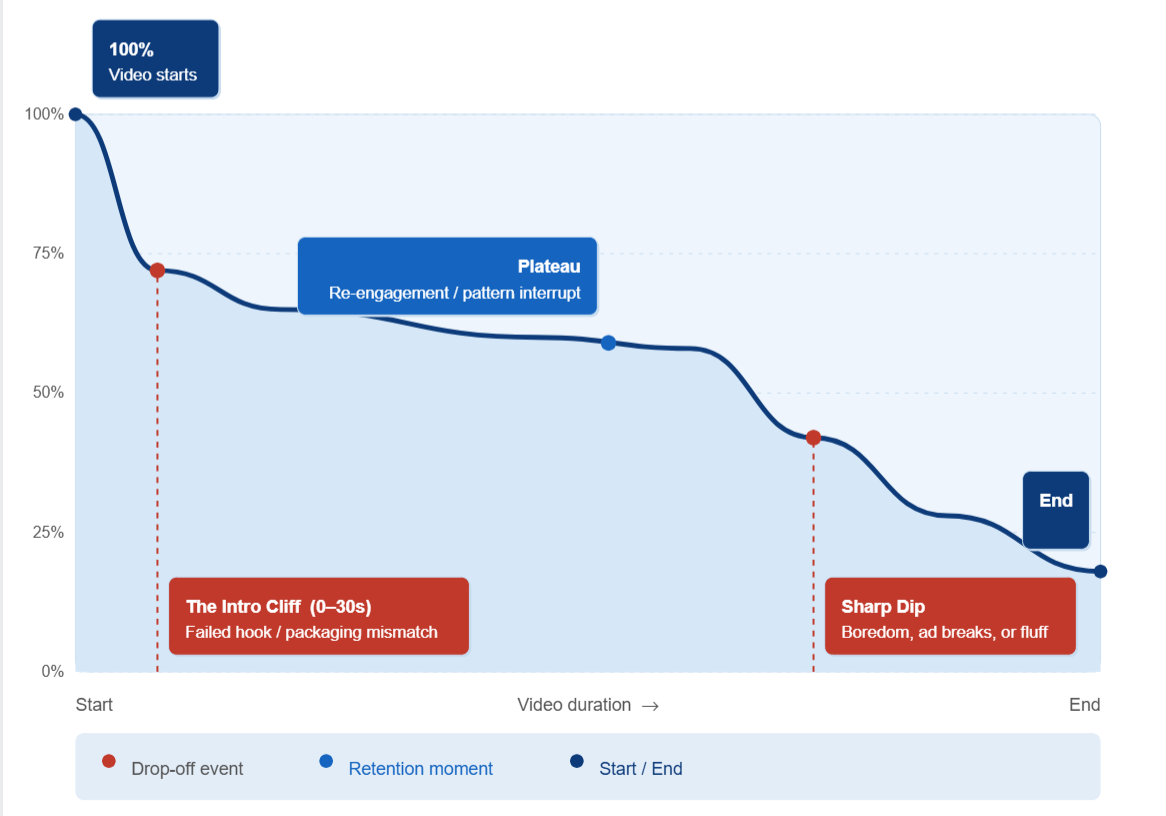
The universal benchmark for long-form content is 50% retention at the exact midpoint of the video. If the curve drops in the first 30 seconds, the algorithm cuts off impressions regardless of how high the CTR is.
The system also heavily favors active participation over passive consumption. A comment is weighted more than a like. A viewer typing a coherent response signals massive investment, which the algorithm rewards with wider distribution.
How to Read YouTube’s Retention Curve?
Every significant drop in the retention curve corresponds to something specific that happened at that timestamp. Here is the exact protocol:
- Find every drop steeper than 5 percentage points relative to the surrounding curve.
- Open the video at that exact timestamp. Watch 30 seconds before and after.
- Ask: did the pacing slow? Did the topic shift? Did a sponsorship appear without setup? Did the promised payoff move further away?
- Write one sentence explaining the cause. That’s a script note for the next video.
Do this across 5–10 videos, and you’ll see the same cause at different timestamps. That’s your channel’s specific structural retention failure. We have already talked about how to reverse-engineer viral videos for success, but this retention protocol applies regardless of your size.
Also, find the spikes and flat sections. When retention holds flat or bumps up, viewers are rewinding. That’s your high-value content, the one they subscribed to get more of. Our guide on how to read your YouTube retention graph goes through each pattern and what to check first.
What Are the Retention Failure Patterns?
YouTube’s retention graph reveals four structural failure patterns. Here’s what each looks like and how to fix it:
|
Pattern |
What It Looks Like |
Root Cause |
The Fix |
|
The Intro Cliff |
Steep drop in first 30 seconds |
Title/thumbnail promised something the opening didn't deliver |
Deliver the core payoff in the first 15–30 seconds |
|
The Gradual Decline |
Steady drop between minutes 3–10 |
Long segment with no state change |
Pattern interrupt every 20–40 seconds: B-roll, new question, visual cut |
|
Sharp Dips and Valleys |
Sudden drops at specific timestamps |
Pacing off, unannounced sponsor, topic shift |
Segment chapters; pre-frame any sponsor integration |
|
The Missing Payoff |
40–60% gone before resolution arrives |
Core answer comes too late |
Structure: Problem → Stakes → Solution → Proof → Recap |
|
The End-Screen Dead Zone |
0.5–2 end-screen clicks per 1,000 instead of 5–10 |
Last 30 seconds not scripted as a handoff |
Name the next video aloud; link to it specifically |
The Intro Cliff (0–30 Seconds)
A steep drop-off in the first 30 seconds signals a failure of the Hook. The thumbnail or title made an explicit promise that the introductory footage failed to validate instantly. If more than 50% of your audience vanishes here, the video is dead to recommendations.
The fix is to deliver the core payoff within the first 15–30 seconds. If your title is “Why your thumbnails aren’t working,” your first sentence begins answering that. If more than 40% of viewers leave before 30 seconds, the algorithm stops distributing the video, regardless of what happens at minute five.
The Gradual Decline (Minutes 3–10)
Retention holds through the intro, then drops steadily. This is the most common failure pattern.
The cause is almost always a long segment without a state change. A three-minute block of continuous explanation with no visual shift, no new question, no chapter break. Viewers don't leave because the information is bad — they leave because their attention clock ran out. Pattern interrupts every 20–40 seconds, reset it: B-roll, on-screen text, a new question, a visual cut. They don't need to be elaborate. They need to signal that something new is happening.
One channel we audited had an APV of 16–23% on its 10+ minute videos. The content team was making the same pacing error on every upload: a strong intro, then a long continuous explanation with no transitions. Adding chapter markers, interim recaps, and visual breaks on three videos lifted APV to 38%.
Sharp Dips and Valleys
Sudden drops at specific timestamps point to a structural issue at that exact moment: pacing going off, a segment becoming overly technical without visual support, an unannounced sponsor integration, or the content shifting away from the viewer's core intent.
Open the video at that timestamp. Watch 30 seconds before and after. The cause will be obvious.
The Missing Payoff
The viewer clicks, the content is solid, but the core resolution arrives too late. By the time you deliver what the title promised, 40–60% of viewers have already left.
The structure that consistently retains: Problem → Stakes → Solution path → Proof → Recap. If your solution path starts past the 30% mark of runtime, you risk a significant drop-off.
The End-Screen Dead Zone
The benchmark we see for episodic educational and entertainment content is 5–10 end-screen clicks per 1,000 views. Most channels audit at 0.5–2. The difference is whether the last 30 seconds are scripted as a deliberate handoff.
"If you need more on this, the next video in the series covers X — it's right here" outperforms a generic "check out my other videos" overlay by a factor of 5–10. Say the title of the next video aloud. Frame it as a logical continuation. Link the end screen to exactly that video, not the latest upload.
One of our channel's top videos had strong CTR but near-zero end-screen CTR and no onward routing. Every new viewer the thumbnail attracted left without watching a second video. The CTR looked like a win in isolation. In practice, it was a reach that converted into nothing.
Spikes and Plateaus
Not a failure pattern, but the opposite. A sudden upward bump or a perfectly flat line in the retention curve means viewers are actively rewinding to rewatch a segment. This is your highest-value content: what they came for and what they'll subscribe to get more of. Study these anomalies and replicate them in the next video.
How To Optimize YouTube Videos That Already Exist?
Humans are biased. There are plenty of biases preventing the audience from watching your content (you’re unfamiliar to them, you don’t have enough views, and so on). The one bias you can influence is recency and the bias of fresh information.
For example, you uploaded the perfect push-up technique video, and it gets views for the first few months. Then views drop — because the audience considers the information old, despite the technique being unchanged. The fix: optimize your video constantly. Reupload, switch up thumbnails, or redo the video completely if your tech has improved.
If a specific format or topic yields an elevated watch-time plateau, change your next three production cycles to exploit that exact narrative vein. If a format doesn’t work anymore (when retention flattens across consecutive uploads), retire it.
How to Use the Subscriber Magnet to Convert Viewers?
Your most-viewed video is rarely the one generating the most subscribers. But every channel has one specific asset that converts raw traffic into subscribers at a disproportionate rate. That's your Magnet Video.
Find it in your advanced analytics — sort by subscriber conversion rate. The video at the top is your Magnet Video.
Once you identify it, deploy it in two places:
- Swap the trailer. Set your Magnet Video as the channel trailer for non-subscribed visitors. Every cold visitor who lands on your channel page sees your best converter first, not your latest upload.
- Dominate end screens. Route end screens across your entire channel toward this one video. Every view on any video becomes a potential entry point into the conversion loop.
The result: every drop of traffic your playlists generate has somewhere to go. Sessions become subscribers instead of evaporating.
How to Use YouTube Shorts for Better Discovery?
With daily volume crossing the 70 billion view milestone, Shorts is a great discovery engine you can use for free. They help people see your content and naturally discover your channel, but only if the bridge is built.
The most consistent Shorts misuse is when a channel builds a catalog that’s 50–60% Shorts by upload count, gets decent views from the Shorts feed, but subscriber growth and watch time don’t move.
Here’s what’s happening. The Shorts feed is algorithmically separate from long-form. A viewer who watches your Short doesn’t automatically see your channel; they see the next Short in the feed instead. Without a deliberate bridge, that view is isolated. It contributes to a view count and nothing else.
If your Shorts-to-long-form conversion rate is below 0.5%, you have a routing problem, not a content problem. The benchmark conversion is 0.5–1%. Most channels are at 0.04%.
How to Build the Short-to-Long Video Bridge?
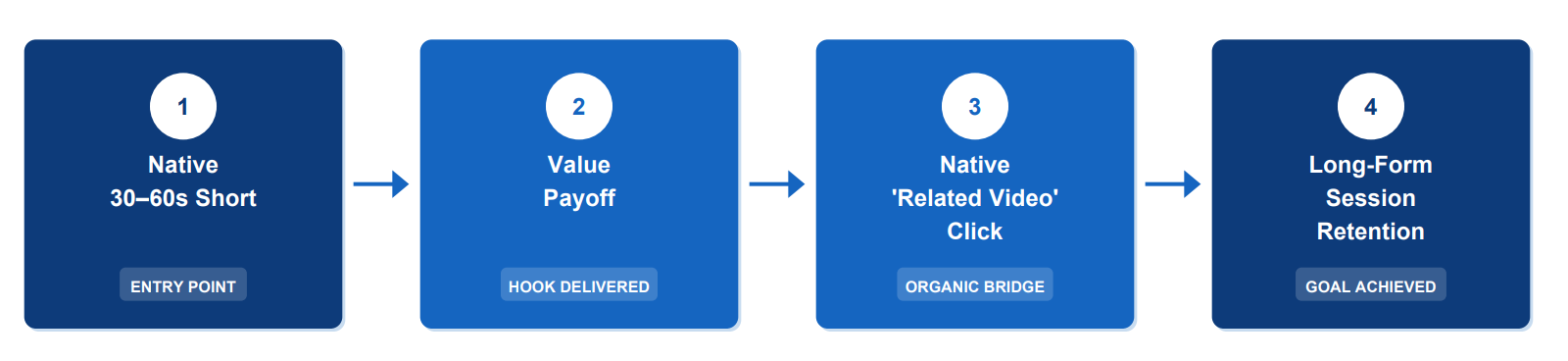
Shorts don’t support end screens. The only routing mechanism is the Related Video metadata field. YouTube allows you to link a long-form video directly inside the Shorts player through the "Related Video" metadata field.
But configuring Related Video isn’t enough. The Short itself must be engineered as an entry point:
- Open with the question the parent long-form answers. The actual question, not a teaser.
- Deliver partial value. Enough to prove you know what you’re talking about.
- Your call to action (CTA) at the absolute tail-end of the Short must point directly to this embedded link with a high-intent prompt: “Full explanation in the linked video.”
- Share a title keyword with the parent long-form so the algorithm understands the relationship.
Getting from 0.04% to 0.5% doesn’t require better content. It requires configured routing and a Short structure with an open loop.
Does the Short-to-Long Bridge Work?
We have countless cases that prove it does. One of our partners, a channel with content about sculpting and resin art, reached out after hitting a sudden ceiling. We put our faith in the cross-format viewing strategy.
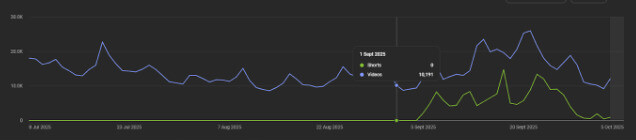
Since their content is evergreen, the approach worked well. We suggested making their short-form into the teaser of the long-form. Shorts made their audience crave more content — and that’s how you make it work in tandem.
How to Make High-Velocity Shorts?
When we look at how short-form work and mend that ‘from short to long-form’ content bridge, they almost always fall into three distinct ‘buckets’:
Micro-Utility (The Single-Question Framework)
Here, you pick one hyper-specific problem and immediately deliver an answer. If your long-form video covers “7 Camera Setups for Solo Filmmakers,” your Short should focus entirely on “The Exact 45-Degree Light Setup I Use for Deep Cinematic Shadows.” That way, you tease your full video and answer a single question with one answer.
Contextual Trend Alignment
We aren’t talking about generic dance trends, or copycat lip-syncs (because that can actually ruin your brand authority). Instead, find industry news from your niche, or trending cultural events (again, within your niche), and deliver a short commentary on it. This helps you to ride the existing search and discovery while preserving your core expert positioning.
High-Density Niche Formats
Make repeatable structural formats. Use highly stylized close-up macro shots, A/B visual comparisons, or data-dense counterintuitive reveals. That way, you take a predictable visual format for your short-form content, which becomes instantly recognizable as your style whenever you pop up.
What Format Mix Works?
If your YouTube catalog is 90% long-form and you’re not growing, your discovery engine is missing. Long-form retains the audience you have. It doesn’t bring in new viewers at the same rate Shorts do.
If your catalog is 60% Shorts and your watch time isn’t growing, you have reach without depth. The benchmark format mix: 2 long-form per week (8–20 minutes) + 3–5 Shorts. Neither works as well without the other.
Why Do YouTube Shorts Stop Growing?
You've seen it happen. A Short hits 500 views, maybe 10,000 — strong watch time, solid engagement, decent CTR — and then it just stops.
This isn't random. The algorithm ran its test, compared your Short against everything else competing for the same feed slot, and made a decision.
The video below breaks down exactly why Shorts stall and what to do about it: how the algorithm's testing window works, why audience-content fit matters more than raw engagement, what role competition plays in the Shorts feed, the two metrics that predict whether a Short gets pushed further, and the retention strategies that change the algorithm's answer.
How to Use YouTube Playlists as a Free Reach Boost?
Playlists are a free distribution that almost nobody sets up correctly. When a viewer watches two or more videos from a playlist in sequence, YouTube registers a binge session — one of the strongest positive signals the platform measures. It responds by increasing Browse and Suggested placements for your channel.
Instead of standard playlists, master the art of Power Playlists.
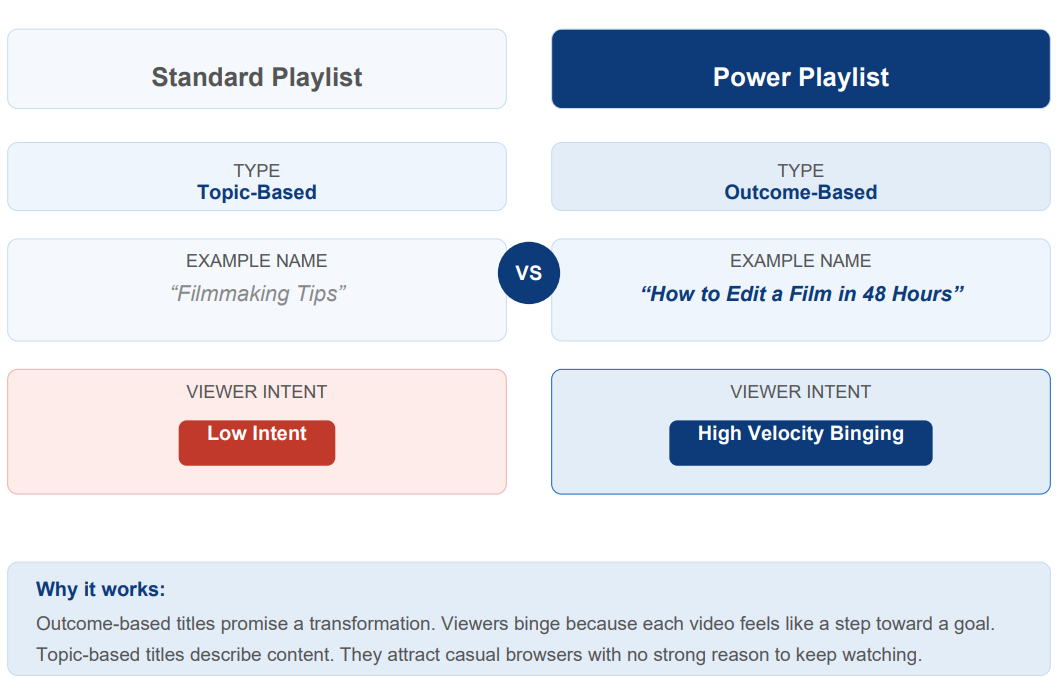
Power Playlists are structured around outcomes (“How to Secure Your First 1,000 Subscribers in 30 Days”) rather than broad topics (“YouTube Tips”). Each consecutive video serves as the logical next step.
Pair this with smart end-screen and card placements. Guide your viewers directly into your “Subscriber Magnet” or the next chapter of your Power Playlist.
How to Structure Playlists That Drive Sessions?
Most playlists are filing systems ordered by upload date. They don’t drive binge sessions because the videos aren’t ordered as a viewing sequence.
- Order by viewer journey: beginner first, intermediate second, and advanced third.
- Mixed-format playlists: a 45-second Short hook, then the full lesson, then a case study.
- Consistent series naming: “Amazon Seller Guide | Episode 1,” “Amazon Seller Guide | Episode 2.” The algorithm treats consistent-naming series as a coherent body of work.
- Each video is in at least 3–4 playlists. Each playlist placement is a separate discovery surface.
The benchmark for channels with strong algorithmic distribution: 800–900% playlist coverage (each video in 8–9 playlists on average). If your coverage is under 200%, you’re leaving significant session signals unreceived.
How to Read YouTube Analytics Signals to Boost the Channel?
Your analytics are a diagnostic instrument. Here are the five signals that tell you whether your promotion is working and what to do when they’re off.
Five Non-Negotiable Analytics Vitals
Check these every Monday morning across the Reach and Engagement tabs:
- Impressions and Click-Through Rate (CTR): Located under the Reach tab, this paired metric is our demand index. Deep impressions with a tanking CTR mean our title and thumbnail failed the execution phase. Low impressions with a high CTR mean our packaging is flawless, but we have targeted a niche with zero market velocity.
- Audience Retention Heatmaps: This is our creative agenda. The retention curve tells us exactly where our audience loses patience, loses interest, or experiences a mismatch in expectations. Every dip is a direct instruction on what to cut from the next script.
- Traffic Sources: We must identify exactly who is feeding our ecosystem. Is the volume driven by intent (YouTube Search), context (Suggested Videos), or predictive modeling (Browse Features)? If a video is tanking on Browse but spiking on Search, our packaging must pivot from broad hooks to precise, utility-focused titles.
- Average View Duration (AVD): The absolute runtime a viewer commits to an asset. The system rewards raw duration over percentages; a 20-minute video with a 40% AVD (8 minutes) generates higher algorithmic authority than a 5-minute video with a 70% AVD (3.5 minutes).
- Top Videos by Watch Time (Not Views): We sort our channel content strictly by total watch time hours. A video with 5,000 views that holds people for 12 minutes is infinitely more valuable to channel authority than a viral clip with 50,000 views that causes a bounce within 15 seconds.
How to Read Your YouTube Traffic Sources?
Your traffic source breakdown is a map of what’s broken. Each pattern has a different root cause and a different fix:
Browse Above 50%: Strong but Fragile
Browse-heavy means the algorithm trusts your channel enough to predict who’ll want your content before they search. That’s good. But if Browse is above 50% and no secondary source is above 10%, you have a single point of failure.
If Browse is your dominant source, your job is to build Search and Suggested as backup engines before you need them.
To fix the situation, actively build two backup engines in parallel. For Search, start titling 2–3 videos per month around specific high-intent queries in your niche — terms people type, not broad topics. For Suggested, publish a named series with consistent episode naming so the algorithm can cluster your content and begin recommending it contextually. Neither needs to overtake Browse. You just need them above 10% each, so a Browse drop doesn’t take everything with it.
Search Below 10%: a Metadata Problem
Search traffic is the most intent-driven surface on YouTube. Viewers who find you through Search were actively looking for what you make. They convert to subscribers at higher rates and return more often.
If your Search is below 10%, your metadata isn’t aligned with how people search. The fix is mechanical: front-load the primary keyword in the first five words of your title, say it aloud in the first 30 seconds (YouTube’s transcript indexing reads audio), and write descriptions where the first 150 characters contain the keyword and a direct outcome promise.
Suggested Below 5%: a Topical Authority Problem
Suggested traffic means YouTube is serving your content to viewers who just finished watching something else. Earning those placements requires topical consistency. The algorithm clusters videos by similarity and recommends them as related. If your catalog is scattered across topics with no naming consistency, it can’t cluster for you. It stops trying.
The fix is to pick one naming convention per series. “Amazon Seller Guide | Setting up your catalog” and “Amazon Seller Guide | Running your first ad” cluster together. “Tutorial #4,” “How I do X,” and “A deep dive on Y” don’t. The algorithm starts recommending the series to everyone who watched any part of it, but only when it can see the series.
Shorts Feed Above 30% With Low Long-Form Conversion
High Shorts feed traffic with sub-0.5% long-form conversion means you’re getting reach without depth. Views accumulate on the Shorts island and go nowhere.
The fix is to configure Related Video metadata on every Short to point to the parent long-form, add a verbal CTA in the final 3 seconds (“full breakdown in the linked video”), and structure each Short as an incomplete answer — one that opens a question it doesn’t close, so the viewer who wants the resolution has to click through.
What Is the YouTube Hype Feature and How to Use It?
YouTube created a tool called ‘Hype’ specifically for channels under 500,000 subscribers. It’s the first mechanism that actively levels the discovery playing field for smaller channels.
For channels in the YouTube Partner Program (YPP) with between 500 and 500,000 subscribers:
- Viewers get three free Hypes per week, resetting on Monday. To support you further, fans can purchase additional paid Hypes.
- The feature applies exclusively to long-form videos.
- A channel with 500 subscribers earns 7,500 points per Hype; a channel near 500,000 earns just 50 points. The smaller you are, the more each Hype is worth.
- Accumulated points push your video onto a country-specific Explore leaderboard. Because this feed is non-personalized, it serves as a massive organic discovery surface. Top videos receive a "Hyped" badge and are pushed directly onto the home feeds of entirely new audiences.
A Hype strategy for smaller channels:
- Publish on Mondays or Tuesdays to catch viewers when their weekly Hype allotments refresh.
- Explicitly direct your community to use their Hypes on your latest upload instead of asking for standard likes.
Even a channel with 0 subscribers can get a video to viral status. The algorithm samples your upload to a tiny seed audience and watches their satisfaction signals. If that seed audience responds with high CTR and strong retention, the system escalates distribution.
What Can Competitors Tell You About Your Channel?
Your own analytics tell you how your channel performs in isolation. To know if your numbers are competitive, you must look outside your channel walls. The analysis that’s actually useful is mechanical, not topical.
Here is a strategy that does:
The 30d/90d Ratio
Divide your competitors’ 30-day average view count by 90-day average. This is the single most diagnostic public signal about any channel’s trajectory. You can pull that data from VidIQ.
|
Ratio |
What It Means |
|
Above 0.7 |
Momentum. Recent content outperforms trailing average. The channel is growing. |
|
0.4–0.7 |
Stable. Consistent performance, no strong trend in either direction. |
|
Below 0.4 |
Structural problems. Recent content underperforms significantly. Something is broken. |
If the entire vertical is at 0.4–0.55 and you’re at 0.55, you’re the best-performing channel in a declining sector.
Views Per 1,000 Subscribers
This normalizes for channel size and shows content efficiency. A channel with 100K subscribers generating 28 views per 1,000 subscribers in 30 days outperforms a 1M-subscriber channel at 4 per 1,000. The smaller channel’s content pulls harder per subscriber. Track this metric against your comps every quarter.
Format Mix and End-Screen Architecture
Don’t just watch what competitors post — measure how much of each format they post and what their per-format averages are. If a competitor runs 58% Shorts and their long-form averages 3x yours, their Shorts are working as an acquisition funnel. That’s a structural playbook.
Watch three of their most-viewed videos and note the end-screen architecture. If they consistently route to a specific playlist or series, that’s a conversion strategy worth reverse-engineering.
The Right Comps to Use
Don’t benchmark against channels 20x your size. They have algorithmic advantages — subscriber notification depth, accumulated Watch History authority, Browse prediction confidence — that don’t apply at your scale. Benchmark against channels 2–5x your size in the same specific sub-niche. They prove the near-term ceiling.
Watching competitors pull ahead?
If other channels are outperforming you, they're doing something structurally different. We'll show you exactly where the gap is and how to close it, using our 14+ years of expertise and 450K-channel training dataset. Get clear answers.
How to Do Cross-Platform Promotion Correctly?
In 2026, blind cross-platform distribution is nothing more than a liability. Because YouTube’s algorithms are built to count viewer satisfaction, you must transition from a broadcast mindset (paste links into your other socials) to a native, platform-specific strategy.
How to Use Links Across Platforms?
Each platform requires a different approach to avoid reach suppression:
- Instagram and TikTok: Never use your main feed to just point to a link. Here, you can repurpose your content from YouTube Shorts or show a 30-second behind-the-scenes video, then route viewers to a single link in your bio.
- X (formerly Twitter): Write a text thread outlining a core thesis or an insane data point from your video. Embed your YouTube link exclusively at the tail end of the tweet.
- LinkedIn (The B2B Premium): If you produce educational or enterprise-level content, LinkedIn is perfect for you. Repurpose your video's core takeaways into a text post or a downloadable PDF slide carousel. Frame the full YouTube video in the comments as a case study validation.
- Reddit and Quora: If you drop a link without context here, the community will ban you, and the algorithm will ignore you. You must find hyper-specific problem threads that are solvable by your video. Write a multi-paragraph solution, then frame your video as a visual step-by-step guide ("If you want to see exactly how I wired this specific circuit board, I documented the full build process here...").
What Is the Pre-Launch Protocol for YouTube Videos?
The most critical window for any upload is immediately after it. The algorithm tracks how fast the audience clicks, how long they stay, and whether or not they watch all the way. If you want to maximize this initial spike, your promotion must start running before the video goes live.
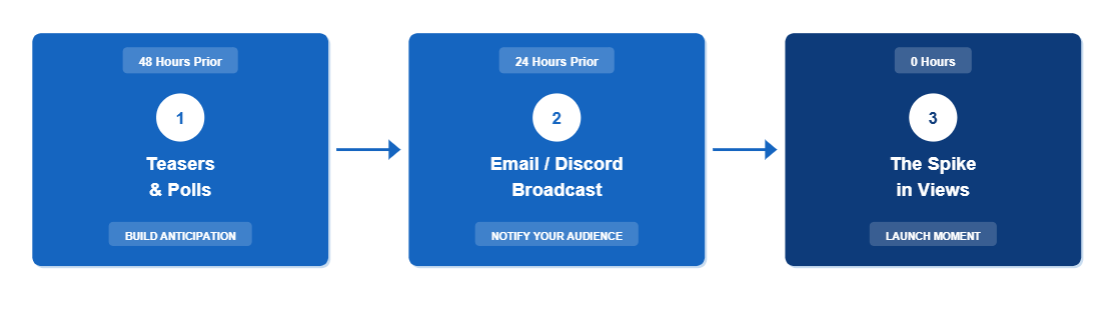
Build anticipation through behind-the-scenes imagery, community voting polls, and countdown tickers across your secondary channels. When your video drops, your core audience should already be primed to seek it out intentionally.
How to Use Discord for Your YouTube Channel?
Discord is more than a gaming platform. We have already discussed how to use Discord to your advantage. Use it to host exclusive post-video discussions, get immediate feedback on concepts, and run live Q&As. An active Discord signals community health to potential sponsors and collaborators.
How to Build a YouTube Community?
In 2026, building a community is a growth mechanism on YouTube. “Lone wolf” doesn’t work in the creator work (at least not for long). The algorithm weights community signals heavily: comments, polls, Community Tab engagement, and returning-viewer rates all feed directly into Browse and Suggested recommendations.
How to Find the Right Collaboration Partner?
Some creators might be lucky enough to be friends with massive YouTubers who can give them a boost in subscribers through shoutouts. However, that’s not the majority of cases. The majority of cases are from people who aren’t popular initially. True collaboration is an equal exchange of specialized value.
The Size Alignment Rule
Simple enough, you get a similar-sized channel to collaborate with you, ideally matching your current audience or slightly exceeding your sub count. Why? Because the value exchange must feel the same to both parties.
The Structural Execution
Mutual shoutouts won’t cut it here. The system rewards integration. Your best friends are Guest Appearances or Joint Videos, where you can take one plot and split it into both channels. For example, part one of a case study lives on Channel A, while the other part lives on Channel B. This, in turn, kills two birds with one stone, because you expose both audiences to the content of the other creator’s channel. Think of it as cross-pollination.
How to Use the YouTube Community Tab?
The Community Tab is one of the most underused tools for community building on the platform. It keeps your channel active in the Home feeds of your viewers even during weeks you don’t upload.
The highest-converting assets: text polls, image quizzes, and behind-the-scenes teasers. Launching a poll 48 hours before an upload signals the system that your audience is actively interacting with the channel, which brings more attention to your main videos.
How to Act in the First 48 Hours to Increase Reach on YouTube?
YouTube’s algorithm values active participation far more than passive consumption. A comment is weighted more than a like. Your job is to moderate and keep the conversation going during the critical 24-to-48-hour post-publish window.
When a video goes live, you should be pinned to the top of the comment section. Ask an open-ended or analytical question that forces the viewer to consider their response. Reply to every comment within the first two days. Active creator engagement in the thread encourages more comments, which sends continuous engagement signals to the system.
As we established earlier, YouTube’s algorithm in 2026 likes the active participation way more than passive consumption (although the laid-back TV views can boost your content quite a lot). Currently, a comment is weighted more than a like.
And your job, as a creator, is to moderate and have this conversation going during the critical 24-to-48-hour post-publish window.
Use Your Creator’s Heart on YouTube
Whenever you like a comment under your video, YouTube shows your icon next to it — a psychological trigger that sends a push notification and email alert to that user.
YouTube’s official metrics show that Creator Heart notifications generate up to three times more clicks than standard platform notifications. This is a direct channel to pull an existing viewer back into your ecosystem.
Is It Worth Spending Money on Paid YouTube Promotion?
The correctly calibrated one? Yes. The incorrectly calibrated one? It will accelerate the demise of a bad video. There are plenty of paid promotion services that promise a fast boost, and there’s a native Promotions tab inside YouTube Studio — but is it worth clicking?
When and How to Promote on YouTube?
YouTube’s Promotion tool allows creators to buy targeted ads. But YouTube’s official guidelines clarify that subscribers and watch hours from paid promotions do not count toward YPP monetization thresholds. Paying to hit 4,000 watch hours is throwing money away.
Paid distribution amplifies existing momentum. Never buy ads for a video that performed poorly organically. If CTR is struggling at 1.5% and retention is a cliff, paid traffic only accelerates the damage.
Instead, find your anomalies. The videos that hit 8% organic CTR and held 55% retention over their first 72 hours. Use a small, targeted budget over a 10-day duration to show this video to new viewers who look like your audience. The ads won't change how YouTube recommends it, but viewers who stay and watch more bring follow-on views, and those count as organic.
What you can also do to accelerate YouTube growth is to translate your metadata into different languages. AI Metadata Translation can do it in seconds, attracting audiences from all over the world.
How Does the YouTube Promotion System Work?
There is no single feature, thumbnail trick, or ad budget that will permanently scale a channel. Promotion is an interconnected ecosystem of four distinct gears grinding together:
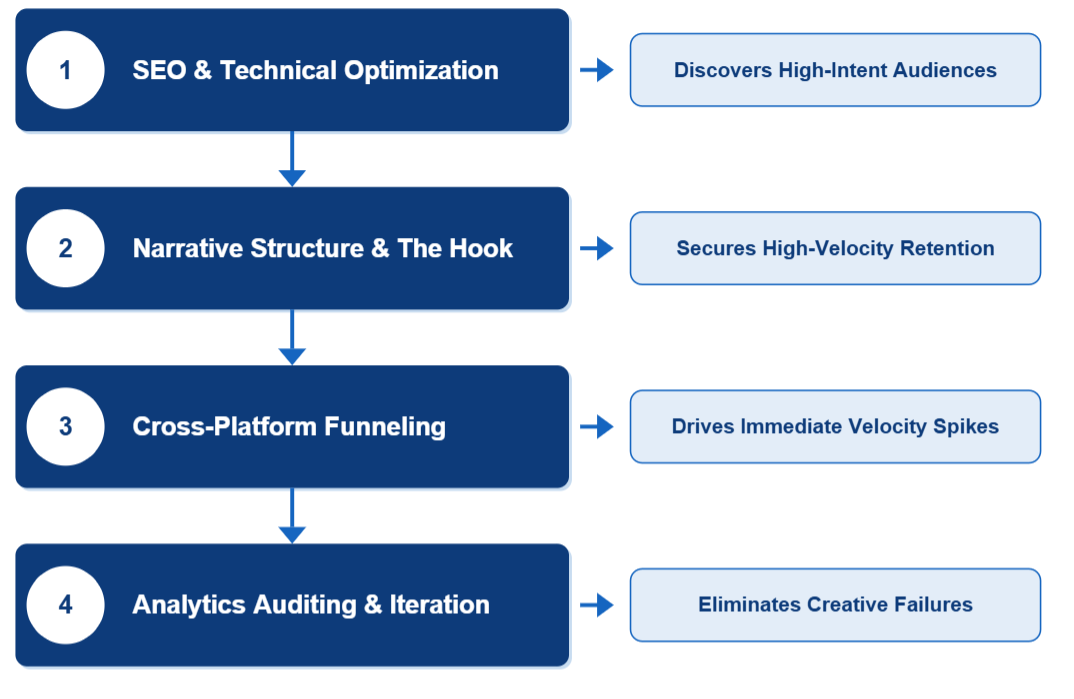
If your narrative hook fails, your SEO doesn’t matter. If your cross-platform strategy is spammy, your analytics will tank. If you don’t read your analytics, you can’t fix your hook. Every piece relies on the structural integrity of the others.
Not Sure Where Your YouTube Channel Is Stuck?
Every channel has at least two structural problems invisible from the inside. Routing. Packaging. A format mix. Optimization. Set up. A policy issue. They’re fixable once you can see them.
AIR has deep Studio access to 3,000+ channels, a training dataset of 450,000+, 1 trillion views analyzed, and 21 in-house AI engines built to see the patterns that hold your channel back.
We can apply all that directly to your channel to find your growth spots and give you a plan exactly to promote your channel.
What you get is:
- a structured report
- a 30-day action plan ranked by impact
- and a 45–60 minute live walkthrough.