If your uploads involve AI anywhere, the disclosure question was mostly yours to answer at upload. Since 27 May 2026, YouTube also answers it for you: when its systems detect photorealistic AI you did not declare, the label goes on anyway.
A label from detection can be corrected in Studio. A label that came from YouTube's own tools, such as Veo or Dream Screen, or from C2PA metadata inside a clip you licensed, stays on the video for good.
What follows covers:
- Which uses of AI need a label, AI music and voiceovers included;
- Which labels you can still change;
- Why the label itself never costs you monetization, while some AI-heavy formats do.
Key takeaways
- The test is realism, not AI involvement. Realistic AI content and meaningful changes need a label; minor edits and openly unreal visuals do not.
- AI-generated music needs a label, and cloning your own voice does not. The pairing catches out most faceless channels.
- Since 27 May 2026, YouTube labels photorealistic AI on its own, and it reaches a real share of creators: as of 30 September 2026, 116 channels in the AIR network publish AI-generated visuals, and 110 narrate with AI voices.
- Labels from YouTube's own tools, such as Veo or Dream Screen, or from C2PA "fully generative" metadata, cannot be taken off. A label you set yourself, or one detection applied by mistake, can be changed in Studio.
- The label itself costs nothing. Monetization risk comes from the inauthentic content policy, which rules out template-driven output and AI personas giving advice on sensitive topics.
- A realistic AI voice does not need a label on its own. YouTube's voice rules turn on whose voice it is, not how human it sounds, unless the narrator is passed off as a real person.
When you must disclose AI content on YouTube, and when you don't
YouTube does not ask whether you used AI. It asks whether a viewer could come away misled about something that happened in the world.
That is why a photorealistic street scene of a city that exists needs a label, and a dragon flying over that same city does not. The test gets harder to call in two places creators tend to overlook: the soundtrack, and footage that is only partly generated.
|
Needs AI disclosure |
Doesn't need AI disclosure |
|
AI-generated music in your video |
AI help with the script, title, thumbnail, or outline |
|
A synthetic voice built to sound like a real person |
Cloning your own voice for voiceovers or dubs |
|
AI footage of a real place, passing as a recording |
Extending a backdrop behind a real subject |
|
A fabricated event involving real, identifiable people |
Beauty filters, colour and lighting adjustment |
|
A real person shown saying something they never said |
Caption generation and translation |
|
A realistic weather event that never happened |
Sharpening, upscaling, voice or audio repair |
|
A public figure shown stealing, arrested or imprisoned |
Someone riding a unicorn through a fantastical world |
|
A photorealistic scene a viewer could take for real |
An AI-generated missile inside a fully animated video |
Source: YouTube Help, altered or synthetic content disclosure.
YouTube calls this the altered or synthetic content disclosure, and AIR's glossary entry covers the definition and how the policy developed.
Worked examples, by channel setup
|
What you made on YouTube |
AI disclosure? |
Why |
|
A history channel generating a photorealistic scene of a real battle |
Yes |
Depicts a real event that was never filmed |
|
A travel channel adding AI drone footage of a city it never visited |
Yes |
Could pass as a recording of a place that exists |
|
A sports channel generating a match between two real players |
Yes |
Fabricates an event involving real people |
|
A finance channel narrating in a voice cloned from a known investor |
Yes |
Misleads viewers about who is speaking |
|
A faceless channel scoring its videos with a Suno or Udio track |
Yes |
AI-generated music counts as synthetic content |
|
A commentary channel reconstructing a press conference on camera |
Yes |
Shows a real person saying what they did not say |
|
A short film placing a real celebrity's face into a scene |
Yes |
Depicts a real person doing something they did not do |
|
A faceless channel narrating stock footage with a stock AI voice |
No |
No real person is depicted, and the footage is real |
|
A creator drafting scripts, titles and thumbnails with ChatGPT |
No |
Production assistance, invisible in the finished video |
|
A beauty channel applying a skin-smoothing filter |
No |
Aesthetic edit to real footage |
|
A podcast cleaning up background noise with an AI tool |
No |
Audio repair |
|
A creator cloning their own voice to dub into Spanish |
No |
Their own likeness, so nobody is misrepresented |
|
An animation channel generating a fully animated AI short |
No |
Not realistic, so no viewer can be misled |
|
A vlogger extending the wall behind them in a shot |
No |
Minor edit to footage that is already real |
One case is missing from these tables: a synthetic narrator, which faceless channels ask about more than anything else.
Do I need to disclose an AI voiceover on YouTube?
Cloning your own voice is exempt, and a synthetic voice built to sound like a recognizable real person needs a label. A stock AI narrator who belongs to nobody sits between the two. YouTube's Help page doesn't name that case, and AIR's Translation Operations team treats a stock voice that imitates no one as label-free. As of September 30, 2026, 110 channels in the AIR network narrate with AI voices: 28 pair an AI voice with non-AI visuals, and 82 combine it with AI-generated footage. The most common myth among them is that a voice realistic enough to pass for a human needs a label. YouTube's rules do not say that. Every voice example on its Help page is about whose voice it is, not how natural it sounds, so a generic AI voiceover over truthful footage carries no disclosure obligation.
Two cases change that:
- A narrator passed off as a real person, with a name, a face, or stories about trips they never took, misleads viewers about who is talking.
- Photorealistic AI scenery under any narrator still needs the label, because the visuals are assessed separately.
Dubbing works the same way: what matters is whose voice the track uses. A dub in your own cloned voice needs no label. YouTube's own auto-dubbing needs no action from you either, because YouTube marks those tracks "auto-dubbed" in the description itself. A dub that clones someone else's recognizable voice does need the label. Whether an AI dub keeps viewers watching is a separate question, and our guide to AI dubbing answers it with retention data from AIR's localized channels.
AI voiceovers and monetization
An AI narrator does not take a channel out of the Partner Program on its own. The monetization policy looks at what the voice is attached to: AI-generated content made with generic or unoriginal templates fails, and so does an AI persona presented as a human expert on health, legal, financial, or political topics. A faceless finance channel whose narrator sounds like an adviser sits closest to that line.
Worried that AI can hurt your channel?
An AIR audit reads your YouTube Studio data, shows how your channel performs against its niche, and tells you where to go next. With AI or not.
Start with a free check →What to check before your next upload
Exposure to all of this depends on what you make. One policy, read against a faceless setup and then against a face-to-camera one, produces a different pre-publish check each time.
Faceless, AI voice and AI visuals
Faceless channels
The check is short.
- Is any visual photorealistic enough to read as a recording of somewhere or someone real?
- Does the audio contain AI-generated music?
The second is where this setup most often gets caught, because the music rule is rarely discussed and generated tracks are now standard under AI voiceovers.
If the track came from Suno’s free plan, the label is only half the problem. Free-plan songs are licensed for non-commercial use, so they cannot sit on a monetized channel. Commercial rights come with Suno’s paid plans, and only for songs made while subscribed. The same rights decide whether you can release Suno songs on Spotify.
Face to camera, AI in post
Creator-led channels
Almost everything in a normal post-production pass is exempt, filters, upscaling, and audio repair included. The line gets crossed by generated B-roll: a photorealistic AI shot of a real location dropped into an otherwise real video puts the whole upload inside the rule.
Commentary, news and reconstruction
Event-driven channels
This setup carries the most exposure, because it covers real people and real events, and AI reconstructions of those are the main thing the policy targets. Reconstructed footage of something that happened needs a label, and a reconstruction of something that did not happen needs one more than anything else on the list. The likeness rules in the companion guide apply here too.
These checks tell you whether to tick the box. Since May 2026, YouTube can also add the label without asking.
YouTube now labels photorealistic AI automatically
Until May 2026, a label reached your video in one of two ways. You ticked the AI use box at upload, or you made the video with one of YouTube's own tools, such as Dream Screen, which label their output on their own. For anything made elsewhere, your answer at upload stood.
On 27 May 2026, a third route opened. YouTube's systems now look for heavy photorealistic AI use and apply the label themselves when a creator has not declared it. The same update moved the label somewhere harder to miss: on long-form it sits directly below the video player, above the description.

On Shorts, it appears as an overlay on the video itself.

Lighter alterations keep the older treatment in the expanded description.
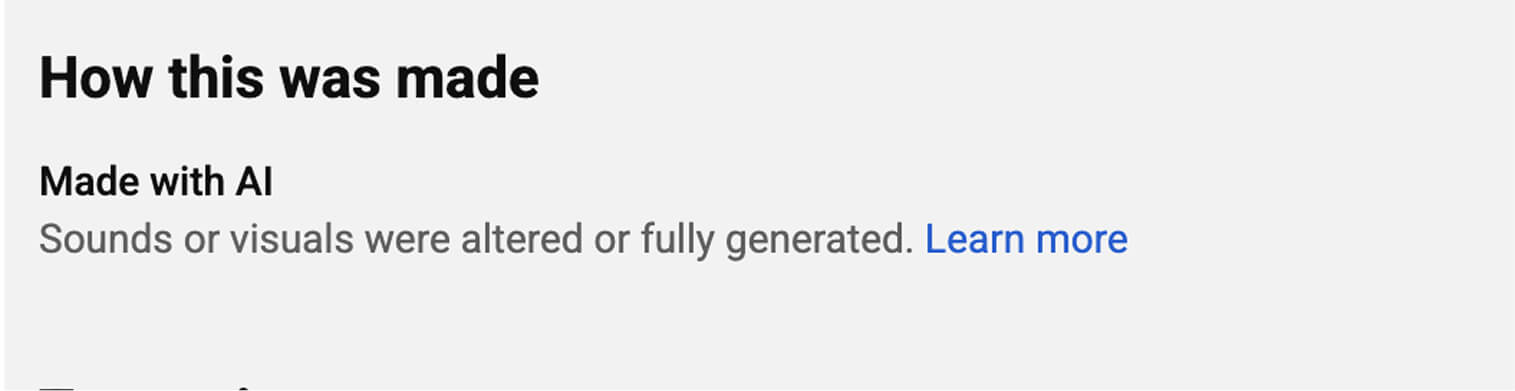
Not every AI edit triggers detection: slightly altered, animated, or clearly unreal content passes without a label.
Of the channels in the AIR network, 116 publish AI-generated visuals as of September 30, 2026: 82 alongside an AI voice and 34 with a human voice or no narration. Once those visuals are photorealistic, this is the kind of content the new detection is built to catch.
Automatic labeling is aimed at photorealism, not at AI use. An openly animated explainer built end to end with AI tools falls outside it, and so does footage that has only been lightly altered. The detection layer is looking for video a viewer could take as a recording of something real.
YouTube has since applied the same approach to sponsorships. On 3 September 2026, it announced that its systems will also label branded content a creator did not declare.
Some of these labels can be removed later, and some cannot.
Some AI labels are permanent
Whether you can remove a label depends on how it got there, and Studio does not show which case you are in. Two of the four routes are permanent.
|
How the label arrived |
Can you change it? |
What to do about it |
|
You answered "AI use" yourself at upload |
Yes |
Studio → the video → Attributes → AI use |
|
Detection flagged photorealistic AI you believe is not there |
Yes |
Update the disclosure status in Studio |
|
The video was made with YouTube's own tools, such as Veo or Dream Screen |
No |
Plan on the label being visible from publication |
|
The file carries C2PA metadata marking it fully generative |
No |
Check provenance before the clip enters your edit |
Source: YouTube Blog, improving AI labels for viewers and creators (27 May 2026).
C2PA metadata, published under the name Content Credentials, is provenance data the generating tool writes into the file it hands you. Support is uneven enough that the tool you picked months ago decides whether a permanent label is on the table:
- Sora writes Content Credentials into video, which is still rare among video models
- Adobe Firefly, DALL·E 3 and Google Imagen write them into images
- Midjourney writes no Content Credentials. It marks images as AI-generated with an IPTC tag instead, a separate metadata standard from the C2PA data YouTube names for permanent labels
- Stable Diffusion depends on where you run it: the hosted platform embeds credentials, the open weights do not
Source: C2PA Viewer, AI tools with Content Credentials support (27 February 2026).
Content Credentials survive a normal edit and travel into the file you upload. Losing them in an export does not change what you owe: YouTube's internal detection runs on the video regardless of metadata, and the disclosure requirement attaches to what the footage depicts rather than to what the file declares.
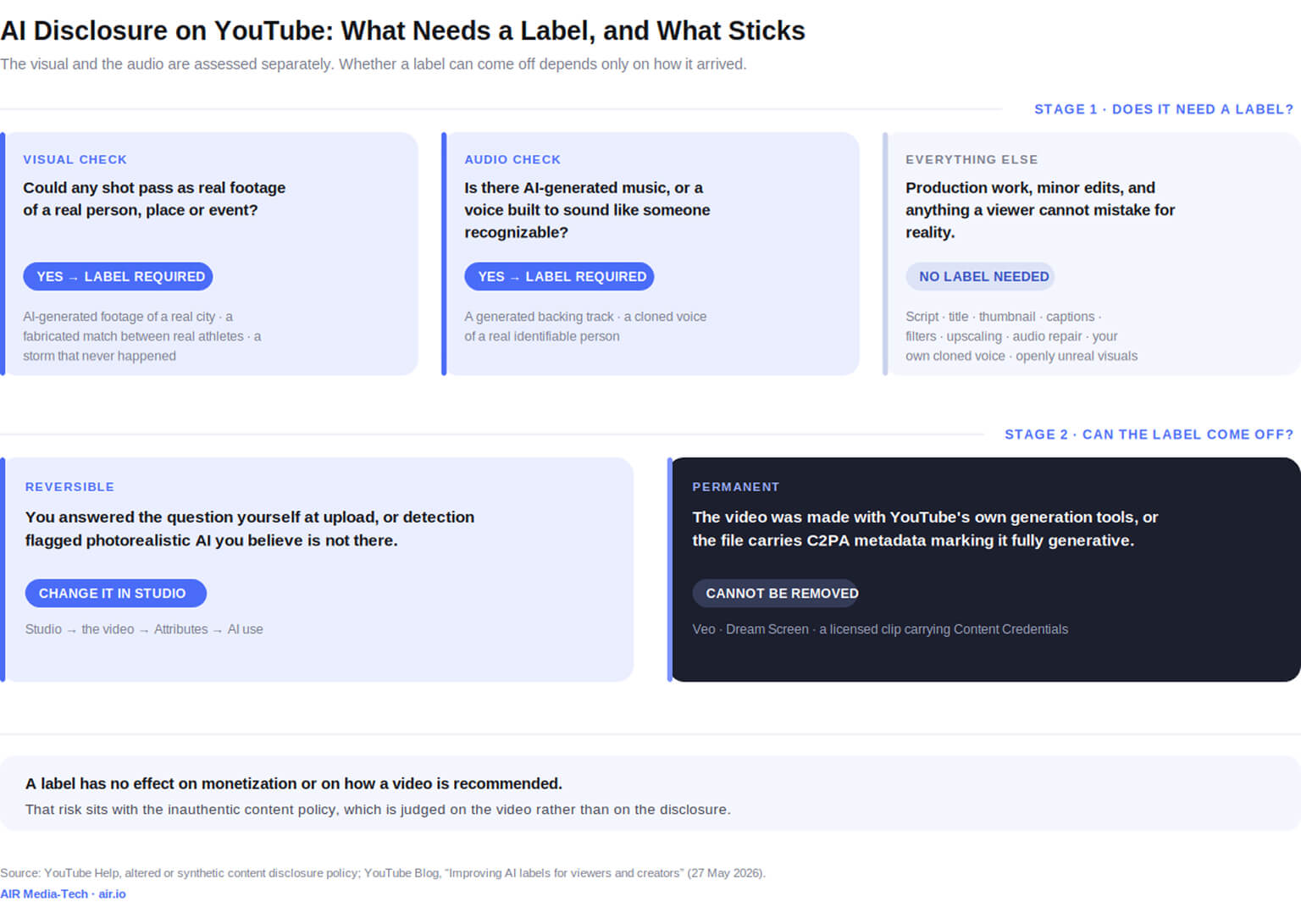
Where a label can still be changed, the control sits in Studio.
How do I add an AI disclosure label on YouTube?
The control lives in the upload flow rather than in a settings menu, which is why creators who go looking for it after publishing often conclude it is missing.
At upload
- Open YouTube Studio and start the upload as normal.
- In the Attributes section, find the AI use question (older guides call it "altered or synthetic content") and answer Yes if the video meets the disclosure conditions.
- Finish the upload and YouTube places the label for you: below the player on long-form and photorealistic content, in the expanded description for animated or non-photorealistic work.
After publishing, or after a label you did not choose
Go to Studio, open the video, and change the answer under Attributes → AI use.
It will not work where the label is permanent, which means anything made with Veo or Dream Screen and anything carrying fully generative C2PA metadata.
Skipping the question entirely carries consequences too, though more modest ones than the warnings circulating about them.
Skipping disclosure: what YouTube has published about penalties
Much of what circulates about skipping the label describes a staged penalty ladder. YouTube has published no such sequence.
What YouTube's Help page lists
Creators who consistently choose not to disclose may face a manually applied label or penalties that include removal of content or suspension from the YouTube Partner Program.
The trigger is a pattern of skipped disclosures, and since May 2026, a label you left off often arrives automatically.
“I advise our partners to label videos with an AI voiceover or AI-generated visuals themselves, right away, and not to hide AI use when the content falls under the labeling rules. The label itself shouldn't affect how a video is recommended or promoted, and YouTube can add it automatically anyway if its systems detect that content. Systematically hiding AI use, on the other hand, can draw extra attention to a channel and create risks for its monetization. The platform may treat deliberate concealment as misleading behavior, which puts the channel's monetization at risk. If you use AI as a supporting tool, label it wherever YouTube's rules require, and don't worry.”
Yelyzaveta Lovtsova, Moderation & Support Team Lead at AIR Media-Tech
Disclosure is also only one layer of the 2026 AI rules. Likeness detection, and the legislation moving alongside it, carries obligations of its own, and AIR covers that side in a companion guide to the 2026 AI rules.
The next question most creators ask is whether any of this affects their revenue.
The AI label and your monetization run on separate rules
Creators who skip the checkbox usually do it to protect their revenue, and that fear merges two different policies into one.
The disclosure policy governs the label, and YouTube states that disclosing AI content "won't limit a video's audience or impact its eligibility to earn money." A disclosure label alone does not change how a video is recommended either.
Whether AI-heavy content earns at all is decided somewhere else: in the monetization policy that screens for mass-produced output.
“YouTube never bans AI as a tool,” says Yelyzaveta Lovtsova, Moderation & Support Team Lead at AIR Media-Tech. “What the platform watches for is content that could mislead viewers, and content that is mass-produced, templated or inauthentic.”
Template output and AI personas lose monetization
Monetization gets judged on the video rather than on the checkbox. YouTube's channel monetization policies require content that is original rather than "mass-produced, generic, repetitive, or manipulative."
The patterns that fall outside monetization:
- Generic or template-driven output, such as narrative videos with only superficial differences between them, or slideshows carrying the same narration
- Emotionally manipulative content built on repetitive scenarios, like a series showing animals in exaggerated distress or peril
- AI-generated personas giving advice on sensitive topics, such as health, legal, financial, or political subjects
The policy does not limit which tools you use. AI may assist wherever you like as long as the final product still demonstrates your creative vision and provides educational or entertainment value. Using AI to edit your video scripts is named as acceptable in the policy itself, and so is generating a unique background visual. Output built from unoriginal templates fails because it gives the impression of mass production.
Volume does not make up for a template either. In AIR's study of 20,000 YouTube channels, channels with fewer than 50 videos got more views on new uploads than channels with 1,000+ in 8 of 11 niches. That is a correlation, not a penalty, but more uploads of the same kind did not bring more views per video.
Not sure what AI will do to your channel?
An AIR channel audit digs into what is blocking your growth and tells you whether AI is part of it:
- The blockers holding your channel back, found in your YouTube Studio data and checked against channels in your niche
- Whether AI is one of them, and whether the way you use it helps your content or hurts it
- How to remove each blocker
- A plan that starts with the issues worth fixing first
Sources: YouTube Help — Disclosing altered or synthetic content; YouTube Blog — Improving AI labels for viewers and creators (May 2026); TechCrunch — YouTube will now automatically label AI videos (May 2026); YouTube Help — Channel monetization policies; YouTube Help — Branded content disclosure; C2PA Viewer — AI tools with Content Credentials support (Feb 2026); IPTC — Midjourney adopts the Digital Source Type tag.
More on the 2026 AI rules
- Will AI tools hurt your promotion on YouTube? — where AI use starts to cost reach, and where it doesn't
- Is YouTube's AI dubbing safe for your channel? — auto-dubbing against pro dubbing, with retention data from AIR's localized channels
- YouTube AI policy in 2026: likeness detection and the NO FAKES Act — the legal layer around AI content, including the EU transparency deadlines
- YouTube RPM by niche, from 300 channels — what a niche pays, before you restructure a channel around it
- More videos don't mean more views: 20,000 channels — archive size against views on new uploads
- Does posting more hurt your RPM? 282 channels — revenue per video as posting frequency rises