
Not Sure Which Languages to Choose?
YouTube metadata is everything attached to your video except the video itself: title, thumbnail, description, tags, chapters, hashtags, category, video language, and captions. Three of those nine fields decide whether anyone sees the video. The other six run from useful to nearly decorative, and knowing which is which saves an hour on every upload.
For most of YouTube's history, every metadata field carried roughly the same weight, because the words a creator typed were the only way the platform knew what a video contained. That stopped being true once YouTube could read the video itself, and the fields have been reweighted around what it works out on its own.
Which YouTube Metadata Fields Carry the Most Weight?
Title, thumbnail, and description carry the most, and the distance between them and the bottom of the list is wide. Spreading effort evenly across all nine fields returns less than spending that same effort on the top three, because the top tier is where YouTube looks first, and the bottom tier is closer to housekeeping.
|
Metadata field |
What it does |
Limit |
Discovery weight |
|---|---|---|---|
|
Title |
Matches search queries and drives the click |
100 characters |
High |
|
Thumbnail |
Drives the click in feed, search, and Suggested |
2 MB, 1280×720 recommended |
High |
|
Description |
Gives context, matches queries, holds links and chapters |
5,000 characters |
High |
|
Video language |
Tells YouTube which audience to match the video to |
Set once per video |
High for multi-region reach |
|
Chapters |
Splits the video into named, seekable sections |
3 minimum, 10 seconds each |
Medium — feeds key moments in search |
|
Hashtags |
Groups the video by topic and shows above the title |
60 max before all are ignored |
Medium — top 3 display |
|
Captions/subtitles |
Make speech readable and indexable |
Per-language tracks |
Medium, higher for global reach |
|
Category |
Places the video in a broad content group |
Fixed list |
Low, except for Music |
|
Tags |
Covers spelling variants of your topic |
500 characters total |
Minimal |
Limits from YouTube Help and the YouTube Data API, current as of August 2026.
What Does High-Quality Metadata Look Like?
Metadata that answers a question a viewer would ask, in every field, without repeating itself. Low-quality metadata fills the boxes. The gap between them shows up field by field.
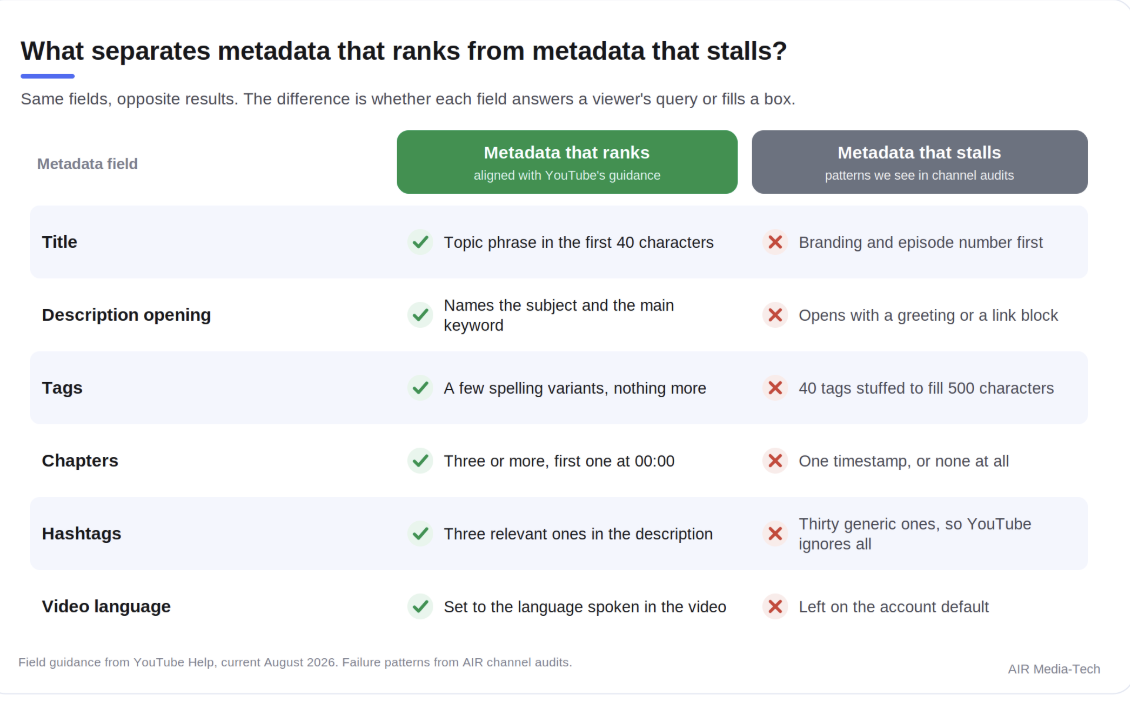
Metadata that ranks versus metadata that stalls, field by field. Source: YouTube Help, current August 2026; failure patterns from AIR channel audits.
- A strong title front-loads the topic and saves the branding for the end.
- A strong description opens by naming the subject rather than greeting the audience.
- Strong tags cover a few misspellings and nothing else, where the weak version stuffs 40 terms to use up the allowance.
- Chapters either meet all three conditions or do nothing at all.
- Hashtags work at three and break at thirty.
- The language setting is either correct or costing you an audience.
Consistency across those fields matters as much as the quality of any one of them. When a title promises a beginner tutorial, the description confirms it, the chapters follow that structure, and the thumbnail shows it, YouTube receives one coherent signal. When the four disagree, the system has to guess, and the guess tends to be conservative.
Metadata looks fine on paper, and views still won't move? When every field checks out and the numbers don't, the cause is usually somewhere else on the channel. We have traced this exact pattern hundreds of times. Find the real bottleneck
Do YouTube Tags Still Matter in 2026?
Barely. Tags now play a minimal role in discovery, and the one job they still do well is catching misspellings of your topic.
The field did not stop mattering overnight; what changed is how much YouTube needs it. Speech gets transcribed, on-screen text gets read, objects and scenes get classified, and every video gets compared against similar videos across the platform.
A keyword list typed into a box adds close to nothing on top of that. Tags survived mainly for the one task automated understanding still handles badly: working out what someone meant when they spell it wrong.
Which means that all you have to do is add a handful of tags covering likely misspellings of your topic or channel name, then stop. The minutes you would have spent filling 500 characters belong in the title and the first two lines of the description.
- Worth adding: common misspellings of your topic, your channel name, and any proper nouns viewers get wrong.
- Not worth adding: long keyword lists, competitor names, trending terms unrelated to the video, or one phrase in fifteen variations.
- Actively risky: keyword lists pasted into the description, which YouTube treats as spam.
How Do You Add Tags to a YouTube Video?
Tags sit behind an expander in Studio rather than on the main details screen, which is why creators often report the field as missing. Here is how to add tags to a YouTube video that has already been published.
- Open YouTube Studio and select Content from the left menu.
- Click the video you want to edit, which opens its Details page.
- Scroll down and click SHOW MORE to expand the hidden fields.
- Enter your tags in the Tags box, separated by commas.
- Click SAVE.
During a fresh upload, the same field appears under MORE OPTIONS. Either way, you are working against a 500-character budget covering all tags combined, commas included. A tag containing spaces gets treated as though it were wrapped in quotation marks, and those marks count toward the total.
Nothing you type here is visible to viewers. That has always been true, and it is one reason tag advice went unchecked for so long: nobody could see the difference between a channel with three tags and a channel with forty.
What Makes a YouTube Title Rank?
A title that ranks names its topic in the words a viewer would type, and puts those words near the front. You get 100 characters, though the point where a title gets cut depends on the surface, the device, and the pixel width of the characters you chose, so no single safe number exists.
The popular 60-character rule is not YouTube's, and treating it as a hard limit gives false confidence.
Our working guideline across the channels we audit is to land the topic inside the first 40 characters and treat everything after that as a bonus some viewers will see. Branding, season numbers, and series labels belong at the end for the same reason.
|
Weak title |
Why it fails |
Stronger title |
Why it works |
|---|---|---|---|
|
EP. 47 — MY BIGGEST BUILD YET!! |
Episode number and hype occupy the space a query would match |
Concrete Countertop Build: Pouring, Sanding, Sealing (Ep. 47) |
Names the task in the first 40 characters, keeps the episode label at the end |
|
You Won't BELIEVE What Happened |
No topic, so no query can match it |
What Happens When You Overwater a Monstera for a Month |
States the subject a viewer would search for |
|
Full Tutorial 2026 |
Tutorial on what, for whom |
Beginner Sourdough Tutorial: One Loaf, No Starter Discard |
Adds the niche, the skill level, and the constraint |
|
Best Budget Laptops (Watch Before Buying!) |
Warning text pushes the category out of view |
Best Budget Laptops Under $600 for Students in 2026 |
Price, audience, and year all become matchable terms |
|
Q&A + Channel Update + Announcement |
Three topics, none of them findable |
How I Plan a Year of Videos in One Weekend |
Picks the one question the video answers |
Illustrative rewrites.
What lifts click-through rate changes by category, and a title built for gaming rarely works for finance. Our study of title patterns across 11 niches breaks down which structures win where.
A title can cost you ad revenue without breaking a single rule.Metadata Lab checks a title, description, and tag set for the phrasing that quietly triggers limited ads or restricted reach, then rewrites it without softening the topic.Try Metadata Lab
What Should Go in a YouTube Video Description?
The subject of the video in the first two lines, then the details. You get 5,000 characters, and the opening lines are the ones that surface in search results and sit above the Show more prompt.
The API counts that 5,000 as bytes rather than characters. Latin text runs roughly one byte per character, while Cyrillic, Arabic, Japanese, and Korean run two to three. A Ukrainian or Japanese description can therefore hit the ceiling at well under 5,000 visible characters, which catches out creators translating one long description into several languages at once.
A description that earns its length usually does four things, and the order is what makes it work:
- Open with the subject. Two lines naming what the video covers, in the words a viewer would use.
- Expand with detail. What is covered, what is needed, what the outcome is. Written for a reader, not padded for a crawler.
- Add chapters if the video has sections. These become seekable markers on the progress bar and can surface as key moments in search.
- Close with links and up to three hashtags. Related videos, playlists, and your relevant product or social links.
Skip the greeting. "Hey guys, welcome back to the channel" occupies the two lines that decide whether a search result gets clicked, and it says nothing about the video.
Which Metadata Fields Do Creators Skip?
Chapters, hashtags, video language, and captions get skipped most often, and between them they cover four of the nine fields. The habit comes from the old three-field definition of metadata, which stopped being complete years ago.
Chapters
Chapters need three conditions to switch on:
- The first timestamp has to be 00:00;
- you need at least three timestamps in ascending order;
- each section must run at least 10 seconds.
Miss one and YouTube ignores the whole list, which is why creators often conclude chapters do not work on their channel.
Past navigation, chapter titles hand the search system named segments to match against, so a well-chaptered 20-minute video can surface for queries the title never mentions. AI tools that generate chapters make this practical across a back catalogue. Not every video is better with them, though — see when YouTube chapters help search and when they cost you watch time before turning them on channel-wide.
Hashtags
Up to three hashtags from your description appear above the video title as clickable topic links. And a video carrying more than 60 hashtags has every one of them ignored. Three relevant hashtags beat thirty generic ones, and stuffing ordinary descriptive words in as hashtags can bring an age restriction or a removal.
Video language and captions
The language setting is the highest-impact field on the list. YouTube uses a video's language signals to decide which audiences to match it to, so a Spanish video left on an English account default competes in the wrong pool. Captions extend the same signal and make the spoken content readable to viewers watching on mute.
Category and playlists
Category is a broad grouping and matters least, with one exception. Setting a music video's category correctly is what makes it eligible to appear inside YouTube Music. Playlist placement is not a metadata field in the strict sense, but playlist titles and descriptions get indexed the same way video metadata does, and they shape what plays next.
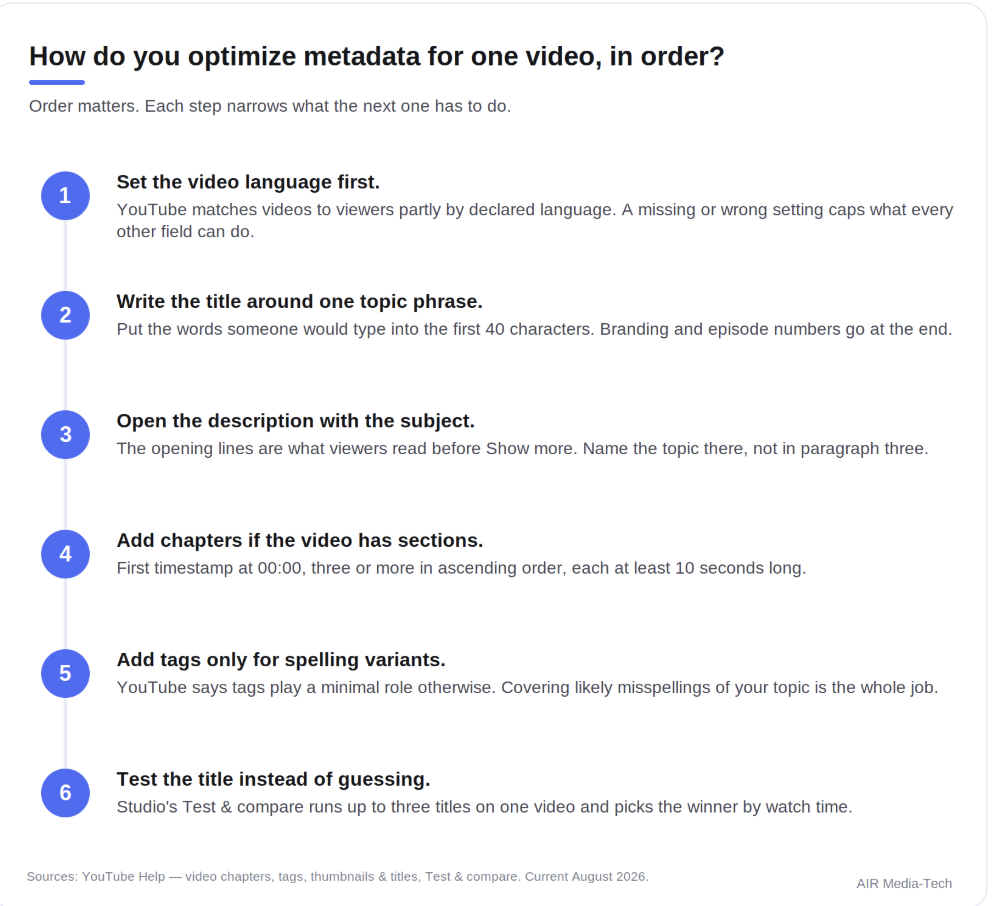
The order to work through metadata on a single video. Sources: YouTube Help on chapters, tags, titles, and Test & compare, current August 2026.
How Do You Test Whether Your Metadata Works?
With Studio's Test & compare, which now runs titles as well as thumbnails. You can put up to three titles and thumbnails on one video, and YouTube resolves the test within two weeks by picking whichever variant produced the most watch time, then serves the winner to everyone.
Testing works in desktop Studio only, needs advanced features enabled on the channel, and cannot run on Shorts, scheduled live streams, Premieres, private videos, videos set as made for kids, or videos marked for mature audiences.
Swapping titles by hand and comparing the results afterwards is the habit to drop. A manual swap cannot hold the audience constant, so any movement in click-through rate might be nothing more than a shift in where the traffic came from. The test tool exists because that comparison is unreliable without it.
For reading the outcome, the Reach tab in Analytics holds the metrics that respond to metadata work:
- Impressions — how many times your thumbnail was shown on YouTube.
- Impressions click-through rate — how often those turned into a watch. Half of all channels sit between 2% and 10%, so treat that band as a reference point rather than a target.
- How viewers find this video — the traffic-source split, including YouTube search.
- YouTube search terms — the queries that led viewers to the video, and the closest thing to a direct read on whether your title and description match real searches.
For running this at scale rather than one video at a time, we covered A/B testing metadata with AI separately.
What Changes When Creators Translate Their Metadata?
For reach specifically, translated metadata is one of the few levers that needs no new content. The videos stay exactly as they are, the titles and descriptions go into more languages, and YouTube starts surfacing them in regions it had been skipping. Four published AIR partner cases show the size of that effect across different niches.
Results from three published AIR partner cases after metadata translation, measured over the following six months.
- Cozy Relaxing Jazz, a music channel, moved its metadata into 8 languages and saw views rise 195%, ad revenue on regular videos 169%, and new subscribers 126%. A quarter of the channel's traffic now arrives through translated metadata.
- KrasOlka, a Ukrainian DIY channel with no voiceover, translated into 9 languages and gained 148% more views, 97% more new subscribers, and 46% more ad revenue.
- An Arabic-language kids channel went into 11 languages and saw views climb 77% and subscribers 58%, reaching 11 countries it had never appeared in. Roughly 70% of the new traffic came from the Home feed and Suggested rather than search.
- M.Worship Music paired metadata localization with a playlist rebuild aimed at US listeners and lifted RPM 5%, views 11%, and revenue 17% without changing its upload schedule.
The pattern across all four is that growth arrives through Home and Suggested rather than search. Translated metadata does not mainly help people find you when they are looking for you; it makes you eligible to appear in front of people who were not.
One language of metadata on a library that could reach a dozen?AI Metadata Translation adds translated titles and descriptions to your channel in 200+ languages, and can keep doing it automatically on every upload after that.See AI Metadata Translation
What Does YouTube Treat as Low-Quality Metadata?
Metadata that misrepresents the video, and metadata produced at scale without judgment. Both sit in policy documents rather than best-practice advice, which is what makes them worth reading carefully.
- Misleading titles, thumbnails, and descriptions. Packaging that promises something the video does not deliver falls under spam and deceptive practices.
- Mass-produced or repetitive metadata. Monetization review weighs titles, thumbnails, and descriptions alongside the channel's About section when deciding whether content is original. The policy was renamed in July 2025 to make that criterion explicit.
- Keyword lists in the description. Excessive tags pasted into a description fall under the same spam policy as misleading titles.
Overpromising in a title tends to work for one video and cost you the next ten. A high click-through rate followed by an immediate exit is a clearer signal to YouTube than the click was, so the trade is bad before policy even enters the picture.
Which of Your Videos Have Metadata Worth Fixing?
Probably not the ones you would guess. On most channels, the largest gains sit in videos that already earned demand and then stopped being shown: old uploads with a weak title, no chapters, and a language setting nobody ever set. Those videos have a watch history YouTube already trusts, which is why a metadata edit moves them faster than it moves a new upload.
Finding them takes a read of the whole channel rather than a single video. An AIR audit compares your existing metadata against what performs in your niche, then comes back with specifics:
- Which videos still hold recoverable demand
- Which fields are costing you impressions, and what order to fix them in.
- Metadata is one of ten pillars we check, alongside packaging, retention, traffic, niche, portfolio, revenue, audience, forecast, risks, and roadmap.
What you get:
- A per-video list of metadata fixes, ranked by likely impact
- A 30-day action plan across all ten pillars
- A 45–60 minute walkthrough with the analyst who ran it
![Best Day and Time to Post on YouTube, by Niche [2026 Data]](https://air.io/storage/btdT0DhMUQogLmZ9u7viBNOJTlPeJPYWzkMM0Kbd.png "Best Day and Time to Post on YouTube, by Niche [2026 Data]")