
The most effective ways to build YouTube community engagement are replying to comments with follow-up questions, running poll series on your Posts tab, pinning viewer comments that spark debate, hosting live Q&As, and spotlighting subscribers weekly. AIR channels that post on the Community Tab report 15–25% higher video engagement rates.
Across the 3,000+ channels we audit, creators running three or more of these tactics consistently see stronger comment depth and higher return viewer rates.
What Are the 10 Best Community Post Ideas?
Here's what each tactic does, how much effort it takes, and what result to expect.
|
Tactic |
Effort |
What it does |
Expected result |
|
1. Reply with follow-up questions |
Low |
Turns comment sections into return visit points |
Deeper threads, higher return viewer rate |
|
2. Polls tied to upcoming video |
Low |
Pre-commits viewers to the next upload |
3–5× more votes than text posts; higher video open rate |
|
3. Poll series (3+ sequential) |
Low–Med |
Builds ongoing engagement across posts |
+250–500% engagement vs baseline per AIR partner data |
|
4. Live Q&A (feedback framing) |
Med |
Deepens trust, generates content ideas directly from the audience |
Stronger live chat engagement, usable viewer feedback |
|
5. Pin viewer comment, not yours |
Low |
Signals that the space belongs to the audience |
Higher comment quality over time; more replies from others |
|
6. Flash challenges (24–48h window) |
Low |
Urgency drives response rates above open-ended prompts |
High participation in niches with UGC (food, fitness, DIY) |
|
7. Teasers with a guessing mechanic |
Low |
Curiosity without the answer drives comment activity |
More pre-publish engagement; first-day view spike |
|
8. Subscriber Spotlight (weekly) |
Low |
Recognition signals that the comment section is worth contributing to |
Comment quality improves; viewers read before posting |
|
9. Hidden Gem posts |
Low |
Drives views to existing content, no new production required |
Archive views; new subscribers find older content |
|
10. Expert takeover/AMA |
Med |
Adds a new perspective without a full production |
Audience engagement from guests' viewers; strong comment activity |
YouTube renamed the Community tab to Posts inside YouTube Studio in 2023. The viewer-facing channel page still shows it as 'Community.' We use Community Tab throughout — that's what most creators still call it.
Googling YouTube-related questions from time to time?
200+ AIR specialists check 3,000+ channels and every platform update daily. Add AIR to preferred sources, and Google surfaces our precise answer first. → Add AIR to preferred sources.
How Does Community Engagement Affect Channel Growth?
Community interaction feeds the algorithm between uploads.
When viewers vote in polls, comment on posts, or like updates, YouTube logs that as audience engagement, and it keeps the channel visible in subscriber feeds. YouTube lists positive viewer interactions as a direct input into how widely content gets distributed.
The revenue connection is more direct than you could expect. When we helped OOHAMI — a Malaysian gaming channel with 1M+ subscribers — relaunch Memberships with community posts at the center (exclusive previews, real-time polls, member recognition), Membership income grew 6.5x in 60 days. By the end of the quarter, Memberships were contributing over 30% of total channel revenue. Posts weren't decoration. They were what made viewers feel like insiders instead of passive subscribers.
We saw the same with Rally Point, a Ukrainian entertainment channel. Weekly Posts tab updates about perks, bonus drops, and member shoutouts in videos built Memberships to 60% of total revenue in one year. The community was the product. Memberships were the result.
Feel like YouTube stopped pushing your content?
It probably did — and there's a specific reason you won't find staring at your own Studio. Our team has found it across 3,000+ channels. We'll find it in yours.
Find what's brokenWhat Are the Best Practices for the YouTube Community Tab in 2026?
The Community Tab is open to any channel with Advanced features enabled, in good standing, and not flagged as Made for Kids. No subscriber minimum — the threshold was removed in 2023. Posts surface in subscribers' home feeds and the Subscriptions tab, not only on the channel page.
If you don't see the Community tab on your channel page, check Settings → Channel → Feature eligibility in YouTube Studio.
|
Practice |
Why it matters |
|
Post 2–3 times per week, not daily |
Daily posting triggers feed fatigue. YouTube reduces surface frequency for channels that over-post |
|
Time posts to the audience's active hours |
Engagement peaks when 50–66% of the audience is online at the time of posting |
|
Use polls as the primary format |
Polls average 1.5× the engagement of text posts and 3–5× more votes than other post types |
|
Mix formats across the week |
Image, poll, and text rotation keep the feed varied without requiring more effort |
|
Pin a post at the top of the tab |
Available since Nov 2025. Useful for channel rules, intros, or ongoing announcements |
|
Set community guidelines |
Available since Dec 2025 in YouTube Studio → Settings → Community moderation. Shown to users before their first comment |
|
Post a Community Tab update 24h before a stream |
Noticeably lifts live attendance by surfacing in subscriber feeds ahead of the stream |
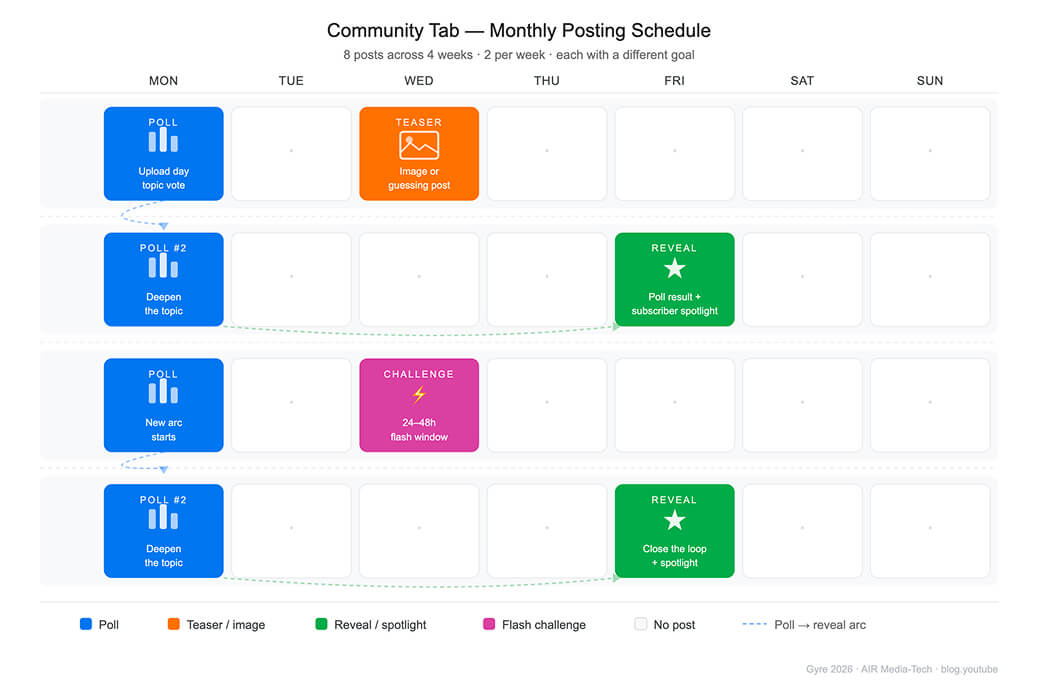
What Does a Good YouTube Community Posting Schedule Look Like?
2-3 posts per week are enough. Here's how to space them so each one serves a different goal.
How Do You Build an Engaged YouTube Community?
These are the 9 tactics that produce the most consistent results across the channels we audit. Jump straight to any one of them.
- Reply with a question, not a thank-you
- Tie your poll to the next upload
- Run a poll series, not a one-off poll
- Frame your live Q&A around feedback
- Pin a viewer's comment, not your own
- Run a flash challenge with a deadline
- Post a teaser that makes viewers guess
- Feature a subscriber every week
- Resurface old content with strong framing
- Bring in a guest for a Community Tab AMA
Reply With a Question, Not a Thank-You
That one shift is the most common comment improvement we make in channel audits. A viewer who gets a follow-up question from the creator is far more likely to reply again, return to the video, and come back for the next upload. The comment section stops being a feedback wall and starts functioning as a regular meeting point.
YouTube's community guide for creators says it plainly: every interaction counts. Even hearting a comment sends a signal. Replying with something specific creates a thread. Threads are what give comment sections a pulse.
Don't reply to everything. Prioritize:
- Comments with a question — answer it, then ask one back
- Comments that share something personal — ask about the context
- Comments that push back — engage with the pushback directly
In late 2025, YouTube Studio added AI-generated reply suggestions in 100+ languages — useful for high-volume sections, with full control to edit before posting. In December 2025, YouTube also added voice replies to comments — up to 30 seconds of audio, recorded from the YouTube mobile app. For personality-driven channels, a spoken reply lands differently than text. It is personal in a way typed sentences rarely are.
Tie Your Poll to the Next Upload
A poll about your next video does two jobs at once.
A poll vote counts as a meaningful interaction — the same algorithmic signal as a comment or a share. That's why polls outperform text posts, image posts, and video links in the Community Tab. That low barrier is why poll participation runs 3–5× higher than comment rates on standard posts.
A viewer who votes for one option has committed to it before the video exists, so when the upload lands they already have a reason to open it.
According to AIR internal data across hundreds of channels, YouTube channels that introduced a weekly poll saw 1.5–6× more engagement on those posts than on their average video comment sections.
Run a Poll Series, Not a One-Off Poll
A one-time poll gets votes. A poll series builds an audience that returns across multiple posts. Instead of 'What should I cover next?', run a sequence:
- Week 1: topic vote ('Where do you want to go next?')
- Week 2: format vote ('Adventure or culture?')
- Week 3: follow-up post with the decision ('Here's what I'm planning based on your votes')
The full poll strategy is in AIR's polls engagement guide.
Channels in your niche are outperforming you?
Let's find the reason and the fix. We'll put your channel next to the right benchmarks and show you the specific gap, not a generic checklist. → Show me the gap.
Frame Your Live Q&A Around Feedback, Not Performance
Ask the right question during your live Q&A. Not 'What did you think of the last video?' but 'What's one thing you'd love to see that we haven't done yet?' The second version gives you answers worth using. It also tells the viewer that their opinion shapes what comes next — which is what makes people come back to a live.
YouTube's community guide names live Q&As as a proven way to deepen community. The live format drops the editing layer. The viewer knows they're talking to you in real time. That's what makes YouTube live chat engagement different from comments.
One operational detail: post a Community Tab update 24 hours before a stream. According to Gyre's 2026 community tab analysis, a poll or preview post published 24 hours before a stream noticeably lifts live attendance. It surfaces in subscriber feeds and works as a reminder.
Pin a Viewer's Comment, Not Your Own
When you pin your own announcement, you signal the space is yours. When you pin a viewer's sharp take, honest pushback, or question nobody else asked, you signal the space belongs to everyone. That's what makes people want to contribute.
What to pin
|
Situation |
What to pin |
Why it works |
|
Tech or product review |
The viewer who raised the alternative nobody else mentioned |
Opens debate, draws in other viewers with opinions |
|
Fitness/lifestyle video |
Comment that started the most interesting thread |
Signals you read the section; invites similar quality |
|
Contested or opinion topic |
A dissenting view you genuinely respect |
Frames the section as a forum, not a feedback box |
|
Tutorial or how-to |
The question that most viewers probably had but didn't ask |
Useful for the whole audience; rewards the one who asked |
The full breakdown of what gets replies versus what gets ignored is in AIR's pinned comment guide.
Run a Flash Challenge With a 24–48 Hour Deadline
The deadline is the point.
Open-ended prompts with no cutoff get low response rates. A 24–48-hour challenge gives viewers a reason to act now. 'Flash Photo Challenge: show me your desk setup!' closes before the next video drops. That time pressure is what drives participation.
Three things the challenge needs to work:
- Low enough effort to complete in a few minutes
- Specific enough that responses look different from each other
- Tied to your niche so the answers feel relevant to other viewers, not just you
A shoutout or feature in the next video closes the loop — it gives people a reason to participate beyond the challenge itself. In food, fitness, DIY, travel, and gaming niches, viewers' responses become material in themselves.
Post a Teaser That Makes Viewers Guess
Make them guess, don't explain.
'New video Friday — it's about [topic]' gets seen and forgotten. A close-up image from the shoot with 'What do you think this is?' gets comments. The difference is that curiosity without the answer prompts participation. People want to be part of the reveal.
For newer channels: pair the teaser with a clear mechanic. 'First correct guess gets a shoutout in the video.' That mechanic gives undecided viewers a reason to comment.
The Posts tab surfaces in subscriber feeds without a full upload. Community posts can also appear on the home feed of viewers who've engaged with similar content — not just your own subscribers. That reach is specific to Posts, and most creators don't use it. More on how the Community Tab distributes content in Gyre's 2026 analysis.
Feature a Subscriber Every Week
Recognition on a schedule works better than recognition at random.
A weekly Subscriber Spotlight (pinning or featuring a viewer's comment, insight, or story) does two things at once. It rewards the viewer being featured. And it signals to every other viewer that this comment section is worth contributing to.
How to run it
- At the end of each upload cycle, read through comments on the previous video
- Pick the one that added something — an interesting perspective, a useful tip, a personal story that connected
- Pin it, mention it in the next video, or post it in the Community Tab with context on why you picked it
Over time, viewers start leaving more considered comments because they know the creator reads them.
The same recognition pattern drives Memberships. When we helped a Health & Sport channel rebuild their Memberships strategy, adding new member recognition in streams and shoutouts (not financial incentives, just public acknowledgment) was one of the highest-impact changes. Monthly Membership income grew 16x in six months.
Resurface Old Content With Strong Framing
Any channel with more than 50 videos has content worth resurfacing.
A 'Hidden Gem' Community Tab post is the lowest-effort way to send views to existing content.
But the framing determines whether it works
'We covered this three years ago, and it still holds up' outperforms 'check out this old video', because it gives the viewer a reason the content is worth their time right now. A caption that explains what changed, what didn't, and what a viewer takes from it in 2026 that they couldn't in 2023 does the work a plain link can't.
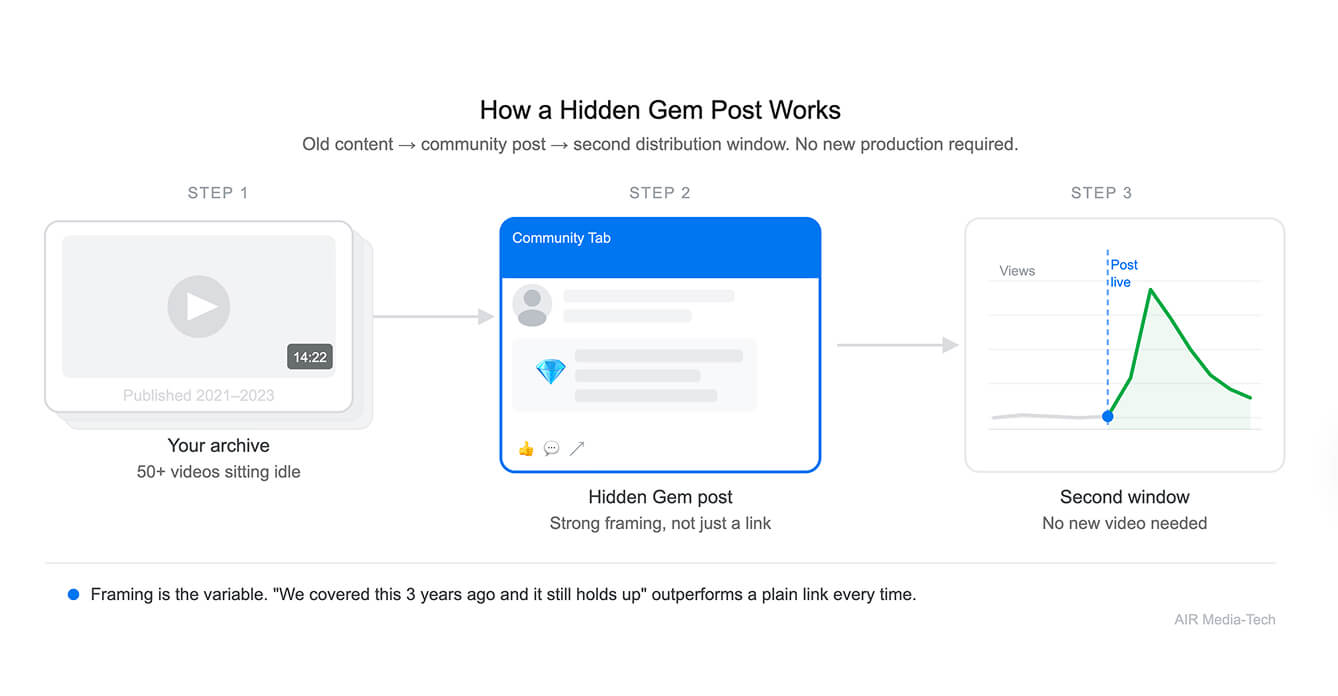
For channels with large archives, this connects to a broader content reuse strategy. AIR's guide on what to do with old videos covers the metadata and playlist approaches that give older content a second distribution window. Hidden Gem posts are the community-side complement to those technical moves. The article on making users rewatch your videos covers the psychological side.
Bring in a Guest for a Community Tab AMA
Low effort to set up. High value to the viewer.
Bringing a guest into your Community Tab for a mini AMA, a takeover post, or a collaborative Q&A adds new thinking to your audience.
Viewers who show up for the guest's perspective become familiar with your channel in the process. The only constraint that matters is relevance. A guest who shares your audience's core interest and brings a viewpoint they haven't heard is worth the coordination. A tangentially related guest generates weak responses. Audience overlap is the variable, and the same principle applies to YouTube collaborations broadly. The guide on where to find collaboration partners on YouTube covers the vetting and outreach process.
How many times has your tactic failed on YouTube?
You can keep testing moves. Or let a team with a 450K-channel dataset and 21 AI diagnostic tools tell you what will work for your channel.
Find what's capping meWhat Separates Weak Community Moves from Strong Ones?
These patterns come from what we see in channel audits before and after adjusting the community approach.
|
Weak version |
Why it fails |
Strong version |
Why it works |
|
Reply: 'Thank you for watching!' |
No thread, no reason to return |
Reply: 'What made you start doing that? Curious.' |
Creates a conversation; the viewer comes back to check the reply |
|
Post: 'New video out now — go watch!' |
Pure promotion; low engagement |
Post: 'We tried something different in this one. Curious what you notice.' |
Prompts engagement before the viewer even clicks |
|
Poll: 'Like this video? Yes / No' |
Binary; no insight; no reason to comment |
Poll series: Week 1 topic → Week 2 format → Week 3 reveal |
Builds a story arc across posts; the same viewer engages three times |
|
Pin: Own announcement at top |
Signals the space belongs to the creator |
Pin: A viewer's sharp observation or honest pushback |
Signals the space is open; raises comment quality over time |
|
Spotlight: Random subscriber shoutout |
Feels arbitrary; no standard set for others |
Spotlight: Quote a specific comment, explain why you picked it |
Sets a clear standard; comment quality improves week over week |
Can YouTube Community Engagement Help Your Channel?
Maybe. But maybe something more important is missing.
We audit channels across 10 pillars — packaging, retention, traffic, niche, portfolio, revenue, audience, forecast, risks, and roadmap — and hand you a fix for all of them.
What you get:
- A structured report covering all 10 pillars of channel performance
- A 30-day action plan ranked by impact
- A 45–60-minute live walkthrough with your AIR strategist