YouTube allows two active strikes and can remove a channel at the third, as long as all three land within 90 days. The part that trips people up is that it keeps two separate counts, one for the Community Guidelines and one for copyright. So a channel with two copyright strikes and two guidelines strikes is still online, and it's the third strike of the same kind that can take it down.
That third strike can arrive faster than people expect. At AIR Media-Tech, our Safety team handles strikes for partner channels and has seen creators shrug off one copyright strike, then get two more at once. After the third, YouTube usually gives about a week to respond, and sometimes blocks the channel the same day. That's why the team's advice is to deal with every strike, even the first.
The first step is the same for both kinds. Leave the video up, because deleting it doesn't remove the strike and can cost you the appeal. Then check which kind of strike you got, since each one has its own way out.
Key takeaways
- Two strikes are allowed. A third strike of the same kind within 90 days can get a channel removed.
- The two kinds count separately. Community Guidelines strikes and copyright strikes each have their own limit of three.
- After a third strike, time is short. AIR Media-Tech's Safety team usually sees about seven days to respond, and sometimes none.
- Deleting the video doesn't help. It doesn't remove the strike, and after a guidelines strike it costs you the appeal.
- An active guidelines strike blocks a YPP application. A copyright strike doesn't, though it can make the review stricter.
How Many Strikes YouTube Allows: Three per System, and There Are Two Systems
We took this question to the Safety team at AIR Media-Tech, an official YouTube partner that handles strikes for our partner channels. Anastasiia Kulyk, who leads the team, answered it in one line. "Two are allowed. The third is already a block, unless you start acting." So when you see both "two" and "three" as the answer, they mean the same rule. A channel can carry two active strikes, and the third within 90 days can end it.
Two kinds of YouTube strikes, two separate counts
Comes from YouTube
Community Guidelines strike
YouTube's reviewers give it when a video, thumbnail, post or comment breaks the Community Guidelines. A first violation usually brings a warning instead.
Comes from a rights holder
Copyright strike
A rights holder sends a legal takedown, and YouTube accepts it. There's no warning first, so the first valid takedown is already a strike.
Each kind has its own limit of three strikes within 90 days. Source: YouTube Help on Community Guidelines strikes and copyright strikes.
YouTube counts the two kinds of strikes separately, and the third strike of the same kind within 90 days can get a channel removed. Its copyright strike page even calls copyright strikes "different from Community Guideline strikes and copyright claims." In almost everything else the two differ too, from what the first strike blocks to how a strike comes off early, as the table shows.
| YouTube strike rules | Community Guidelines strike | Copyright strike |
|---|---|---|
| 1st strike | One week without uploads, live streams, scheduled videos, Premieres, custom thumbnails, posts or playlist edits | The video is removed and Copyright School opens. If the strike came from a live stream, live streaming is blocked for 7 days |
| 2nd strike within 90 days | Two weeks without posting | The video is removed. After a live-stream strike, another copyright strike makes the live streaming block 14 days |
| 3rd strike within 90 days | The channel can be permanently removed | The account and associated channels can be terminated, and new channels aren't allowed |
| When a strike expires | 90 days after it was issued | 90 days after it was issued, once Copyright School is done |
| How to remove one early | An appeal, within 6 months of the strike | A retraction from the rights holder or a counter notification |
Source: YouTube Help pages on Community Guidelines strikes, copyright strikes and appeals, checked October 2026.
Two copyright strikes and one guidelines strike won't remove a channel
Because the counts are separate, two copyright strikes and one guidelines strike don't add up to three, and the channel stays up. It's still one copyright takedown away from the limit, though, so the next copyright strike is the one that matters most.
YouTube can also skip the counting entirely. One severe violation can end a channel with no strikes at all, YouTube Help says.
Community Guidelines Strikes: A Warning First, Then One Week, Two Weeks, Removal
A first Community Guidelines violation usually ends with a warning, not a strike. YouTube removes the video and names the policy it broke, while your uploads, streams and other features keep working. The warning stays on the channel, though, and it decides what the next violation costs. Break the same policy again within 90 days, and the warning can turn into your first strike.
The 90 days start when you finish the policy training
YouTube offers a short policy training on the rule you broke, and that's how a warning expires. Once you finish it, the warning comes off 90 days later. The clock starts on the day you complete the training, not the day you got the warning, so the sooner you take it, the sooner the warning is gone. You'll find the training on the Studio dashboard, in the Content tab and behind the link in YouTube's email, according to YouTube Help.
AIR Media-Tech's Safety team sees the training work the way YouTube describes. In the team's experience, the warning comes off after those 90 days unless something else on the same topic comes up in that time. If it does, the warning stays, and a strike can follow.
Take the training the day the warning arrives
The 90 days start when you finish it, not when YouTube sends the warning, so every day you wait moves back the date the warning comes off.
The training isn't always on offer. YouTube says not every warning qualifies, and repeat offenders can lose access to it. Breaking a different policy after the training brings another warning instead of a strike.
What a first, second and third strike blocks
The first strike freezes the channel for a week. The week counts from the day you acknowledge the strike in Studio, and for those seven days you can't do any of the following.
- upload videos or live streams, or start a scheduled live stream
- schedule a video to go public, create a Premiere or add a trailer to one
- create custom thumbnails or posts
- create or edit playlists, add collaborators to them, or save playlists from the watch page
Try to upload during that week, and YouTube shows an error that reads "Too many strikes due to Community Guidelines strikes. You cannot upload videos at this time." Creators get it after their first strike, so in YouTube's wording, even one strike can be too many. Posts and live streams get similar messages, and they all go away once the freeze ends.
Anything you had scheduled to go public turns private for that week, so you'll need to reschedule it. Full access comes back on its own afterwards. The strike itself stays on the channel for 90 days from the day it was issued, and YouTube Help warns it can also cost you advanced features.
A second strike within those 90 days means two weeks without posting. A third one within the same 90 days can remove the channel for good. If you think YouTube got a strike wrong, you have six months to appeal it.
Two strikes on your channel already?
One more within 90 days, and YouTube can remove the channel, usually with about a week to respond and sometimes less. Our Safety team goes through both strikes with you and gives you a plan before a third one lands.
Get help with my strikes →Copyright Strikes Skip the Warning: What Happens After 1, 2 and 3
A copyright strike has no warning stage. The first valid takedown already counts, YouTube removes the video, and you're asked to finish Copyright School, a short course you only take once. Until you do, the strike won't expire, and once you do, the 90 days still count from the day of the strike.
A copyright strike doesn't freeze the channel, though, so you can keep uploading the whole time. Here is what each strike does, according to YouTube's copyright strike page.
- One copyright strike. The video comes down and Copyright School opens. If the takedown hit a live stream, you can't go live for 7 days.
- Two copyright strikes. The same happens to the second video. After a live-stream strike, another copyright strike stretches the live streaming block to 14 days.
- Three copyright strikes within 90 days. YouTube can terminate the account and every channel linked to it, and you can't create new ones. It works the other way too, so a linked channel with three strikes puts yours at risk.
A copyright strike can also come off early. The rights holder can retract the takedown, or you can file a counter notification if the video was removed by mistake or counts as fair use. AIR Media-Tech's Safety team sees most cases settled through a counter notification, and our guide to removing a copyright strike walks through each route step by step.
Waiting out the 90 days rarely hurts a channel in the team's experience, but they still advise dealing with every strike, because the next two can arrive sooner than you think.
Sometimes the rights holder is simply hard to reach. A kids channel we work with got hit over music it had a license for, its objection was rejected, and the claimant never answered emails. Our team tracked the claimant down, the strike came off, and the channel went on to earn $5,360 after the recovery, as we describe in the full case.
A kids channel we work with, at a glance
The strike
Copyright, over music the channel had a license for. The objection was rejected, and the claimant never answered emails.
What our team did
Tracked the claimant down, and the strike came off.
Result
$5,360 earned after the recovery.
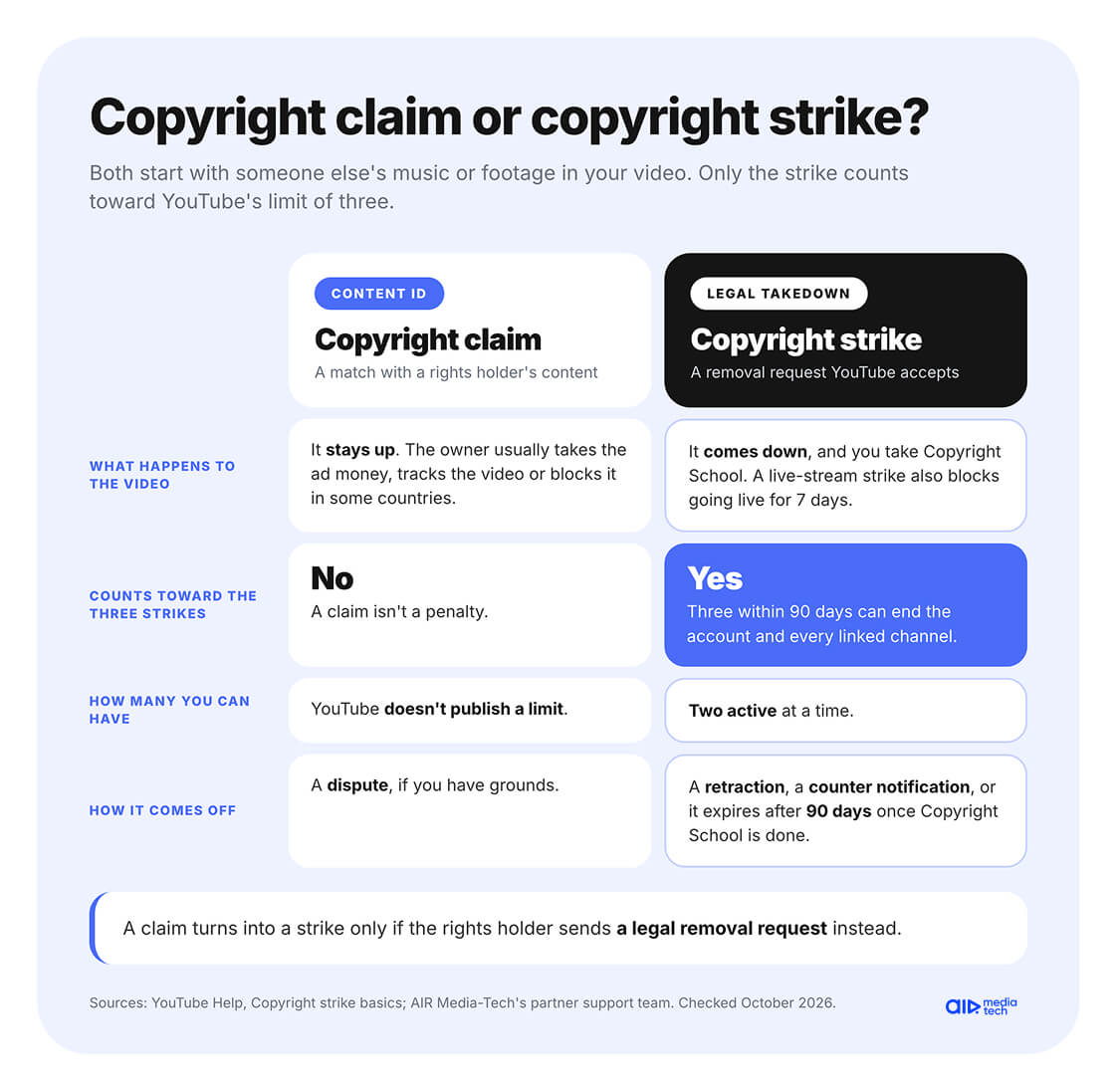
A copyright claim is not a strike
Creators often ask how many copyright claims YouTube allows. YouTube doesn't publish a limit, because a claim isn't a penalty. When Content ID matches your video with someone else's music or footage, the rights holder usually takes the ad money from that video, tracks it, or blocks it in some countries, and the video stays up. Our partner support team puts it simply. A claim lets the owner take the monetization from one video, and it doesn't count toward your three strikes, as YouTube confirms.
A pile of claims usually isn't a problem for an original channel either. AIR Media-Tech's Safety team says it can become a reason for a closer look only when something about the channel already seems off. A claim turns into a strike only if the rights holder sends a legal removal request instead. Our Content ID guide covers how claims work and when to dispute them.
Three strikes in one day still count as three
Each video can carry only one copyright strike, but nothing stops three videos from getting struck on the same day. That's how xQc lost his main channel in November 2023. It already had two strikes when several takedowns hit at once, and the channel, with about 2.3 million subscribers, was gone before his counterclaim went through, Tubefilter reported.
When a batch like that comes from one company, AIR Media-Tech's Safety team starts with a calm check rather than a rushed appeal.
- Look into the company, each strike, and what exactly you used.
- Check whether your use could count as fair use, and dispute the takedowns if you have grounds.
- If you did use their content, contact the company and ask what it wants to settle and what proof of ownership it has.
- If the company turns out to have no rights at all, dispute as well, with that evidence in hand.
When you can't tell whether the claimant even owns the rights, get a second pair of eyes before you answer. Strike Resolution checks the claims, the claimant, and your footage with you, then helps you decide whether to dispute, negotiate, or wait.
What Happens After 3 Strikes on YouTube, and How Many Days You Usually Get
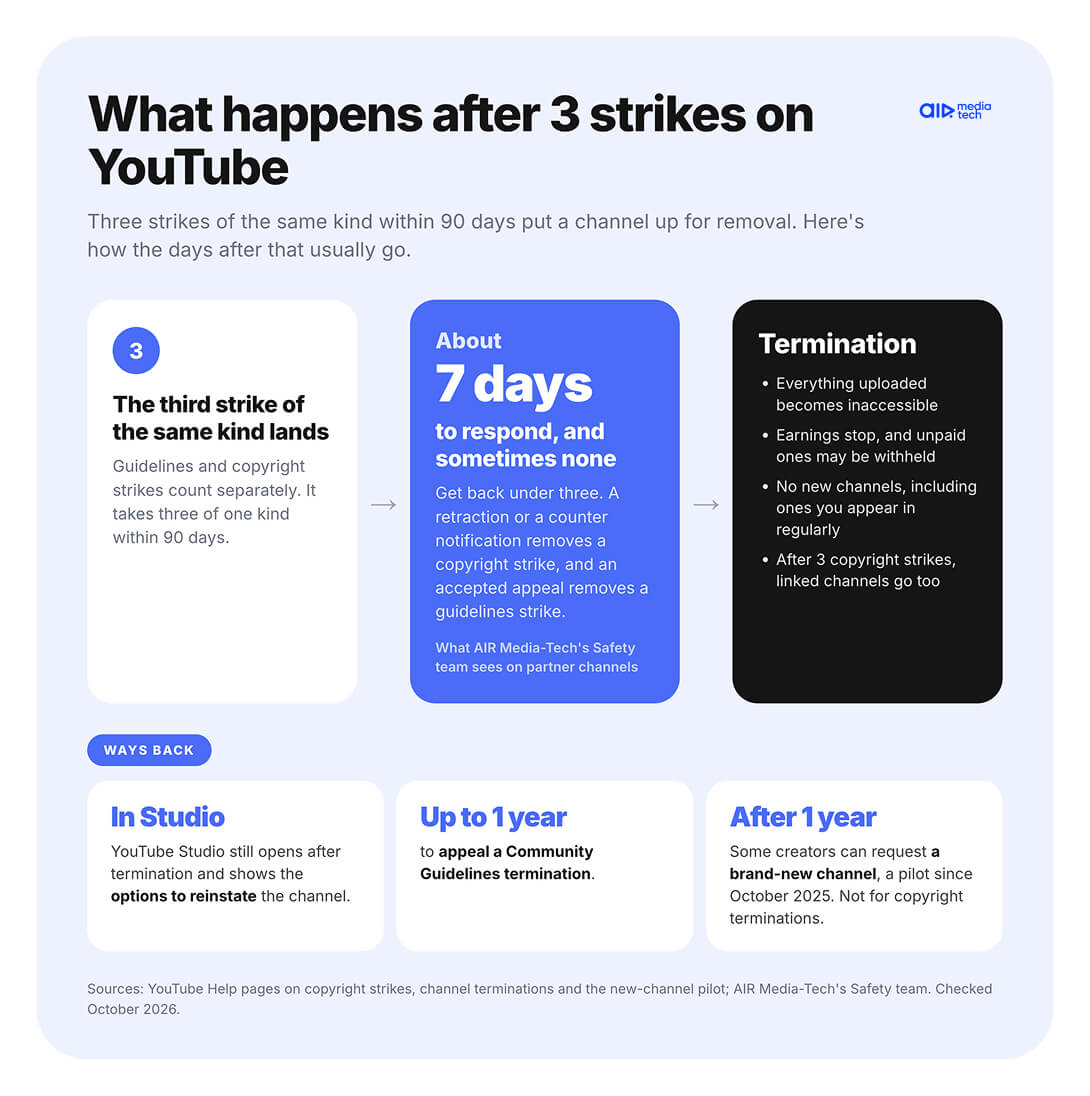
Three strikes of the same kind within 90 days put the channel up for removal, and from that moment, time is short. For copyright strikes, YouTube Help promises a 7-day courtesy period, but only to channels in the YouTube Partner Program. In practice, a channel usually gets about seven days to respond after the third strike, and sometimes none at all. That's what AIR Media-Tech's Safety team sees on partner channels.
“
Usually they give seven days. But sometimes a channel gets blocked on the day the third strike comes in. In most cases, there's time to appeal.
Anastasiia Kulyk, Safety Team Lead, AIR Media-Tech
Those days are for getting the count back under three. A copyright strike comes off when the rights holder retracts it or a valid counter notification goes through, and a guidelines strike comes off when YouTube accepts your appeal. Remove one, and the channel is back to two.
If the channel does get terminated, it loses more than its videos.
- Everything uploaded to the channel becomes inaccessible.
- Earnings stop, and YouTube may withhold whatever hasn't been paid out yet.
- You can't use, create or buy another channel, and the ban also covers channels where you appear regularly.
- After three copyright strikes, channels linked to your account go down with yours.
These rules come from YouTube's pages on copyright strikes and channel terminations.
A terminated channel isn't always gone for good. YouTube Studio still opens after termination and shows the options to reinstate it, and a guidelines termination can be appealed for up to a year. Our guide on restoring a deleted YouTube channel covers that route step by step.
Since October 2025, YouTube has also been piloting a way back for some creators. A year after termination, they can request a brand-new channel, which starts from scratch with no old videos or subscribers. The pilot isn't open to channels terminated for copyright infringement, YouTube Help says, so a copyright termination has to be fixed through the strikes themselves.
How an Active Strike Affects Monetization and Your YPP Application
A strike hits your earnings differently depending on where your channel stands with the YouTube Partner Program. An active Community Guidelines strike blocks a YPP application, while a copyright strike doesn't, though it can make the review stricter. For channels already in the program, a strike costs money in smaller ways.
If you're about to apply to YPP
YouTube's eligibility rules ask for no active Community Guidelines strikes on the channel. You can apply once the strike expires, or sooner if an appeal removes it, according to YouTube Help. Copyright strikes aren't on that list, but AIR Media-Tech's Safety team still treats them as a warning sign. In the team's experience, a channel with copyright strikes gets a stricter review, because the strikes point to a problem on the channel.
A warning works differently. It doesn't stop you from applying, but the reviewer may look at the channel more strictly while it's active, our partner support team says. Once you finish the policy training and 90 days pass without another violation, the warning comes off, and the reviewer no longer sees it.
The timing matters more than usual this winter. From February 1, 2027, new applicants need 8,000 watch hours instead of 4,000, or 20 million Shorts views instead of 10 million. An application sent before that date is still judged at 4,000 hours, our partner support team confirmed, but a channel can't apply while a guidelines strike is active.
YPP watch-hours bar for new applicants
Application sent by January 31, 2027
4,000
watch hours
Application sent from February 1, 2027
8,000
watch hours
A guidelines strike from early November 2026 or later is still active on February 1, so waiting it out means 2x the hours.
A strike that lands in early November 2026 or later won't expire before February 1. That's why our partner support team advises appealing rather than waiting, unless the violation is obvious and there's nothing to argue. Our guide to the 2027 changes covers who still applies at 4,000 hours.
If your channel is already monetized
Channels already in YPP aren't removed from the program for a guidelines strike, YouTube says. Strikes still cost money in quieter ways.
- The struck video comes down, and its earnings go with it.
- A copyright strike on a live stream blocks live streaming for 7 days, and Super Chat and other live income stop with it.
- A guidelines strike freezes uploads for a week, or two weeks after a second one, so nothing new earns in that time.
- Strikes can contribute to a monetization suspension on all your related accounts, YouTube Help warns.
If monetization does get suspended, deleting the video won't fix it. You'd need to appeal the guidelines strike or resolve the copyright one, and otherwise YouTube may turn monetization back on after three months without new issues.
What to Do in the First Days After a Strike
The first days after a strike decide whether it stays one strike. Our partner support team sends partners the same short plan after any strike, and it starts in YouTube Studio rather than in the video editor.
1. Find the strike in Studio
The Dashboard on a computer, Account Status in the YouTube Studio app.
2. Leave the video up
Deleting it doesn't remove the strike, unless the removal was scheduled and the 7 days aren't over.
3. Choose your way out
Appeal a guidelines strike once, within six months. For a copyright strike, ask for a retraction or file a counter notification.
4. Check your older videos
Look for the same policy, music or footage before another strike lands.
Find the strike in YouTube Studio
Start by checking which kind of strike you have and when it expires. On a computer, open the Dashboard in YouTube Studio. Copyright strikes show under Active copyright strikes, and Community Guidelines warnings and strikes sit in the Channel violations card.
In the YouTube Studio app, tap your profile picture and open Account Status, where the Channel violations section lists both kinds, YouTube Help says. Tap a strike to see which video it hit and what you can do next.
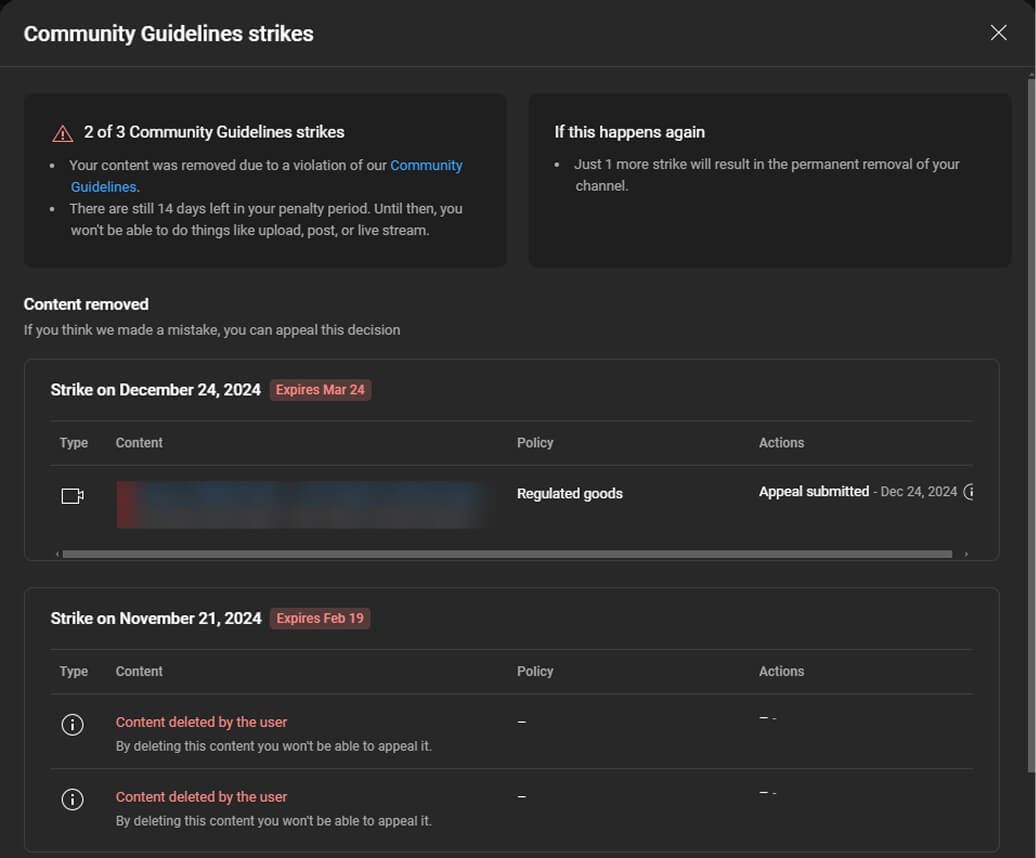
Here's that page for a channel we work with, back when it had two guidelines strikes. Studio shows how many strikes are active, how many days of the penalty are left, and when each strike expires.
Don't delete the video, with one exception
Deleting the video feels like the quickest fix, and it almost never is. The strike stays either way, and YouTube can even issue a guidelines strike on content you've already deleted. For a guidelines strike, deleting also costs you the appeal, because a strike on a deleted video can't be appealed again, according to YouTube Help. Next to a deleted video, Studio warns that "By deleting this content you won't be able to appeal it." That's why the email our support team sends partners after a strike carries the line "Don't delete the video" right in the subject.
The one exception is a scheduled copyright removal. Some rights holders give you 7 days to take the video down yourself, and if you do, no strike lands. The copyright email from [email protected] says whether you have that option, YouTube explains. In every other case, deleting doesn't resolve a copyright strike.
Appeal, ask for a retraction, or wait
Which way out you take depends on the kind of strike.
- Community Guidelines strike. Appeal from the Channel violations card on the Studio Dashboard. You have six months, and each strike gets only one appeal, so make it count. Our support team's advice is short. Explain the context of the video, because YouTube looks at facts, not intentions.
- Copyright strike. Ask the rights holder to retract it, file a counter notification if the removal was a mistake, or finish Copyright School and wait out the 90 days. Our guide to removing a copyright strike covers each route.
A granted appeal brings the video back and removes the strike. YouTube can also put the video back with an age restriction instead. A rejected appeal leaves the strike in place but adds no extra penalty, per YouTube Help.
Check your older videos against the same policy
One strike is often a sign that other videos carry the same problem, and old uploads can still be flagged. So after a guidelines strike, go through your back catalog with the policy YouTube named in mind, and fix or hide anything close to the line. After a copyright strike, look for other videos with the same music or footage, and replace it before another takedown arrives.
That's the habit behind AIR Media-Tech's Safety team's advice to deal with every strike, even one. For music and footage, our guide on how to avoid copyright strikes goes further.
Sure the strike was a mistake?
YouTube names the policy but rarely explains what it saw in your video, and each strike gets only one appeal. With Strike Resolution, our Safety team goes through the case with you and gives you a plan for every strike on the channel.
- A breakdown of what triggered each strike and whether it can come off early
- Help choosing the route, an appeal, a counter notification, a retraction or waiting, and writing it
- Escalation to YouTube when your case stalls
- A check of your other videos, so the next strike doesn't follow
- No need to join our network, the service works for any channel