In most cases, you can restore a deleted YouTube channel – if you move inside the recovery window. A channel you deleted yourself is often recoverable for about 30 days through your Google account. A channel YouTube terminated can be appealed, and since last October, some terminated creators can apply for a brand-new channel through YouTube’s Second Chances pilot. The one hard limit is a fully deleted Google account past its 20–30 day window, which is usually gone for good. Timing decides almost everything, so act today.
Which Kind of Deletion Are You Dealing With?
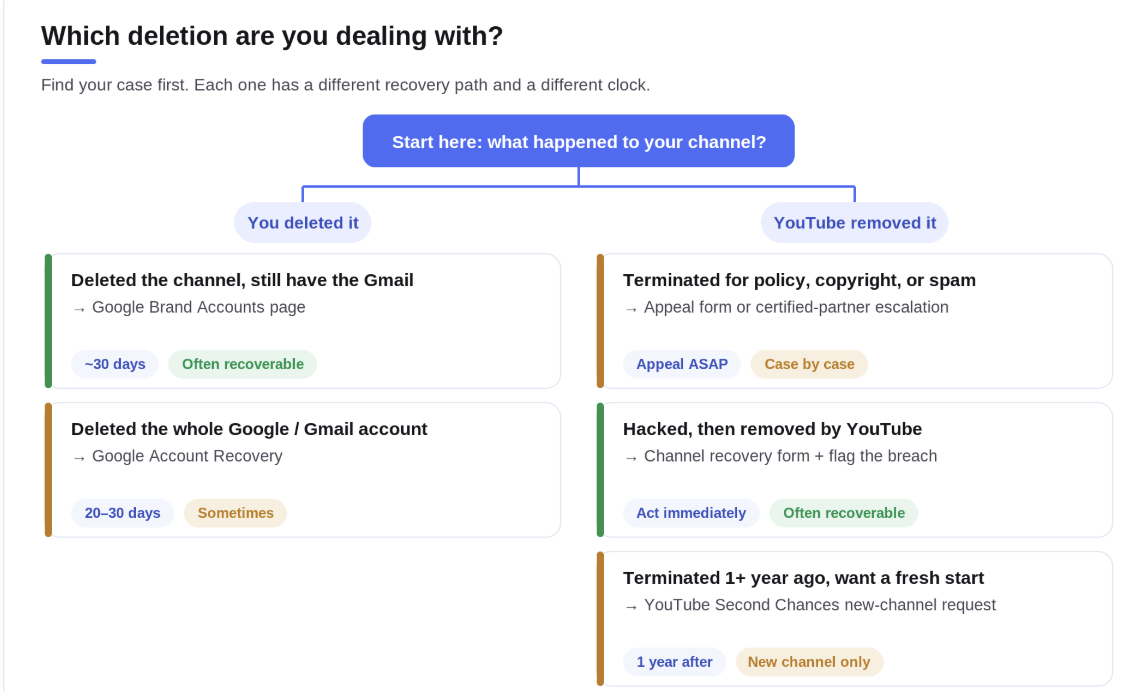
Recovery path by deletion type. Source: Google Account Help & YouTube Help, July 2026.
Start by naming your situation, because each one has a different recovery path and a different clock. Most creators lose their window by chasing the wrong fix for the wrong case. Find your row first.
|
Your situation |
Recoverable? |
Where to go |
Typical window |
|
You deleted the channel yourself (still have the Gmail) |
Often yes |
Google Brand Accounts page |
30 days |
|
You deleted the whole Google / Gmail account |
Sometimes |
Google Account Recovery |
20–30 days |
|
YouTube terminated the channel (policy, copyright, spam) |
Case by case |
Appeal form or partner escalation |
Appeal as soon as possible |
|
Channel was hacked, then removed by YouTube |
Often yes |
Channel recovery form + security team |
Act immediately |
|
Terminated 1+ year ago, want a fresh start |
Sometimes |
YouTube “Second Chances” new-channel request |
1 year after termination |
Source: Google Account Help and YouTube Help, current as of July 2026. Windows are typical, not guaranteed.
Quick Check: What Should You Do in the First 48 Hours?
Move fast and in order. The first two days decide most recoveries, because every window above is counting down while you read this.
- Confirm which case you are in using the table above. The wrong fix wastes the days you have.
- Sign in to the Google account that owned the channel, from a device you have used before. Do not create a new account.
- If you deleted the channel yourself, open the Brand Accounts page right away and restore it if it appears.
- If the channel was hacked, change your password, turn on 2-Step Verification, and remove unknown connected apps before you appeal.
- If YouTube terminated the channel, file one clear appeal with evidence. Several appeals at once can slow the review, not speed it.
- Save proof of ownership now: past emails from YouTube, analytics screenshots, and your original video files. You may need them to verify the account.
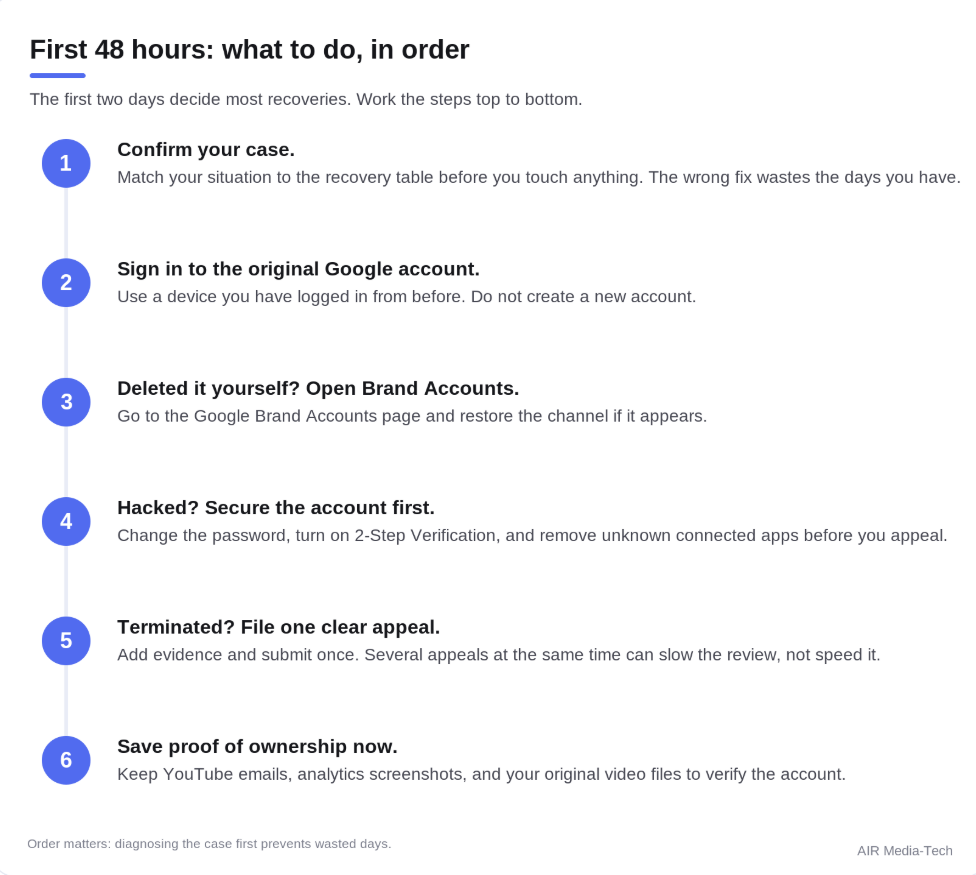
The first 48 hours, in order.
What Does “Deleted” Really Mean for Your Channel?
“Deleted” covers four different situations, and each one recovers differently. The reason recovery fails so often is a misdiagnosis: creators appeal to YouTube when the problem sits with Google, or wait for a manual review when a self-service button would have fixed it in minutes.
Here is how to tell your case apart.
Case 1: You Deleted the Channel Yourself but Still Have the Gmail
This is the most recoverable case, and the clock runs about 30 days. When you delete a YouTube channel from your Google account, YouTube warns that the action is permanent, but a Brand Account channel often sits in your Google account for a limited time before it is purged.
What to do?
Sign in to the Gmail tied to the channel, open your Brand Accounts page, and look for the deleted channel. If it appears, you can often restore it in a few clicks. This has worked days and even weeks after deletion, but the success rate falls sharply the longer you wait.
Case 2: You Deleted the Google Account Connected to the Channel
If the whole Google account is gone, the channel goes with it – but you have a 20–30 day window to bring both back. Use Google Account Recovery and verify ownership through a recovery email or phone number tied to the account.
What to do?
Start at Google Account Recovery. If you can prove ownership, you get back the Google account and the connected channel. If you cannot, Google locks it, and YouTube support cannot override Google’s account system. So if you are reading this and still have the Gmail account, keep it. That account is the anchor to your channel.
Case 3: YouTube Terminated Your Channel (Policy, Copyright, or Spam)
A channel YouTube removed can be appealed, and the correct path depends on why it was removed. If you are in the YouTube Partner Program, contact Creator Support through chat or email. Otherwise, submit the official appeal form through YouTube Studio or the direct link in your termination email.
Keep the appeal short, respectful, and specific. Support wants facts: why the takedown was a mistake, and what evidence backs that up. Use the YouTube channel-appeal help page to find the right form for your case.
Appeals stay open for one year after termination, and a successful appeal reinstates the original channel with its videos, subscribers, and watch history intact. That is the difference worth defending: an appeal gives you back what you had, while the Second Chances route below only grants a new, empty channel. Appeal first, and treat the new-channel request as the fallback.
Check which strike system removed the channel before you plan past the appeal. Three active copyright strikes and three Community Guidelines strikes inside 90 days both end a channel, but the two counts never mix. Only copyright terminations are excluded from Second Chances, so if copyright ended your channel, the appeal is the only route back.
If the termination followed a hack, go to Case 4 first. An appeal filed before you recover the compromised Google Account may be refused outright, and refiling wastes the one credible attempt you get.
Most termination appeals are rejected, and you get one credible attempt at it. AIR has walked over 500 channels through termination appeals since 2011. → Get your appeal reviewed before you send it.
Case 4: Your Channel Was Hacked
A hacked channel needs a different sequence, and the order is not optional. YouTube's own guidance is to recover the Google Account first, then appeal. An appeal filed before recovery completes may be refused outright.
Signs your channel has been compromised:
- All videos suddenly switched to private
- Videos published that break platform rules — crypto exchange streams, investment scheme livestreams
- Channel name changed to something unrelated to your content
- Icon, banner, or descriptions changed without your action
Step 1 — Recover the Google Account.
Every YouTube channel is tied to at least one Google Account, and a hacked channel means that account is compromised too. If you can still sign in, change the password and run a security checkup. If you cannot, start Google Account recovery. Every manager and owner on the channel does the same.
Step 2 — Revert the changes.
Delete anything the hijacker uploaded. Content posted from your channel counts against your channel, so strikes can accumulate while you are still recovering. See cleaning up a hacked channel.
Step 3 — File the right form.
Which one depends on what happened to the channel.
If the channel is still live but compromised — videos privatised, name or branding changed, content posted that isn't yours — file the hijacking report. It requires sign-in, so complete Step 1 first.
If the channel was terminated after the hack, use the hacked-channel appeal form instead of the general appeal form. It only works once account recovery is complete.
If both apply — the channel was terminated, and you have not regained account access — nothing else moves until Step 1 finishes. Neither form is reachable without it.
Secure the linked Google Account, audit channel permissions, and use a channel email that is not reused anywhere else.
The 9-month limit.
YouTube supports hacking cases only from the past nine months, because of its data retention policy. Older incidents may be unrecoverable. This is the one deadline in the whole process that cannot be appealed.
Evidence that speeds up review.
Attach proof of ownership: behind-the-scenes footage, raw files, clips showing your face or voice. Host it on Google Drive with link access set to anyone with the link.
After recovery.
In some cases, the malware is still on the machine that was compromised. A deep antivirus scan and, occasionally, an OS reinstall are what stop the second hack.
AIR's security team handles hacked-channel recovery for partner channels, typically in one to two weeks. Contact us before you file anything — we’ll guide you on confirming ownership to YouTube directly and the next recovery steps.
Can Terminated Creators Get a Second Chance in 2026?
Yes, for some. Last October, YouTube launched a Second Chances pilot that lets certain terminated creators request a brand-new channel, one year after termination. It is a fresh start, not a restore: old videos, subscribers, and monetization do not come back, and the new channel has to requalify for the Partner Program under current thresholds.
The pilot excludes channels terminated for copyright infringement or creator-responsibility violations, and it does not appear for creators who deleted their own channel or Google account. YouTube reviews each request against the severity of past violations and behavior on and off the platform. If you qualify, treat the new channel as a rebuild and plan to promote it from scratch.
What Survives a Channel Restoration?
A genuine restore brings your channel back as it was. A Second Chances rebuild starts you at zero. The gap between them is the whole reason recovery is worth fighting for.
|
Genuine restore |
Second Chances rebuild |
|
|
Subscribers |
Returned in full |
Start from zero |
|
Videos and watch history |
Returned in full |
Gone |
|
Monetization / YPP status |
Kept |
Must requalify |
|
Channel URL and handle |
Kept |
New channel, new handle |
|
Algorithmic standing |
Preserved |
Rebuilt from scratch |
This is why a real restore beats a fresh start every time. When AIR recovers a channel through partner escalation, the historical metrics and algorithmic standing come back intact, which is what let that Spanish kids channel keep growing right after it returned.
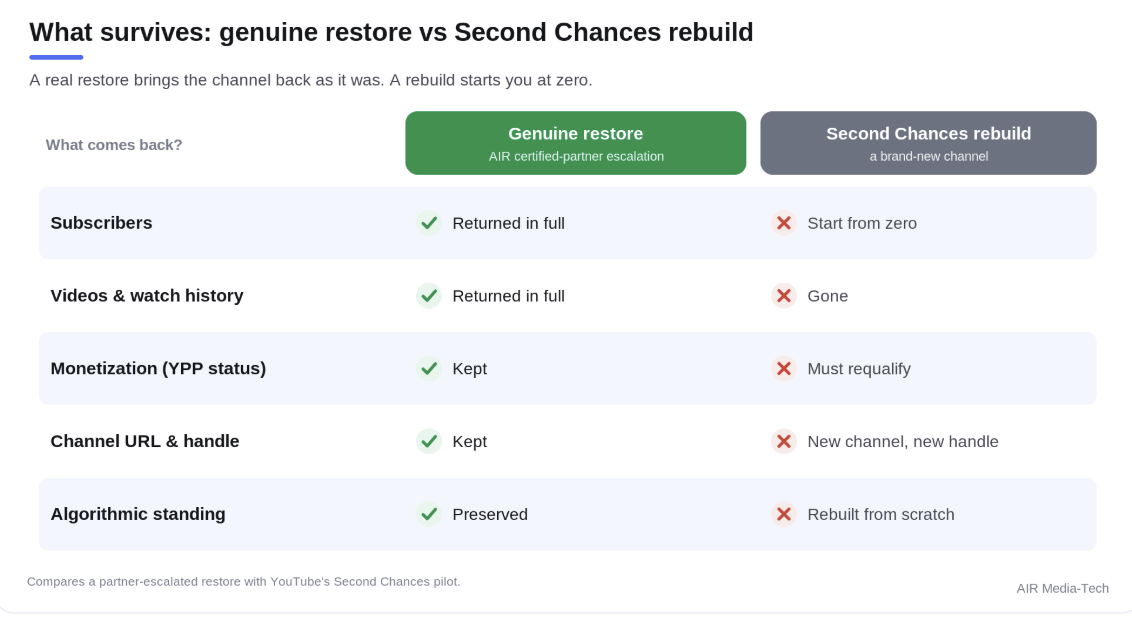
What a genuine restore keeps versus a Second Chances rebuild.
What Makes a Deleted YouTube Channel Impossible to Recover?
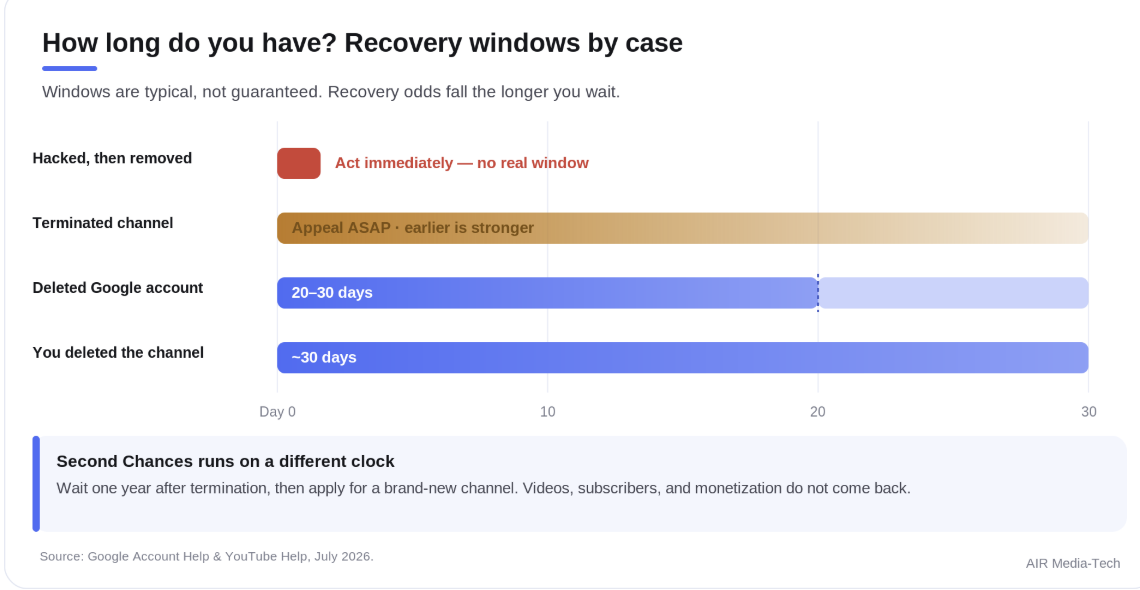
Typical recovery windows. Second Chances runs on a separate one-year track.
- Waiting too long. Most channels vanish permanently once the recovery window (about 30 days) passes.
- No ownership on file. If you never verified a phone number or recovery email, Google may not accept that the account is yours.
- Expecting YouTube to override Google. YouTube support cannot restore a deleted Google account, and Google support cannot reverse a YouTube policy termination. Different systems, different doors.
Deleted channel? Don't wait out the 30-day window.
Recovery odds drop fast once the clock starts. AIR's team escalates directly to YouTube and can act while your window is still open. → Talk to the recovery team.
How Do You Back Up a YouTube Channel Before It’s Gone?
The safest backup is Google Takeout, which exports your uploads in their original resolution straight from your own account. Run it before any rebrand, transfer, or deletion.
Open the Takeout page, sign in with the account that owns the channel, and select YouTube. Takeout can even schedule automatic exports every two months. For a Brand Account, switch to the brand profile first, or the videos will not export.
How Does AIR Restore Channels Creators Can’t?
AIR escalates through certified YouTube partner access, which reaches reviewers that self-filed appeals never do. Managing 3,000+ channels means the team can spot the false positive behind a termination and take a policy-backed case straight to YouTube.
- Spanish kids channel, deleted by YouTube, had its own appeal rejected. AIR traced the exact false positive, escalated to YouTube partner reps, and restored the channel with zero loss of historical metrics or algorithmic standing. The partner’s sibling Arabic channel recovered too, growing +72% views and +133% revenue in a quarter.
- A tech channel throttled by hidden strikes returned to +484% revenue after AIR pushed the appeals through internal escalation.
- A kids channel recovered $53K after AIR negotiated copyright-strike removal directly with the claimant.
Can AIR Help You Get Your Channel Back?
Yes. AIR's safety team can help to restore the channel. We support you with appeals, restorations, and disputes with YouTube alongside you. We guide you on what to file, in what order, and escalate through certified partner channels that a self-filed appeal never reaches.
What that means in practice:
- Diagnosis of which case you are in, before anything gets submitted
- A review of the appeal while it can still be changed
- Escalation through partner access when the standard route returns an automated rejection
- The same process for hacks, strike disputes, and copyright claims
No one can promise YouTube's decision, and any team that does is selling something. What moves the odds is filing the right thing, in the right order, inside the window.