
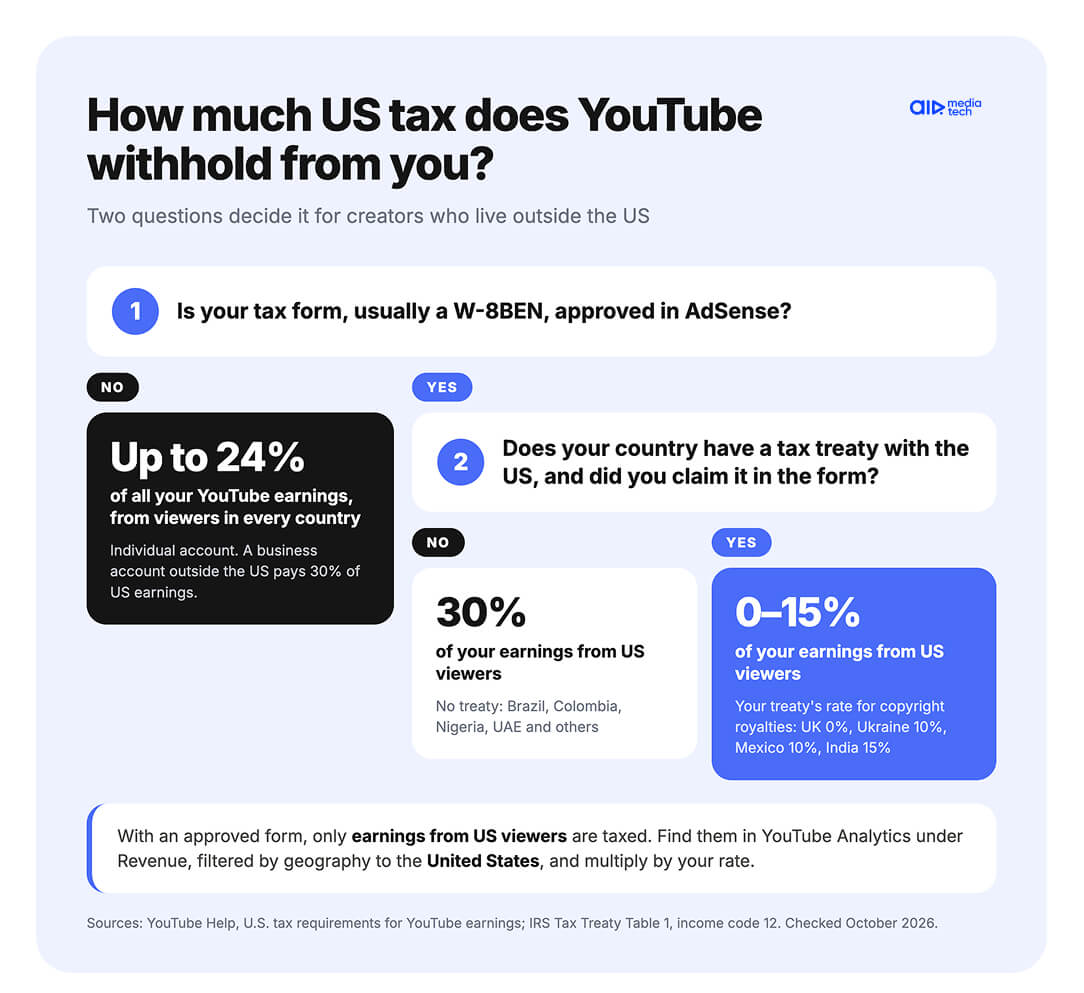
If you live outside the US and your channel was just monetized, AdSense for YouTube asks for your US tax info, usually on a W-8BEN form. With the form in place, Google withholds tax only from what you earn from viewers in the US, at 0% to 30% depending on your country. Without it, Google can withhold up to 24% of everything your channel earns, from every country.
Creators usually come to this from one of two screens in AdSense. Either a banner asks for tax info, or a line called US Ch. 3 tax withholding has already taken part of the month's earnings. The second has a deadline, because Google returns tax withheld at the wrong rate only within the same calendar year.
A tax treaty with the US can cut the 30% to 15%, 10%, or 0%. Without one, the form still pays off unless more than 80% of your revenue comes from US viewers.
In this guide:
- why the form matters before $100
- what Google takes in each case
- treaty rates by country
- no treaty with the US
- how to fill in W-8BEN
- after you submit
- getting withheld tax back
- when your form expires
- tax at home and Form 1042-S
Key takeaways
- Without a tax form, Google can withhold up to 24% of all your YouTube earnings. With the form, it withholds only from earnings from US viewers, at 0% to 30% depending on your country.
- YouTube Partner Program earnings get your treaty's copyright royalties rate. It's 0% for the UK, Germany, Spain and Japan, 10% for Ukraine, Mexico, Indonesia and Poland, and 15% for India and the Philippines. Brazil, Colombia, Nigeria and the UAE have no treaty with the US, so the rate there is 30%.
- Without a tax treaty, the form still pays off unless more than 80% of your revenue comes from US viewers.
- US viewers weigh more in revenue than in views. In CPM data AIR Media-Tech published in June 2025 from 3,000+ channels, US audiences had a $14.67 CPM and India $0.74. On one large international channel in AIR Media-Tech's network, 10% of views from the US bring in more than half of the revenue.
- Google refunds tax withheld at the wrong rate only within the same calendar year, through a corrected form with the affidavit ticked by December 31.
- The mistake AIR Media-Tech's support team sees most is a form that ran out. The creator forgets to submit a new one, and Google withholds 24% of everything.
YouTube Tax Info Before Your First $100: Why the US Asks Creators Who Live Elsewhere
"Do I need to submit tax info if I'm not withdrawing yet?" a creator from India asked on r/PartneredYoutube in February 2026. He was close to the $100 payment threshold and wanted to let the money build up. The top reply told him to wait until $100. Google's results show that reply first, and following it costs money.
Google is a US company, so US tax law makes it collect tax info from every creator in the YouTube Partner Program, wherever they live. Under Chapter 3 of the US tax code, Google has to withhold tax on your earnings from viewers in the US. That covers more than ads.
- ads on your videos
- YouTube Premium
- Super Chat and Super Stickers
- Super Thanks
- channel memberships
Earnings from viewers in other countries stay out of it.
Waiting for $100 changes nothing, because the tax comes off when your monthly earnings are finalized, not when you get paid. YouTube finalizes your earnings once a month and leaves US tax out of the final figure. On YouTube's payment calendar, that happens on the 7th–12th of the next month, and the payment comes on the 21st–26th, once your balance passes $100. So the deduction shows up in AdSense even while your balance sits below the threshold.
When US tax comes off your YouTube earnings
Month ends
Studio shows estimated revenue, before tax
7th–12th
Earnings are finalized and US tax comes off, even below $100
21st–26th
AdSense pays once your balance passes $100
Google asks for the form by December 10 each year, and without it, Google can withhold up to 24% of your total earnings from viewers in every country.
Google asks for the form even if your channel gets no views from the US. YouTube Help tells every creator in the program to submit it either way, and the rate for your country then applies whenever US viewers show up. Fill it in the week you're monetized, and your first finalized month already gets the right rate.
The tax form is one of three things AdSense needs before your first payment, next to the PIN and a payment method. Our guide to AdSense Step 2, the PIN and your first payment covers the other two.
24% of Everything or 30% of US Views: How Much Tax YouTube Withholds in Each Case
YouTube Help explains the rates with one creator in India who earns $1,000 in a month, $100 of it from viewers in the US. Without a tax form, Google takes $240. With the form but without a treaty benefit, it takes $30. With the form and India's treaty rate of 15%, it takes $15.
The first number is so much bigger because it comes out of a different pot. Without any tax info on an individual account, Google applies backup withholding of up to 24% to all of your YouTube earnings. Once your form is approved, Google withholds only from what US viewers bring in, and the rate depends on your country.
Here's what Google withholds in each situation.
| Your situation | What Google withholds | From which earnings |
|---|---|---|
| No tax form, individual account | Up to 24% (backup withholding) | All YouTube earnings, from every country |
| No tax form, business account outside the US | 30% | Earnings from viewers in the US |
| Form approved, no tax treaty or treaty not claimed | 30% | Earnings from viewers in the US |
| Form approved, treaty rate claimed | Your country's treaty rate, 0% to 15% for the countries in the next section | Earnings from viewers in the US |
| Form expired | Same as no tax form until a new one is approved | Depends on your account type, as in the first two rows |
Source: YouTube Help — U.S. tax requirements for YouTube earnings. Checked October 2026.
How much that is for you depends on what share of your revenue comes from the US, and it's usually bigger than your share of US views. In CPM data AIR Media-Tech published in June 2025 from 3,000+ channels, US audiences had a $14.67 CPM and India $0.74.
So a channel with 15% of its views from the US can easily get a much larger slice of its revenue from them.
Vlad Khvorostianyi from AIR Media-Tech sees it on large international channels in our network. On one of them, 10% of views come from the US, and those views bring in more than half of the revenue, because US ads cost the most and more of them run. Take a creator earning $40,000 a month that way. About $20,000 of it comes from US viewers, so even a 10% treaty rate means $2,000 a month in US tax. On a channel with half its views from the US, the US share of revenue can reach 60% to 90%.
To estimate your number, YouTube Help suggests four steps.
- Open the Revenue report in YouTube Analytics and set the dates to one month.
- Filter by geography to see estimated revenue from the United States.
- Find your withholding rate in AdSense under Manage tax info. It appears after you submit the form.
- Multiply the US revenue by that rate.
The tax itself won't show up in Studio, because withholding amounts aren't visible in YouTube Analytics. The exact figure appears in AdSense, in the Transactions report, as a line called US Ch. 3 tax withholding.
YouTube Withholding Tax by Country: Treaty Rates for Creators Outside the US
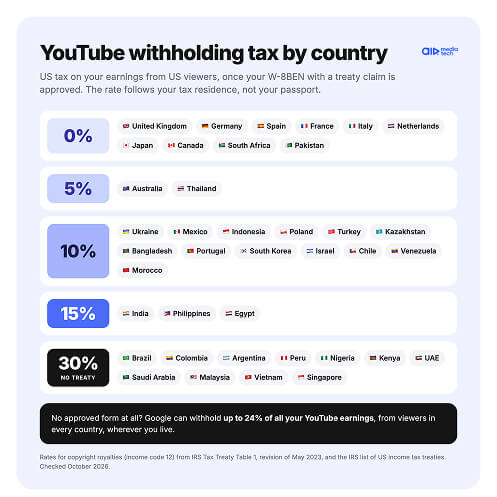
Ukrainian-language guides disagree on the rate for creators in Ukraine. Some say 0%, others 15%. The IRS treaty table puts it at 10%.
The rate comes from the tax treaty between your country and the US, and YouTube money is paid as royalties. For YouTube Partner Program earnings, the rate that applies is the one your country's treaty sets for copyright royalties.
Google's form fills in the treaty article and rate on its own once you pick your country and claim the treaty, but only if you enter your local tax number. The rate follows your tax residence, not your passport. A creator who has moved to Poland for good claims the Polish treaty, while one who is only staying abroad and remains a tax resident of Ukraine claims the Ukrainian one.
Here are the rates for creators in countries where YouTube audiences are big.
| US withholding on YouTube earnings from US viewers | Countries (tax residence) |
|---|---|
| 0% | United Kingdom, Germany, Spain, France, Italy, Netherlands, Japan, Canada, South Africa, Pakistan |
| 5% | Australia, Thailand |
| 10% | Ukraine, Mexico, Indonesia, Poland, Turkey, Kazakhstan, Bangladesh, Portugal, South Korea, Israel, Chile, Venezuela, Morocco |
| 15% | India, Philippines, Egypt |
| 30% (no tax treaty with the US) | Brazil, Colombia, Argentina, Peru, Nigeria, Kenya, United Arab Emirates, Saudi Arabia, Malaysia, Vietnam, Singapore |
Rates for copyright royalties (income code 12) from IRS Tax Treaty Table 1, revision of May 2023, and the IRS list of US income tax treaties, both checked October 2026. Treaty benefits have conditions, so check with a tax advisor if your case is unusual.
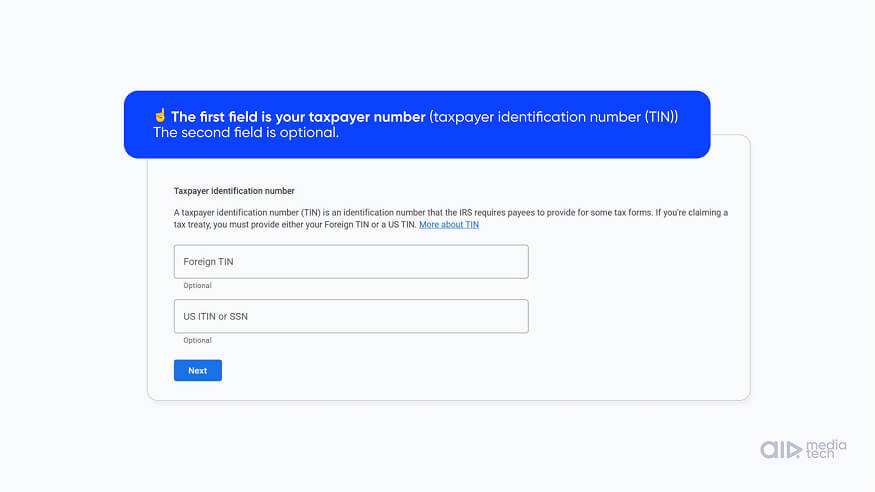
The tax number goes into the Foreign TIN field. It's the number your own tax office uses for you, and you don't need a US one.
- India: PAN
- Brazil: CPF
- Mexico: RFC
- Ukraine: RNOKPP, the individual taxpayer number
- Indonesia: NIK, the national ID number, which replaced the NPWP for residents
- Pakistan: your CNIC number
- Spain: the number on your DNI
- Poland: PESEL, or NIP if you run a business or pay VAT
- Colombia: NIT
- United Kingdom: UTR or National Insurance number
- Japan: My Number
Country numbers come from the OECD's tax identification number pages, and the UK and Japan from YouTube Help.
No Tax Treaty With the US: Why the W-8BEN Still Pays Off
Some Portuguese-language guides on how to fill in the W-8BEN for YouTube tell Brazilian creators to claim treaty benefits in the form, as if the US and Brazil had a tax treaty. The two countries don't have one, so there's nothing to claim.
Without a treaty, Google withholds 30% of what US viewers bring in, and the form can't lower that rate. It changes the base instead. Without the form, Google can withhold 24% of everything the channel earns, from every country.
Take a channel that earns $1,000 in a month, $200 of it from viewers in the US. With the form, Google withholds 30% of $200, which is $60. Without it, Google can withhold 24% of $1,000, which is $240. The math flips only at 80%, where 24% of all earnings equals 30% of US earnings. Without a tax treaty, the W-8BEN saves money for any channel that gets less than 80% of its revenue from US viewers.
No tax treaty, $1,000 a month, $200 of it from US viewers
Without the form
$240
withheld, 24% of everything
With the form
$60
withheld, 30% of US earnings
The form keeps $180 a month in your pocket, and it costs more only above 80% of revenue from the US.
Opening a US LLC
Videos and articles on this often suggest opening a US company. If you're its only owner, the IRS treats a single-member LLC as a disregarded entity, so for income tax its money is yours. The W-8BEN instructions say the owner, not the LLC, files the form and counts as the one receiving the income.
So a one-owner LLC on its own leaves the withholding where it was. Turning the LLC into a corporation is a separate tax decision with US corporate tax returns of its own, so it belongs with a tax advisor.
Joining a Network
Joining a network on its own doesn't change the rate either. YouTube Help says creators in a network still submit tax info in the AdSense account linked to their channel, and the tax comes out of the payment the network receives for that channel.
One setup does change it. When a channel sits in a network's own content owner account instead of as an affiliate, YouTube calls it owned and operated, and Google uses the network's tax info for it. Moving a channel there takes a contract with the network.
At AIR Media-Tech, this is our Premium CMS. A channel there is paid through our Canadian AdSense account, and under the treaty between Canada and the US, the withholding rate on its copyright royalties is 0%. It suits creators who live outside the US and run large original channels with no policy violations, a high share of views from the US and high revenue. The 0% doesn't apply to creators who live in the US. They pay US tax directly, wherever their channel sits.
Are you sure your channel's taxes are optimized?
Channels in AIR Media-Tech's Premium CMS are paid through our Canadian AdSense account, and under the Canada–US treaty the rate on YouTube Partner Program earnings is 0%. Our team will look at where your views and revenue come from and tell you whether this setup fits your channel.
Get a consultation →
How to Fill In the W-8BEN for YouTube in AdSense, Step by Step
YouTube's own reminder email asks creators to set aside 15–20 minutes for the tax form, because starting a new submission makes the previous form inactive. So don't open the form until you have your passport and your local tax number at hand.
Here's the path through AdSense for YouTube, in the order the screens come up.
- Sign in to AdSense for YouTube and open Payments, then Payments info, then Manage settings.
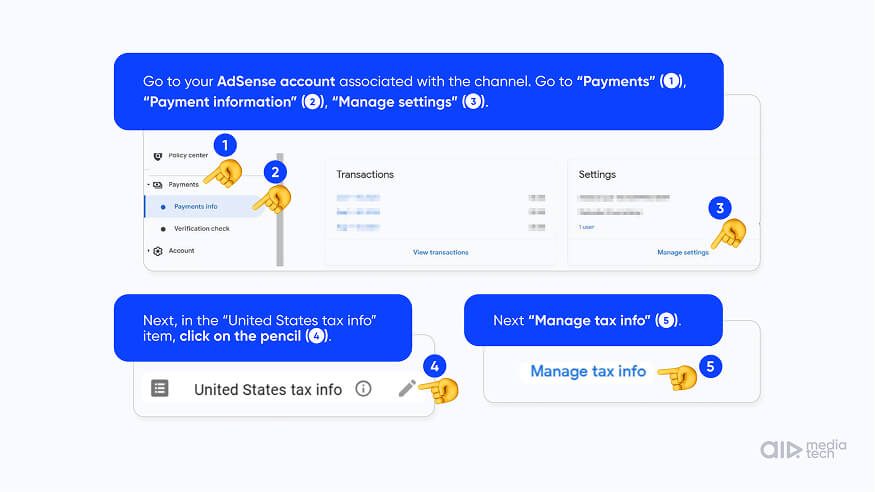
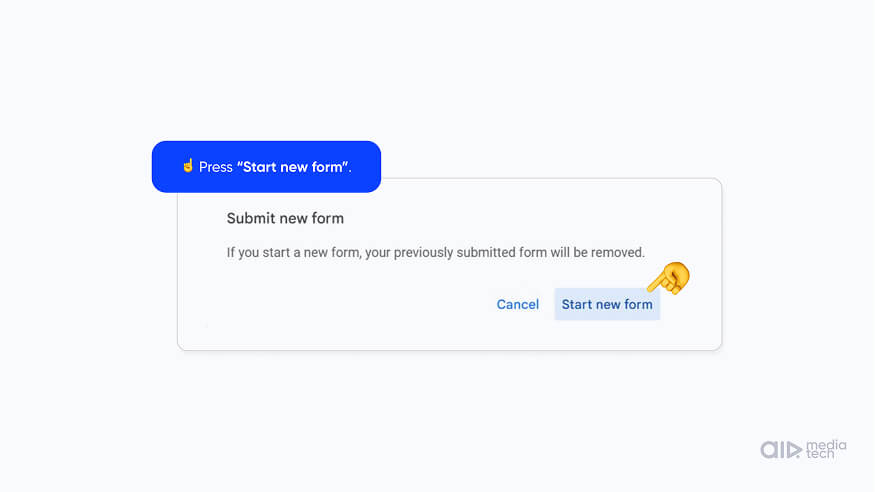
- In Payments profile, click the pencil next to United States tax info, then Manage tax info, and start a new form.
- Pick the account type. Choose Individual if the channel and its AdSense are in your own name, including if you're a sole proprietor, and Business if they belong to a company.
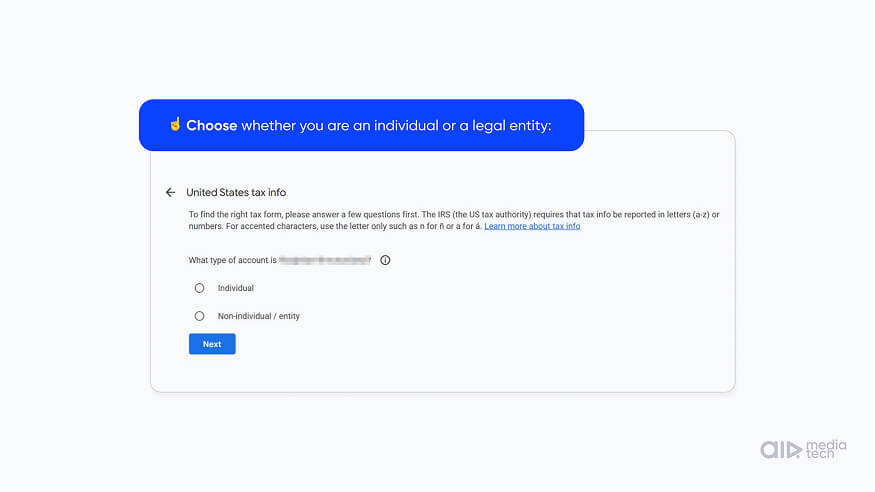
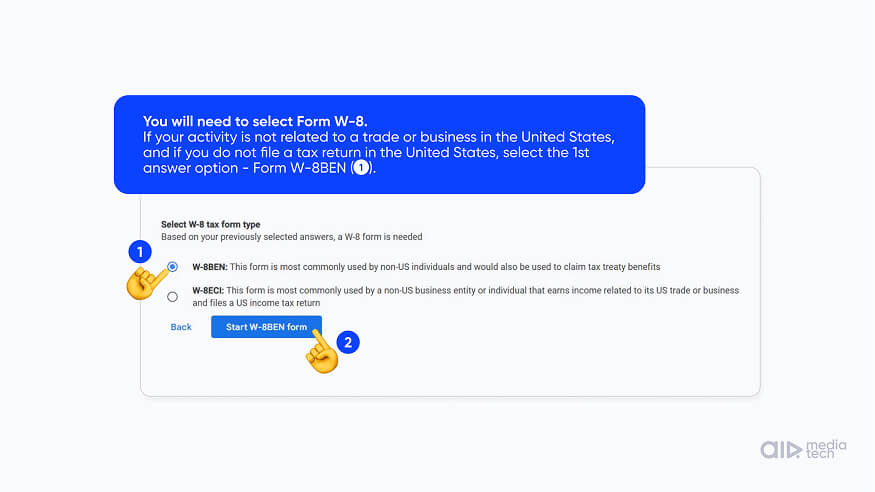
- Answer No to the question about being a US citizen or resident, and the tool picks the W-8BEN for you.
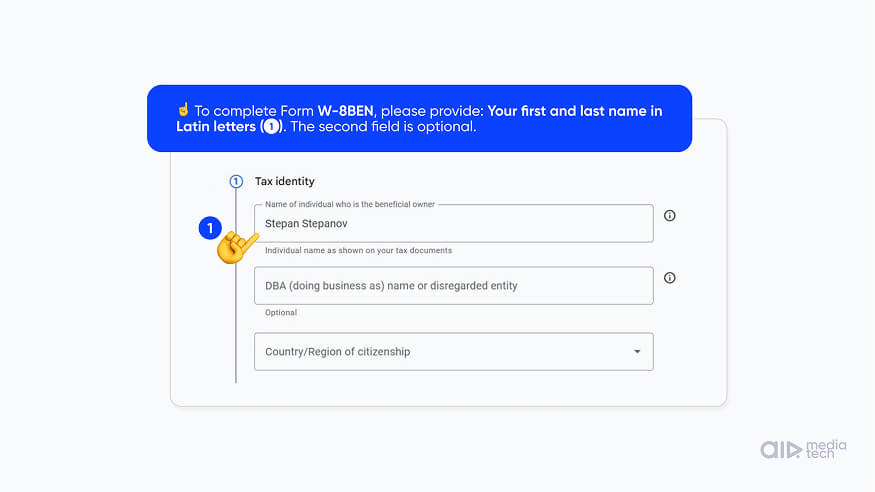
- Enter your legal name as it appears on your passport. The fields take only Latin letters, numbers, spaces, hyphens and &, so ñ becomes n and á becomes a. Leave DBA empty unless you trade under a business name.
- Enter your country of citizenship and your local tax number in the Foreign TIN field. Leave the US TIN empty if you don't have one.
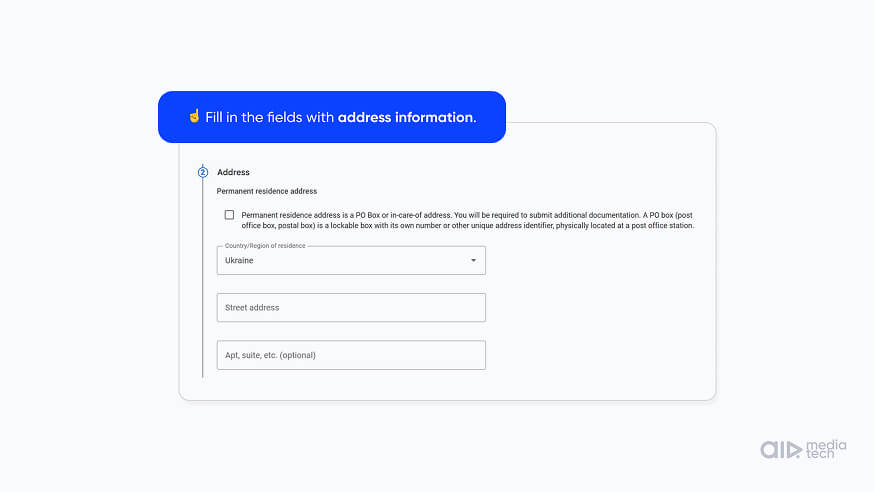
- Enter your permanent residence address. It can't be a PO box, and it should match the legal address in your payments profile, since Google sends your year-end tax forms there.
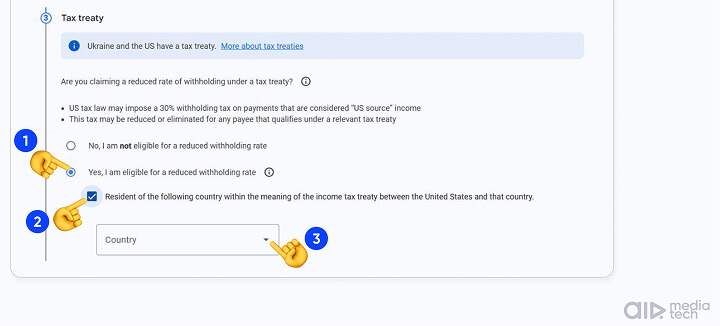
- Claim the tax treaty, pick your country and tick the income types. More on this step below.
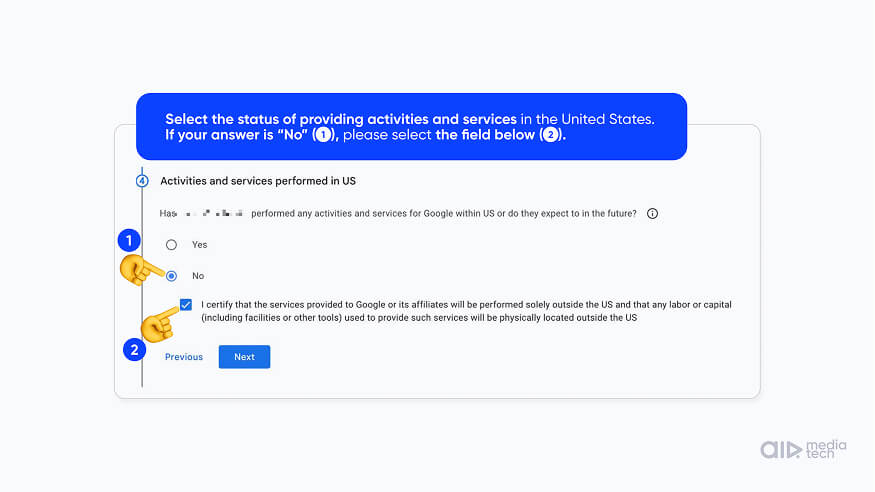
- Answer No to the question about US activities, unless you have staff or equipment in the US that help earn this money.
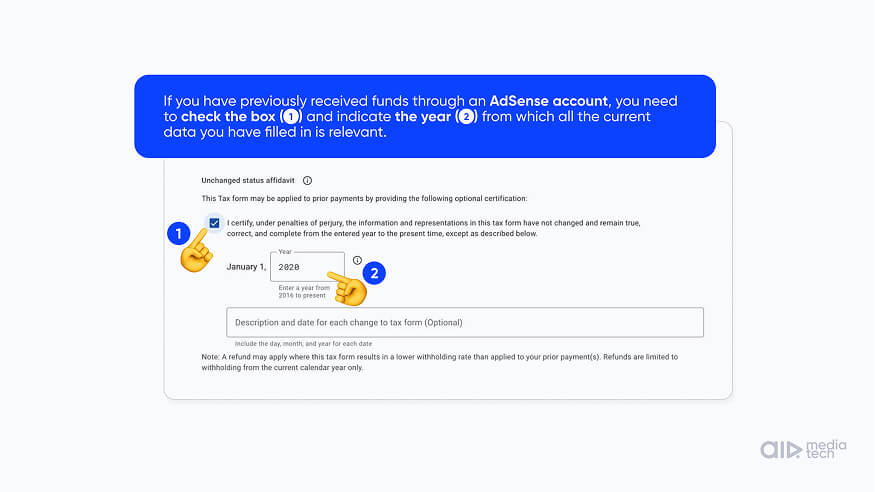
- Check the PDF preview Google builds from your answers, sign with your name and submit. If Google already withheld more than your treaty rate this year, tick the affidavit before you sign.
If your channel is in a network, the form is still yours to fill in. Networks see how much tax was withheld for the channel, not the form itself.
Where AIR Media-Tech's support team sees the form go wrong
The form expired, and nobody submitted a new one. Google went back to withholding 24% of all earnings.
A W-9 instead of a W-8BEN. The W-9 is only for US citizens and residents.
Special Rates and Conditions: Which Income Types to Tick
Guides disagree on this step, so here's what Google itself says. YouTube Help asks you to tick every income type you're eligible to claim a treaty rate for. Google then withholds only on the type it pays, at the rate your claim sets for that type.
- Other copyright royalties. This is how Google pays YouTube Partner Program earnings, so this rate is the one that lands on your channel's money.
- Motion picture and TV royalties. These cover certain YouTube Movies and Shows partners.
- Services. This means AdSense on websites, not AdSense for YouTube.
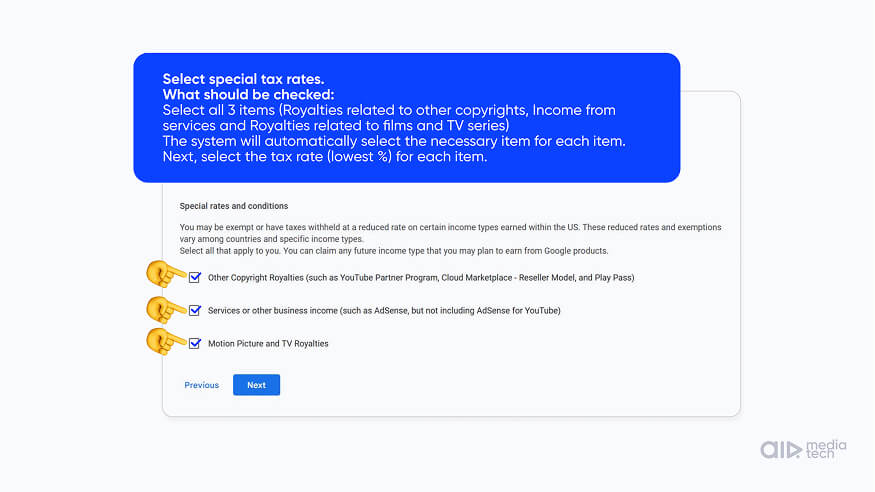
The tool fills in the treaty article and the rate for your country. For a creator in Ukraine or Mexico, other copyright royalties come up under Article 12(2) at 10%, and for a creator in India at 15%. If the tool offers no treaty at all, that's the no-treaty case from the section above.
Affidavit of Unchanged Circumstances: The Box That Gets Money Back
If Google withheld at a higher rate earlier this year, for example before your form was approved, the affidavit of unchanged circumstances lets Google apply your new form to those earlier payments. Google then refunds the difference itself, as long as the new form gives you a lower rate and you claim it by December 31 of the year the tax was withheld. Money withheld in earlier years doesn't come back this way. The section on getting withheld tax back covers that case.
Channel on a Company or an LLC: W-8BEN-E or W-9
If your AdSense for YouTube belongs to a company, choose Business as the account type. A company outside the US gets the W-8BEN-E, and a US company gets the W-9, according to YouTube Help. A company that claims a treaty rate also has to certify that it meets the treaty's limitation on benefits clause, which is a question for your tax advisor. A US LLC with one owner outside the US works differently, because the owner files the W-8BEN, as the section on countries without a treaty explains.
After You Submit: In Review, Approved, Declined, and the US Ch. 3 Line
One creator we work with had an approved tax form from 2023 and still saw 24% come off his US earnings in early 2026.
So the green status isn't the end of it. The form shows one of three statuses.
- In review. Google checks the form, which can take up to 7 business days. If it needs a document, such as a passport or proof of address, it asks in the Google payments center and by email.
- Approved. The form is accepted, and the withholding rates that apply to you now show under United States tax info in your payments profile.
- Declined. Google couldn't validate the form, most often because the legal name doesn't match the one in your payments profile letter for letter or the documents don't back it up. You get an email, and you submit a new form.
“
Fill in the tax form and make sure the system approved it, so you see Approved in AdSense. That doesn't mean everything is fine from then on. Some time after the first submission, the system often asks you to verify your identity again, and the YouTube channel gets no notice of it, only an email. Creators miss that email, the form gets stuck as not approved, and they pay higher tax. So check your tax form's status in AdSense from time to time and verify again when you're asked.
Vlad Khvorostianyi, AIR Media-Tech
Once the form is approved, check the rate it shows against the table for your country. If it says 30% and your country has a treaty, the treaty claim didn't go through, and the form needs another pass. The new rate applies from the next payment cycle.
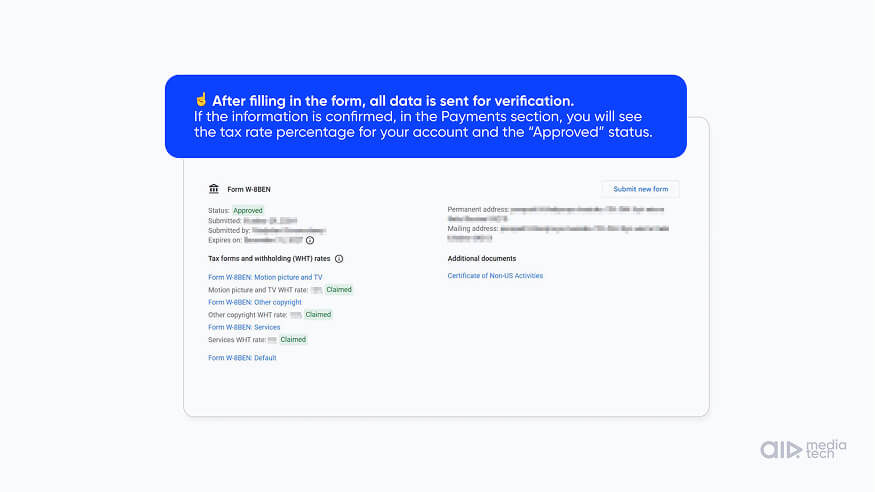
The withholding itself shows up in AdSense in the Transactions report, as a line called US Ch. 3 tax withholding: YouTube earnings. YouTube Studio doesn't show it, because Studio estimates revenue before tax.
How to Get Withheld YouTube Tax Back: Same Year Through Google, Later Through the IRS
When creators AIR Media-Tech works with updated their tax form, Google returned part of the tax it had withheld earlier in the same calendar year.
Which way you get it back depends on when the tax was withheld.
Two ways to get withheld YouTube tax back
Same calendar year
Through Google
Submit a corrected form with the affidavit of unchanged circumstances ticked by December 31. Google refunds the difference to the channel.
After December 31
Through the IRS
File Form 1040-NR with the Form 1042-S for that year and a US taxpayer number. For a small sum, talk to a tax advisor first.
Sources: YouTube Help — Submitting your U.S. tax info to Google; IRS — Instructions for Form 1040-NR. Checked October 2026.
Google refunds tax it withheld at too high a rate only within the same calendar year. To get it, submit a corrected form with the affidavit of unchanged circumstances ticked, and Google can then apply the lower rate to earlier payments from that year. Google refunds wrong US withholding only if you claim it by December 31 of the year the tax was taken. Channels in a network get the same deal, and the refund goes to the channel the tax was withheld from.
After December 31, the only route left goes through the IRS. That means a US nonresident tax return, Form 1040-NR, which the IRS says you should file if you can get withheld tax back, using the Form 1042-S Google sends you for that year. You also need a US taxpayer number to file it. For a small sum, the paperwork can cost more than the refund, so it's worth a talk with a tax advisor before you start.
Your YouTube Tax Form Expires Every Three Years: When to Resubmit
Every autumn before December 10, AIR Media-Tech's support team reminds the creators we work with to check their tax form, because the form runs out on a set date whether anything changed or not.
The form stays valid through the end of the third full calendar year after you sign it. YouTube Help gives the example of a form submitted in June 2021, which expired at the end of 2024. So a form you sign in 2026 lasts until December 31, 2029. Google recommends checking your tax info every year, and the yearly deadline to fix it is December 10.
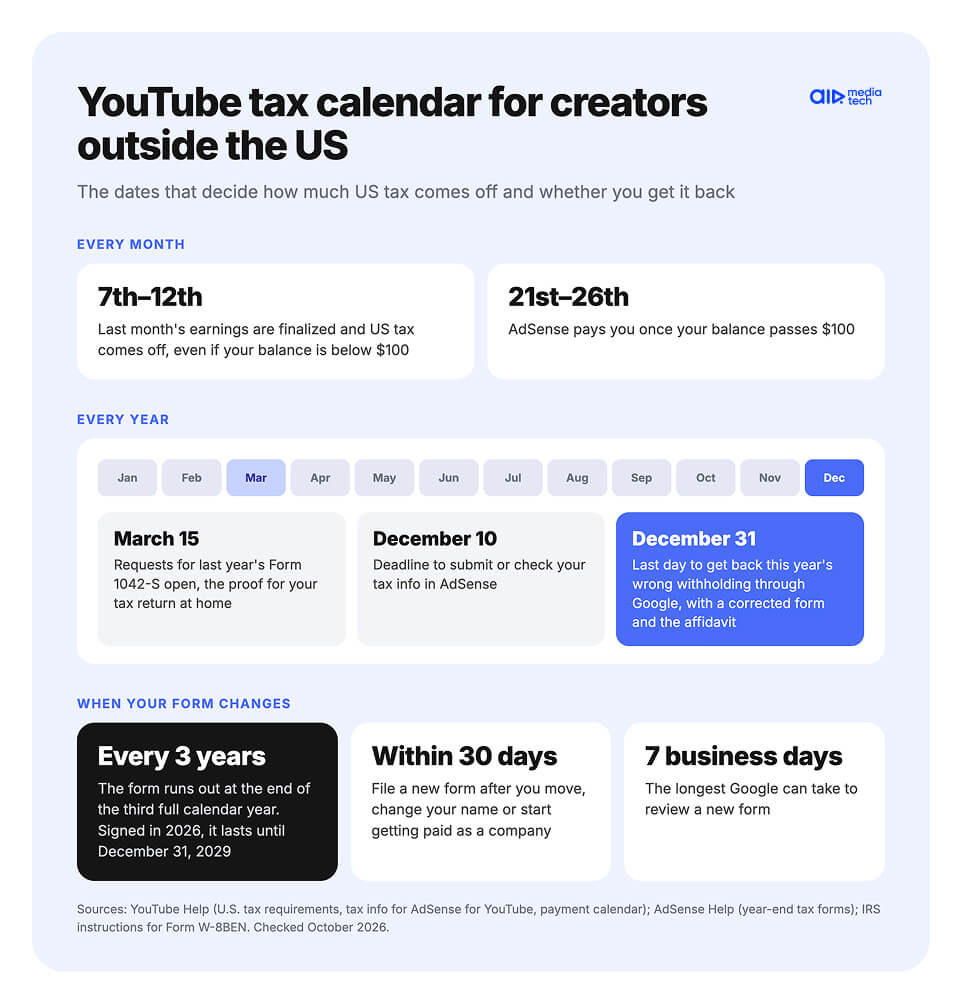
If the form expires, YouTube's reminder email warns that Google may withhold up to 24% of your total worldwide earnings or hold payouts until a new form is approved. Without valid tax info, YouTube Help says an individual account gets 24% backup withholding on worldwide earnings, and a business account outside the US gets 30% of US earnings. AIR Media-Tech's team has seen both after a form expired. The lower rate returns from the next payment cycle after the new form goes through.
A form can also stop being valid before then. The old form no longer fits after any of these changes.
- you move to another country
- you change your name
- you start getting paid as a company
The W-8BEN instructions give you 30 days after the change to tell the payer and file a new form. On YouTube, a new name or a switch to a company means a fresh form in AdSense. A move to another country takes more, because AdSense can't change the country of your payment address. You close the old account, open a new AdSense account in your new country, link it to your channel and fill in the tax form there. AIR Media-Tech's team tells creators to close the old account before opening the new one, because AdSense allows only one account per person and a second one can get blocked.
Do You Also Pay Tax at Home? Form 1042-S and the Foreign Tax Credit
The tax Google withholds goes to the US, and your own country can still tax the same money. Most countries tax their residents on income from everywhere, and many let you count tax already paid abroad against what you owe at home.
The proof is Form 1042-S, which Google issues for each year it withheld US tax from your earnings. Here's where it comes from and what to do with it.
- Google sends it to the address in your tax info.
- If you can't find it, YouTube has a form to request a copy of a year-end tax form.
- Requests for last year's 1042-S open on March 15.
- Keep it together with your monthly AdSense statements.
The credit usually has a limit. It covers tax paid abroad only up to the tax your country charges on the same income. India's tax department, for example, limits the foreign tax credit this way and asks for Form 67 to claim it.
So if Google withheld 15% and your home rate on that income is 10%, the extra 5% doesn't come back at home. That's one more reason to get the treaty rate right in the form, rather than counting on fixing it later.
15%
withheld by Google from your US earnings
10%
counted at home with a 10% home rate, the other 5% is lost
If you pay a simplified flat tax at home, as many small creators do, check whether it allows a foreign tax credit at all. Some systems don't, and then every point of US withholding is lost. A local accountant can tell you how your country treats it.
Monetized and want the next months to pay more?
The tax form decides what you keep. An AIR Media-Tech channel audit works on what you earn, and ends with a plan.
- Your channel checked from 10 angles to find the gaps, RPM by country included
- Your numbers compared with up to 3 competitors you pick
- A 90-day plan of 5–8 actions ranked by impact
Every creator's tax situation is different. This guide explains how YouTube and AdSense handle US tax info, based on Google's help pages, IRS instructions, and what AIR Media-Tech's team sees with the creators we work with. It isn't tax or legal advice, and AIR Media-Tech isn't a tax advisor. Rates and rules can change, so check the linked Google and IRS pages before you submit a form. For your own taxes, talk to a tax advisor in your country. For questions about your tax info in AdSense or how a network setup changes withholding, our team can walk you through it.