If you run a label and your music distributor isn't responding, the problem lands on you. Your artists see a release that missed its date or a track that disappeared from Spotify, and they come to you, not to the distributor.
So in October 2026 we went through the help pages of Spotify and YouTube and the support terms of seven distributors: TuneCore, LANDR, Symphonic, CD Baby, DistroKid, Too Lost, and AIR Music, the music distribution service of AIR Media-Tech. Only three of the other six publish a reply time at all, and on TuneCore's entry plan it's 3 business days.
Here's what a label needs when support goes quiet: which problems you can fix without the distributor, how to escalate the rest, what to tell your artists while you wait, and when slow support is a reason to switch.
What You Can Fix Without Your Distributor, and What Only They Can Fix
Before you chase a ticket, check who can fix the problem. Some problems only the distributor can solve, because it delivered the release and it collects the royalties. Others you can take straight to the platform. Here's who fixes what, as of October 2026.
Who fixes each distributor problem, and what a label can do while support is silent. Checked on Spotify and YouTube help pages in October 2026.
|
Problem |
Who can fix it |
What your label can do today
|
|---|---|---|
|
A release isn't live on its release date |
The distributor. If a release doesn't show up in Spotify for Artists, Spotify's advice is to check with the distributor that it went to the right artist profile. |
Check the Upcoming tab in Spotify for Artists. Spotify says a delivered release takes about 48 hours to appear there. |
|
A release disappeared from Spotify without your request |
The distributor. Spotify tells artists to contact their label or distributor, which checks whether a takedown was delivered and sends an update to reinstate the release. |
Send the UPC and the date the release disappeared, and ask directly whether a takedown went out. Spotify says a reinstated release goes live within 2 business days. If the distributor says the release was flagged for artificial streaming, here's what that flag means for a label. |
|
A release is on the wrong artist profile |
The artist's team on each platform; the distributor fixes the delivery that caused it. |
File the fix with the platform yourself. Our guide to fixing a wrong artist profile lists the form on Spotify, Apple Music, YouTube, Amazon Music, and SoundCloud. |
|
Wrong title, credits, artwork, or release date |
Only the distributor. Spotify shows music as the metadata was delivered and can't change it manually. |
Put every correction for the release into one message, so the distributor sends one metadata update. |
|
Someone else released your track |
The copyright owner, directly with the platform. Spotify takes notices through the form in its Intellectual Property Policy. |
File the notice as the rights holder. On YouTube, you can send a copyright removal request from YouTube Studio or by email. |
|
Royalties are missing or lower than expected |
Only the distributor. Spotify pays rights holders, and the distributor pays the artist under your agreement. |
Check that each track passed Spotify's threshold first: since April 2024, a track needs at least 1,000 streams in the previous 12 months to earn royalties. Then ask the distributor for a per-platform statement. |
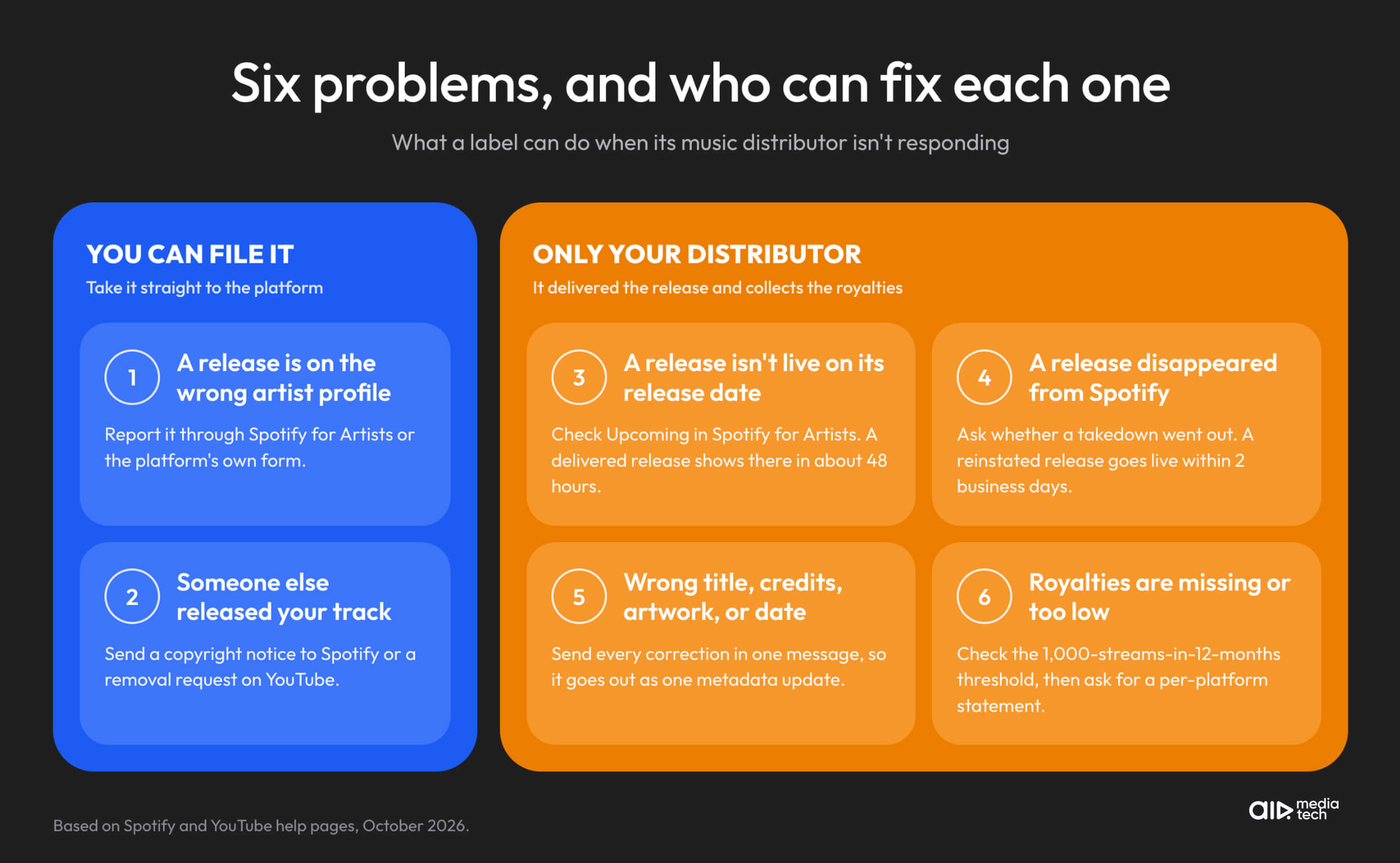
On Spotify, two of these six problems don't depend on the distributor: a wrong artist profile and a stolen track. For the other four, only the distributor can fix it, because Spotify shows what the distributor delivered and pays the distributor, not the artist. The next section covers how to get an answer when the ticket sits unanswered.
How to Escalate a Distributor Ticket Nobody Answers
A second and third ticket about the same problem split the history across several threads, and whoever picks one up sees only part of the case. Reply in the original ticket instead, with the whole case in one message. Here's what to put in it:
- Your label account name and every ticket number about this problem.
- The artist, the release title, the UPC, and the ISRC of each affected track.
- The platforms where the problem shows, with a link to each.
- What's wrong, in one or two sentences, and what you need the distributor to do.
- The date you need it by, and why: a release date, a playlist pitch, or a payout your artists are waiting for.
Distributors ask for the same details. TuneCore's support page asks for UPCs, ISRCs, artist names, and release names in every request. LANDR asks you to keep all communication about a request in one ticket.
A subject line that carries the same facts helps the message get routed: "Escalation: [Label] / [Artist – Release] / UPC [number] / needed by [date]."
If the ticket still sits unanswered, try the other routes you have:
- A named contact. Some distributors give labels an account manager, but often only on a higher plan. The support table below shows what each distributor offers.
- The distributor's official accounts on X or Instagram. Post the ticket number and one line on the problem, without accusations.
- Email over phone. A call leaves no record, and you'll need the record.
While you wait, don't deliver the same release through a second distributor. Two deliveries of one release are one of the causes of duplicate artist profiles, SoundCloud says, and you'd end up with a second problem on top of the first.
Keep a log from the first ticket. It's what you show your artists, and it's your record if the distributor's support or payment terms ever become a contract question. A simple one works:
A support log template for a record label. One row per ticket.
|
Date |
Ticket number |
Artist, release, and UPC |
Problem |
Last reply from the distributor |
Next step and date
|
|---|---|---|---|---|---|
|
Sep 29 |
#48213 |
Luna – "Tide" – 1234567890123 |
Release missing from Spotify |
Automated reply, Sep 29 |
Escalate in the same ticket, Oct 1 |
If the delays touch payouts, read your distribution agreement for payment dates and notice terms, and talk to a music lawyer before you act on them.
Waiting days on a ticket while your artists wait on you?
With a roster, every unanswered ticket holds up someone's release, and the questions land on you. At AIR Music, every label gets its own personal manager who replies within 4–24 hours, on WhatsApp or whichever channel you prefer.
Apply for a Personal Manager →How to Keep Your Artists on Your Side While You Wait
Kevin Kane, founder of the Indonesian indie label Barvill Entertainment, described what slow support did to his label before it moved to AIR Music: "When you run a label, you can't wait weeks for support. It makes you look unprofessional in front of your artists." Your artists don't see the ticket queue, so your updates are the only part of the problem they see.
An update fits in four lines:
- What's wrong, in one sentence.
- What you've done so far, with dates.
- What happens next, and who is waiting on whom.
- When you'll write again.
Set the date of the next update and keep it, even when there's no news. An artist who knows when they'll hear from you doesn't have to chase you for it. Here's a template:
Template: a status update to your artist
Hi [name], an update on "[release]."
What's wrong: [the release isn't on Spotify yet].
What we've done: reported it to [distributor] on [date], ticket [number], and escalated it on [date].
What's next: we're waiting for [distributor] to [redeliver the release].
I'll write to you again on [date], even if nothing has changed.
Leave two things out of the update: a date the distributor hasn't given you, and guesses about why the distributor is slow. If either turns out wrong, the artist will remember it came from you.
Show the artist where to check for themselves. Anyone with Admin or Editor access on the artist's Spotify for Artists team sees unreleased music in the Upcoming tab, so the artist can see when the release arrives.
If the release date is at risk, talk to the artist before the pitch window closes. Spotify adds a song to followers' Release Radar only if it's pitched at least 7 days before release. If the release still isn't in the Upcoming tab a week before release day, decide together whether to move the date.
How Fast Distributor Support Replies, Checked October 2026
Most distributors don't publish a reply time at all. Three of the six other distributors we checked publish one: 24–48 hours at Symphonic, 1 to 3 business days at TuneCore depending on the plan, and 3 days at LANDR, or 24 hours on its Studio Pro plan. Here's what each one says on its own support pages, as of October 2026.
How fast music distributors say their support replies. From each distributor's official support pages, checked in October 2026.
|
Distributor |
How you reach support |
Published reply time |
Support hours |
Faster or named support
|
|---|---|---|---|---|
|
Request form in the help center |
3 business days on Rising Artist, 2 on Breakout Artist, 1 on Professional |
7 days a week: 10am–6pm ET on weekdays, 12pm–7pm ET on weekends |
Faster replies on higher plans |
|
|
Email request only |
3 days on Studio Essentials and Standard, 24 hours on Studio Pro |
9am–5pm EST on weekdays, limited hours on weekends |
Faster replies on Studio Pro |
|
|
Client Relations help desk |
Most requests within 24–48 hours, depending on volume |
Not published |
Not listed in the FAQ |
|
|
Request form in the help center |
Not published for standard support |
Not published |
FastForward, $29.99 per release: a year of priority support |
|
|
DistroBot chat, which can hand you to a person |
Not published |
Not published |
Not listed |
|
|
Tickets by topic through the support portal |
Not published |
Not published |
Not listed |
|
|
A personal manager for every artist and label, on WhatsApp, Telegram, email, or the AIR Music dashboard |
Within 4–24 hours |
The same 4–24 hours for labels in any time zone, direct to your manager; the support team answers on weekends |
A named manager on every account |
When you compare, look at the plan you'd be on. TuneCore's 1 business day applies only to its Professional plan, LANDR's 24 hours only to Studio Pro, and CD Baby's priority support costs extra for every release.
Two labels that moved to AIR Music, our distribution service, show what the difference looks like in practice. Refaat Mridha, an artist who runs his own label, waited 5–7 days for ticket replies at his previous distributor. At AIR Music, he gets replies within hours or the same day, and when a fake label uploaded one of his tracks, the team investigated right away and returned it. FH360, an independent artist distributing with AIR Music, got a metadata fix in 30–60 minutes after waiting 7–14 days for releases at his old distributor.
A reply is only the first step. Here's how long common fixes take at AIR Music, according to our team in October 2026.
| Problem | Typical time at AIR Music |
|---|---|
| Linking a track to the right YouTube Topic channel | 24–72 hours |
| Moving a release to the right artist profile on a platform | Up to 3 days |
| Fixing a metadata error | Up to 3 days |
| Releasing a claim on a YouTube video | Within 24 hours |
| Taking a release down | Sent the same day; platforms take up to 7 business days, so up to 10 business days in total |
| Settling a copyright dispute | From 1–2 days to a year, depending on the case |
| Finding a missing track | Depends on why it disappeared |
In one copyright case, an agency struck an artist's track. AIR Music contacted the agency, the strike was lifted within a day, and the track was back the next day.
For prices and the rest of the terms, see our comparison of music distribution services.
When Slow Support Is a Reason to Switch, and How to Switch Without Losing Streams
One slow reply doesn't mean you need a new distributor. These signs do:
- The same kind of problem comes back with every release, and each time you explain it from scratch to a new support agent.
- Replies take longer than your release schedule allows, even after you escalate.
- Payouts arrive late, or statements don't add up and nobody explains them.
- Your plan has no named contact, and the distributor doesn't offer one for labels.
Before you switch, check two things in your current setup:
- What happens to your releases when you leave. Read the notice terms in your agreement. Some plans take releases down on a fixed date: if you cancel the renewal of a TuneCore Unlimited plan, your music comes down from stores the day the plan expires, with no grace period.
- Royalties earned before the move. The old distributor still owes you what it collected before your releases went live elsewhere, as LANDR's migration guide explains.
Here's the order that keeps stream counts and playlist placements, based on Spotify's and LANDR's guidance. Our label catalog migration guide covers the rest, including YouTube Content ID and timings:
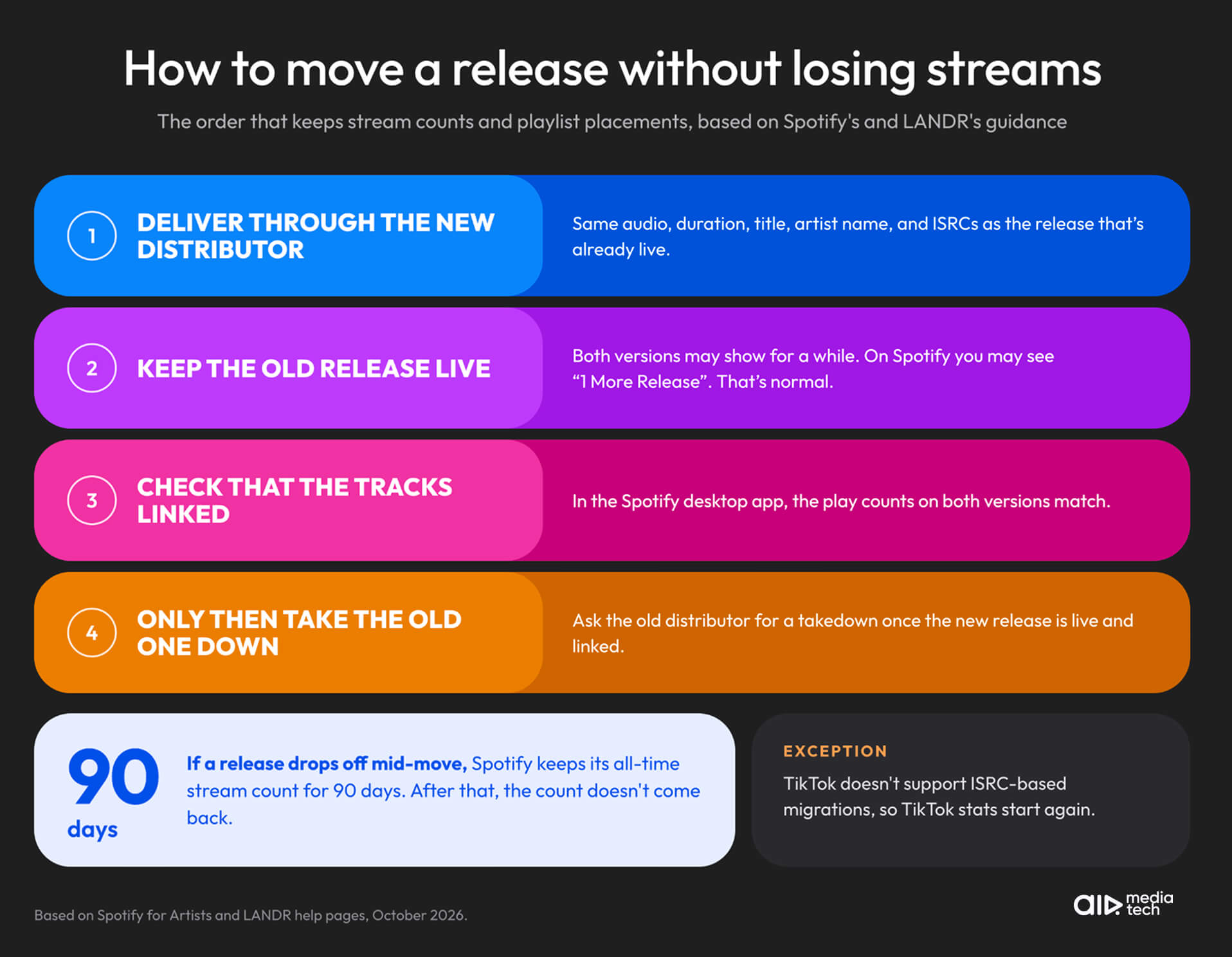
- Deliver each release through the new distributor with the same audio and metadata. Spotify links the old and new versions, a process it calls track-linking, only when the audio, duration, title, and artist name match. Keep the same ISRCs too. LANDR notes that TikTok doesn't support ISRC-based migrations, so TikTok stats won't carry over.
- Keep the old release live until the new one is live. LANDR says both versions may show on platforms for a while. On Spotify, you might see "1 More Release" on the release page.
- Check that the versions are linked. In the Spotify desktop app, open the artist profile and compare the play counts: if they match, the tracks are linked.
- Only then ask the old distributor for a takedown. Platforms can take up to 7 business days to process a takedown, so the old version may stay visible for a while.
If a release drops off in the middle of the move, Spotify keeps its all-time stream count for 90 days. After that, the count doesn't come back.
You can keep two distributors, but not for the same release. LANDR says platforms don't accept duplicate deliveries, so each release goes through one distributor, or each distributor gets its own territories. After the move, check every artist page for duplicate profiles, as our release-day check for labels explains.
What to Ask a Distributor About Support Before You Sign Your Roster
Support terms rarely make it onto a pricing page, so ask before you move your catalog. Send these questions in writing, and keep the answers:
- Who answers when something breaks: a named person or a ticket queue? Can a label get a named contact, and on which plan?
- What reply time do you publish for the plan we'd be on?
- Do you answer on weekends?
- Which channels can we use: email, chat, or messaging apps like WhatsApp?
- When a problem sits on Spotify's or YouTube's side, who takes it to the platform, and do you tell us when the fix is filed?
- What happens to our releases and unpaid royalties if we leave?
- Can you move our catalog with the same ISRCs and keep the old releases live until the new ones link?
At AIR Music, our music distribution service, every label gets its own personal manager on WhatsApp, Telegram, email, or the AIR Music dashboard, who replies within 4–24 hours, and the support team answers on weekends. Managers take platform problems to Spotify and YouTube directly.
After Barvill Entertainment, an Indonesian indie label, moved to AIR Music, its releases started going live in about 3–5 days.
Tired of explaining your distributor's silence to your artists?
With AIR Music distribution, your label gets:
- A personal manager for your label who replies within 4–24 hours
- WhatsApp, Telegram, or email, with a support team on weekends
- Platform problems taken to Spotify and YouTube by your manager, from wrong artist profiles to Official Artist Channel requests
- Duplicate artist profiles merged and releases moved to the right profile, usually within a couple of days
- Content ID with reupload protection, and claim disputes handled by the team
- Revenue share set in the contract, with your artists keeping 100% of their rights