

Every major DSP (Digital Service Provider) has specific technical standards, metadata rules, and content expectations, and failing any of them can mean your tracks get rejected, delayed, misattributed, or stuck in moderation.
At AIR Music Distribution, we’ve distributed music to 100+ platforms, including Spotify, Apple Music, Amazon Music, YouTube Music, Deezer, TIDAL, JOOX, KKBOX, Resso, and more. We know exactly what each service looks for in a release.
Let’s start.
1. Audio Requirements for Streaming Platforms
Most platforms expect lossless or near-lossless audio that ensures high-quality playback across all devices, from phone speakers to hi-fi systems.
Preferred audio formats:
- WAV (uncompressed) is the industry standard, required by many DSPs.
- FLAC / ALAC (lossless compressed) are accepted on Apple Music & many others.
Avoid uploading MP3 as your primary master file. Platforms will often reject it or re-encode it, which hurts quality and may cause processing errors.
Standard specifications:
|
Parameter |
Common Requirement |
|
Sample Rate → |
44.1 kHz (standard) or higher |
|
Bit Depth → |
16-bit minimum; 24-bit supported |
|
Channels → |
Stereo |
|
Loudness → |
Around -14 LUFS integrated (streaming target) |
|
True Peak Ceiling → |
Typically -1 dBTP or lower |
|
Silence at Start/End → |
~1–3 seconds (optional but recommended) |
Platforms often normalize loudness automatically. Meeting recommended loudness prevents excessive cuts or boosts in playback.
Stereo mix:
- All tracks must be delivered as a standard stereo mix.
- Mono files or improperly bounced stems may be rejected.
Also, keep the original files clean. Ensure there are no clicks, pops, distortion, or abrupt silence unless artistically intentional, as DSPs may flag poor masters as problematic.
2. Metadata: The Backbone of Distribution
Metadata is what tells every streaming platform who, what, when, and where your music is, and it must be accurate, complete, and consistent.
All the platforms have their own metadata rules. For example:
Spotify Metadata Rules
Spotify has an official guidelines page you can review here:
➤ Spotify Music Metadata Formatting Guidelines
Key points from Spotify:
- List each artist in a separate field (don’t cram multiple artists into one slot).
- Spell artist names exactly the same every release.
- A spelling change is one of the main reasons releases end up on the wrong artist profile.
- Use correct explicit/clean tagging.
- If AI generated part of the audio, the lyrics or the melody, declare it in your distributor’s AI credits. Spotify shows them in Song Credits.
- Set your planned live date at least 7 days ahead to allow delivery & editorial pitching.
Apple Music Metadata Rules
Apple Music has an official style guide:
Apple’s system focuses on:
- Accurate artist roles and contributor credits.
- Assigning clean/explicit correctly.
- Metadata exactness. Avoid marketing text like “Official,” “Exclusive,” etc.
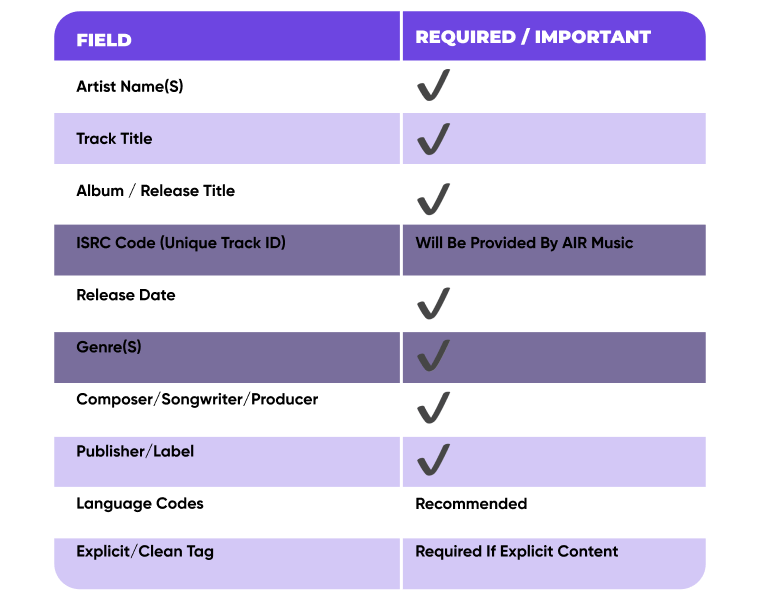
Some things are common on all the platforms:
Metadata Essentials Across Platforms
Here Is How AIR Music Distribution Helps Artists With Metadata
At AIR Music Distribution, we provide human-led music metadata optimization for streaming platforms. This process ensures your tracks are released correctly and without technical delays. Unlike automated services that rely on bots, every release is reviewed by a personal manager who manually checks, prepares, and supports your data.
1. Pre-Release Review and Cleanup
Before your music ever reaches the platforms, your manager performs a thorough quality check to prevent common rejections:
- We verify the completeness and consistency of your metadata, including artist names, featured artists, and credits.
- We provide and teach you how to use a metadata dashboard, which allows you to identify and correct mistakes before the final submission.
- Your manager checks "metadata sanity" to ensure the data meets the strict streaming platform requirements of 120+ digital service providers (DSPs).
2. Preventing and Fixing Errors
Metadata errors are a primary cause of releases getting stuck in "review hell" or appearing incorrectly.
- We fix mismatched metadata that often causes streams to be split across duplicate artist profiles, working directly with platforms to merge these pages into one unified identity.
- Your manager handles the "messy parts," such as formatting metadata for specific platforms and generating required codes like ISRC and UPC if you do not have them.
- If an issue is found, your manager provides a clear "fix this" list in plain language to get your release back on track.
3. Post-Release Updates
We understand that sometimes details need to be changed after a track is live.
- You can request updates for credits and contributors even after the release.
- Your manager handles the back-and-forth with platforms to ensure these changes are applied correctly, typically within 2 to 14 days.
By providing a human point of contact who understands your catalog, we replace the chaos of DIY tools with a stable, professional workflow that keeps your music searchable and playable across the globe.
3. Artwork & Visual Assets
Cover art and visual assets must meet exact specs to pass automatic moderation. At AIR Music, this aspect is also reviewed by your personal manager, who manually checks your visual assets before delivery.
Minimum artwork specs:
- Square image, usually 3000×3000 pixels.
- RGB color mode (not CMYK).
- Accepted formats: JPG or PNG.
Artwork must be clean and platform-neutral. This means:
- No URLs or website links
- No email addresses or phone numbers
- No social media handles
- No pricing or “out now” language
- No transparency layers
- No logos of other streaming services
Images must also be sharp and high-resolution. If your cover art violates these specs, platforms often reject the entire release.
In the following sections, we will answer a popular question: how to optimize music for Spotify, Apple Music, and YouTube Music?
Distribute your music with 0% upfront costs
Distribute your music globally while retaining 100% ownership. Contact AIR Music and let a manager handle uploads, promotion, and reporting for you.
Platform-Specific Optimization
Each key platform offers unique features that require specific preparation during the upload process. Let’s look into music optimization for Spotify, Apple Music, and YouTube Music in detail:
Spotify
Sure, Spotify relies heavily on accurate metadata, precise timing, and consistent artist profiles, all of which we covered in the previous section. But in addition to this, the platform actively encourages creators to make use of its own features to boost visibility and engagement.
For example, pre-save campaigns.
AIR Music helps every artist plan the release strategy, which includes providing specific pre-save and launch ideas. Your manager guides you through the entire pre-save and links setup process to ensure everything is done correctly before your release.
Pre-save links let fans save your track before release day, so it appears in their library the moment it goes live. This helps generate immediate saves and first-day streams, which are important early engagement signals for Spotify.
Spotify officially supports this through Countdown Pages, which allow fans to pre-save upcoming releases and receive notifications when the music drops.
To use pre-saves effectively, we will upload your release at least 2–3 weeks before launch so Spotify can generate the pre-save option. Then we create a pre-save link and help you promote it across your socials, bio links, email list, and YouTube descriptions.
On release day, all pre-saves automatically turn into library saves, giving your track a stronger start and better chances to gain traction in Spotify’s algorithmic systems like Release Radar.
Apple Music
Apple Music is extremely metadata-driven and favors clean presentation, strong first-day engagement, and editorial readiness. Pay attention to:
#1. Apple Music Pre-Add
Apple Music’s version of Spotify’s pre-save is called Pre-Add, and it serves the same purpose. It lets listeners add an upcoming release to their library before launch, so it appears automatically on release day. It leads to better early performance signals for Apple Music’s charts and editorial team.
To enable Pre-Add, we will deliver your release well in advance (usually 2–3 weeks) and properly schedule it. Then, your AIR manager will create Pre-Add links and share them with you to promote.
#2. Artist Image & Profile Optimization
Even though we understand that this is not a track reqs, Apple Music places strong emphasis on artist imagery. A missing or outdated artist photo can reduce discoverability and delay profile verification.
Best practices:
- Upload a high-resolution artist image (not album art)
- Keep branding consistent across releases
- Update imagery when entering a new release era
A polished profile improves your chances of being considered for editorial playlists and features.
YouTube Music
YouTube Music is tightly integrated with YouTube’s Content ID system, which identifies music, tracks usage, and monetizes content across the entire YouTube ecosystem.
AIR Music monetizes and protects your music across YouTube at no extra cost. Via Content ID, we monetize unauthorized re-uploads by other channels to ensure you, not a stranger, earn the revenue.
We also help you to:
- Attribute streams and revenue correctly
- Prevent unauthorized or duplicate uploads
- Consolidate all usage under the official audio track
If Content ID data is missing, inconsistent, or duplicated, your release may still go live, but monetization, visibility, and analytics can break silently.
For proper Content ID matching, we ensure your release is:
- Uploaded with clean, final stereo masters
- Assigned consistent ISRCs across all platforms
- Matched with accurate titles, artist names, and contributor credits
Re-uploading the same track with different metadata or ISRCs, for example, when you switch to a new distributor, is one of the most common causes of Content ID conflicts, claim errors, and split revenue.
But instead of having to navigate the system alone, your AIR manager:
- Handles the technical enrollment and setup of the catalog in the Content ID system.
- Manages claims and disputes when they arise, ensuring artists don’t have to spend time writing "copyright essays" to defend their work.
- Helps to resolve copyright strikes or rejections.
- Monetizes UGC and unauthorized re-uploads.
For artists and labels, this system provides a stable, recurring income stream from a platform that is often one of the biggest music discovery engines globally.
Avoiding Moderation Errors and "Stuck" Music
The "stuck" music often happens when automated systems flag a release but don't explain why. Your AIR manager will check:
1. Metadata Precision
Every release requires an explicit flag (if there is profanity), the correct language setting, and accurate copyright info (℗ and © symbols with the current year). Missing or inconsistent artist names are the leading cause of duplicate artist pages, where your new release might end up on a different "John Smith" page instead of your own.
2. Lead Times
While platforms can sometimes go live in 2–4 days, a "rush release" is risky. Providing a 3–4 week lead time ensures that your manager can check for format issues or metadata rejections before your scheduled release date.
3. The Human Factor
Many DIY distributors use automated "robot" support that leads to long ticket queues. When an error occurs, automated systems may leave your track in "review hell" for weeks.
Don't Navigate the Chaos Alone
Distributing music across 100+ platforms is complicated, and technical hurdles shouldn't kill your momentum.
At AIR Music, every artist is assigned a personal manager – a real human who checks your metadata, fixes artwork errors, and solves platform rejections within 24–48 hours. We optimize music for streaming platforms, handle the pitching, and set up Content ID protection while you focus on the music.
Stop acting like your own support agent and start growing with a partner. We will place your music everywhere and ensure it is optimized for every listener, on every device.