If your label is moving to a new music distributor, the risk sits in the catalog. Deliver a release the wrong way and Spotify reads it as a new recording: the play count starts from zero, playlist placements drop, and your artists come to you asking where their streams went.
So in October 2026 we went through the help pages of Spotify and YouTube and asked our team at AIR Music, which once moved a catalog of 19,000 releases in two months, what breaks when a label switches distributors. Most guides on switching are written for one artist. This one covers a roster: what to collect before you give notice, the order that keeps streams, what happens on YouTube, how long a move takes, and what usually goes wrong.
Why Streams Survive a Distributor Switch: Same ISRC, Same Audio, Same Metadata
Spotify keeps a track's play count when the new delivery matches the old one. Spotify calls this track-linking, and its help page sets the condition: the audio and metadata of the old and new versions must be the same, including duration, title, and artist name. Keep the same ISRC for every recording too. Platforms use the ISRC to tell one recording from another, so a new ISRC means a new recording.
Here's what keeps the numbers and what resets them on Spotify, as of October 2026:
|
What changes in the new delivery |
What happens on Spotify |
|
Nothing: same audio, ISRC, title, artist names, and duration |
The versions link, and the play count carries over |
|
A new ISRC |
Spotify reads it as a different recording, and the count starts from zero |
|
A remastered or re-edited audio file |
The audio or duration no longer matches, so Spotify's condition for linking isn't met |
|
A changed title or artist spelling, for example "ft." instead of "feat." |
The metadata no longer matches, so Spotify's condition for linking isn't met |
|
The old release taken down before the new one is live |
The track leaves Spotify for that time. Spotify keeps its all-time count for 90 days |
If a release drops off Spotify in the middle of a move, Spotify keeps its all-time stream count for 90 days. After that, the count doesn't come back.
What to Get From Your Old Distributor Before You Give Notice
The new distributor needs every release as it went out the first time. At AIR Music, our team sees two gaps in label migrations more often than any other: the old distributor doesn't hand over the audio files and artwork, and the metadata comes back without codes. Without the codes, the new delivery can't link to the old one, and your analytics split between two versions of the same track.
Collect all of this while you still have access to the old dashboard:
|
What to collect |
Why you need it |
|
The ISRC of every track and the UPC of every release |
Without them, platforms read the new delivery as new recordings |
|
The original audio files, as delivered the first time |
Spotify links versions only when the audio matches |
|
Artwork for every release |
The old distributor may not send it after you leave, and then you search for it artist by artist |
|
Titles, artist names, featured artists, and credits as they appear on each platform |
Spotify links versions only when the title and artist name match |
|
Original release dates |
So each release keeps the date it first came out |
|
Your label name, spelled the same way on every release |
Spotify builds a label's catalog from the label and distributor names in the metadata |
|
Each artist's Spotify and Apple Music artist ID |
So every release lands on the right artist profile |
|
Royalty statements per release and per platform |
The old distributor still owes you what it collected before the move |
|
Your distribution agreement |
For the notice period and what happens to your releases when you leave |
Read the agreement before you give notice. Some plans take releases down on a fixed date: if you cancel the renewal of a TuneCore Unlimited plan, your music comes down from stores the day the plan expires. Time the notice so the old releases stay live until the new ones link.
If some codes or credits are missing, ask the new distributor to help before anything is delivered. At AIR Music, our team tracks down missing metadata for labels that move to us.
Moving your catalog, and your old distributor won't send the files?
At AIR Music, a personal manager moves large label catalogs for you, keeps the same ISRCs, tracks down missing metadata, and gives you a plan for when to take the old releases down.
Apply for a Personal Manager →How to Switch Music Distributors Without Losing Streams: The Order for a Label Catalog
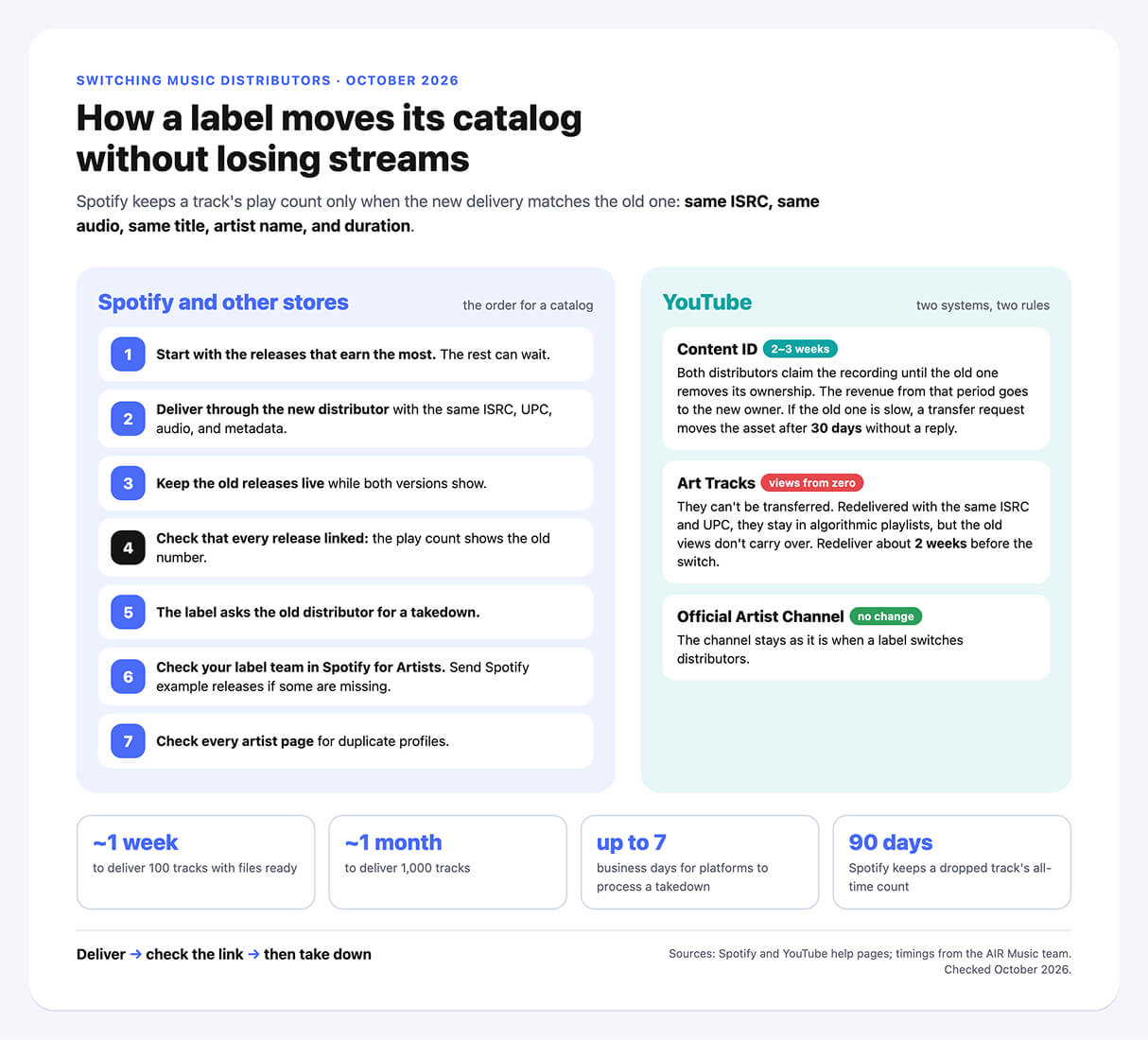
Here's the order for a label catalog, based on Spotify's and YouTube's guidance and on how our team at AIR Music moves catalogs:
- Start with the releases that earn the most. Our team advises moving the popular tracks first, because they carry the playlist placements and most of the streams. The rest can stay with the old distributor until you're ready.
- Deliver each release through the new distributor with the same ISRC, UPC, audio, and metadata. At AIR Music, our team uploads large catalogs once the label sends the metadata, artwork, and audio. Smaller labels usually upload their own releases.
- Keep the old releases live. For a while, both versions show on the platforms. On Spotify, you might see "1 More Release" on a release page.
- Check that every release linked. In the Spotify desktop app, open the artist profile and look at the play count next to each song. If it shows the old number, the versions are linked.
- Ask the old distributor for a takedown. The label sends this request, not the new distributor. Platforms can take up to 7 business days to process a takedown.
- Check your label team in Spotify for Artists. Spotify builds a label's catalog from the label and distributor names in each release's metadata, so releases from a new distributor may not show up in your existing label team. Spotify says to contact its support with example releases, and it can add them to your catalog.
- Check every artist page for duplicate profiles. Our release-day check for labels covers what to look at on each platform.
Deliver, check the link, then take down: in that order, a release never leaves the platforms during the move.
What Happens to Content ID, Art Tracks and Your Official Artist Channel on YouTube
YouTube keeps your music in two systems, and a distributor switch affects them differently. Here's what happens to each, from YouTube's guide for music partners on asset transfers and our team's experience at AIR Music:
- Content ID. The new distributor claims ownership of each sound recording first. For a while, both distributors claim the same recording, which YouTube calls an ownership conflict. When the old distributor removes its ownership, the conflict closes, and YouTube gives the revenue earned during the conflict to the new owner. At AIR Music, this usually takes 2–3 weeks. If the old distributor is slow to remove its claims, we send it an ownership transfer request in YouTube's Content Manager. If the other owner doesn't act within 30 days, YouTube transfers the asset automatically. Before the move, check which of your tracks can go into Content ID at all, so the new distributor doesn't inherit tracks it can't claim.
- Art Tracks are the audio versions YouTube generates for YouTube Music and Topic channels. These can't be transferred. The new distributor redelivers them with the same ISRC and UPC, which keeps them in algorithmic playlists and in listeners' own playlists and libraries on YouTube Music. But YouTube creates new videos with new view counts starting from zero, and the old views are lost. YouTube asks the new partner to redeliver 2 weeks before it publishes the catalog, and the old one to send takedowns only after that. While the old Art Tracks are up, the new ones don't show in YouTube search. Removing an old Art Track can also affect the count of Shorts made with the track, so agree on the timing with both distributors.
- Official Artist Channel. Our team sees no change to an artist's Official Artist Channel when a label switches distributors.
On YouTube Music, an Art Track's old views don't carry over, even with the same ISRC. Tell your artists before the move, so a Topic channel that starts again from zero doesn't come as a surprise.
How Long a Catalog Migration Takes: About a Week for 100 Tracks, a Month for 1,000
How long a move takes depends on how ready the files are. Here's what our team at AIR Music sees, as of October 2026:
|
Stage |
Typical time at AIR Music |
|
Delivering 100 tracks, with metadata, artwork, and audio ready |
About a week |
|
Delivering 1,000 tracks |
About a month |
|
Moving Content ID ownership on YouTube |
2–3 weeks |
|
Takedown of the old releases |
Up to 7 business days on the platforms' side |
|
Old and new versions live side by side |
Until you confirm the play counts match |
A large catalog takes longer to prepare than to deliver. Our team at AIR Music once moved a catalog of 19,000 releases in two months.
“
Keep all your metadata, artwork, and audio files. Moving a catalog is complicated, but it isn't hopeless. You do it once, we help you, and then you get back to work. That's what a manager is for. We once moved a catalog of 19,000 releases in two months.
Artem Kruchko, A&R Manager, AIR Music
What Breaks When a Label Switches Distributors, and How to Fix It
Most problems in a label migration start before the first delivery. Here's what our team at AIR Music sees most often, and how to avoid each one:
|
Problem |
What it costs |
How to avoid it |
|
Metadata comes back without ISRCs or UPCs |
The new delivery doesn't link, and analytics split between two versions |
Export the codes before you give notice. Ask the new distributor to find what's missing |
|
The old distributor doesn't send audio or artwork |
The label has to collect files from every artist |
Download everything while you have dashboard access, and ask artists for their masters early |
|
A release goes out with a new ISRC |
Its play count starts from zero |
Reuse the ISRC for every recording that hasn't changed |
|
Old releases come down before the new ones link |
Tracks leave the platforms, and playlist placements drop |
Take down only after you check the play counts |
|
The label name is spelled two ways |
New releases don't show in your Spotify label team |
Use one spelling everywhere, and send Spotify example releases |
You Don't Have to Move the Whole Catalog at Once
A label can move part of its catalog, for example its newest artists or its biggest releases, and leave the rest with the old distributor for now. The one rule: each release goes through one distributor. Platforms don't accept duplicate deliveries of one release, and two deliveries of the same release can create duplicate artist profiles.
If slow support is what's pushing you to move, our guide on what a label can do when its distributor stops responding lists the questions to ask a new distributor before you sign. For prices and terms, see our comparison of music distribution services.
Worried the move will cost your artists their streams?
With AIR Music distribution, your label gets a personal manager and a plan for moving your catalog, release by release:
- A personal manager for your label who replies within 4–24 hours
- Large catalogs uploaded by our team, with the same ISRCs and UPCs
- Missing metadata and codes found before delivery
- Content ID ownership moved on YouTube, with transfer requests sent when the old distributor is slow
- Revenue share set in the contract, with your artists keeping 100% of their rights