




Across the channels AIR Media-Tech works with, 0.5–3% of subscribers become members. In AIR partner data, education channels convert 2–4%, lifestyle channels about 1–2%, and entertainment and gaming channels 0.5–1%.

22 Steps to Grow from $500 to $10,000 on YouTube.pdf
A YouTube memberships strategy decides what each tier costs, what members get for it, where viewers see the offer, and which numbers you track after launch. Skip it, and the Join button can sit at $50 a month for years. A Health & Sport channel we work with stayed there for five years. After a relaunch, memberships grew 16 times and now bring in almost 80% of its revenue.
Most channels land somewhere in between. Across the channels AIR Media-Tech works with, 0.5–3% of subscribers become members, and 5–10% of members cancel each month. You keep 70% of what members pay, so a channel with 50,000 subscribers, 1% conversion, and a $4.99 tier earns about $1,750 a month before cancellations.
Memberships open at 500 subscribers, earlier than ad revenue. YouTube has announced Partner Program changes for February 1, 2027, and they don't raise that bar. If your memberships are already on and few people join, start with the offer and where viewers see it. YouTube's own data shows creators who mention memberships in their videos get three times as many members.
Key takeaways
- Memberships open at 500 subscribers. That's earlier than ad revenue, and the YouTube Partner Program changes announced for February 1, 2027 don't raise that bar.
- 0.5–3% of subscribers become members. That's the range across the channels AIR Media-Tech works with, and 5–10% of members cancel each month.
- Three levels are enough to start. An easy entry price, a core level where most members land, and a superfan level.
- Regular members-only content brings in members. YouTube reports 15 times more new members for creators who post two or more members-only videos a month.
- Viewers need to see the offer. Creators who mention memberships in their videos get three times as many members, according to YouTube's data.
Monetizing your YouTube channel with memberships
Channel memberships let viewers pay you every month for perks like badges, custom emoji, early access, and members-only videos. What channel memberships are is covered in our glossary, so this guide sticks to strategy.
In the US, you can price a membership level anywhere from $0.99 to $499.99 a month, and you can offer up to six levels. You keep 70% of what members pay after taxes and fees, and YouTube currently covers the transaction costs, including card fees.
Who can launch memberships in 2026
Memberships belong to the lower tier of the YouTube Partner Program, the one for fan funding. A channel can join it with 500 subscribers, 3 public uploads in the last 90 days, and either 3,000 qualified watch hours in the last 12 months or 3 million qualified Shorts views in the last 90 days, as our YouTube Partner Program requirements guide explains. Ad revenue still needs 1,000 subscribers, so memberships can start earning first.
You need to be at least 18 and live in a country where memberships are available. The channel can’t be set as made for kids, and it can’t have a significant number of ineligible videos, such as videos made for kids or videos with music claims.
YouTube has announced that the ad revenue bar will double on February 1, 2027, to 8,000 watch hours or 20 million Shorts views. The fan funding bar stays where it is, and channels already in the 500-subscriber tier keep their memberships, as our breakdown of the 2027 changes shows. How to turn memberships on is covered in our 15 tips for launching memberships.
It can give you $50… or it can boost your income 30%+
YouTube memberships pay back the work you put into them. Three channels AIR Media-Tech works with show the range.
The $50 story: a Health & Sport channel we work with turned memberships on in August 2019 and left them alone. For five years, they brought in about $50 a month. In March 2024, the AIR team and the creators relaunched them with perks built around training, such as extended workout videos, live Q&As, and a private chat for members. Six months later, membership income was 16 times higher, the number of active members had grown 9 times, and memberships brought in almost 80% of the channel’s revenue.
The 30% story: OOHAMI, a Malaysian gaming channel with over 1 million subscribers, had memberships switched on since early 2020 and barely used them. In February 2024, on AIR’s advice, the creator recorded a short video about what members get, pinned it to the memberships page, added a JOIN widget to the homepage, and put the link in every description. Members got exclusive videos, sneak peeks, behind-the-scenes clips, and polls on what to upload next. In 60 days, membership income and the number of members both grew 6.5 times. By the second quarter, memberships made up more than 30% of the channel’s revenue.
The 60% story: Rally Point, a Ukrainian entertainment channel we work with, launched memberships in September 2024 with a strategy the AIR team built from its analytics. Members got behind-the-scenes clips, a fan-only segment, a private chat, personal video replies, and physical gifts for long-term supporters. The channel kept the offer visible with a JOIN widget, Community posts, members-only thumbnails, and thank-yous at the start of videos. Six months in, memberships already brought in nearly as much as ad revenue. Within a year, memberships made up 60% of the channel’s total revenue.
Here’s what the three relaunches had in common.
- A clear pitch. Each channel told viewers what members get, in a short video or a regular post.
- Perks that fit the audience. Workout extras for a fitness channel, sneak peeks for a gaming channel, insider access for an entertainment show.
- The offer in plain sight. JOIN sat on the homepage, in every description, on end screens, and in Community posts.
- A steady rhythm. New members-only content came out every month. YouTube reports that creators who upload two or more members-only videos a month get 15 times more new members.
Two of the three channels had memberships switched on for years before anything changed. What changed was the offer and how often viewers saw it.
Googling YouTube-related questions from time to time?
200+ AIR specialists check 3,000+ channels and every platform update daily. Add AIR to preferred sources, and Google surfaces our precise answer first. → Add AIR to preferred sources.
Feel like you should be earning more?
You're probably right. Specialists who've seen 3,000+ channels will read your Studio data, show where your channel has the most room to grow, and give you a plan to get there.
Find my revenue leaks →Setting membership pricing and benefits
Turning memberships on changes little by itself. What moves the numbers is how you structure the levels, what each one costs, and how you describe the offer.
Anchor your tiers to audience behavior
Instead of guessing, look at your analytics. Who’s watching the longest? Who comments the most? These are your “superfans.” Build perks around what they already crave. For a gaming channel, that might be “play with me” streams. For fitness, it’s bonus workouts. For education, it’s direct feedback or cheat sheets.
Start with three tiers and a careful entry price
Three levels are enough to start, even though YouTube allows up to six. Before you set the lowest price, YouTube suggests asking whether $2.99 would bring in at least twice as many members as $5.99. If it wouldn’t, starting at $5.99 likely earns more.
Think less about what you want from each member and more about how many members you want to activate. A three-level setup that works for most channels looks like this.
| Tier | Price per month | Perks | Goal |
|---|---|---|---|
| Entry | $1.99–$5.99 | Loyalty badges, custom emoji, members-only posts and polls | Make joining an easy yes |
| Core | $4.99–$9.99 | Everything in Entry, plus early access, members-only videos and live streams | The level where most members land |
| Superfan | $19.99 and up | Everything below, plus Q&As, priority replies, or a credit in your videos, in limited slots | Give your biggest fans closer access without overloading your schedule |
Stack value, don’t inflate it
Each level should add one or two meaningful perks to the one below it, as in the table above. YouTube gives higher levels every perk from the levels below automatically, so you only describe what’s new. That way upgrading feels like a natural step, and a member on the entry level can see what the next one adds.
Test and iterate like a product
YouTube Memberships aren’t static. Track which tiers convert, which perks get used, and which ones flop. Kill what doesn’t work, double down on what does. That's how the three channels above turned memberships into 30–80% of their revenue.
Promotion tips that drive joins
Viewers can’t join what they don’t see. YouTube’s data shows creators who mention memberships in their videos get three times as many members. About 20% of new members join after YouTube shows them members-only content on the home page, in watch next, in search, or on the channel page. Here’s how to keep the offer in front of viewers.
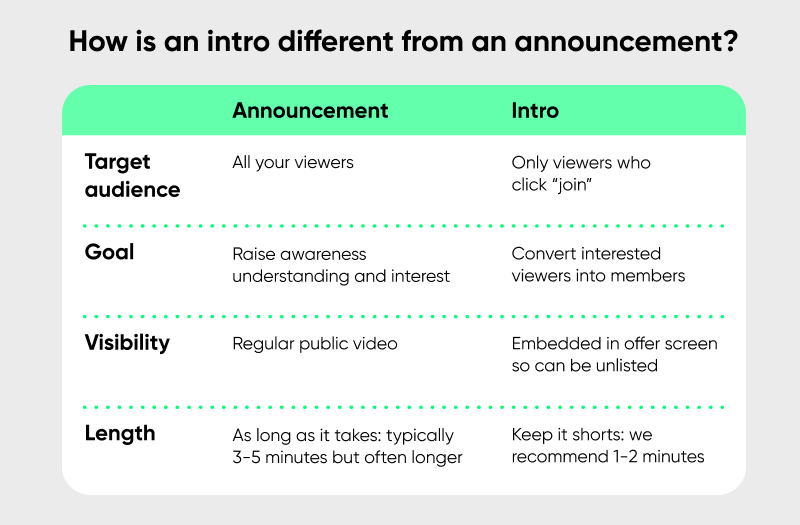
- Intro video → your permanent sales pitch
Don’t just “create” a video. Pin it to your Memberships page and your channel homepage. Keep it short (60–90 seconds), but make it specific.
- “Here’s what Members get” (bullet clear perks on screen).
- “Here’s why it matters” (tie it to your mission/content).
- End with a direct CTA: “Hit Join and be part of it.”
Think of it as your evergreen ad.
- Community posts → FOMO in action
Tease exclusive content before it drops. Example:
“Tomorrow, Members get the full uncut Q&A — here’s a 15-second preview.”
This does two things: rewards current members and shows non-members what they’re missing. Do it consistently, not occasionally.
- Live Streams → convert in real time
Answer questions, give shoutouts, and show member badges lighting up in chat. New viewers will see it’s a community, not just a button. Drop the Membership link directly in chat and mention it at high-energy moments, not randomly.
- Cross-Promotion → bring fans from outside
Fans on Instagram or Twitter may not even know you have YouTube Memberships. Run short posts like these.
- “Want to help me make more videos like this? Join the club → [link].”
- Show behind-the-scenes clips that are only for Members, and frame the post with: “Full version is in the Members tab.”
Each platform becomes a funnel into your Memberships, but always lead them back to YouTube, where joining is one click away.
- Homepage widget → JOIN in plain sight
Place the membership shelf above your playlists and show what members get. OOHAMI put a widget with its active members and a bold JOIN button on the homepage, which kept the offer visible and made members feel seen.
- Every description → one line, every upload
Add your channel's /join link to your upload defaults, so it lands in every new video without you having to remember. Viewers click it at the moment they're most curious.
- Public previews → show what members already got
Mention members-only content in public videos, like "Members saw the uncut version of this last week." It costs one sentence and gives viewers a reason to look.
- On-Screen graphics → small reminders that add up
Add a short lower-third or an end-screen element that points to memberships. One is easy to miss, but across dozens of videos they add up.
Members first: give members your next video a few days early
Members First lets members watch a regular video before everyone else. You set it up in the video’s publishing settings. There you choose which membership levels can watch it now, and the date and time it becomes public. YouTube suggests a 3–7 day head start, which makes the perk feel exclusive without any extra filming. A members-only video stays behind the paywall, while a Members first video goes public on its own at the time you picked. Views from members during early access count toward the video’s views and earnings like any others, AIR Media-Tech’s team confirms.
Early access is one of the five perks that bring in the most sign-ups in AIR Media-Tech’s partner data. It also gives you a natural line for the public version, like “Members saw this three days ago.”
Gifted Memberships: let fans bring in new members
During a live stream or a Premiere, you or your viewers can gift memberships to other people in the chat. YouTube picks recipients among viewers who turned on Allow gifts, subscribe to the channel, and have interacted with it recently. Current members can’t receive a gift.
A gift costs the closest membership price up to $9.99, so a pack of 20 gifts costs at most $199.80. Each gift gives one month of perks and doesn’t renew. That makes the first month a trial. Welcome gifted members, point them to your best members-only content, and tell them what’s coming next month. YouTube reports that members who watch members-only content in their first month cancel over 20% less often.
For launch steps and more tips, see our 15 tips for YouTube channel memberships.
Creating exclusive content and perks for YouTube Members
Perks decide who joins and who stays. Based on YouTube’s data and its own work with partner channels, AIR Media-Tech found that five kinds of perks bring in the most sign-ups, as our breakdown of the perks that drive member sign-ups shows.
- Members-only live streams. Members get time with you in real time, even if it’s a moderated Q&A.
- Early access to regular videos. Members see the video before everyone else, at no extra production cost.
- Polls tied to real channel decisions. Voting on the next topic turns a viewer into a contributor.
- Spaces for members. Members-only posts or a Discord server keep members talking between uploads.
- Loyalty badges and custom emoji. They rarely win a sign-up on their own, but they help members stay because the badge shows how long someone has supported you.
One perk can be enough. A history channel with 881,000 subscribers that AIR Media-Tech works with gives members a monthly poll on the next episode’s topic. Memberships now bring in about 20% of its revenue, and the extra work fits into the normal production schedule.
If you already stream, opening one stream a month to members adds little work. In AIR Media-Tech’s data from 404 streaming channels, a stream view out-earned a video view in 8 of the 11 niches studied, as our livestream revenue research shows.
YouTube’s own advice is to start with what you already have, like bloopers, uncut versions, and early access to regular uploads. Add a perk only when you know you can deliver it every month, because a missed drop is the fastest way to lose members.
Looking for ways to make money on YouTube without relying on traditional monetization? Our article on How to Make Money on YouTube Without Monetization has you covered.
Best practices to keep Members and make them stick
The first month decides whether most members stay. Monthly churn across the channels AIR Media-Tech works with averages 5–10%, so every member you keep is a sign-up you don’t have to win again. Here’s what keeps people subscribed.
- Welcome them on day one
Pin a members-only post that says what members just unlocked and what’s coming this month, and give them something to watch right away. YouTube reports that members who watch members-only content in their first month cancel over 20% less often.
- Consistent drops
Don’t ghost. New content or updates every week keeps members from canceling.
- Exclusive Q&As
Give them FaceTime. Live or recorded, answer member questions directly. Builds closeness.
- Loyalty rewards
Month 3? Badge upgrade. Year 1? Small gift or shoutout. Milestones keep people hooked.
- Member spotlights
Showcase a supporter in a video or post. Recognition feels like currency.
- Behind-the-Scenes access
Extra clips, bloopers, or raw takes. Low effort for you, high value for them.
- Private polls
Let members vote on content. Even tiny input makes them feel like insiders.
- Early access drops
Post big videos to members first. Creates buzz and a reason to stick around.
- Feedback loop
Ask: “What do you want more of?” Then deliver it. Retention is listening. Engagement is what flips a $2 supporter into a year-long subscriber.
Want to explore more strategies to monetize your YouTube channel? Check out How to Make Money on YouTube: 9 Ways to Monetize.
Analyzing YouTube Membership metrics and performance
The Memberships tab in YouTube Studio shows your active members, revenue, members by level, and sign-ups and cancellations for each billing period. It also shows why some members canceled. Five numbers from it tell you what to fix.
- Conversion rate
How many subscribers hit JOIN? For most channels in AIR partner data, 0.5–3% of subscribers become members, depending on the niche. If you're below your niche's range, work on the offer and where viewers see it before you add perks.
- Retention curve
Compare cancellations with sign-ups every billing period. Monthly churn across the channels AIR Media-Tech works with averages 5–10%. If 20% cancel after the first month, your perks aren't sticky enough, and the cancellation feedback in Studio usually shows why.
- Revenue mix
Which tier pays the bills? Sometimes $5 beats $25 because volume wins.
- Content performance
Which bonus videos get replayed? Double down on what members binge, and drop what they skip. The Memberships tab also lists the recent videos members joined on, so you can see which public videos sell the membership best.
- Feedback pulse
Run quick surveys. If members tell you what’s missing, you fix churn before it hits. Numbers steer. If you’re not tracking these, you’re flying blind. To compare membership income with what ads pay, see our RPM data from 300 channels.
Memberships vs. other monetization tools
Here's how memberships compare with Patreon and with Super Chat and Super Thanks.
|
Feature |
YouTube Memberships |
Patreon |
Super Chats / Thanks |
|
Platform integration |
✅ Built-in YouTube |
❌ External |
✅ Native to streams |
|
Recurring monthly income |
✅ Yes |
✅ Yes |
❌ One-time |
|
What the creator keeps |
70% after taxes and fees; YouTube covers transaction costs |
90% for pages launched after August 4, 2025, minus payment processing (2.9% + $0.30 per card payment) |
70% after taxes and fees |
|
Community perks |
✅ Badges, emojis |
✅ Flexible |
❌ Limited |
|
Discovery & promotion |
✅ Visible on YT |
❌ Off-site |
✅ Livestream-only |
|
Best for… |
YouTubers wanting an easy setup |
Creators with broad content ecosystems |
Streamers monetizing hype moments |
Sources: YouTube Creators — Channel memberships; Patreon Help Center — A standard platform fee for new creators; YouTube Help — Manage Super Chat & Super Stickers. Checked October 2026.
Memberships fit creators whose audience already watches on YouTube, because joining takes one click and no new account. Patreon fits creators who sell downloads, courses, or perks outside YouTube, and it keeps the relationship with fans even if a channel’s memberships are paused. Many channels run both with the same levels and perks, and one channel AIR Media-Tech works with grew revenue 24% in two months that way, as our comparison of Patreon and YouTube memberships shows. At VidSummit 2026, Hammer Media showed a third option, a membership that runs on YouTube and in its own app, now past 175,000 members.
How many subscribers become members: conversion rates by niche
Across the channels AIR Media-Tech works with, 0.5–3% of subscribers become members, depending on the niche and how often the channel promotes memberships. YouTube doesn’t publish an average, so these ranges come from AIR partner data, the same figures behind our 15 tips for launching memberships.
Conversion by niche, from AIR partner data:
- Education channels (tutorials, language learning, niche coaching) convert 2–4% of subscribers, the highest of any niche, because the perk is concrete and easy to picture.
- Lifestyle channels and vloggers convert about 1–2%, mostly through personal perks like behind-the-scenes videos.
- Entertainment and gaming channels convert 0.5–1%, and their larger audiences make up for the lower rate.
Cancellations count as much as sign-ups. Monthly churn across the same channels averages 5–10%, so a program with 100 members has to win 5 to 10 new ones every month to stay where it is. A channel with many inactive subscribers also lands at the low end of its range, because only active viewers ever see the offer.
0.5–3%
of subscribers become members, in AIR partner data
5–10%
of members cancel each month, in AIR partner data
70%
of what members pay stays with the creator
Here’s what the ranges mean in money, after YouTube’s 30% share.
- A gaming channel with 500,000 subscribers converting 0.8% gets 4,000 members. At $1.99 a month, they pay $7,960, and the creator keeps about $5,570.
- An educational channel with 50,000 subscribers converting 3% gets 1,500 members. At $4.99 a month, they pay $7,485, and the creator keeps about $5,240.
Both figures are before cancellations. A full breakdown by channel size is in our guide to how much you can earn from channel memberships.
More YouTube Membership proof in action
Three more channels AIR Media-Tech works with show the same pattern at different sizes.
- A news channel with over 2 million subscribers set up memberships with AIR Media-Tech, together with Super Thanks and Super Chat. Over three months, its revenue grew 130%.
- A channel that already earned on Patreon set up YouTube memberships with the same levels, prices, and perks. Revenue grew 17% in the first month and 24% in the second, as our comparison of Patreon and YouTube memberships shows.
- An educational channel with 5.3 million subscribers earns at least $20,000 a month from memberships by giving members in-depth versions of its regular videos. In its best year, memberships alone brought in $217,000.
Mistakes to avoid with Memberships
- Too many tiers – Confuses viewers. Keep it simple.
- Incorrect pricing – Setting everything at $10+ may scare off casual supporters. Start low, then scale.
- Overpromising perks – If you can’t consistently deliver exclusive videos or live sessions, members will cancel.
- Insufficient communication – If you don’t mention Memberships often, subscribers will forget it exists.
How to sell Memberships without sounding pushy
You don't need to sound like a salesperson. These three scripts keep the ask short and natural.
→ During a video:
“If you’ve been enjoying this content and want to support me while getting exclusive perks like behind-the-scenes videos and early uploads, hit the Join button below. I’d love to welcome you to our members’ community.”
→ During a live stream:
“Quick shoutout to all my channel members – you’re the reason I can keep doing this. If you want to unlock custom emojis and join our next members-only stream, hit that Join button right here in the chat.”
→ In a community post:
“Thinking about joining our Members’ club? This week, I’ll be sharing an exclusive behind-the-scenes vlog that only members will see. Click ‘Join’ to get access.”
Memberships are on, but the money isn't there?
For channels from 1,500 subscribers, AIR Media-Tech's Alternative Monetisation service builds your memberships with you and gives you a plan to turn them into steady income.
- An analysis of your audience and the channels you compete with
- Membership levels and perks built for your viewers, plus badge design
- An implementation checklist and help with the setup
- Super Thanks and Super Chat set up alongside memberships