


Most creators who turn on YouTube memberships earn very little from them. They set up the feature in a rush, mention it once, and move on. In the three channels we break down below, memberships grew to 30%, 60%, and 80% of total revenue. The difference came from perks built around what that audience wanted, a natural mention in every video, and tiers priced around what superfans will pay. Those three tactics and 12 more are below.
What Are the Best Practices for YouTube Memberships?
Here are fifteen practices from the channels we manage. Not all carry equal weight, but each one addresses a different reason members join or leave.
|
Tactic |
Effort |
Income impact |
|---|---|---|
|
1. Pricing your tiers right |
Low — one-time setup |
High — determines your revenue ceiling |
|
2. Reusing Patreon tiers |
Low — copy what you have |
Medium — additive if you already have Patreon |
|
3. Member shoutouts in videos |
Low — a few minutes per video |
Medium — retention and organic recruitment |
|
4. Super Features during live streams |
Medium — requires regular streaming |
High — can reach 50%+ of total revenue |
|
5. Member-only virtual hangouts |
Medium — recurring time commitment |
Medium — strong retention, reduces churn |
|
6. Early access to new content |
Low — no extra production |
Medium — strong conversion driver |
|
7. Exclusive bloopers and outtakes |
Low — footage already exists |
Low-medium — good retention perk, weak standalone |
|
8. Member-only polls and Community posts |
Low — minutes per week |
Medium — keeps members engaged between uploads |
|
9. Uncut versions of videos |
Low — no extra filming |
Medium — depends on how much gets cut |
|
10. Merch discounts for members |
Low — one-time setup |
Low-medium — secondary revenue, strong loyalty signal |
|
11. Member-only Q&A sessions |
Medium — scheduled time per session |
Medium — high perceived value, strong retention |
|
12. Monthly member recognition |
Low — minutes of video time |
Medium — retention over acquisition |
|
13. Exclusive tutorials and workshops |
High — dedicated production time |
High — strongest perk for education and skills channels |
|
14. Downloadable resources |
Medium — one-time to build, then passive |
Medium-high — strong conversion when the resource is specific |
|
15. Member-only content vault |
Medium — curation takes time upfront |
Medium — reduces churn, stronger on larger channels |
1. Figure Out the Best Pricing for Tiers
Three tiers — low, medium, high — are the right starting point. YouTube allows up to six levels, priced from $0.99 to $499.99 a month in the US, but six is too many to manage and too many for viewers to choose from. The entry price matters a lot.
YouTube itself frames it this way in its pricing guide:
"Would you attract twice as many members at $2.99 as you would at $5.99? If not, you may earn more revenue by starting the price at $5.99."
The math on that is worth doing before you launch. A $5.99 tier with 100 members earns more than a $1.99 tier with 200 members.
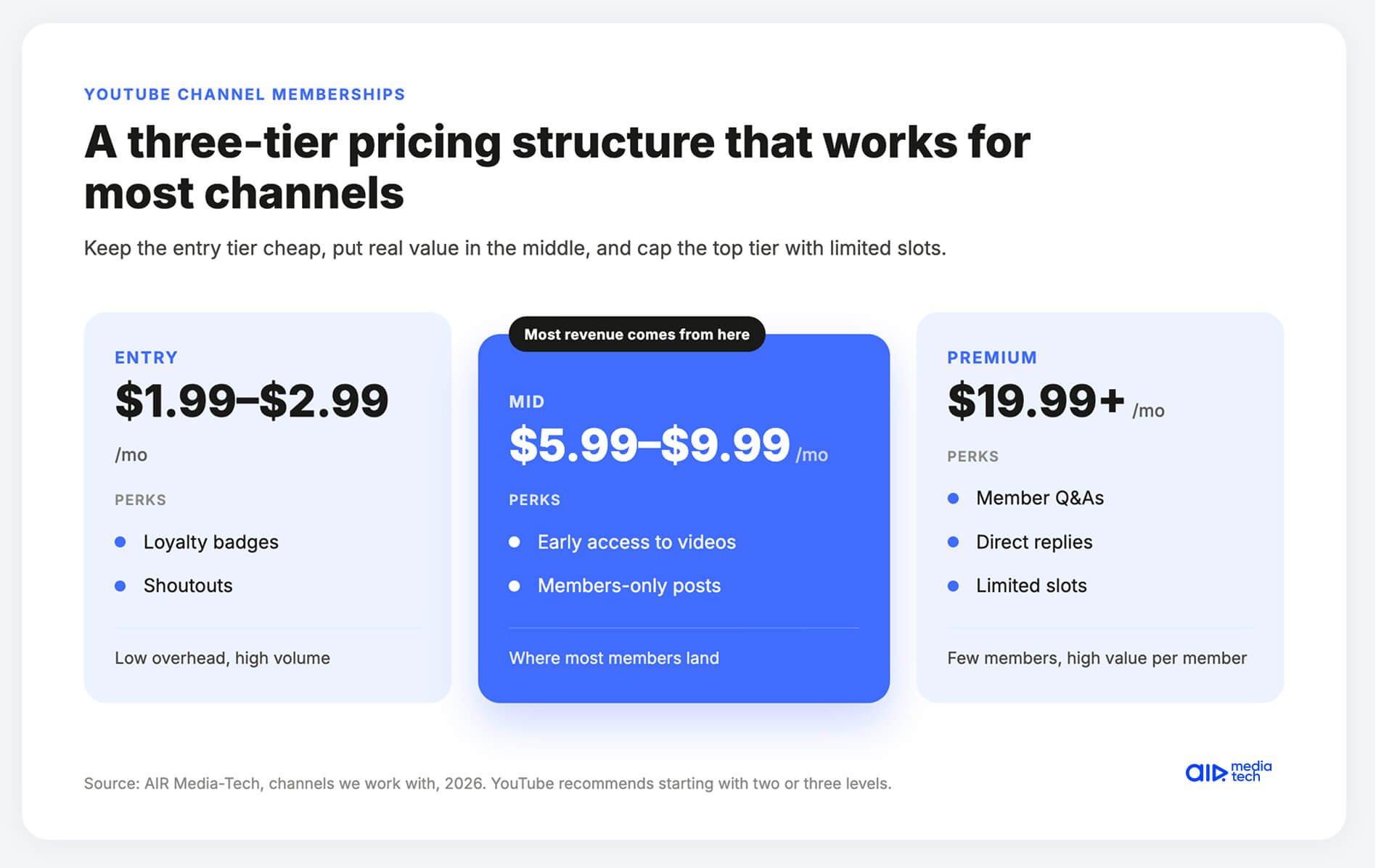
A practical three-tier structure that works for most channels:
- Entry at $1.99–$2.99 (badges, shoutouts — low overhead, high volume);
- Mid at $5.99–$9.99 (early access, exclusive posts — where most members land);
- Premium at $19.99+ (Q&As, direct replies, limited slots).
Across the channels we work with, the mid-tier is where the majority of revenue comes from, not the top. YouTube's own creator page on memberships recommends starting with two or three levels and building from there.
2. Reuse Levels and Perks from Patreon
Already on Patreon? Copy the tier structure to YouTube Memberships instead of building from scratch. They reach different people in different ways, so they don't eat into each other. We have partners running both in parallel and earning from each independently.
- YouTube's built-in friction is lower than Patreon's. A viewer who already has a YouTube account can join with one click and an existing payment method.
- Patreon requires a separate account. That extra step costs sign-ups: on YouTube, a viewer can join a comparable offer without going anywhere new.
3. Highlight Members in Videos
Shoutouts work. A name at the end of a video, a segment where you answer members' questions, a personal reply — these keep members subscribed and attract new ones. Member badges are visible in comment sections. Non-members see them. That's organic recruitment that costs nothing.
Isaac, a music producer and reaction creator, puts it plainly in a YouTube Blog interview: tie the shoutout directly to the video content.
His formula:
"My channel members helped me choose today's topic. If you want to help choose topics for future videos, hit that join button below."
It connects the perk to something visible in the video the viewer is already watching.
4. Run Super Features During Live Streams
Super Chat, Super Stickers, and Super Thanks sit alongside memberships — they don't replace them. Our Ukrainian partner Yanina Sokolova runs all of them together. Combined, they account for over 50% of her total channel revenue in a year.
Live streams are also where memberships sell themselves. Since October 2025, you can switch a public stream to members-only without restarting it. Non-members see that the stream is now exclusive and get a prompt to join your channel. For now, it works only for horizontal streams started from a desktop.
One way to extend this is 24/7 live streaming — running your existing video catalog as a continuous live stream that earns even between uploads. Gyre is the tool most creators use for this. It queues your existing videos into a playlist and runs them as a live stream around the clock.
The revenue profile is different from regular uploads:
- A live view often pays more than a video view. In our data from 404 streaming channels, live RPM beat video RPM on the same channels in 8 of the 11 niches we could measure.
- Watch time per session is longer because live viewers tend to stay. See how it works.
5. Organize Member-Only Virtual Hangouts
Regular informal sessions — where members can talk to you and each other — turn supporters into community. Promote them in your videos and Community posts. People who have something to look forward to don't cancel.
What format works:
- Keep it unscripted and low-key.
- A 30-minute live chat where you answer whatever members bring up performs better than a formal Q&A with prepared questions.
- The appeal is access, not production value. Members stay for those sessions because they feel different from a regular video — which they are.
Do channels in your niche earn more from memberships?
Our audit compares your channel with competitors in your niche and tells you what to do to outperform them.
Show me how to catch up6. Share Early Access to New Content and Features
Early access is simple: members see it before everyone else. But vague "early access" doesn't convert. Specific does. "You'll see Tuesday's video this Saturday" is a reason to join.
YouTube's internal data shows that 20% of new members join because they see members-only content promoted on the homepage or in watch next recommendations — which means the platform is actively surfacing your exclusive content to non-members as a conversion tool.
7. Share Exclusive Bloopers and Outtakes
The footage already exists. Bloopers and outtakes cost nothing extra to produce. Share specific moments in Community posts as previews. Give non-members a reason to feel like they're missing out.
This perk works better as a complement than as the main offer. YouTube's own membership best practices page lists bloopers, uncut versions, and early access as ways to "offer value to members with less additional work" — low-production perks that reinforce the relationship rather than anchor it. Build your membership around something substantive; use outtakes to add texture.
8. Leverage Community Posts for Member-Only Polls and Updates
Member-only polls give your audience a say in what you do next. People who influence your content stay subscribed. Since November 2025, you can also pin posts to the top of your Community tab and share a direct tab link, useful for pointing people to what member content looks like.
One member-only poll or update per week is enough to keep the tab active. The goal is that members feel checked in on between uploads
9. Offer Uncut Versions of Your Videos
Non-members see the edited version, and members see the full cut. Make the gap real — a two-minute extension with nothing in it is not a perk. If the uncut version doesn't add something worth having, don't use this one.
Where this works well:
- Interviews where you cut for pacing
- Tutorials where you removed side discussions
- Vlogs where the interesting parts didn't fit the main edit.
Where it doesn't: videos that were tight to begin with. Promising an "uncut version" of a 10-minute video that only runs 12 minutes uncut trains your members to expect less than you said.
10. Offer Members-Only Discounts on Merchandise
A discount does two things: rewards loyalty and gives members something to mention publicly. Make it big enough to feel real. Ten percent isn't. Twenty or thirty is, and it signals that membership has tangible financial value, not just content value.
One thing to set up: make the discount offer visible in the member perks tab before launch. Members who notice it before you mention it feel like they discovered something, which is a better feeling than being told about it in a video.
11. Provide Access to Member-Only Q&A Sessions
Members can ask questions that won't be answered in public comments. Run it live or recorded — both work. Pull specific member questions into your public videos occasionally. Non-members will notice the access they don't have.
How to structure the promotion:
- In the video just before a Q&A, mention that you'll be spending time next week answering member questions.
- You don't need to explain the whole membership, just name the thing members will get.
The contrast between what members get and what public viewers get is the pitch.
12. Create a Monthly Member Recognition Program
Members want to be seen by you and by each other, and recognition keeps them around longer than most perks do.
- Names in the video.
- A Community feature.
- A dedicated segment.
- It takes minutes.
Mandy, a creator interviewed by YouTube for their membership success series, talks about the psychological side of this: memberships give creators room to take more risks, try new things, and be less guarded, because the people watching are already on your side.
Recognition programs reinforce that dynamic. Members who feel seen by name in a video act differently in comments, share differently, and stay longer.
13. Create Exclusive Member-Only Tutorials and Workshops
For educational, skills-based, or professional channels, tutorials and workshops are the strongest perk you can offer. They carry a clear implied value (this is worth paying for) that behind-the-scenes content usually doesn't. Announce them in advance so members have something to wait for.
Conversion tip from AIR partner data:
- Education channels see 2–4% of subscribers convert to members — the highest conversion rate of any niche.
- The reason is that the perk is specific and learnable. "Advanced tutorial only for members" answers the question "what do I get?" in concrete terms.
Channels where the perk is vague ("exclusive content!") convert at a fraction of that.
14. Offer Members-Only Downloadable Resources
Templates, presets, checklists, e-books — you produce them once, and they keep delivering. Name the specific resource when you promote it. "A Lightroom preset pack calibrated for outdoor shooting" converts better than "exclusive downloadable resources."
One production tip: batch these. Spend a day building out three or four resources at once, then release them monthly. Members stay subscribed when they know something new is coming.
YouTube's membership pricing guidance specifically notes that you can update and adjust perks at any time, so if one resource type doesn't land with your audience, swap it out without rebuilding your whole tier structure.
15. Create a Member-Only Content Vault
A curated archive of your best content — extended cuts, deleted scenes, exclusive videos — gives members a reason to stay subscribed past the current upload cycle. Promote it by naming specific titles, not just the fact that a vault exists. The catalog is the sell.
The vault works differently at different channel sizes.
- On smaller channels (under 50K subscribers), it's most useful as a launch perk — something members get access to immediately when they join.
- On larger channels with a long content history, it becomes a genuine reason to stay: members know there's a backlog they haven't found yet.
Either way, tease specific pieces rather than the concept.
Memberships on, but earning pocket change?
Most stalled memberships have a promotion problem. Our specialists find where your fan revenue leaks and hand you a ranked plan to fix it. → Find my missing revenue.
What Happened When These Channels Did It?
Three channels. Very different starting points.
Health & Sport channel — from $50/month to 80% of revenue.
Memberships had been live since 2019. Five years. No strategy, almost no promotion. Monthly income from the feature: about $50. We rebuilt it around what their fitness audience actually wanted — extended workout videos, live Q&As, a private community chat for members to share progress. Then we made it visible: JOIN button on end screens, Community posts highlighting what non-members were missing, the membership link in every description. Six months later: monthly membership income up 16x, active sponsors up 9x, memberships now at close to 80% of total channel revenue.
Rally Point — 60% of revenue within one year.
Ukrainian entertainment channel. We built their full membership strategy from analytics, they launched in September 2024. The perks fit the channel — clips, a private chat, personal video replies, physical gifts for long-term members. Promotion was everywhere and consistent: JOIN widget on the homepage, community teasers before each drop, the link in every description, shoutouts at the start of videos. One year in: memberships at 60% of total revenue. More stable than AdSense. Still growing.
OOHAMI — 30% of revenue in 60 days.
Malaysian gaming channel, over 1M subscribers. Memberships had been sitting unused since 2020. In February 2024, the creator made one change: he recorded a short video explaining exactly what members would get. Exclusive videos, sneak peeks, community polls, BTS from the recording booth. He added a JOIN widget to the homepage and put the link in every description. Sixty days: membership income 6.5x, member count 6.5x, memberships at 30% of total channel revenue.
Which Perks Work in Your Niche
The three cases above and the channels AIR Media-Tech works with point to the same pattern: the perks that convert depend on why people watch the channel in the first place.
|
Niche |
Share of subscribers who become members |
Perks that work |
Evidence |
|
Education and skills |
2–4% |
In-depth versions of regular videos, tutorials, workshops |
A 5.3M-subscriber education channel we work with earns at least $20,000 a month from memberships |
|
Fitness and health |
— |
Extended workout videos, live Q&As, a private chat to share progress |
A Health & Sport channel we work with grew membership income 16x in six months |
|
Entertainment |
0.5–1% |
Clips, a private chat, personal video replies, gifts for long-term members |
Rally Point, a Ukrainian entertainment channel, made memberships 60% of total revenue within a year |
|
Gaming |
0.5–1% |
Exclusive videos, sneak peeks, community polls, behind-the-scenes clips |
OOHAMI, a Malaysian gaming channel, grew membership income 6.5x in 60 days |
|
Lifestyle and vlogging |
1–2% |
Unedited vlogs, members-only hangout streams, a say in what gets filmed next |
AIR memberships team |
|
Music |
— |
Studio sessions, early access to new releases, breakdowns of how a track was made |
AIR memberships team |
|
Cooking and food |
— |
Uncut recipe videos, cook-along streams, printable recipe cards |
AIR memberships team |
|
Beauty and fashion |
— |
Full routines, get-ready-with-me streams, early access to hauls |
AIR memberships team |
|
Podcasts and news |
— |
Extended and bonus episodes, after-show streams, deeper analysis |
AIR memberships team |
Source: AIR Media-Tech partner channels and memberships team. Conversion rates are typical ranges across the channels we work with; "—" means not measured separately.
Kids channels are the exception: memberships aren't available on channels set as made for kids, so kids creators need other revenue layers. For every other niche, YouTube reports that creators who upload two or more members-only videos a month get 15x more new members, and members who engage with that content in their first month cancel over 20% less often.
How Much Can You Earn On YouTube Memberships?
It varies. Channel size, niche, perk quality, how consistently you promote — all of it matters. Channels we work with that get all of this right regularly add 20–30% to total revenue from memberships. Sometimes a lot more.
One of our educational channels with 5.3M subscribers earns at least $20,000 every month from memberships by offering members in-depth versions of their regular videos. Their peak in a single year was $217,000 from the feature alone. That's an outlier, but it shows what's possible when the audience is engaged and the perk matches what they came for.
Conversion rates vary by niche. From the channels we work with:
- Education channels (tutorials, language learning, niche coaching) convert at 2–4%;
- Entertainment and gaming channels at 0.5–1%, though they often scale higher because of larger subscriber bases;
- Lifestyle and vlogging channels at around 1–2%, often boosted by personality-driven perks.
A rough revenue estimate for your channel:
- Start with your active viewer base — frequent commenters and high watch-time viewers, not your total subscriber count.
- Apply a conversion rate. Across the channels we audit, 0.5–3% of subscribers typically become members, depending on niche and how well the membership is promoted.
- Multiply that by your average monthly tier price.
- Factor in churn. Monthly churn across the channels we manage averages 5–10%. Subtract it from your projected member count to get a realistic monthly number.
Membership Revenue Estimation:
10,000 active viewers × 1% = 100 members. $5/month × 100 = $500/month. After 10% churn: around $450/month.
One note on the iOS and Android fee: when members join through the app rather than a browser, Apple or Google may take an additional platform fee on top of YouTube's 30% cut.
How Hard Is It to Launch YouTube Memberships?
Not hard. The setup in YouTube Studio walks you through it. The harder part is understanding why people join, because the mechanics are simple and everything depends on execution.
Five things drive conversions, from what we see across the channels we work with:
- Some viewers want to support you. They don't need a long perk list — "support my channel here" is enough for them.
- Fans want behind-the-scenes access. Not broadcast updates. Personal ones.
- Some viewers will pay for something they can't get anywhere else. Say the specific thing in the video, not just "exclusive content."
- Members want recognition — from you and from other members. Shoutouts, badges, being named.
- Part of your audience wants direct engagement. Replies, polls, members-only chat. These are people already trying to get closer to you through comments.
Isaac's observation from building his own membership: "In my experience, they really just want two things: to be heard, and to support you." The elaborate perk structure comes second. Connection is what they're buying. The perks are just proof it's real. Full creator interview on YouTube Blog.
What Mistakes Kill Memberships Before They Start?
Four failure modes we see regularly across the channels we audit.
- No clear value. "Exclusive content and more" is not a reason to pay. Name what members get, how often, and why it's worth it. Vague doesn't convert.
- Launching too early. Members are your superfans, people who already show up consistently. If that base isn't there yet, the feature will sit empty. Timing matters.
- Promoting once. Most viewers miss one mention. Consistent, natural promotion — in videos, descriptions, Community posts, end screens — is not annoying when the value is clear. One mention is not a launch.
- Treating all viewers the same. Your membership is for the people who comment, watch everything, and engage with your community. Promoting it to everyone dilutes results. Aim at the people who already act like members.
How Should You Promote YouTube Memberships?
Mentioning memberships regularly pays off. According to YouTube, creators who do it usually have twice as many members as creators who don't.
Make it feel like an invitation. Three things that work:
- In the video, at a natural moment — "If you want to see how this gets made, join the Members community — exclusive content and direct Q&As every month." Not at the end as an afterthought.
- In the description, explicitly say what members get, how often, and why it matters. "Members get early access, exclusive live streams monthly, and custom badges — and it directly supports the channel."
- One mention per video to start. Test it before you add more. Overselling trains your audience to tune it out.
Use YouTube's Built-In Promotion Tools
YouTube gives you five tools that do part of the selling for you.
- An intro video in the membership window. YouTube shows it to everyone who clicks Join, so it's the pitch viewers see at the moment they decide. OOHAMI, a Malaysian gaming channel we work with, started there: a short video that spelled out the perks came before a 6.5x jump in membership income in 60 days.
- The /join link. Add /join to the end of your channel URL to send viewers straight to the membership window, then put that link in descriptions, cards, end screens, and Community posts.
- Free trials. YouTube automatically offers eligible viewers one free month of membership, once per viewer across all of YouTube. Trials are on by default, and you can turn them off in the Memberships tab in YouTube Studio.
- Gift memberships. During a live stream or Premiere, viewers can buy one-month memberships for other viewers who opted in to receive gifts. Gifts don't renew, so treat them as a free sample: share your gift opt-in link before the stream so more of your audience can receive one.
- The Channel Memberships page. YouTube picks creators for its Channel Memberships page based on viewer preferences and prioritizes those who consistently post members-only content and engage with their audience.
Track Cancellations, Not Just Sign-Ups
New members make a membership program look healthy, but cancellations decide whether it grows. Monthly churn across the channels AIR Media-Tech manages averages 5–10%, so a channel with 100 members has to win 5 to 10 new ones every month just to stay flat.
YouTube Studio shows what you need in the Memberships tab:
- Sign-ups and cancellations. How many viewers joined and how many canceled over time. New members minus lost members is your real growth.
- Cancellation feedback. The multiple-choice reasons some members give when they leave.
- Member duration. How long each member has been paying, which shows whether people stay past the first month.
- Top videos members joined on. The uploads that convert viewers into members.
- Members by level. Which tiers hold their members and which lose them.
YouTube Analytics adds members gained, canceled, and lost per day, plus how many gift memberships were sent and redeemed.
What to do with the numbers each month:
- Match spikes in cancellations to what changed. A skipped members-only stream, a late perk, or a new tier price usually shows up in the next month's cancellations.
- Make more of what converts. If one video type keeps bringing members in, give it a members-only follow-up.
- Cut perks nobody uses. Read the cancellation feedback and rebuild around what your members want, the way a Health & Sport channel we work with grew membership income 16x in six months.
Are YouTube Memberships Worth It?
The answer depends less on subscriber count than on how many of your viewers already act like fans. Memberships pay off when you already have regulars, not when you're hoping to create them.
Why they're worth it:
- A bigger cut. Creators keep 70% of membership revenue, against 55% of ad revenue on long-form videos.
- Income that doesn't follow views. Members pay monthly whether a video takes off or not. For Rally Point, a Ukrainian entertainment channel we work with, memberships became more stable than AdSense within a year.
- A low bar to start. Memberships unlock at 500 subscribers, long before ads do.
- Little friction for fans. Viewers join with the Google payment method they already use, without creating a new account.
What makes them hard:
- Few viewers convert. Across the channels AIR Media-Tech audits, 0.5–3% of subscribers become members, so a small or passive audience earns little.
- Members leave. Monthly churn across the channels we manage averages 5–10%, and perks have to arrive every month to keep it there.
- Turning them on isn't enough. A Health & Sport channel we work with had memberships live for five years and earned about $50 a month from them until we rebuilt its perks and promotion.
- Your members live on YouTube. If a channel loses YPP status, memberships pause, and after 120 days the program ends. Patreon or Buy Me a Coffee keep the relationship off-platform, which is why many creators run both. Caleb Hammer's team went further and moved Hammer Elite's main experience to its own app, as they explained at VidSummit 2026.
What Do You Need to Qualify for a YouTube Membership?
Channel memberships are part of YouTube's fan funding features, which sit inside the YouTube Partner Program. Two tiers matter here.
Early access tier — this is what unlocks memberships, Super Chat, Super Stickers, Super Thanks, and YouTube Shopping:
- 500 subscribers
- 3 valid public uploads in the last 90 days
- 3,000 qualified watch hours in the last 12 months, or 3 million qualified Shorts views in the last 90 days
- Accepted into the YouTube Partner Program (YPP)
- 18 years old or older
- YouTube's terms and policies agreed to
- Living in one of the available countries
- Channel not set as "made for kids" and without a significant number of videos marked that way
- No significant number of ineligible videos — videos with extensively claimed music count as ineligible
- 2-Step Verification turned on for your Google Account
Full monetization tier — adds ad revenue on top of fan funding:
- 1,000 subscribers
- 4,000 qualified watch hours in the last 12 months, or 10 million qualified Shorts views in the last 90 days
Current eligibility and the full list of available countries: official YouTube Memberships page.
What Changes for Memberships in 2027
YouTube has announced that from February 1, 2027, new channels applying for full monetization will need 8,000 qualified watch hours in the last 365 days, or 20 million qualified Shorts views in the last 90 days. The 500-subscriber bar for memberships and other fan funding features stays the same, so a channel can still launch memberships long before it qualifies for ads.
Two changes affect channels that already run memberships:
- New terms by January 31, 2027. Open YouTube Studio and accept the updated YPP terms. If you don't, memberships and the other affected features stop paying from February 1, 2027, until you accept.
- Pre-2023 memberships move to a new contract. If you turned on memberships or Super Chat before 2023, your channel is still on the older Commerce Product Addendum. YouTube is moving everyone to the Commerce Product Module. The revenue share and features stay the same, but you still have to accept it.
YouTube will also start checking that partner channels stay active. From February 1, 2027, a channel needs at least one of these: 1,000 qualified watch hours in the past 365 days, 1 million qualified Shorts views in the last 90 days, or 2 long videos or 5 Shorts uploaded every 90 days. Channels that fall short get an extra 90 days to hit the watch-hour or Shorts-view target. The full breakdown is in our YPP update guide.
How to Turn On Memberships and Prepare Your Launch
Once you're eligible, go to YouTube Studio → Earn → Memberships (the tab used to be called Monetization). YouTube walks you through the setup from there.
What to do before you launch:
- Define tiers with clear, escalating benefits
- Prepare at least 2–3 months of members-only content before you go live
- Design custom badges and emojis
- Test that payment and access delivery work before you announce anything
- Write a launch video script and a description template
- Run a soft pre-launch — mention it to your community before the full launch to gauge interest
- Set up a way to collect ongoing member feedback
Full setup walkthrough: how to effectively set up YouTube Memberships.
For context on how memberships fit into broader channel monetization — and why channels with the same subscriber count can earn very different amounts — our YouTube monetization comparison breaks down three real channel pairs in detail.
What Are the Alternatives to YouTube Memberships?
Memberships don't fit every creator. Some can benefit more from Patreon or Buy Me a Coffee. The full comparison is in our Patreon vs YouTube Memberships article.
- Patreon has more flexible tiers, strong international payment support, and detailed analytics. Better for creators with a global audience who want to monetize across platforms. Creators who joined after August 4, 2025 pay a flat 10% platform fee plus payment processing, while older accounts keep their legacy 5–12% rates. YouTube takes 30%, but covers payment processing from that cut.
- Buy Me a Coffee is simpler — one-time and recurring payments, low setup overhead. Better for smaller creators who want to accept support without building a full membership structure. Analytics are limited.
A lot of the channels we work with run both alongside YouTube Memberships. They don't compete — they reach different people.
Feel like you should be earning more?
You're probably right. Memberships stall for the same reasons whole channels do: perks that don't match the audience, promotion that stopped after one video, or ineligible videos sitting in the archive. An AIR channel audit reads your Studio data across 10 blocks, revenue included, and compares it with channels in your niche. We've done this for 3,000+ channels over 16 years.
What you get:
- A structured report across packaging, retention, traffic, niche, portfolio, revenue, audience, forecast, risks, and roadmap
- An action plan ranked by impact
- A 45-minute live walkthrough with a senior AIR specialist (Channel Growth Blueprint)
