If you run a label, your catalog already earns on YouTube. Fans upload lyric videos, edits and Shorts with your artists' recordings every day. Without Content ID, the label sees none of that money.
So in October 2026, we went through YouTube's Content ID rules, what DistroKid, TuneCore, CD Baby, and Symphonic accept, and how we handle Content ID for labels at AIR Music. Here's what a label needs: where the catalog earns without you, how to get access, which tracks qualify, which policy to set, how to keep your own channels safe, what goes wrong with two distributors, and what Content ID won't collect.
Lyric Videos, Edits and Shorts: Where Your Catalog Earns on YouTube Without You
Content ID compares every video uploaded to YouTube with reference files sent in by rights holders. When it finds your recording, it applies the policy you chose: monetize, track, or block. If a track has no reference file, Content ID has nothing to match, and views on videos with that track earn the label nothing.
The basics of how matching works, and what an uploader can do about a claim, are in our guide to how Content ID works.
Most rights holders take the money. YouTube processed about 2.5 billion Content ID claims in 2025, and rights holders chose to monetize over 90% of them, according to its Copyright Transparency Report. By December 2024, Content ID had paid rights holders more than $12 billion, TorrentFreak reported.
A label's reference file is its master recording, so it catches uploads that use that recording. Here's what it catches and what it doesn't, as of October 2026.
What a label's master recording in Content ID can claim on YouTube, and who claims the rest. From YouTube Help, checked in October 2026.
|
Upload type |
Example |
Can the label claim it with the master? |
|---|---|---|
|
Full re-upload |
A channel posts your artist's single with a still image |
Yes |
|
Lyric video |
A fan lyric channel uses the official recording |
Yes |
|
Edits, dance videos and Shorts |
A creator uses 20 seconds of the track in a Short |
Yes. Since September 24, 2026, new Shorts of one to three minutes with an active claim stay playable instead of being blocked, per YouTube Help |
|
Background use |
A wedding video or a vlog with the track playing |
Yes |
|
DJ mix or compilation |
A one-hour mix that includes the track |
Yes, on the part that matches |
|
Cover |
Another singer records the song |
No. A cover is a new recording, and the song's publisher claims it as the composition owner, per YouTube Help |
|
Karaoke version |
A karaoke channel re-records the backing track |
No. Only the composition owner can claim it |
A cover of your artist's song earns money for the song's publisher, and the label that owns the master gets nothing from it. If your label also handles publishing for its artists, you can claim covers too. The last section covers how.
How much of a label's income this brings depends on the label. Among the labels we work with at AIR Music, as of October 2026, one has a catalog of 12,000 tracks on 6,000 releases, all of it in Content ID, and Content ID brings about 10% of its earnings. Another label with a similar number of releases gets about 50% of its income from Content ID. A third label promotes mostly on TikTok and earns about 80% of its income there, while YouTube brings it almost nothing. The difference comes from how the artists grow, how viral their tracks get, and where the label promotes them.
Fans use your catalog on YouTube every day. Is that money reaching your label?
AIR Music puts your label's catalog into Content ID through AIR Media-Tech's own CMS and claims fan uploads, lyric videos, and edits for you. Your personal manager tells you which tracks can go in and gives you a plan for the rest of the roster.
Apply for a Personal Manager →How a Label Gets YouTube Content ID: Direct Access, a Distributor or a Partner
You can't switch Content ID on from a regular YouTube channel. YouTube gives direct access to rights holders with exclusive rights to material people upload often, and it also weighs their "demonstrated need," according to its Content ID eligibility page. Most independent labels get in through a company that already has a Content Management System (CMS), YouTube's back office for rights holders.
Here are the four routes, as of October 2026.
Four ways a record label can get its catalog into YouTube Content ID, and who controls the claims on each. Checked in October 2026.
|
Route |
Who it fits |
Who sends the references and handles claims |
What to check before you sign |
|---|---|---|---|
|
Direct access from YouTube |
Large labels with a big catalog that gets re-uploaded often |
Your own team in YouTube's Content Manager |
Whether you have people to review disputes and keep references valid. YouTube can disable Content ID for an account that misuses it, per YouTube Help |
|
Opt-in at a distributor |
Labels already releasing through DistroKid, TuneCore, CD Baby, Symphonic and similar |
The distributor's rights team |
Which tracks it accepts, whether Content ID costs extra, and whether you see Content ID income per artist |
|
A standalone Content ID administrator |
Labels that keep their distributor for streaming but want a separate company on YouTube claims, such as Identifyy, a HAAWK company, or AdRev, now part of FUGA |
The administrator's team |
That your distributor isn't sending the same tracks to Content ID too, and what revenue share the administrator takes |
|
A distribution partner with its own CMS |
Labels that want a person to handle claims, disputes and allowlists |
The partner's CMS team, with a manager for your label |
Who controls the claims on your tracks if you leave, and how fast the manager answers |
Here's how the four distributors from the top search results handle it, from their help pages, checked in October 2026:
- DistroKid adds Content ID through Social Media Pack, an album extra charged every year per release, and keeps 20% of what it earns. It requires that you own 100% of the sounds and that no one else, band members and producers included, sends the same release to Content ID, per DistroKid's eligibility page and its page on Social Media Pack.
- TuneCore lets you opt tracks in, and says YouTube can take up to a month to find all the videos that use them, per its getting started page. Its eligibility list rules out 12 kinds of tracks.
- CD Baby includes Content ID in Social Video Monetization, which also covers Meta and TikTok. Its team audits delivered tracks and can remove them later, and a removal for eligibility reasons is final, per CD Baby's eligibility page.
- Symphonic takes applications through Enrollments in your account, and its UGC team reviews each one. You have to distribute through Symphonic with YouTube as a delivery partner, per Symphonic's help desk.
At AIR Music, our distribution service, Content ID runs through AIR Media-Tech's own CMS. AIR Media-Tech is listed in YouTube's Partner Directory. Content ID is part of the revenue share set in the label's contract, with no separate fee. It isn't switched on for every track by default: each track goes through a check first, and only eligible tracks go in. Reports show income by platform, down to the video the money came from. Each label also gets a personal manager, who replies within 4–24 hours.
Which of Your Tracks Can Go Into Content ID: Beats, Covers, Features and Old Catalog
Content ID only accepts tracks where you hold exclusive rights to everything in the recording, according to YouTube's Content ID eligibility page. Every distributor adds its own list on top. On a label roster, the problems usually hide in contracts, production credits, and samples inside leased beats.
Here's how common roster situations play out, checked against YouTube, TuneCore, CD Baby, DistroKid and Identity Music in October 2026.
Which tracks a record label can put into YouTube Content ID, by situation. Checked in October 2026.
|
Track situation |
Can it go into Content ID? |
Why, and what to check |
|---|---|---|
|
The label owns the master outright, and every part was recorded for the release |
Yes |
Check that no other company already sends it to Content ID |
|
The artist licensed the master to the label without exclusivity |
No |
YouTube rules out music licensed without exclusivity, per its eligibility page |
|
The beat was leased from an online store |
No |
A lease is non-exclusive. TuneCore rejects beats used in other tracks even if they're now exclusively licensed to you, per its eligibility list |
|
The track uses Splice or GarageBand loops, library sounds or an uncleared sample |
No |
CD Baby rejects loops and kits even with a paid license, because other tracks use the same sounds, per its eligibility page |
|
The track features an artist signed to another label |
Only if one label delivers it |
Two references for one recording create an ownership conflict. Agree in writing which label sends it |
|
Your artist covers an OPM song |
Depends on the distributor |
Distributors disagree. DistroKid accepts covers through Social Media Pack, per its page on covers. CD Baby rejects all covers, even licensed ones. TuneCore rejects karaoke, sound-alike, tribute and traditional or public-domain covers. At AIR Music, a mechanical license isn't enough: it lets you release a cover, not claim it in Content ID. The song's publisher can still claim the composition |
|
A remaster of an old release |
Usually no |
YouTube lists remasters next to karaoke and sound-alikes as references that aren't distinct enough, per YouTube Help. Deliver one reference per recording |
|
An album intro or skit with speech |
Not at TuneCore, if it has 10 or more seconds of spoken word in a row |
TuneCore lists this in its eligibility rules |
|
A compilation, DJ mix or full album as one file |
No |
YouTube wants each track as its own reference, per YouTube Help |
|
The track is already in Content ID through the artist's old distributor |
Not until it's removed there |
TuneCore and CD Baby both reject tracks another company already monetizes on YouTube |
|
An AI-generated track |
Depends on the distributor |
YouTube's reference rules don't list AI music. Some distributors, such as Identity Music, don't accept it |
|
A live recording |
Usually no |
YouTube says recordings of performances usually don't count as exclusive material, per its eligibility page |
At AIR Music, every track goes through the same check before release, and a track that fails it goes out neither to streaming platforms nor to Content ID. As of October 2026, we filter out only a small share of tracks. The usual reasons are the ones in the table, plus religious and traditional songs that belong to everyone. If YouTube has doubts about a track, it can check the artist's Spotify and ask where the listeners came from, so artists with real social accounts and followers pass more easily.
“
Don't abuse Content ID. Some people take a popular song with its video, add 30 seconds of their own track at the end and upload it. Viewers come for the popular song, but the claim goes to both tracks, so the second track gets paid for views it didn't earn. This is an illegal compilation, and both we and YouTube check for it, so a track caught this way can be removed from Content ID for good. Content ID is a great way to earn from your music, but sort out the licenses and copyright first, and then your music will earn from more places, legally and with no claims against you.
Daria Marchenko, Artist and Label Relations Manager, AIR Music
Sort the Roster Into Green, Yellow and Red Before You Deliver
Build one sheet for the whole catalog, one row per track. Add these columns: artist, track, ISRC, master owner, exclusive or not, territories, producer or beat source, samples, features, current distributor, and whether the track is already in Content ID.
Then sort every row:
- Green: the label owns the master exclusively, and everything in the recording is original. Deliver it.
- Yellow: a feature, a beat with unclear terms, a cover, a remaster or a previous distributor. Check the contract or ask the producer first.
- Red: a leased beat, library loops, an uncleared sample or a non-exclusive license. Keep it out.
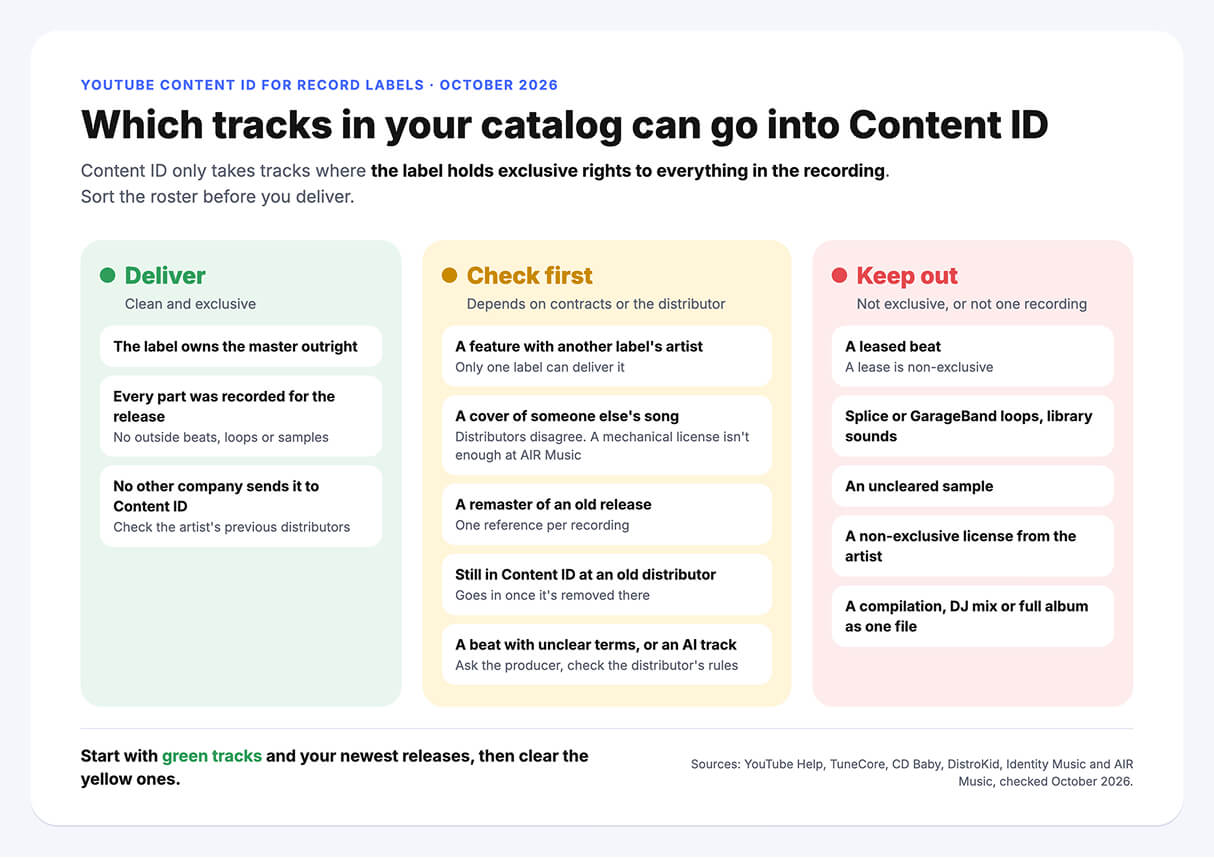
Start with green tracks and the newest releases, then work through yellow. A shorter clean list is safer than a long one. At TuneCore, breaking its Content ID rules can block your account from the service for good, and on a label account that means every artist on it.
Not sure where the beat on your next release came from? Check the track for free
A real AIR Music manager checks the track for samples, metadata, and rights conflicts and sends a report in 24–48 hours: safe, fixable, or high risk, with what to fix before release.
Get a free Track Safety Check →Monetize, Track or Block: Choosing a Content ID Policy for Each Track
Every reference in Content ID carries a policy, and the policy decides what happens to a matching video. YouTube gives three options, and you can set them differently by country, per its guide to upload and match policies:
- Monetize: ads run on the video, and the revenue goes to the rights holder.
- Track: the video stays up without your ads, and you see its views.
- Block: the video can't be watched, worldwide or in the countries you pick.
A policy can also depend on the match itself: audio only or video too, and how much of the video or of your track matches. Borderline matches can go to manual review instead of an automatic claim.
Here's a starting point for a label, by type of use.
Which Content ID policy fits each kind of use of a label's catalog. A starting point, not a YouTube rule.
|
Use of your catalog |
Policy that usually fits |
Why |
|---|---|---|
|
Fan uploads, lyric videos and edits with catalog tracks |
Monetize |
The video keeps the song in front of people, and the label gets the ad revenue |
|
Uploads of a single before its release date |
Block |
A leak shouldn't compete with the official release |
|
A song you're pushing in a creator campaign |
Track |
The creator keeps the video's money, and you still see how far the song travels |
|
Full re-uploads of an official music video |
Monetize, or block in countries where it takes views from your channel |
Policies can differ by country, so you can do both |
Shorts Over One Minute Aren't Blocked Automatically Since September 24, 2026
Since October 15, 2024, YouTube counts new square and vertical videos of up to three minutes as Shorts. For Official Artist Channels and channels linked to a music Content Owner, the same applies to videos uploaded on or after December 8, 2025. Until September 24, 2026, a Short longer than one minute with an active Content ID claim was blocked, whatever policy the rights holder set. New Shorts of one to three minutes uploaded since then aren't blocked automatically and stay playable, per YouTube Help. So a 90-second fan edit with your track now stays up instead of disappearing. The rules for Shorts under one minute haven't changed.
At AIR Music, claims on Shorts use a monetize policy, and we don't set Shorts to block. One thing to watch on your own side: if an artist's channel is linked to your label, a one-to-three-minute Short with your music can get an automatic claim from the label itself, and only the label can release it.
Someone Has to Answer Disputes Within 30 Days
When an uploader disputes a claim, the claimant has 30 days to respond, per YouTube Help. While the dispute is open, the video's revenue is held, and it goes to whoever wins, per YouTube's page on revenue during disputes. If nobody answers a dispute within 30 days, the claim expires, and the label loses the revenue from that video. On a catalog with thousands of claims, that takes a person or a team, yours or your partner's.
Keep Content ID Off Your Own Channels and Your Artists' Channels
Content ID doesn't know which uploads you approved. Your label channel, your artists' channels and the creators you brought into a campaign all post your songs, and without setup, a claim can land on them too.
YouTube handles this in two ways, per its guide to exempting channels from claims:
- Linked channels. Content ID doesn't claim videos on channels linked to the Content Manager that holds the reference.
- The allowlist. For any other channel, the rights holder adds it to an allowlist, and Content ID stops claiming its new uploads.
Three details matter for a label:
- The allowlist works by channel. You can't exempt a single track or video.
- Adding a channel doesn't release the claims it already has. Those have to be released by hand.
- If more than one partner owns an asset, each of them has to allowlist the channel. On a feature with another label's artist, ask that label to do it too.
Before you turn Content ID on for the catalog, list the channels that should never get a claim:
- your label's channels, unless they're linked to the Content Manager that holds your references;
- every artist's channel, including old channels that still post your music;
- creators and brands you pay or ask to use a song;
- lyric, playlist and promo channels you've licensed.
With a distributor or a partner, you don't edit the allowlist yourself. You send the channel links to the team that runs your references.
At AIR Music, we don't add channels outside our network to an allowlist. Instead, the label writes to its manager, and we release the claim within 24 hours.
One Track, Two Distributors: How Duplicate Content ID Claims Cost a Label
Duplicates usually start with history. An artist joins your label with songs already in Content ID through their old distributor. Or you move the catalog, and the previous distributor never removes its references. Now two companies say they own the same recording on YouTube.
YouTube calls this an ownership conflict: owners claim more than 100% of an asset in one territory. Here's what it does to the money, per YouTube Help on ownership conflicts:
- Monetization claims based on that asset are usually put on hold until the conflict is resolved.
- If the owners set different policies, the most restrictive one applies. Your monetize policy loses to the other side's block.
A smaller version of the same problem is a reference overlap: two references share a segment, such as a sample or an intro both tracks use. One side has to exclude the segment or confirm exclusive rights to it, per YouTube Help on reference overlaps.
What to Ask When You Move a Catalog to a New Distributor
YouTube's guide for music partners on transfers sets the order: the new partner adds its ownership first, and the old one removes its ownership after. Done in that order, the revenue earned during the overlap goes to the new partner. Before you switch, get answers to these:
- Which of your tracks does the current distributor have in Content ID, and in which territories?
- Will it remove its ownership once the new partner adds theirs, and how fast?
- Who gets the YouTube revenue earned during the transfer?
- What happens to your Art Tracks? They can't be transferred. The new partner redelivers them, YouTube recommends doing it two weeks before they go live, and views from the old Art Tracks don't carry over.
- Does the old distributor claim any of your official videos with a block policy? After a channel transfer, those claims can turn into third-party claims and make the videos unplayable.
If your current distributor stops answering while you move, here's what a label can do.
At AIR Music, if a label's track is still in Content ID through its previous distributor, we tell the label, and we send that distributor a catalog transfer request. If someone who doesn't own the track uploaded it, we contact them and return the track to the label once it confirms ownership. That's how Refaat Mridha got a stolen track back. If a label leaves AIR Music, we remove its tracks from Content ID and release the claims, so the next distributor can deliver them again. That usually takes about 10 business days, longer for a big catalog.
When a label moves its catalog to AIR Music, moving Content ID ownership on YouTube usually takes 2–3 weeks. Here's how to switch distributors without losing streams, from the files to collect to the order of takedowns.
What Content ID Won't Collect for a Label: The Composition Side
Every song carries two copyrights: the master recording, and the composition, meaning the melody and lyrics. Content ID handles them as separate assets. YouTube's page on Content ID for music partners says labels shouldn't create Composition Share assets without a contract that gives them those rights, and publishers shouldn't create Sound Recording assets.
We cover the two copyrights in more detail in our music copyright guide.
So with masters alone, a label collects on uploads of its recordings. Covers, karaoke versions and other new recordings of the song pay the composition owner. The song's publisher claims a cover, and creators in the YouTube Partner Program can share that revenue, per YouTube Help on cover videos. When one video matches both a Sound Recording asset and a Composition Share asset with different policies, YouTube applies the most restrictive one.
What Content ID collects for a label, depending on who holds the publishing.
|
Your setup |
What Content ID collects for you |
What to do |
|---|---|---|
|
The label owns masters only |
Uploads that use your recordings |
Make sure your artists' songs are registered with a publisher or a collecting society, so covers pay the songwriters |
|
The label also runs publishing for its artists |
Uploads of your recordings, plus covers, if your publishing contracts include YouTube |
Deliver Composition Share assets only for songs those contracts cover |
|
Your artists publish their own songs |
Uploads that use your recordings |
Point them to a publishing administrator or a collecting society |
In the Philippines, that society is FILSCAP, the Filipino Society of Composers, Authors and Publishers. Its right to license public performances of its members' songs was upheld by the Supreme Court of the Philippines. FILSCAP also pays its members royalties from YouTube: its distribution rules include YouTube market-share royalties for general entertainment content, per the FILSCAP distribution rules amended in 2022. So registering your artists' songs with FILSCAP is how their YouTube composition money reaches them.
At AIR Music, we work with masters only. Covers of your artists' songs get claimed through their publisher or collecting society.
Running Content ID, disputes, and allowlists for every artist yourself?
With AIR Music distribution, one team runs YouTube for your whole catalog and gives you a plan for every artist on it.
- Content ID through AIR Media-Tech's own CMS, an official YouTube partner
- Claims and disputes handled for you, and claims on your own channels released within 24 hours
- A personal manager for your label who replies within 4–24 hours
- Release to 100+ platforms, with a revenue share set in the contract