A YouTube copyright strike comes off in one of three ways. The rights holder retracts it, your counter notification goes through, or it expires 90 days after it was issued, once you've finished Copyright School. Until then, your video stays down, and the strike counts toward the three that can end your channel.
Our Safety team at AIR Media-Tech handles copyright strikes for partner channels, and most of the strikes it gets removed go through a counter notification. That route needs real grounds, like your own footage, a license, or fair use. Without them, ask the claimant to retract or wait out the 90 days. Either way, deal with every strike, even the first, because two more can land at once.
If a strike just showed up in YouTube Studio, don't delete the video, because that won't remove the strike. If a claim on another video has you worried, a Content ID claim isn't a strike at all, though it can turn into one.
Key takeaways
- A copyright strike comes off in three ways. A retraction, a counter notification, or 90 days after it was issued once Copyright School is done.
- Most cases close through a counter notification. That's the experience of AIR Media-Tech's Safety team, when you have real grounds such as your own content, a license or fair use.
- The claimant gets 10 US business days. After YouTube forwards a valid counter notification, the claimant has to show a lawsuit, or the video can come back.
- A retraction can take days, not months. In a recent case AIR Media-Tech's Safety team handled, the strike came off about two days after the creator reached the claimant.
- Don't delete the video. Deleting doesn't remove the strike, and a deleted video won't come back even after the strike comes off.
In this guide:
- Strike or claim
- Three ways out
- Counter notification
- Retraction
- Waiting 90 days
- Several strikes at once
- Monetization and recovery
- How to avoid a strike
First, Make Sure It's a Copyright Strike, and Leave the Video Where It Is
Every time a copyright strike lands on a partner channel, AIR Media-Tech's Safety team opens a case that ends with the same line. Don't delete the video, because that won't remove the strike and only makes the work harder. Before you pick a way out, check two things.
A strike takes the video down, a claim leaves it up
A copyright strike means a rights holder sent YouTube a legal removal request, and YouTube found it valid and took the video down. A Content ID claim is an automatic match. The owner can take the video's ad money, track it, or block it in some countries, YouTube Help explains, and the video stays up. A claim also doesn't count toward your strikes, according to YouTube's Strikes FAQ.
Copyright strike or Content ID claim
Comes from a legal removal request
Copyright strike
The video is removed, the strike counts toward the three that can end your channel, and YouTube emails you from [email protected].
Comes from an automatic Content ID match
Content ID claim
The video stays up. The owner can take its ad money, track it or block it in some countries, and the claim doesn't count toward strikes.
Sources: YouTube Help — Understand copyright strikes; YouTube Help — How Content ID works; YouTube Help — Strikes FAQ. Checked October 2026.
So if your video is still online, it's a claim, and our guide to Content ID covers what to do. If it's gone and YouTube emailed you, it's a strike. The real email comes from [email protected], YouTube says. Treat a "strike" message from any other address that asks you to click a link or sign in as a phishing attempt.
You'll also see it called a DMCA strike, and it's the same thing. In the US, the request behind it is a takedown notice under the Digital Millennium Copyright Act.
Where YouTube Studio shows the strike
You'll find it in two places in YouTube Studio, according to YouTube Help.
- On the Dashboard, look under Active copyright strikes.
- For details, open Content and filter by Copyright.
- Find the video marked Removed and click See details.
- Note the claimant's name and the part of your video they flagged, down to the audio track.
The name tells you whether you're dealing with a label, an agency or another creator, and that changes how you'd talk to them.
Deleting the video won't remove the strike
Deleting a struck video doesn't resolve the strike, YouTube says plainly. It can cost you the video, though. A retraction puts the video back only if you haven't deleted it, YouTube's retraction page says. A successful counter notification works the same way, according to YouTube Help.
| If you delete the struck video | What happens |
|---|---|
| The strike itself | Stays on the channel until it expires or comes off another way |
| A retraction or counter notification goes through later | The strike comes off, but the video doesn't come back |
| The removal was scheduled, and you delete the video within 7 days | No strike is applied |
The one exception is a scheduled removal. Some rights holders give you 7 days to take the video down yourself, and if you do it in time, no strike lands. YouTube's email says whether your removal is scheduled.
Three Ways to Remove a YouTube Copyright Strike, and the One That Works Most Often
YouTube lists three ways out of a copyright strike. You can finish Copyright School and wait 90 days, get the rights holder to retract the removal request, or file a counter notification if the video was removed by mistake or counts as fair use, according to YouTube Help.
One of them clears far more strikes than the others. When you have real grounds, a counter notification is the route that clears the most copyright strikes AIR Media-Tech's Safety team handles. The team works on strikes for partner channels of AIR Media-Tech, an official YouTube partner. After YouTube forwards a valid counter notification, the claimant has 10 US business days to show a lawsuit, or the video comes back.
“
Most cases get resolved through a counter notification. It's a good tool the platform gives you. Once it's filed correctly, YouTube passes it to the claimant, and they have 10 business days to show they've gone to court. If they don't, the video is reinstated.
Anastasiia Kulyk, Safety Team Lead, AIR Media-Tech
The other two still have their place. Retractions work often too, the team says, though less often than counter notifications. They stall when the claimant won't budge, doesn't answer or asks for too much money. In one recent case, the strike came off about two days after the creator reached the claimant.
Waiting out the 90 days rarely hurts your channel by itself. It does leave you one strike closer to the limit for three months, which is why the team advises dealing with every strike, even the first.
Here's how the three compare, as of October 2026.
| Way to remove a copyright strike | When it fits | How long it takes | What it costs you | What happens to the video |
|---|---|---|---|---|
| Counter notification | The removal was a mistake. It's your own content, you have a license, or it's fair use or public domain | YouTube checks it first, then the claimant has 10 US business days to show a lawsuit | Your full name, address and phone number go to the claimant, and you accept a US federal court's jurisdiction | Comes back if the claimant doesn't show a lawsuit in time |
| Retraction | The claimant made a mistake, or is open to a deal for the material you used | Depends on the claimant. In a recent case AIR Media-Tech's Safety team handled, about two days | Nothing upfront, but the claimant can refuse or never reply | Comes back, unless you deleted it |
| Waiting 90 days | The removal was valid, and the claimant won't retract | 90 days from the day of the strike, once Copyright School is done | The strike stays active and counts toward three the whole time | Stays down |
Sources: YouTube Help — Understand copyright strikes; YouTube Help — Submit a copyright counter notification; YouTube Help — Retract a copyright removal request. Checked October 2026. Retraction timing from AIR Media-Tech's Safety team.
Which one fits comes down to one question, whether the video was removed by mistake.
- It was a mistake, and you can show it. It's your own footage, you have a license, or it's fair use or public domain. File a counter notification.
- You used their material, but they might agree to a deal. Ask the claimant for a retraction.
- You used it without permission, and they won't retract. Finish Copyright School and wait out the 90 days.
If you can't tell which of these is yours, our Safety team can go through it with you.
Got a copyright strike and not sure which way out fits?
Our Safety team looks at the strike, the claimant, and your video with you, and gives you a plan for the route that fits your case.
Get help with my strike →How to File a Counter Notification on YouTube, Step by Step
A counter notification is a legal request to put your video back, YouTube Help says. You sign it under penalty of perjury, the claimant gets your contact details, and if they disagree, their next step is a court. So it works best when your grounds are solid.
File it only when you have grounds
YouTube accepts a counter notification when the video was removed by mistake or misidentified, and that includes uses that qualify as fair use, fair dealing or public domain, according to YouTube Help. Before you file, make sure you own or have a license for every element in the video, including music that only plays in the background.
Giving credit, using only a few seconds or adding "no copyright infringement intended" aren't grounds, YouTube's list of copyright myths says. If you rely on fair use, only a court can decide whether it applies, the same page notes.
What the claimant gets from you
YouTube has to share your counter notification with the claimant by law, according to YouTube Help. Here's what's in it.
- Your full legal name, not a channel or company name
- Your physical address and phone number
- Your explanation of why the removal was a mistake
- Two legal statements, your consent to a US federal court's jurisdiction and a sworn statement that the video was removed by mistake
- Your signature, which is your full legal name
If sharing your address is a problem, an authorized representative such as a lawyer can file for you by email, fax or mail.
How to file it in YouTube Studio
For a video, the quickest way is YouTube Studio on a computer or in the Studio app.
- Open Content in YouTube Studio and filter by Copyright.
- Find the video marked Removed, hover over Copyright in the Restrictions column and click See details.
- Under Content used, click Take action and choose Submit a counter notification.
- Confirm the requirements and enter your contact info, with your full legal name and complete physical address.
- Write your rationale. Explain clearly and briefly why the removal was a mistake or misidentification.
- Agree to the statements and sign with your full legal name.
- If other videos from the same removal request were taken down by mistake, add them to the same counter notification.
- Click Submit.
Non-video content, like a channel banner, goes by email to [email protected], with everything in the body of the email, not as an attachment.
What happens after you file
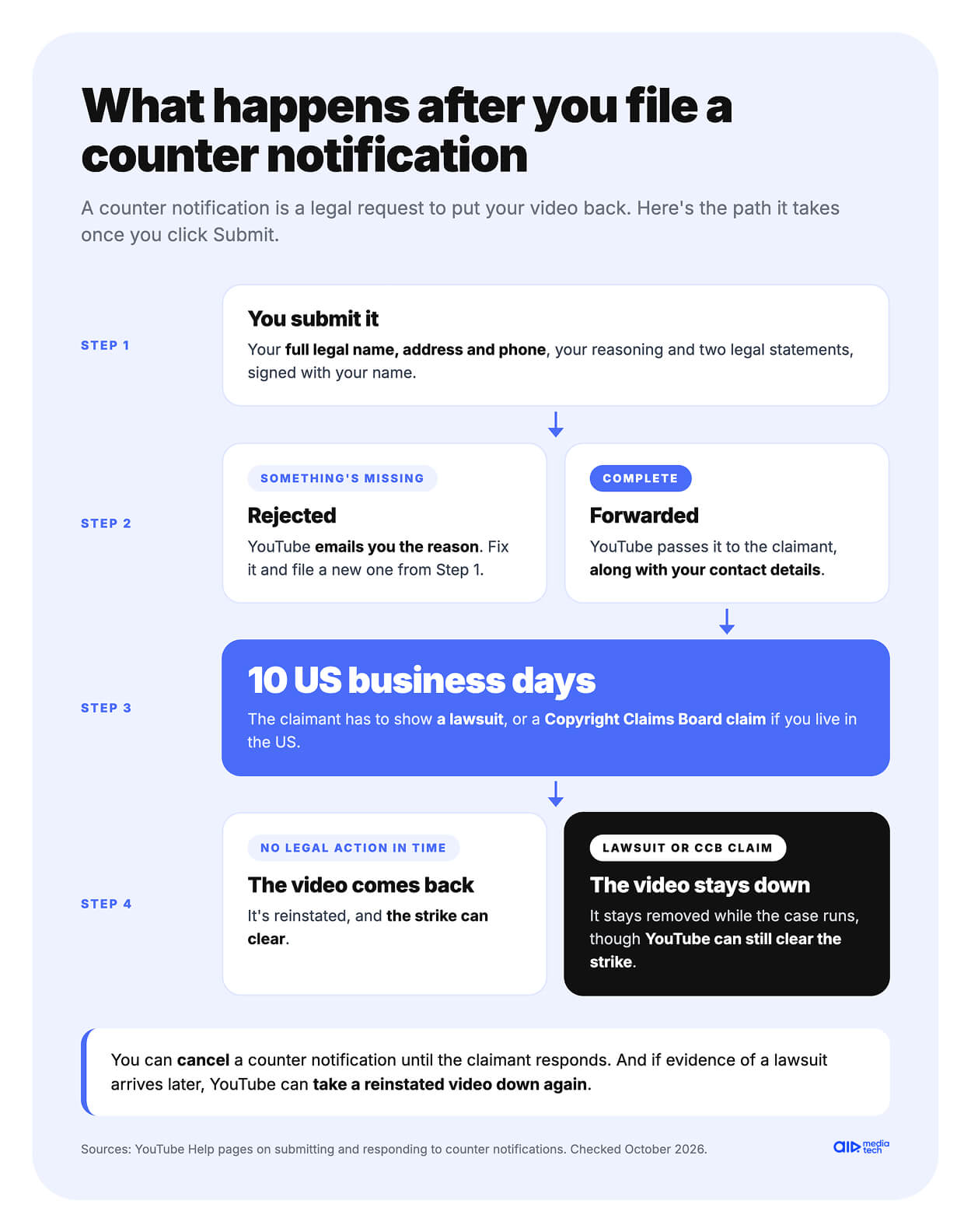
YouTube first checks that every required part is there. That check has no fixed length, AIR Media-Tech's Safety team says, and the 10-day clock doesn't run during it. A valid counter notification then goes to the claimant, who has 10 US business days to show legal action, according to YouTube's page for claimants.
That means a lawsuit asking a court to stop the use. If you live in the US, it can also be a claim with the Copyright Claims Board. If the claimant doesn't respond in time, the video comes back, and the strike can clear.
Day 0
You submit, and YouTube checks every required part
Forwarded
A valid counter notification goes to the claimant
10 days
US business days for the claimant to show a lawsuit or a CCB claim
Reinstated
No legal action in time, so the video comes back
Few claimants go to court after a counter notification, in the experience of AIR Media-Tech's Safety team, and those who do are mostly rights-holder companies.
Two details can catch you out. Evidence of a lawsuit can arrive after the 10 days, and YouTube can then take a reinstated video down again. And while a case is pending, YouTube can clear the strike but keep the video down, YouTube's page for claimants explains.
You can also change your mind. A counter notification can be cancelled until the claimant responds by replying to YouTube's confirmation email, according to YouTube Help.
If YouTube rejects your counter notification
A counter notification that misses any required information can be rejected, and YouTube emails you the reason, according to YouTube Help. You can then file a new one with everything in place.
YouTube doesn't publish what it rejects most often. In the experience of AIR Media-Tech's Safety team, it usually comes down to how the contact details were filled in and how the reasoning for the use was written, says Anastasiia Kulyk, who leads the team. If yours came back and you can't see what went wrong, Strike Resolution goes through the case with you and shows what to fix before you file again.
A rejection doesn't close the other doors. In October, a channel we work with had its own counter notification rejected, so it went to the claimant directly. About two days later, the strike was gone, and the video was back.
This guide explains how YouTube's process works and isn't legal advice. If a lawsuit looks likely, talk to a copyright lawyer.
How to Get the Claimant to Retract a YouTube Copyright Strike
One wrong sentence from the claimant can leave your strike in place. YouTube only accepts a retraction of the removal request, the complaint that caused the strike. An email that says “I retract my copyright strike” doesn’t count, according to YouTube’s retraction page. When the claimant withdraws the request itself, the strike comes off and the video comes back, unless you deleted it.
Find the claimant in YouTube Studio
YouTube doesn't step into ownership disputes, so reaching the claimant is up to you. Their contact details are in YouTube Studio, YouTube Help says.
- On the Dashboard, select Active copyright strikes.
- Find the video and click Select action.
- Look under Contact claimant for their email or other details.
Some claimants also list a contact on their own channel or website.
What to write
Keep the message short and specific. AIR Media-Tech's Safety team starts by finding out what the claimant wants and which documents show they own the rights. These are the points worth covering.
- The link to the removed video and the date of the strike
- Why you think the removal was a mistake, or that you've already taken their material out
- What you can offer, such as a license, an agreed credit or keeping the video down
- A request to retract the removal request itself, not just the strike
If the claimant rarely deals with YouTube, they may not know the process, so tell them what to send.
What the claimant needs to send YouTube
They can click Retract removal in YouTube Studio, under Copyright and then Removal requests. Or they can email [email protected] from the address that filed the request, with links to the videos, the sentence "I hereby retract my claim of copyright infringement," and their full legal name as a signature.
How long it takes
It depends on the claimant. In a recent case AIR Media-Tech's Safety team handled, the strike came off about two days after the creator reached the claimant, following a rejected counter notification. Two days is a realistic pace, the team says, though it isn't a rule. When it stalls, the reasons are usually on the other side. The claimant won't budge, doesn't reply or asks for too much money, the team says.
Once a retraction goes through, YouTube emails both sides. The strike clears unless other videos are tied to it, and the video returns unless you deleted it, according to YouTube Help.
If the claimant asks for money
A request for payment isn't always a scam. Some rights holders sell licenses for their content, YouTube notes, and a license can be a fair way out. Still, don't pay right away, AIR Media-Tech's Safety team advises. First, check everything you can about the claimant and make sure they own the rights to the material in dispute. In a tough case, it's worth talking to a lawyer. All of this applies only when you're sure a counter notification isn't an option, because you have no real grounds for one. It's a warning sign when the claimant can't show they own what they claimed. That situation has its own section, on several strikes from one company.
When Waiting Out the 90 Days Is the Right Call
The 90 days count from the day the strike was applied, not from the day you finish Copyright School, YouTube's copyright strike FAQ says. Copyright School is still required. Skip it, and the strike stays on your channel.
Here's what waiting involves.
Copyright School
Four questions about how copyright works on YouTube. You take it once, and it counts for later strikes too.
90 days from the strike
The strike expires 90 days after it was applied, as long as your channel has fewer than three.
The video stays down
Waiting doesn't bring it back. Only a retraction or a counter notification does.
The strike still counts
For all 90 days, it's one of the three that can end your channel.
Copyright School is four questions, you take it once, and the strike expires if your channel has fewer than three, according to YouTube Help. The video doesn't come back on this route, YouTube's removal request page adds.
Waiting is the honest choice when the removal was valid, you used the material without permission, and the claimant won't retract. A counter notification in that case would mean swearing to something untrue.
AIR Media-Tech's Safety team says waiting rarely hurts your channel by itself, and still advises acting on every strike. "Don't panic over one strike, but do everything you can to resolve it," says Anastasiia Kulyk, Safety Team Lead at AIR Media-Tech. "A creator thinks one strike is no big deal, then three land at once, and there's no time left to do what they could have done right away."
If your channel already has two active copyright strikes, waiting gets risky, because a third within 90 days can end it. Our guide to handling multiple YouTube strikes covers that case.
Several Copyright Strikes from One Company at Once
A batch of strikes from one company can be a real enforcement sweep or plain abuse, and YouTube sees plenty of both. Each year, it terminates tens of thousands of accounts that try to abuse its copyright tools, YouTube Help says.
Each video can carry only one copyright strike, but three different videos can be struck on the same day, according to YouTube Help.
If that takes your channel to three active strikes, the clock starts. Channels in the YouTube Partner Program get a 7-day courtesy period, according to YouTube Help. For those 7 days, the channel stays active, but the strikes don't expire, and you can't upload. If counter notifications forwarded to the claimant, or retractions, bring you under three strikes, the channel stays.
Outside YPP, there's no such guarantee. In the experience of AIR Media-Tech's Safety team, YouTube sometimes blocks a channel the same day the third strike lands. Removing one strike brings the count back to two.
“
If a channel isn't in the YouTube Partner Program, the 7 days after a third copyright strike aren't guaranteed. That doesn't mean every channel outside YPP gets removed instantly or loses the chance to dispute its strikes. Just don't count on a guaranteed week to respond.
Dmytro Korniienko, YouTube Safety Manager, AIR Media-Tech
AIR Media-Tech's Safety team works through these cases in the same order, says Anastasiia Kulyk, who leads the team.
Five steps when one company sends several strikes
01
Collect the facts
Find what you can about the company, each strike and what you used in every video.
02
Check your grounds
See whether you had a license, or whether the use can stand as fair use.
03
Dispute what you can defend
File counter notifications for the videos where you have real grounds.
04
Talk to them where you slipped
If you did use their material, contact the claimant, find out what they want, and ask which documents show they own the rights.
05
Push back on fake claimants
If the company doesn't own the rights and you have grounds, file a counter notification.
In short, gather the facts first, then dispute what you can defend, negotiate where you used someone's work, and challenge claimants who don't own the rights. The hard part is judging all of it at once, while a deadline runs.
When several strikes land together, and you can't tell whether the claimant even owns the rights, get a second pair of eyes before you answer. Strike Resolution checks the claims, the claimant, and your footage with you, then helps you decide whether to dispute, negotiate or wait.
Several strikes from one company in one day?
Our Safety team checks who filed them and whether they hold the rights, and helps you plan which strikes to tackle first.
Talk to our Safety team →How a Copyright Strike Affects Monetization, and How Fast Revenue Comes Back
YouTube's copyright strike page doesn't name a monetization penalty for your channel. The losses it does describe are narrower.
- Your struck video stops earning, because it's no longer on YouTube.
- A strike on a live stream blocks live streaming for 7 days, and the next copyright strike makes it 14, so Super Chat and other live income stop too.
- Three active strikes put your account and its linked channels at risk of termination, along with everything they earn.
A copyright strike doesn't stop you from applying to the YouTube Partner Program, though in the experience of AIR Media-Tech's Safety team, your channel gets a stricter review. When you apply, YouTube asks for no active Community Guidelines strikes, according to its YPP eligibility rules, and copyright strikes aren't on that list.
Revenue can come back the day the strike comes off
An English-language kids and family channel we work with got a copyright strike in August 2025, and its revenue dropped. The strike came off on September 23, and revenue recovered right after, according to the channel manager's report. That part isn't guaranteed, though. The strike clearing and your views coming back don't always happen at the same time, AIR Media-Tech's Safety team says.
Another kids channel had a license for the music in its videos and still got hit. Its objection was rejected, and the claimant didn't answer emails, so our team tracked the claimant down, and the strike came off. The channel then earned $1,652 in March and $5,360 after the recovery, from 18.3M views, as the full case describes.
How to Avoid a Copyright Strike on YouTube
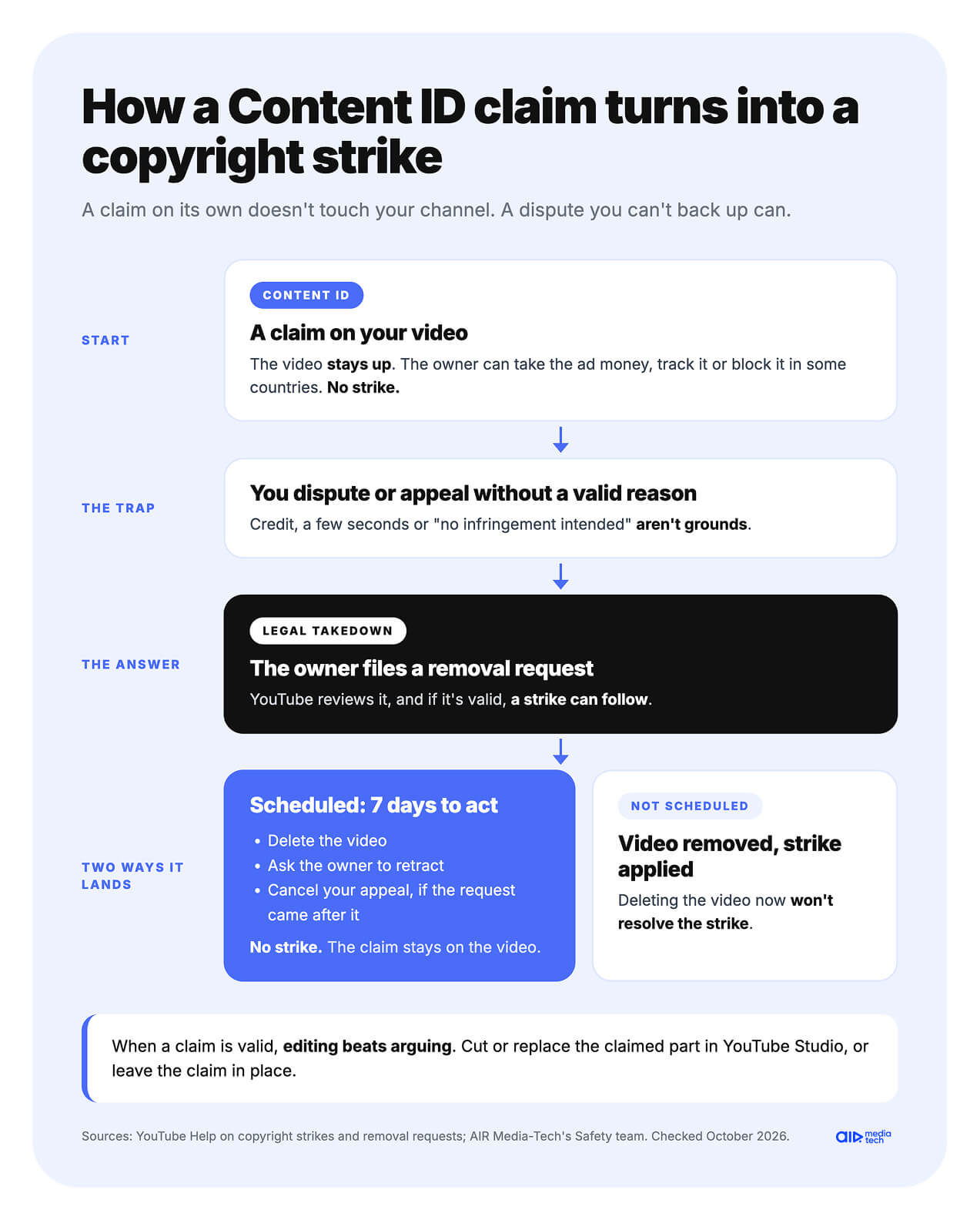
Some copyright strikes start as an ordinary Content ID claim. Dispute a claim without a valid reason, and the owner can answer with a legal removal request, which brings a strike, YouTube Help explains. So avoiding strikes starts with what goes into the video and how you handle claims.
How a Content ID claim turns into a strike
A claim on its own doesn't touch your channel. The risk comes with a dispute or appeal you can't back up, because the owner can then file a removal request instead.
If that request is scheduled, you get 7 days before the strike lands. During that time, you can delete the video, ask for a retraction or, if the request followed your rejected appeal, cancel the appeal, according to YouTube Help. Cancelling keeps the claim on the video but avoids the strike.
When a claim is valid, editing beats arguing. AIR Media-Tech's Safety team puts it simply, cut the claimed fragment or leave the claim in place. YouTube Studio can erase the claimed song, replace it, or trim the part out. Since May 2026, if you're in the US, you can also generate a royalty-free instrumental in the Replace Song tool, as we covered in our September 2026 YouTube updates.
Credit, a few seconds, and "no copyright intended" don't protect you
YouTube answers the most common beliefs in its list of copyright myths. Here's what it says about each.
| What you might assume | What YouTube says |
|---|---|
| Giving credit is enough | Credit doesn't give you the rights, unless the work is under a Creative Commons Attribution license |
| A few seconds is fine | Any amount used without permission can cause copyright issues |
| "No copyright infringement intended" protects you | Disclaimers like "I do not own" or "all rights go to the author" don't give you the rights |
| It's not monetized, or it's educational | Not making money from the content doesn't prevent copyright issues |
| You bought the song or the DVD | Buying content doesn't give you the right to upload it |
| Other creators use the same clip | They may have a license, or the owner allowed only some of its content |
| Changing it makes it new | Parodies, covers, and translations usually still need the owner's permission |
If you rely on fair use, only a court can decide whether it applies, the same page notes.
Use music and footage you can prove you're allowed to use
- The Audio Library in YouTube Studio has royalty-free music and sound effects that YouTube calls copyright-safe. Tracks under a Creative Commons license need a credit in the description, according to YouTube Help.
- For paid music libraries, check that the license covers YouTube and monetized videos, and what happens to your old videos if you cancel.
- Shorts made with YouTube's remix features come with a license for that use, YouTube's myths page says.
- Keep licenses, receipts, and permission emails. They're your grounds if a claim or strike ever comes.
For music in particular, our guide on how to tell if a song is copyrighted goes further.
Run Checks before you publish, but don't stop there
The Checks step in the upload flow looks for Content ID matches before the video goes public, so you can trim or replace a flagged part in time. A copyright strike comes from a removal request a rights holder files, as YouTube's removal request page explains, so a clean check doesn't rule one out.
After a strike, check your other videos
One struck video says something about the rest of your channel. Search your uploads for the same track, clip, or footage, and fix those videos before another removal request arrives.
Not sure your video counts as fair use?
Before you sign anything, our Safety team looks at the strike, the claimant, and your video with you. With Strike Resolution, you get a plan for every strike on your channel.
- A breakdown of each strike and whether it can come off early
- Help choosing the route and writing the counter notification or the message to the claimant
- Escalation to YouTube when your case stalls
- A check of your other videos for the same material
- Works for any channel from 1,500 subscribers, with no need to join our network