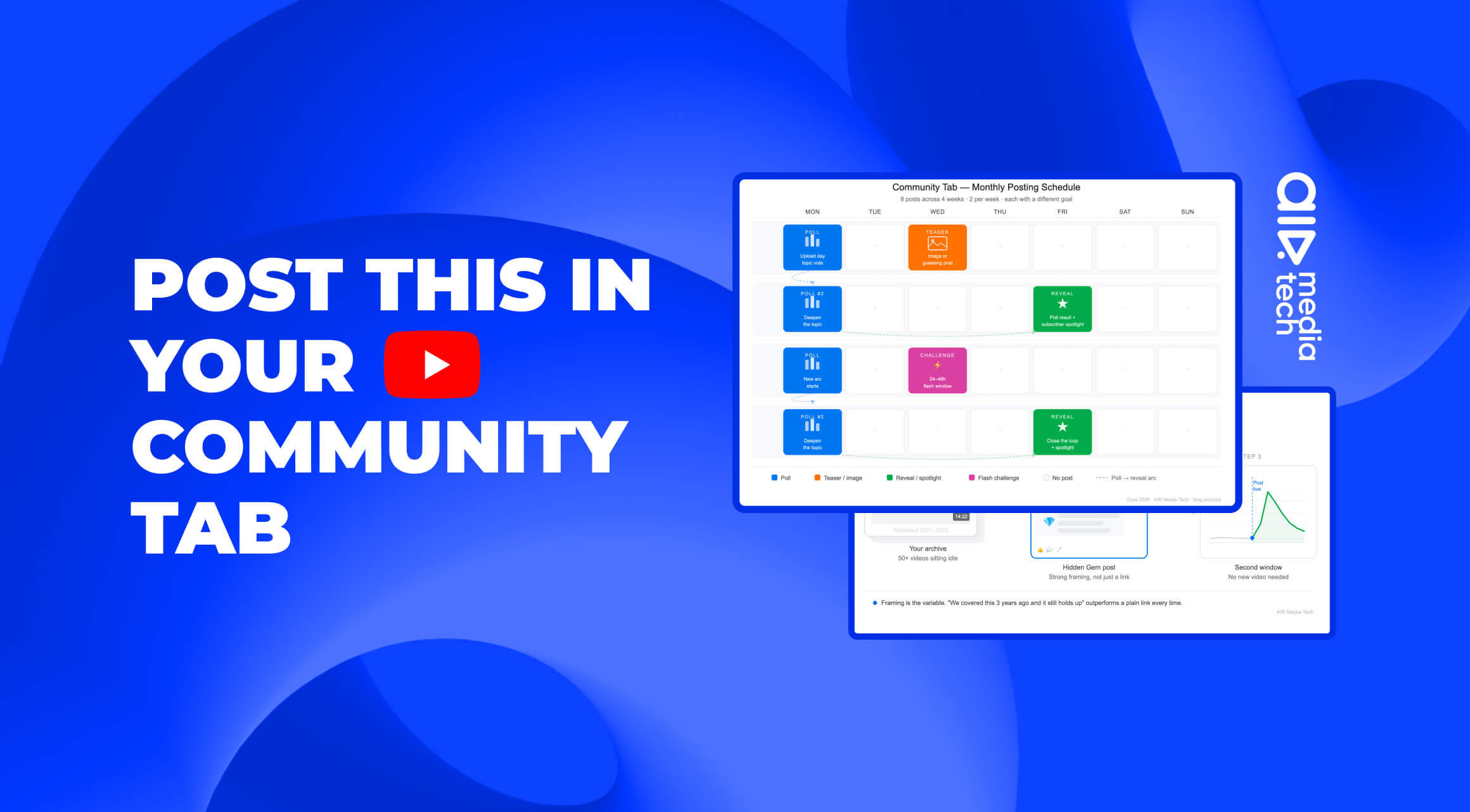
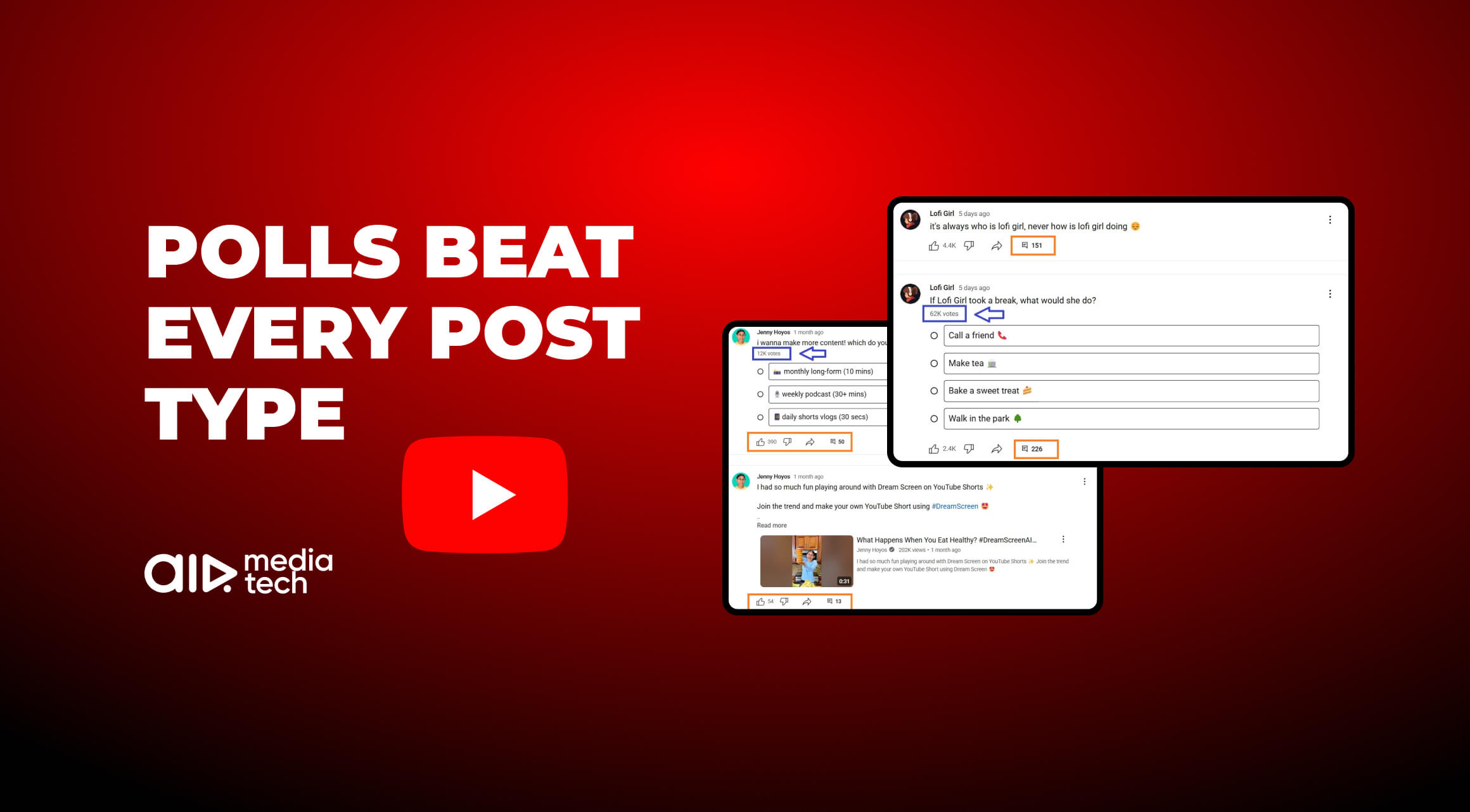

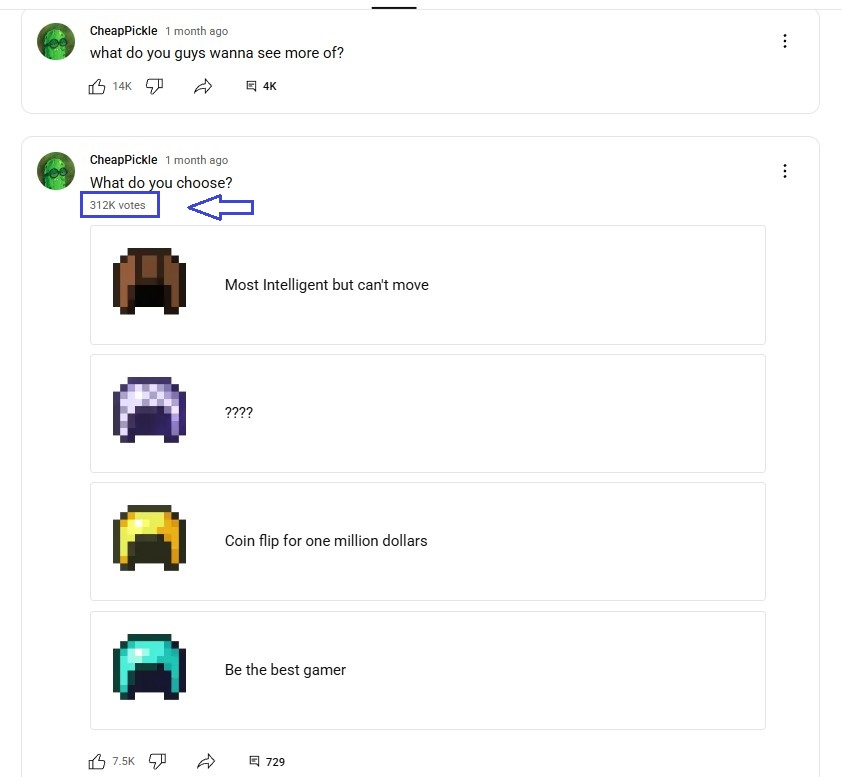
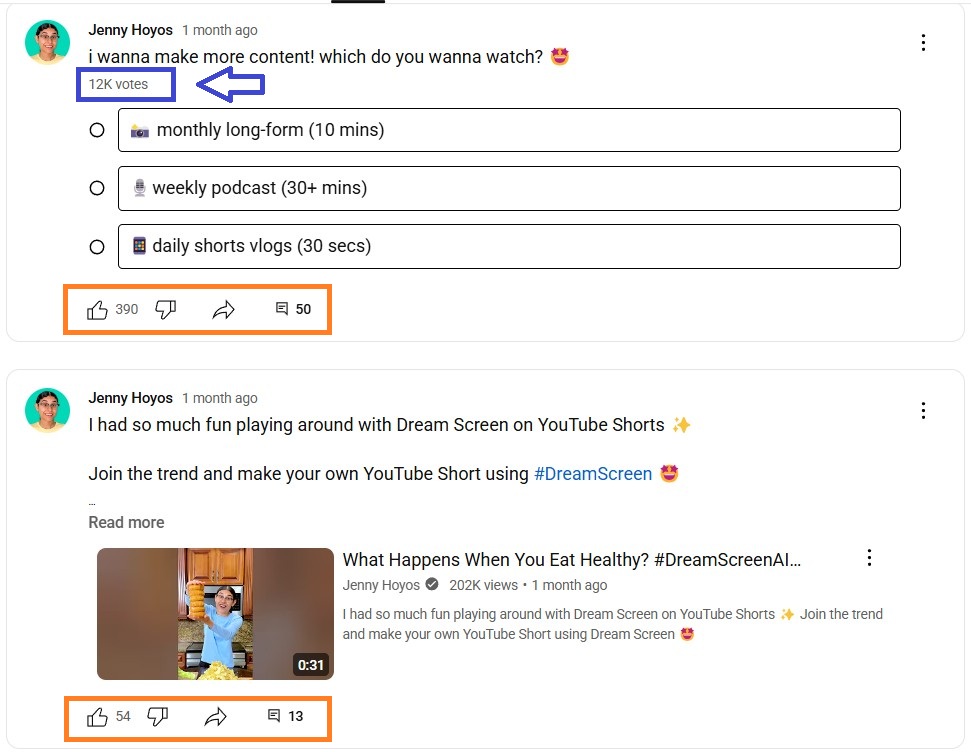
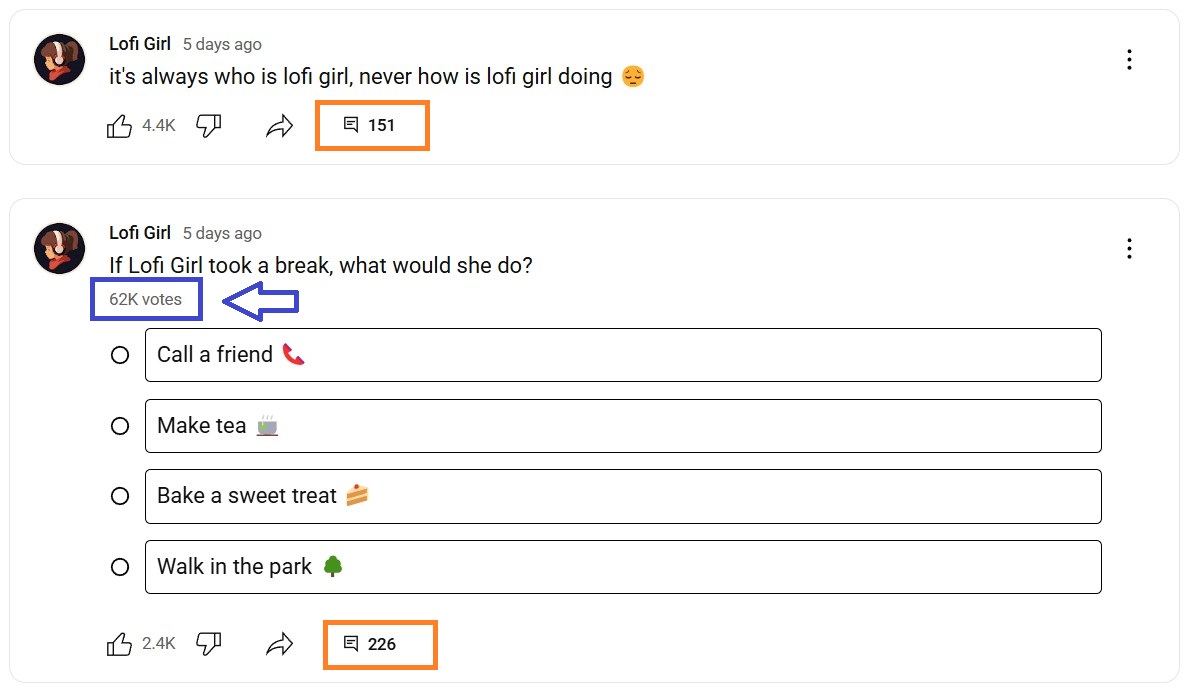
CheapPickle gets 300K+ votes on absurdist, low-stakes polls. Jenny Hoyos gets 400+ reactions from simple one-tap questions. Even faceless channels like Lofi Girl use polls to turn passive viewers into an active community. Meanwhile, plenty of Community Tab polls close with under a hundred votes. The difference comes down to two things: when you post the poll, and whether it connects to something you are about to publish.
Quick note: YouTube renamed the Community tab to Posts on the public channel page in early 2025. We're keeping the "Community tab" throughout. That's what most creators still call it, and this is how it’s still named inside the Studio.
Three Poll Strategies That Drive Votes, Comments, and Watch Time
Three strategies consistently drive the strongest results: getting viewers to lock in your next video, turning your channel into a series they follow, and creating a two-stage engagement spike before a launch. Here's how each works in practice.
1. Get Viewers to Lock In Your Next Video
Use polls to make content decisions:
- Next video topic
- Thumbnail option
- Or format
Don't present open-ended choices. Offer 2–3 options you're already considering. Viewers feel heard, but you're not paralyzed waiting for their input.
Viewers who voted for Option B will watch Option B when it drops. They pre-committed. It's a pre-built audience for the next upload.
2. Turn Your Channel Into a Series Your Viewers Follow
Turn content into a series where each poll shapes the next episode. Gaming channels do this naturally ("Should I take the risky path?"). It works just as well for cooking channels (ingredient combinations), travel channels (next destination), and education channels (which topic to cover next).
Viewers who voted come back to see if their choice won. That return visit registers as a high-signal return viewer — the metric YouTube prioritizes when deciding what to recommend next.
3. Create a Two-Stage Engagement Spike Before a Launch
In the 48–72 hours before a big release, run polls directly tied to the content:
- Ask viewers to predict something that happens in the video
- Vote on the title or thumbnail
- Or choose a snippet before it drops
Use a two-stage spike tactic: one when the poll goes live (Community Tab engagement), one when the video drops and people return to see the result (video engagement + return viewer signal). Both feed the algorithm.
Five Channels That Used Polls and Multiplied Their Engagement
The five channels below come from our partner network and from public creator data, drawn on 3,000+ channel audits. Across that set, a poll tied to an upcoming video release pulls 3–5× the votes and comments of a standard text post. They span five different niches, so the format works across the board.
Absolute Motivation: From 1,200 Likes to 7,700 Votes per Post
Absolute Motivation, 1.55M subscribers, came to us with solid content and a quiet Community Tab. Posts averaged 1,000–1,500 likes and about 40 comments.
We made two changes:
- Structured poll campaigns in the Community Tab, built on strategy 1 above: every poll offered two or three concrete options for the next upload.
- And converting short videos into longer compilations for more watch time potential.
The campaign ran on a fixed weekly slot: one poll per week on the same day, options pulled from videos already in production, and the result announced publicly in the next post. That gave voters a reason to come back and gave the channel a predictable engagement beat between uploads.
The Community Tab shift was immediate:
- Post engagement went from ~1,200 average likes to 7,700 votes per poll
- Comments grew from ~40 to 215 per post. That’s a 5× increase!
The poll format changed how the algorithm saw the channel between uploads. Revenue grew 96% in the period that followed, with the poll campaigns running alongside several other changes.
Poll Engagement vs Every Other Post Type
Standard text posts get 15–40 comments on average. Polls tied to upcoming videos get 100–215+. The strongest results come when the poll is directly connected to content the audience is about to watch.
Across 3,000+ channel audits, here's how the formats compare:
|
Post Type |
Avg. Votes / Post |
Avg. Comments / Post |
Engagement vs. Baseline |
|---|---|---|---|
|
Standard text update |
— |
15–40 |
Baseline |
|
Image post, no poll |
— |
30–60 |
+20–40% |
|
Standalone poll, any topic |
800–2,000 |
50–100 |
+80–120% |
|
Poll tied to upcoming video |
1,500–7,700+ |
100–215+ |
+200–400% |
|
Poll series, 3+ sequential |
2,000–5,000+ |
120–250+ |
+250–500% |
Source: AIR Media-Tech partner channel analysis, 3,000+ channels, 2024–2026. Numbers are median ranges, not peaks.
How a Motivational Channel Grew Engagement 26% With Poll Timing
A second AIR partner in the motivational niche was losing Community Tab engagement between upload cycles. They increased poll frequency, with every poll tied directly to upcoming video themes – strategy 3, the two-stage engagement spike, run on a weekly cycle rather than around a single release. The result was +26% overall channel engagement growth in the first month. The Community Tab became a retention tool, not just an announcement board.
Doing everything right but still stuck?
There's a specific cause. Our specialists will find it across 10 angles and hand you a ranked plan in 7 days.
Get clear answersCheapPickle Case With 300K Votes on Absurdist Low-Stakes Polls
CheapPickle uses absurdist, low-stakes polls to spark debates in the comments:
- "Which of these is the absolute worst purchase?"
- "You get $5 and one hour in Walmart. What do you buy?"
These generate debates, community in-jokes, and hundreds of comment threads. Polls on this channel regularly hit 300K+ votes.
Jenny Hoyos Poll Example Showing How Single-Tap Questions Can Bring 400+ Reactions
Jenny Hoyos uses simple one-tap polls that fit naturally into how her audience live online:
- "What's the first app you open in the morning?"
- "Would you rather lose your phone for a week or give up YouTube for a week?"
Participation is high because there's no friction. Every viewer has an answer ready.
Lofi Girl Building Community on a Faceless Channel With Polls
Even a faceless 24/7 music channel builds real community through polls. Lofi Girl posts questions that fit the channel's vibe:
- "What time of day do you usually listen?"
- "What's your current mood today?"
Thousands of votes and hundreds of comments per poll. That's emotional engagement from a channel with no on-screen personality.
Which Poll Types Get the Most Votes and Comments?
Not all polls perform equally. Here are the types of YouTube polls that show the best performance across our partner network:
|
Type |
How It Works |
Why It Wins |
Example |
|---|---|---|---|
|
Content shaping |
Audience votes on your next video topic, thumbnail, or format |
Viewers feel like co-creators → higher loyalty and a pre-committed audience for the next video |
"Which challenge next week? A / B / C?" |
|
Prediction polls |
Ask viewers to guess an outcome before you reveal it in the video |
Creates a loop — viewers return to see if they were right. Return visit = high-signal engagement |
"Who wins? Vote before I post the result." |
|
Lifestyle/opinion |
Low-stakes personal questions tied to your niche |
Everyone has an instant answer — maximum participation rate |
"Sweet or savory breakfast?" |
|
Interactive storytelling |
Each poll shapes the next video's direction or plot point |
Turns the channel into a serialized experience — viewers invest across multiple episodes |
"Risky path or safe route?" (gaming) |
|
Pre-launch hype |
Build anticipation in the 48–72 hours before a big release |
Two-stage spike: one when the poll goes live, one when the video drops |
"Vote for your favorite snippet before the official release." |
|
Poll series |
3+ sequential polls that go deeper into one topic over time |
The same audience stays engaged across multiple posts without reset |
Travel: destination → activities → accommodation type |
Growth stall, and you don't know why?
A sudden plateau almost always has a specific cause — a packaging issue, a classification signal, a technical flag invisible in standard Studio views. We've resolved this pattern hundreds of times. We'll tell you what happened and what to do next. → Get clear answers.
How Do You Write a Good YouTube Poll Question?
Most poll questions underperform because they're too vague, too obvious, or have no connection to content. Here's the difference between a poll that gets 80 votes and one that gets 8,000:
|
Weak Poll Question |
Why It Fails |
Stronger Version |
Why It Works |
|---|---|---|---|
|
Do you like my videos? |
Yes/no with social pressure to say yes. Zero discussion. |
"Which type of video do you want more of: [A] or [B]?" |
Clear options, tied to real content. Viewers feel they're shaping the channel. |
|
What's your favorite color? |
No connection to the channel or upcoming content. Feels random. |
"Which color palette should I use for the next Shorts series?" |
Still simple, but tied to actual work the creator is doing. |
|
What do you think? |
Undirected. No options mean nothing to vote on. |
"Who do you think wins: [Option A] or [Option B]? I'm posting the result on Friday." |
Stakes, a deadline, and a payoff. Gives viewers a reason to come back. |
|
Poll: Gaming or Cooking? |
Too abstract. What does voting even do? |
"Should my next video be a gaming speedrun or a cooking challenge? Vote — I'm filming Tuesday." |
Specific. Time-bound. Viewers know their vote matters. |
|
How old are you? |
Demographic question. Low stakes, no emotional investment. |
"At what age did you discover YouTube? I'll share the results in the comments." |
Personal, but with a payoff. Closes the loop and generates comment discussion. |
Three rules for poll questions that get high engagement on YouTube:
- Give viewers a real stake — their vote should change something (next video topic, thumbnail choice, format)
- Keep each option under 30 characters — options that are too long lose votes to the first option by default
- Close the loop — tell viewers you'll share the results in the next video or post. That turns voters into return visitors. Ten more ways to motivate your audience to comment work the same way.
YouTube Poll Ideas That Work for Every Niche
The best poll ideas for YouTube creators are specific to what your audience already cares about. Here's what works across our partner network by niche, with poll examples that have generated real comments:
|
Niche |
Best Poll Type |
Example That Gets Comments |
|---|---|---|
|
Entertainment / Lifestyle |
Preference & opinion debates |
"Pick one: Netflix, YouTube, TikTok, or Twitch? Defend your answer in the comments." "Which show did everyone love and you just couldn't finish?" "Best night in: takeaway and a series, or going out? No middle option." |
|
Gaming |
In-game decision polls |
"Should I take the risky route or play it safe? Vote now — I'm posting the result tomorrow." "Which boss should I beat on the hardest difficulty next? Winner gets a full video." "Do I keep the overpowered build or start again from level one? You decide the run." |
|
Education / Tutorial |
Topic selection with deadline |
"Which do I explain first: A or B? Video drops Friday — vote before then." "What tripped you up most when you started? I'll build the next tutorial around the top answer." "Short 5-minute walkthroughs or one full breakdown per topic?" |
|
Cooking / Food |
Food debate polls |
"Savory or sweet breakfast? Fight it out in the comments." "Pineapple on pizza: defend your vote in the comments." "Which recipe do I attempt on a $5 budget next week?" |
|
Travel / Vlogging |
Destination votes with a hook |
"Where next: Tokyo, Barcelona, or Medellín? I've got 3 weeks — you decide." "Carry-on only or checked bag? There is a right answer." "Which city should I try to survive in for 48 hours on $50?" |
|
Fashion / Beauty |
Look at the selection with the attached photos |
"Photo A or B for the next video?" — attaching photos triples engagement vs. text-only options "Which look do I recreate on a drugstore budget? Vote and I'll film the top pick." "One product for the rest of your life: concealer or mascara?" |
|
Music / Audio |
Pre-release preview vote |
"New single drops Thursday. Vote for the snippet you want first." "Which track from the set should I break down in the next video?" "Vote on the cover I record next — comment the artist if it isn't listed." |
|
Fitness / Health |
Next challenge or format vote |
"30-day strength challenge or HIIT series? Vote for next month." "Morning or evening training? Tell me what actually works for your schedule." "Which lift should I film a full form breakdown on first?" |
|
Kids / Family |
Character or story vote |
"Which character stars in the next video? Vote now!" "What should we build next: treehouse or rocket ship?" "Which snack should we try making at home this week?" |
|
Business / Finance |
Topic priority poll |
"What's your biggest YouTube revenue question right now? A / B / C" "Which revenue stream should I break down first: sponsorships, memberships, or affiliate?" "Would you rather have 10,000 loyal subscribers or 1 million casual views?" |
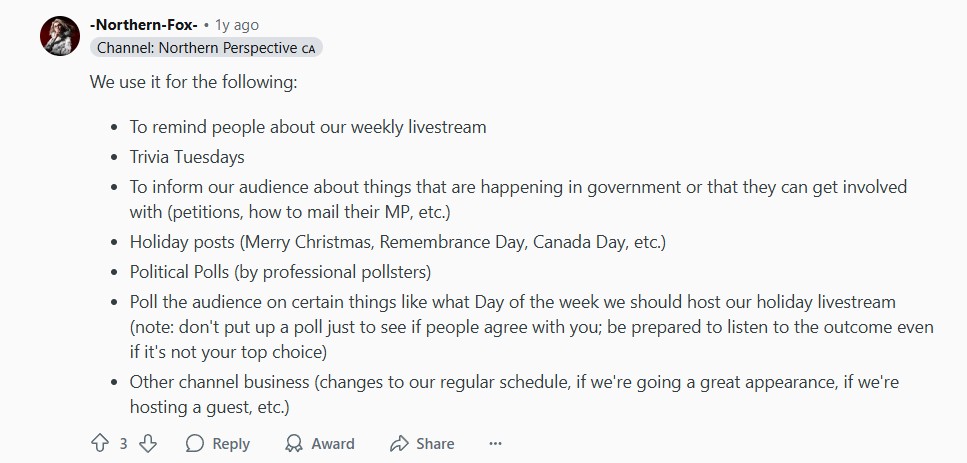
Also, don’t forget to mix polls with other types of posts. Northern Perspective is worth reading as a blueprint. They run a structured YouTube community tab strategy — polls, text posts, and image posts mixed, never more than 2–3 per week, every poll tied to the content calendar. They shared the approach publicly on Reddit in the PartneredYouTube community. If you want a creator-perspective implementation guide, that thread is worth reading. A pinned comment under the video does the same job from the other direction.
How to Find YouTube Poll Ideas?
The best poll questions are already in your comment section — your audience is telling you what they're debating, what they're confused about, and what they want next. The AIR YouTube Comment Analyzer runs AI analysis across up to 10,000 comments from any video and surfaces the recurring questions, debate topics, and sentiment patterns hidden in the volume. Each of those patterns is a ready-made poll question.
Here's how the workflow looks in practice: run the Comment Analyzer on your last 3–5 videos → identify the top recurring questions or debates → turn each one into a poll option. Our guide to managing viewer comments and engagement covers how to work the thread after a poll closes.
This is more reliable than AI topic generators that work from keywords rather than your audience data.
The Engagement Loop That Makes Polls the Strongest Community Tab Format
A poll vote counts as a meaningful interaction, just like a comment or a share. That's the core reason polls outperform text posts, image posts, and even video links in the Community Tab.
The feedback loop:
- You post a poll → viewers vote (one tap, no friction)
- Votes trigger comment threads — "I voted X because..."
- YouTube detects high engagement → boosts channel distribution
- New viewers discover the channel → existing viewers return to see results
Polls are the lowest-effort action a viewer can take in the Community Tab. Leaving a comment requires thought and typing. Voting takes one tap. That low barrier is why poll participation runs 3–5× higher than comment rates on standard posts.
For live streaming, polls add immediacy that static Community Tab posts can't match. Viewers feel urgency to vote before results lock, creating a FOMO-driven spike. YouTube's algorithm reads that as a strong quality signal. More on how to use streaming polls and community engagement together here.
The Engagement Loop That Makes Polls the Strongest Community Tab Format
A poll vote counts as a meaningful interaction, just like a comment or a share. That's the core reason polls outperform text posts, image posts, and even video links in the Community Tab.
The feedback loop:
- You post a poll → viewers vote (one tap, no friction)
- Votes trigger comment threads — "I voted X because..."
- YouTube detects high engagement → boosts channel distribution
- New viewers discover the channel → existing viewers return to see results
Polls are the lowest-effort action a viewer can take in the Community Tab. Leaving a comment requires thought and typing. Voting takes one tap. That low barrier is why poll participation runs 3–5× higher than comment rates on standard posts.
For live streaming, polls add immediacy that static Community Tab posts can't match. Viewers feel urgency to vote before results lock, creating a FOMO-driven spike. YouTube's algorithm reads that as a strong quality signal. More on how to use streaming polls and community engagement together here.
How Do You Create and Schedule a Poll on the YouTube Community Tab?
The Community Tab is available to any channel with Advanced features enabled, in good standing, and not flagged as "made for kids." YouTube removed the subscriber threshold entirely in 2023. If you don't see the Community tab on your channel page, check Settings → Channel → Feature eligibility in YouTube Studio.
Creating a YouTube poll takes under two minutes. Here's the step-by-step:
- Open YouTube Studio and go to Content → Posts
- Click "Create post"
- Select the poll icon — it looks like a bar chart
- Write your question (max 200 characters)
- Add 2–5 answer options (max 60 characters each)
- Optionally add an image or GIF to the poll — this triples engagement for visual niches
- Click the arrow next to "Post" and select "Schedule" to pick a specific date and time
- Or click "Post" to publish immediately
- Scheduling polls is built into YouTube Studio natively. Click the arrow next to "Post" → Schedule → pick a date and time. No third-party tool needed for scheduling.
YouTube also builds an AI image editor into Posts, so you can adjust an image — change a background, remove an object — without leaving the platform. It is region-limited and works from English prompts, so check whether it is live on your account before you plan around it.
YouTube has added three updates to the Community Tab that are active in 2026 (official update):
- You can now pin posts to the top of your Community Tab (useful for announcements or channel rules)
- Like subscriber posts directly
- And share a unique Community Tab link to other platforms.
Use all three — they're free reach.
Best Time to Post a YouTube Poll
Post when 50–70% of your audience is active. Posting at random hours produces 30–50% lower engagement than posting at peak windows.
Find your specific window: YouTube Studio → Audience → "When your viewers are on YouTube" heatmap. That shows your peak hours by day. Use it, don't guess.
General patterns across our partner network:
|
Audience |
Peak Engagement Window |
Best Poll Trigger |
|---|---|---|
|
Ukrainian / Eastern European |
19:00–21:00 local |
Evening before a video premiere |
|
US / Canada |
12:00–15:00 EST |
Lunch hour or after school |
|
International mixed |
14:00–16:00 UTC — test first |
Align with your top geography |
|
Gaming / Entertainment |
Friday–Sunday evenings |
Before weekend uploads |
|
Education / B2B |
Tue–Thu, 09:00–11:00 local |
Morning commute window |
Source: AIR Media-Tech audience analysis, 450K+ channels + Studio peak-hour data from partner audits.
One timing tactic that works across niches: post 24–48 hours before a video premiere. It primes the audience, generates discussion before the video is live, and ties community poll engagement directly to video performance metrics.
How Often Should You Post Polls on the YouTube Community Tab?
Weekly is the optimal poll frequency for most channels. More than 3 posts per week trigger audience fatigue — engagement per post drops noticeably. Fewer than 1 per week breaks momentum and reduces algorithmic visibility.
|
Frequency |
Engagement per Post |
Best For |
|---|---|---|
|
1 per week |
Highest — audience anticipates it |
Most channels, all niches |
|
2–3 per week |
Moderate — good for launch periods |
Pre-launch campaigns, event-based content |
|
Daily or more |
Drops quickly — fatigue sets in |
News/daily channels only |
|
Less than 1 per week |
Inconsistent — momentum loss |
Not recommended as a primary strategy |
For major launches: increase to 2–3 polls per week in the build-up, then drop back to weekly after the release. Don't sustain high frequency long-term; it trains your audience to ignore posts.
Are Streaming Polls Different From Community Tab Polls?
Yes. The format and psychology are different, and so are the results.
Community Tab polls are asynchronous: you post, people vote over hours or days. Streaming polls are real-time, which creates three effects that don't exist in standard Community Tab posts:
- FOMO: results get locked when the poll closes, so participation feels urgent
- Social proof: watching others vote in live chat pulls more people in
- Gamification: polling during a stream turns passive watching into active decision-making with a visible outcome
The algorithmic signal is the same — engagement counts as a meaningful interaction — but the intensity is higher during live streams. A poll that decides the outcome of a challenge or game decision creates shared stakes, and YouTube reads that engagement spike as a strong distribution signal.
For live streamers:
- Run a poll every 20–30 minutes
- Always tied to something that happens on screen within the next few minutes.
- Close the loop visibly. Don't poll and forget.
Can YouTube Polls Help To Grow YOUR YouTube Channel?
Maybe. But maybe something more important is missing.
We audit channels across 10 pillars — packaging, retention, traffic, niche, portfolio, revenue, audience, forecast, risks, and roadmap — and hand you a fix for all of them.
In most channels we audit, the Community Tab isn't the primary constraint. It's something upstream: a packaging issue suppressing Browse impressions, a retention drop capping Suggested traffic, a Shorts ratio pulling the wrong audience into long-form. Those don't show up from inside your own Studio.
We've found them across 3,000+ channels using a 450K-channel dataset and 21 in-house AI agents.
What you get:
- A structured report covering all 10 pillars of channel performance
- A 30-day action plan ranked by impact
- A 45–60-minute live walkthrough with your strategist