

If you want to grow a kids’ YouTube channel in 2026, optimize everything. Titles, thumbnails, descriptions, tags, end screens… each one influences how far your content travels and how many families YouTube recommends it to.
Here are the exact optimization steps we use to push kids’ videos into Browse and Suggestions. We’ve already applied this playbook across hundreds of AIR’s partner channels. This one even pulled +917% subscriber growth after re-optimization.
So take this guide, apply it, and grow faster.
Keyword Research for Kids’ Content: Your Semantic Core
The semantic core is the group of keywords you consistently repeat across:
- Titles
- Descriptions
- Tags
- Playlists
So YouTube can clearly answer:
- What is this video?
- Who should watch it?
- What other videos should it sit next to?
The Core Rules Kids Channel Semantic Core
First, pick a niche YouTube already recognizes. Not a single topic, a recognizable category:
- school life series
- challenges for kids
- fairy tales for children
- learn colors/cars/animals
- toy playtime / pretend play
Then try to maintain keyword consistency. Your main target phrases should appear in:
- every title (at least once)
- first lines of description
- core tags
- playlist names
This way, your “semantic fingerprint” gets stronger with each upload.
Next, layer keywords: High → Medium → Unique:

The High + Medium ones repeat. The Unique ones change every upload.
01. Metadata That Gets Kids’ Videos Recommended
YouTube pushes videos it understands. That understanding starts with metadata: title, description, and tags.
If these three are weak or chaotic, the algorithm has no idea:
- What the story is about.
- Which audience should see it.
- Which other videos should it sit next to in recommendations.
So let’s make your metadata do the heavy lifting.
1.1. Titles: Two Jobs in One Line
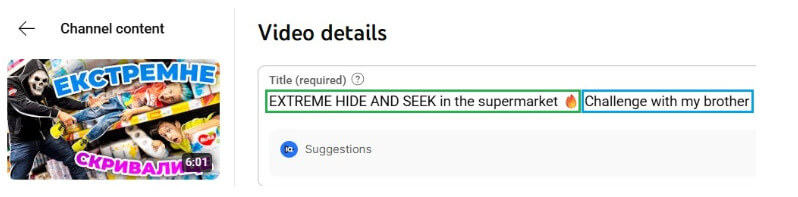
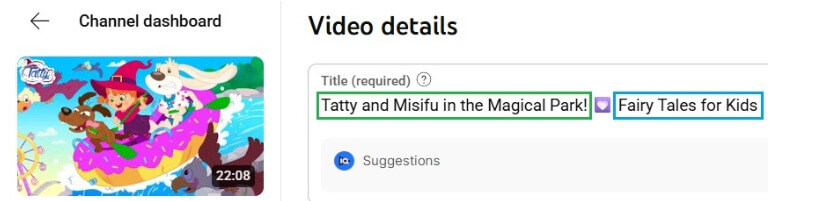
Every strong kids’ video title optimization has two parts:
- Interactive part – emotional hook, curiosity, situation.
- Functional part – clear keywords that help with YouTube search ranking + recommendations.
Think of it like this: HOOK + KEYWORD / CONTEXT.
Examples from our partners (reframed from the guide so you can reuse the logic):
“EXTREME HIDE AND SEEK in the supermarket?! 😱 | Challenge with my brother.”
“Tatty and Misifu in the Magical Park 🏆 | Fairy tales for kids.”
“$1000 vs $10 Sand Castle! | Fun challenge with my brother.”

How to build titles for kids’ content:
- Put the story moment first. “Diana’s biggest embarrassment at school” will always beat “Funny video” in CTR and relevance.
- Then attach the keyword. “Cartoons for kids”, “fairy tales for children”, “kids challenge”, “school series”, etc.
- Let the title explain, not copy, the thumbnail. If your thumbnail already shows a sand castle, the title should explain what’s happening (vs repeating “Sand Castle” in giant text).
- Use caps and emojis to highlight, not scream. Caps on one or two words max (“NEW”, “EXTREME”, “ADVENTURE”). 1–2 emojis are enough. Overly shouty titles can hurt trust in the kids’ niche.
- Questions work. Titles that include questions (“Who will win?”, “What happens if…?”) can drive both clicks and comments. Just keep them clear and kid-appropriate.
- Study what already wins in your niche. Look at the top channels and check:
- How they mix hook + keyword
- Which words repeat across videos
- What their “evergreen” patterns are (e.g., “24 hours…”, “lost…”, “learn colors with…”)
Mini-checklist before you publish a title:
- Does the first part make a kid curious?
- Does the second part include clear, niche keywords?
- Does it add context to the thumbnail instead of copy-pasting it?
- Is it still readable for parents watching with kids?
If not, rewrite. Title tests are the cheapest A/B testing you can do.
Download the kids' video optimization guide
We gathered 34 rules for quality kids' content for you! Get them all.
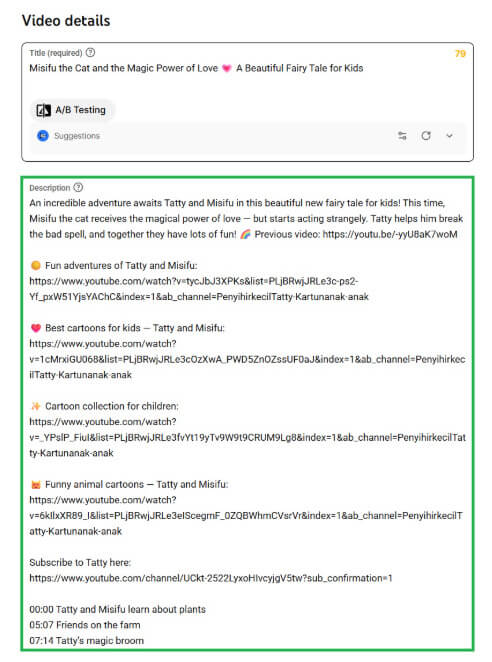
1.2. YouTube Description Best Practices: Context, Keywords, and Traffic Loops
Most creators treat descriptions as an afterthought. For kids’ content, they’re underrated:
- They give YouTube extra context about the topic and emotional tone.
- They tell parents what the kid is about to watch.
- They help you build internal traffic loops across your own videos.
Use this structure:
1. Short overview (3-4 sentences)
First lines = the most important ones. They show up in search and above the fold. Hit:
- What happens in the video.
- Who it’s for.
- Your main keywords.
Example skeleton:
“Join us for a fun 24-hour challenge in the desert! We test survival skills, face crazy tasks, and see who lasts the longest. This video is perfect for kids who love adventures, challenges, and school-style fun after class.”
You can adjust “desert/challenge/school” to your niche (toys, fairy tales, learning colors, etc.).
2. Link to another video or playlist
Right under the overview, send them deeper into your channel.
- Link to 1 key video or playlist that fits the same theme.
- Add a short teaser: “👉 Watch more 24-hour challenges here: [link to first video in playlist].”
Don’t link to the playlist page only. Link to the first video in the playlist so it autoplays and continues the sequence.
3. YouTube kids channel keywords and SEO block
Use this part to put extra keywords naturally in text:
- phrases related to your niche (school, teen series, toys, fairy tales, bedtime stories, learning colors, etc.).
- not just a raw hashtag dump.
Example:
“If your kids love school stories, teen challenges, and funny 24-hour videos, they’ll enjoy this episode. We mix friendship, school life, and fun dares into one big adventure.”
This is where you highlight niche phrases like:
- “school”, “teen series”, “challenge”, “24 hours”, etc.
- Adapt to your niche: “playtime”, “toy unboxing”, “learning colors”, “nursery rhymes”, “bedtime stories”, etc.
4. Playlist links (highly underrated)
Playlists help YouTube understand themes and series on your channel.
Best practices pulled straight from the guide:
- Name playlists with popular keywords from your niche:
- “🎒 School Life Series – Teen Challenges and Friends”
- “🎨 Learn Colors with Cars and Trucks”
- Add emojis to make them stand out visually.
- Include your channel name or character name in at least one playlist title:
- “Diana’s School Adventures”
- “Luna the Unicorn – Magical Stories”
- Order playlists from most popular to least popular in your description block.
Playlists behave like “chapters” to YouTube. The clearer they are, the easier it is for the algorithm to understand your universe.
1.3. Tags for Kids’ Content
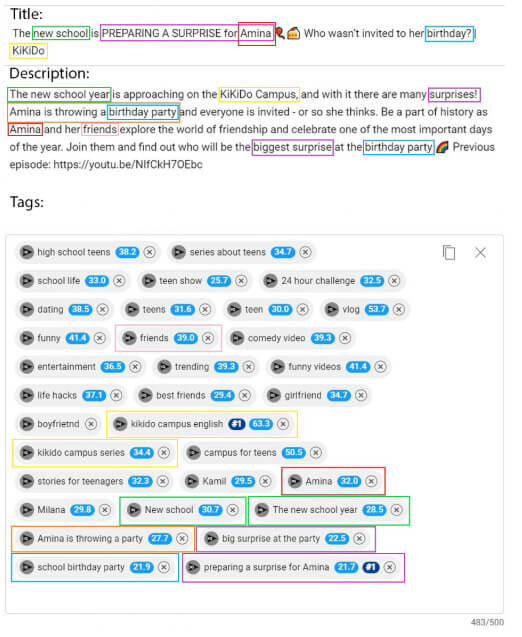
Tags help YouTube understand your video and improve its ranking. Include a mix of:
- High-frequency tags – broad, popular: “cartoons for kids”, “videos for children”, “kids songs”, “learn colors.”
- Medium-frequency tags – niche/category specific: “school life series”, “24-hour challenge for kids”, “toy car wash.”
- Low-frequency tags – unique / video-specific: “Luna the Unicorn lost a shoe”, “sand castle vs wave challenge.”
General tags = for your channel theme. Unique tags = for each specific video.
How to find them:
- Analyze your competitor channels:
- Check the latest uploads.
- Look at tags with tools like VidIQ. AIR Media-Tech partners get VidIQ Pro free. Contact us to activate it.
- Re-use only those that are relevant to your content.
- Avoid using other creators’ names or branded tags unless directly connected (collab, parody, or obvious tie-in). Misleading tags can hurt you.
Multilingual angle:
If you work across languages (or plan to):
- Check how key terms translate and what their search volume is in each language.
- Example from the guide: “cartoons” in Arabic will have different variants and volumes.
- Don’t assume a literal translation = best keyword. Test.
How many tags?
Aim for 450-500 characters total:
- enough to cover your high + medium + unique phrases.
- not so much that it becomes a spam soup
When you re-optimize an old video, don’t wipe all tags at once. They’re part of how YouTube indexes you. Add new ones gradually while keeping some of the old core.
1.4. When to Re-Touch Metadata
A great video that didn’t catch fire on day one can still take off if you give it a second chance.
Start by checking traffic sources. If your views are low and "Browse" and "Suggested" are near zero, your metadata might not be triggering discovery.
Tweak one element at a time. Wait. Then adjust another.
This approach triggers re-testing behavior described across creator communities like Reddit and Quora discussions.
If a video:
- had a decent start, but then plateaued.
- never really got into Browse/Suggested.
- or has a strong watch time but weak impressions.
…it’s a candidate for re-optimization:
- Refresh the title (stronger hook + clearer keyword).
- Tune the description (cleaner overview + better links).
- Update tags without deleting everything that was working.
Done right, this is how “dead” kids’ videos quietly come back to life.
Want us to spot what’s holding your views back?
We can analyze your channel and send a step-by-step optimization plan tailored to your niche. Get your custom optimization plan.
YouTube Kids Block Keywords
Let’s clear up the biggest myth in kids' channel SEO: There is no secret blacklist where one word instantly kills your video.
What actually happens is that YouTube runs safety classifiers across your titles + thumbnails + videos. If they detect repeated stress/conflict cues, your content gets:
- Less browse traffic.
- Fewer suggestions.
- Limited eligibility for YouTube Kids surfaces.
- Slower monetization growth.
So instead of forbidden words, think in risk clusters.
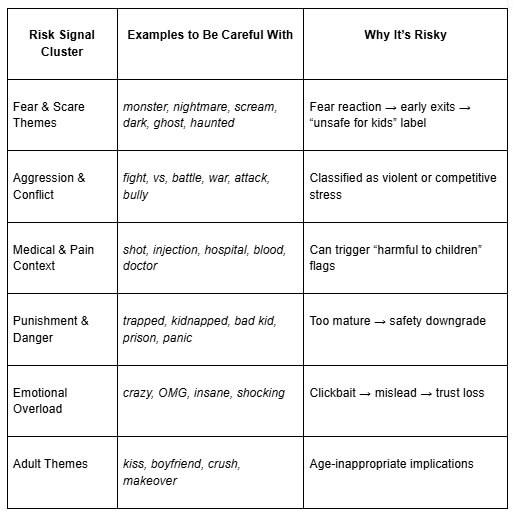
If you are already in a danger zone, re-optimize your best videos first. Reduce risky signals gradually (don’t flip everything at once).
Official YouTube Policies You Should Follow
If you want your content for kids to be fully safe, these pages define what’s allowed, what’s limited, and what gets blocked from Kids surfaces:
- YouTube Kids Quality Guidelines
- Made for Kids / COPPA Requirements
- Child Safety on YouTube
- Inappropriate Content Involving Minors
- Violent or Dangerous Content Policy
- Misleading Metadata (titles, tags, thumbnails)
- Advertising + Commercial Content Rules for Kids
- Hate & Harassment Policy (including bullying)
- Shocking / Sensitive Imagery Policy
Want us to pinpoint your red flags?
Get a kids' channel safety audit. We’ll show exactly what to fix, and how fast traffic can bounce back.
1.5. Thumbnails: Make the Click Easy (Not Risky)
A thumbnail for kids has just one job: Make it instantly clear that the video is fun and safe.
Kids scroll fast. Parents and algorithms judge safety even faster.
So the winning formula is: 1 happy face + 1 clear action + 1 item that shows the topic (Smile → What’s happening → Why watch).
Bright, simple, positive → YouTube trusts it → more Browse traffic.
What to Show vs. What to Avoid on a Thumbnail
Use this table as a quick decision filter before publishing:
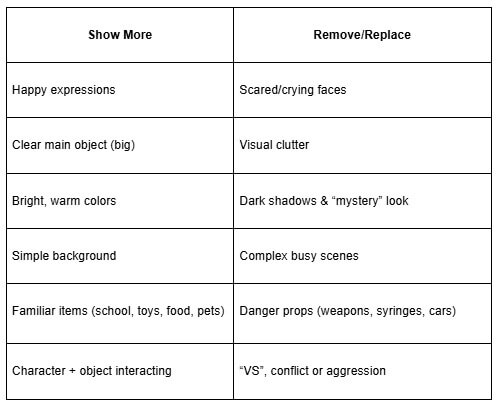
If 2+ warnings appear in a thumbnail → change it before publishing.
Quick kids thumbnail checklist
- Big eyes, low text, clean shapes.
- One action kids recognize instantly.
- The title adds information not visible in the thumbnail.
- Keep brand style consistent.
Kids YouTube Channel Description Ideas
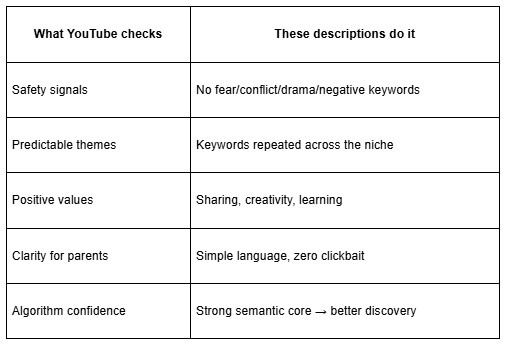
A good description for a YouTube kids content channel must check five boxes:
- Clear + calm language (parents + algorithm trust it).
- Positive values (friendship, learning, creativity).
- Keywords aligned with your semantic core.
- Age-appropriate topics (no fear/violence/night themes).
- Signals to YouTube that the content is safe and recurring.
Here are 3 examples of AIR’s partners. You can adjust to your niche:
Kids Diana Show – 138M subscribers
One of the three biggest kids channels on YouTube goes with this description:
“Kids Diana Show" is the top-rated kids' YouTube channel starring Diana and Roma as they constantly engage in fun and crazy adventures. Since launching on YouTube in 2015, Kids Diana Show has attracted over 200+ million worldwide subscribers and 100+ billion views, with on average 10 billion monthly views on 20 channels and translated into 20 languages. Each episode is created with a creative mix of live performances, animation, and music to create comedy videos for preschoolers.
Let your children join the fun! Please support us by subscribing and liking :)
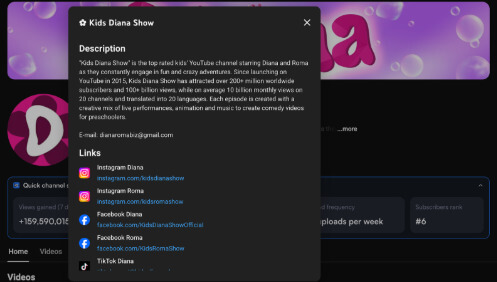
Format takeaway: Characters + scale + what kids will feel
Vania Mania Kids – 31M+ subscribers
This AIR’s partner chooses the family-first storytelling:
Hi and welcome! We are a big family. Mom, Dad, and the kids Ivan, Maria, Stephi, Dasha, and Alex! Yep, there are 5! Let your children join the fun! Please support us by subscribing and liking :)
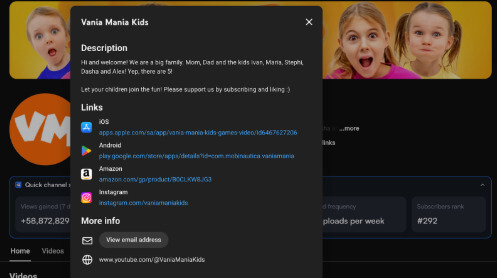
Format takeaway: Family-first identity → trust for parents
Jason Vlogs – 25M+ subscribers
Jason Vlogs picked the playground + travel + challenges theme in their description.
Welcome to Jason Vlogs! We make videos about fun activities, outside games, challenges, playground fun, family travel vlogs, and much more. Our vlogs and stories are for kids and teenagers! Hope you enjoy our channel! You can also follow us on Instagram ''JasonVlogsLife'' and message us for questions, or you can just email us at the email address below!

Format takeaway: Clear content categories + “fun” repeated = safe & engaging
How to Write a Kids’ Channel Description
A kids’ channel description’s job is to make it easy for YouTube to know who should see your videos and make parents trust clicking play. Keep it simple, repeat your core niche keywords, and tell what kids will actually watch here.
Want Help Getting Discovered?
SEO for kids' content is a specialty. We’ve helped creators in this niche grow from zero to millions of views by building metadata systems that work inside the rules of YouTube Kids and beyond.
If you want custom advice for your channel, based on data, reach out to us. We’ll analyze your channel and give you a step-by-step plan to improve your SEO, content structure, and discoverability.
Let’s get your content to shine!


