
Not Sure Which Languages to Choose?
Translate your script in minutes, launch in new languages, and scale fast without hiring a team. Sounds perfect, right?
But creators who’ve already used AI translation know it’s not that simple. There are powerful advantages and real risks that can impact watch time, audience retention, brand perception, and growth.
In this article, we want to give you the full picture: the good, the bad, and the actionable, including what creators are saying, where AI fails most often, and how to implement ChatGPT translation the right way.
The Pros: Speed, Accessibility & Creativity
Let’s break down the benefits of ChatGPT for YouTube that make it so tempting:
1. Quick Multilingual Drafts
ChatGPT can generate base translations instantly. No waiting for freelance translators, no upfront outsourcing cost.
This means:
- Faster turnaround
- More languages tested early
- Higher throughput before editorial review
This is exactly why so many people use it as their go‑to translator for YouTube transcripts and subtitles. You can explore which languages perform best for your niche before committing resources.
2. Scalable and Cost‑Efficient
Human translation remains expensive, especially with timing and localization expertise. Using ChatGPT:
- Slashes initial translation costs
- Preserves budget for native editing
- Opens localization to smaller creators
You can use a limited version of ChatGPT for free or start with 7$ per month (their new “Go” plan) for extended access. This dramatically lowers the barrier to international expansion, one of the most cited upsides in AI vs human translation debates.
3. Flexibility for Niche Localizations
ChatGPT with the right prompts can:
- Localize slang, idioms, and cultural references
- Suggest alternatives where direct translation doesn’t fit
- Adapt voice to niche audiences (e.g., gaming, finance, health)
For example, a prompt like:
“Translate this into Mexican Spanish for Gen Z gamers. Keep slang and pacing tight.”
…produces significantly different output than a generic translation prompt.
This flexibility helps creators preserve tone across languages.
4. Useful for Subtitle Timing and Scripting
ChatGPT can help with:
- Breaking up scripts into timed chunks
- Suggesting natural pauses
- Adapting scripts for voiceover artists
This is especially helpful when producing dubbed versions, though it’s important to understand the AI subtitling limitations when timing isn’t reviewed by a human.
5. Great Starting Point for Human Editors
Rather than starting from scratch, translators can build off an AI draft. This is often faster and cheaper than full human translation.
A lot of Redditers agree:
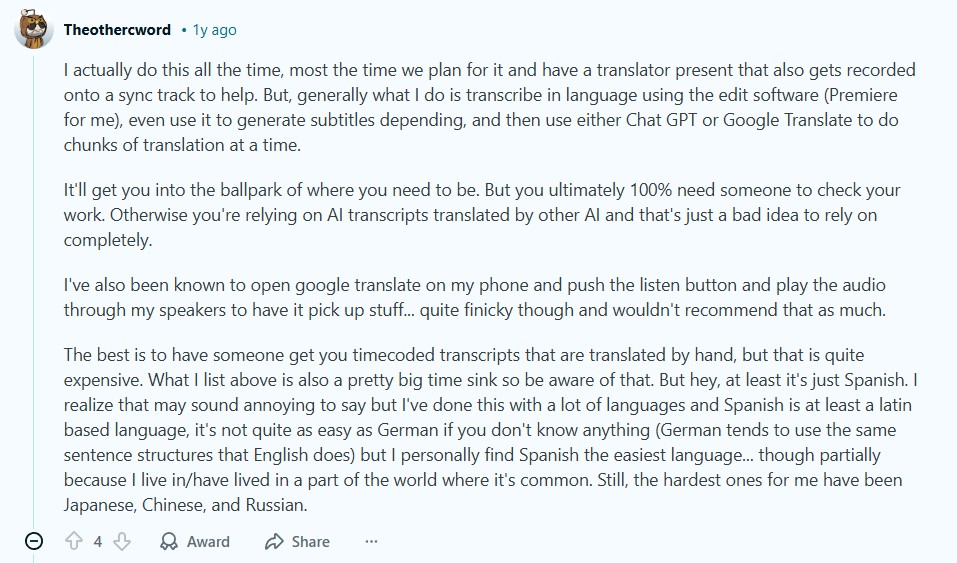
This hybrid approach is widely considered the right balance between speed and quality.
Want to go global?
AIR handles translation, localization, timing, and even subtitles or dubbing for every video. Contact us today.
Risks and Limitations of ChatGPT Translation
So… what about the cons of translating with ChatGPT? Let’s see:
1. ChatGPT Isn’t Always Reliable
AI translation accuracy isn’t perfect (to put it mildly ;).
While translations can be okay, they’re often clumsy, especially with minority languages, idioms, slang, and grammar. In language learning communities, users note that ChatGPT can confidently assert incorrect grammar or definitions if you don’t double‑check it.
For video creators, this leads to classic automated translation risks:
- Jokes that fall flat.
- A cultural nuance might get misrepresented.
- Minor errors can make your script sound unnatural.
Human review is not optional here.
2. Contextual Blind Spots
ChatGPT doesn’t watch your video. It only sees text input.
If the transcript misses sarcasm, a visual gag, or context that only shows up on screen, the translation may:
- Mistranslate meaning
- Miss jokes entirely
- Add phrasing that contradicts visuals
This is one of the biggest ChatGPT localization risks creators report.
3. AI Hallucinations and Errors
By design, models like ChatGPT generate text that sounds plausible. But without fact‑checking, that plausibility can turn into a mess. One academic research highlights that AI systems can produce subtle mistakes, especially in low‑resource languages or gender‑sensitive pronouns.
Even Reddit users who analyze translation quality occasionally raise eyebrows about unexpected mistakes in newer ChatGPT models.
4. Privacy and Control Considerations
Putting proprietary scripts into a cloud‑based AI system raises:
- Data control questions
- Content ownership concerns
- Risk of sensitive content leaking
This is less of a concern for public content, but for pre‑released material, some creators prefer offline solutions.
5. Post‑Editing Still Required
And still, after all the effort you put into the translation, trying to make it right, it still needs human editing.
Many creators point out that Machine Translation Post Editing (MTPE), where humans polish AI output, is simply a necessity.
But some experienced translators say sloppy edits don’t fix deeper issues and can cannibalize professional translator jobs.
What This Means for You as a Creator
So, is ChatGPT safe for translation? Yes, if you use this checklist based on real user behavior and research:
Use AI for:
- First-draft translations you plan to edit.
- Testing multiple localized versions of the same line.
- Shortening or expanding sentences to fit voiceover timing.
- Adapting scripts to different audience ages or niches in the same language.
- Translating subtitles fast to spot-check demand in new regions.
- Creating rough dubs or subtitle drafts before professional localization.
Don’t use it for:
- Final scripts without native-speaker review.
- Publishing translations you haven’t checked against retention data.
- Humor, sarcasm, or wordplay without human validation.
- Emotionally sensitive or culturally loaded topics.
- One-click “translate and upload” workflows.
- Brand-critical content where tone matters more than speed.
And always:
- Prompt with clear audience, niche, tone, and pacing instructions.
- Compare translated lines directly against the original timing.
- Have a native speaker clean and localize before publishing.
- Test translated videos with a small audience first.
Not sure if AI is enough?
AIR makes sure your scripts, voiceovers, and visuals all sync perfectly in every language. Reach out to us and grow confidently.
Best Practices for Using ChatGPT Translation Correctly
You’ve learnt all the ChatGPT video translation pros and cons. Now it’s time to put that knowledge into practice with a step-by-step guide:
STEP 1. Prepare Your Script
Don’t just paste a raw transcript and hope for the best. Before you translate:
- Clean the transcript (remove filler words, stutters).
- Split long paragraphs into short, spoken lines.
- Mark jokes, sarcasm, emphasis, and emotional beats.
- Add notes where visuals carry meaning (“this joke relies on what’s on screen”).
- Flag sections where pacing is tight or visuals change quickly.
This gives ChatGPT context it can’t infer on its own, especially for timing and tone.
Then feed it in with a clear description of:
- Your channel niche
- Target audience
- On-screen pacing (fast cuts vs. long takes)
- Whether the output is for subtitles or voiceover
This improves quality and reduces errors.
STEP 2. Prompt for Localization
Never ask ChatGPT to “translate.” Ask it to localize.
Well, at least, it will try to do it.
A strong prompt does three things:
- Defines the audience and region.
- Sets tone and pacing expectations.
- Gives permission to rewrite, not just convert words.
Example prompt:
“Translate this YouTube script into Argentinian Spanish for a gaming channel. Use casual, creator-style language. Keep sentences short for fast edits. Avoid literal translation. Localize slang and cultural references. Flag any jokes, idioms, or references that won’t land and suggest alternatives.”
This tells the model how to think.
STEP 3. Edit with a Native Speaker (Non-Negotiable)
This is where most creators cut corners and pay for it in retention.
A native editor should:
- Rewrite lines that sound technically correct but unnatural.
- Adjust the rhythm so the script feels spoken, not written.
- Shorten or expand lines to match real speech timing.
- Replace references that don’t make sense culturally.
- Catch when AI is trippin'.
AI gets you speed. Humans protect quality.
STEP 4. Sync and Test Against the Actual Video
A good translation should fit the video.
You need to check:
- Voiceover length vs. clip duration.
- Subtitle reading speed (especially on mobile).
- Whether jokes, reveals, and punchlines land on the right frame.
- If visuals need small timing adjustments to support the translated audio.
Common fix:
- Slightly extend clips in localized versions.
- Trim or rephrase lines without losing meaning.
- Reorder sentence structure to match natural speech flow.
This step is about making the video feel native.
STEP 5. Test With Real Viewers
Before a full public release, get the video in front of actual native speakers.
This can be:
- A small group of subscribers in that language.
- Local creator friends or Discord communities.
- Paid testers or focus groups for key markets.
Ask them:
- Does anything sound weird or unnatural?
- Did any jokes or lines feel confusing?
- Was it easy to follow without reading closely?
- Did anything pull you out of the video?
Real viewers catch things that editors and AI both miss, such as tone, humor, and flow.
STEP 6. Measure, Learn, and Improve
Translation quality shows up in analytics fast.
Track:
- Watch time per language.
- Audience retention graphs (especially first 30–60 seconds).
- Drop-off points compared to the original.
- Comments mentioning “awkward,” “strange,” or “hard to follow” language.
Use that data to:
- Refine your prompts.
- Adjust how aggressively you localize.
- Improve timing assumptions per language.
- Decide which languages are worth scaling further.
A/B testing localized versions should be standard if you’re serious about growth.
Balancing Speed and Quality
Pros like speed and flexible prompts make ChatGPT a compelling first pass.
But risks mean creators who rely on it blindly risk loss of engagement, misunderstandings, and weaker global reach.
Need help?
At AIR Media‑Tech, we use a proven blend: 80% human, 20% AI.
That means:
→ Native-speaking professionals lead every script translation.
→ AI is used strategically for consistency, speed, and terminology (never as the final say).
→ Every script is timed to your video.
→ We localize tone, cultural context, and pacing, so your content feels native.
→ Voiceovers, dubbing, subtitles? We handle the full stack.
You get high-impact localization that feels real, connects with new audiences, and protects your retention, tone, and brand. Contact us to get started.